
1. تعارف
Thank you for choosing the GenMachine Mini PC. This compact yet powerful computer is designed to deliver exceptional performance for a variety of tasks, including gaming, office productivity, and creative design. Equipped with an AMD Ryzen 7 3750H processor, ample memory, and fast storage, it offers a seamless computing experience. This manual provides essential information for setting up, operating, maintaining, and troubleshooting your new Mini PC.
2. باکس میں کیا ہے۔
Please verify that all items are present and in good condition upon unboxing.
- 1 x GenMachine Mini PC
- 1 x HDMI کیبل
- 1 ایکس پاور اڈاپٹر
- 1 ایکس یوزر مینوئل (یہ دستاویز)
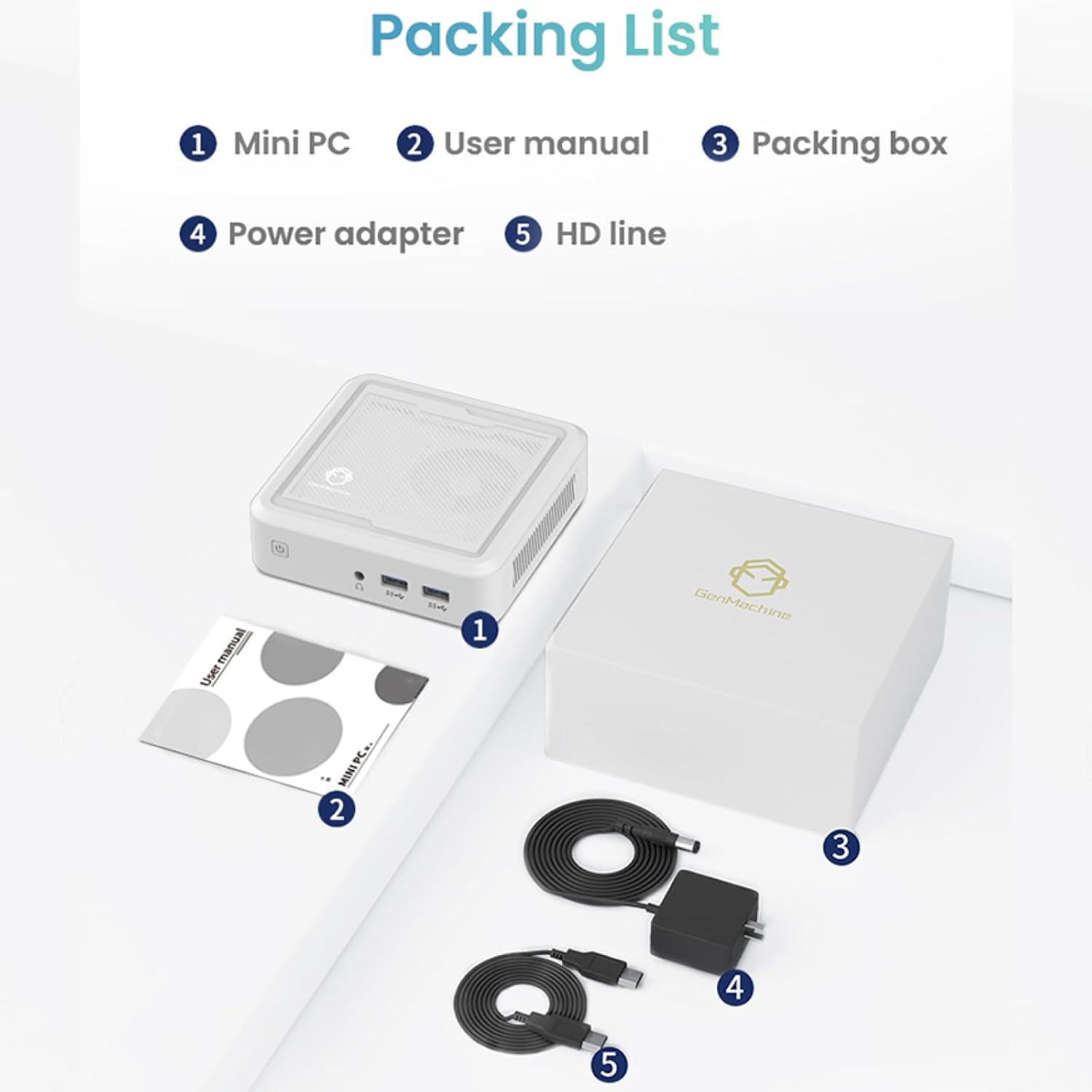
Figure 2.1: Packaging contents of the GenMachine Mini PC.
3. مصنوعات کی خصوصیات
The GenMachine Mini PC is engineered with features to enhance your computing experience:
- طاقتور کارکردگی: Equipped with an AMD Ryzen 7 3750H processor, delivering speeds up to 4.0GHz with 4 cores and 8 threads for demanding tasks.
- Ample Memory and Storage: Features 8GB of DDR4 RAM and a 256GB SSD with M.2 NVMe support for seamless multitasking and quick file رسائی
- ورسٹائل کنیکٹیویٹی: Advanced WiFi 6 and Bluetooth 5.2 capabilities ensure high-speed internet and smooth device pairing.
- کومپیکٹ ڈیزائن: A sleek, small form factor that fits easily into any workspace or gaming setup.
- ایک سے زیادہ ڈسپلے کے اختیارات: HDMI and DisplayPort outputs support dual 4K displays for expanded productivity and immersive visuals.

شکل 3.1: سامنے view of the GenMachine Mini PC.
3.1 Rich Interface for Easy Connection
The Mini PC offers a comprehensive set of ports to meet various connectivity needs:
- USB 3.0 x 4
- HDMI x 1۔
- DisplayPort (DP) x 1
- LAN (Ethernet) x 1
- 3.5mm Audio Jack x 1
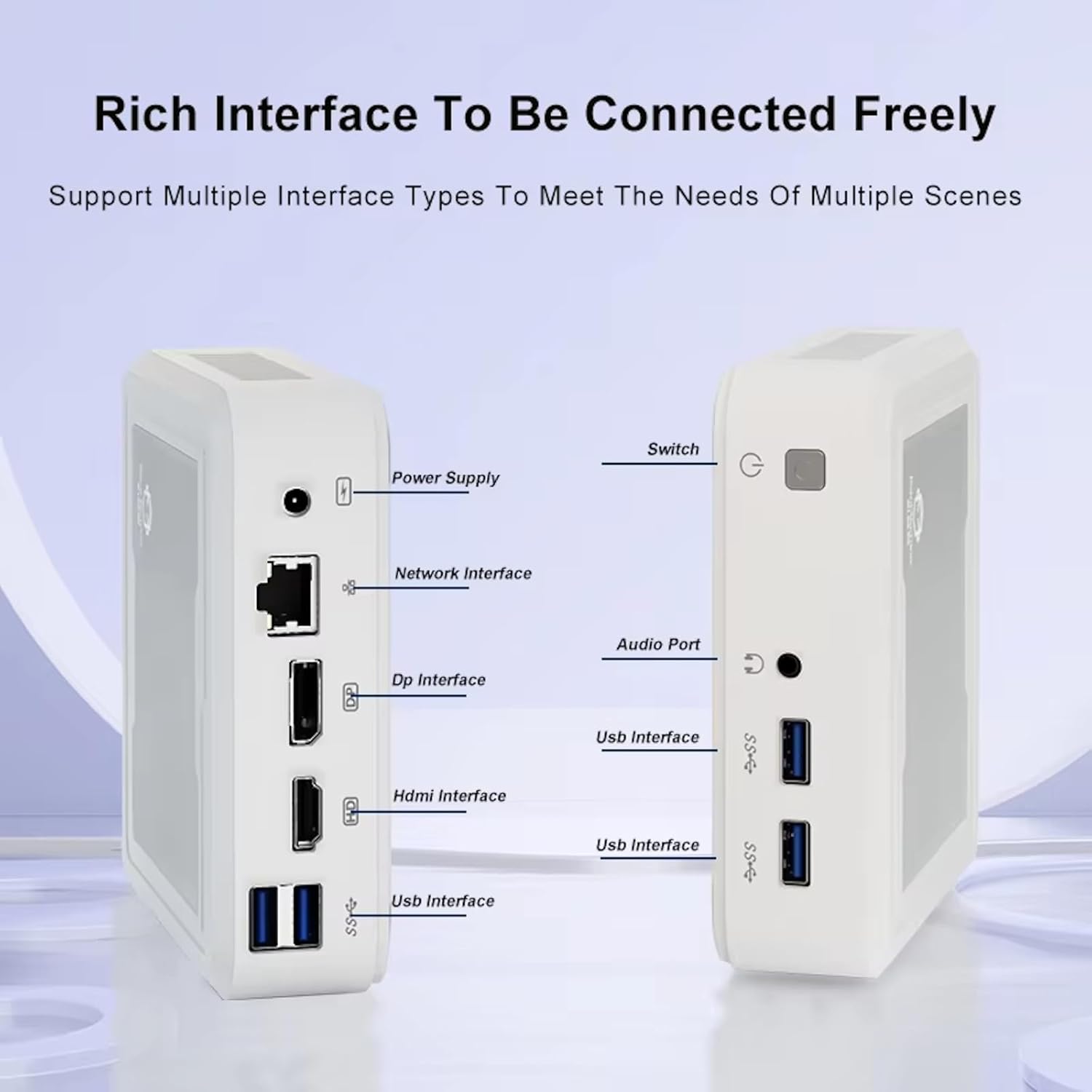
Figure 3.2: Available ports on the GenMachine Mini PC.
3.2 Dual Monitor Support
Enhance your productivity or gaming experience by connecting up to two 4K displays simultaneously using the HDMI and DisplayPort outputs.

Figure 3.3: Dual 4K display setup with the GenMachine Mini PC.
Video 3.1: Demonstration of the GenMachine Mini PC supporting two monitors simultaneously.
3.3 Energy Efficiency and Quiet Operation
Designed for low noise operation, the Mini PC maintains a quiet environment, making it suitable for various settings.

Figure 3.4: Noise level comparison of the GenMachine Mini PC.
3.4 کومپیکٹ اور پائیدار ڈیزائن
The Mini PC features an ultra-durable, lightweight metal casing, making it space-saving and robust for any work environment.
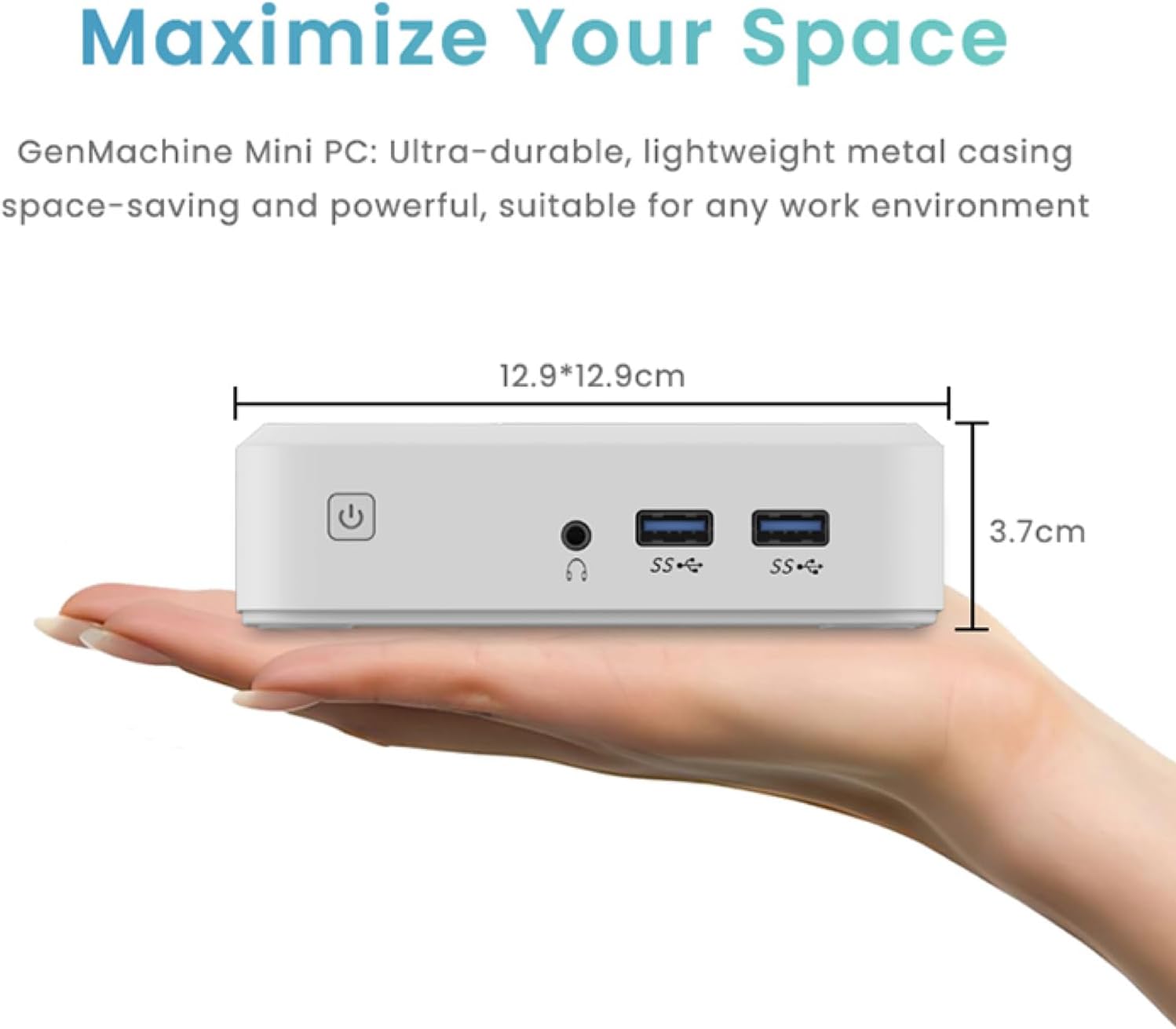
Figure 3.5: Compact size of the GenMachine Mini PC.
ویڈیو 3.2: ختمview of the GenMachine Mini PC's features and compact design.
4. سیٹ اپ گائیڈ
Follow these steps to set up your GenMachine Mini PC:
- Unpack the Mini PC: پیکیجنگ سے تمام اجزاء کو احتیاط سے ہٹا دیں۔
- ڈسپلے سے جڑیں: Use the provided HDMI cable to connect the Mini PC to your monitor or TV. If using a DisplayPort monitor, use a compatible DP cable (not included).
- پیری فیرلز کو جوڑیں: اپنے کی بورڈ، ماؤس، اور دیگر USB آلات کو دستیاب USB 3.0 پورٹس میں پلگ ان کریں۔
- نیٹ ورک سے جڑیں (اختیاری): For a wired internet connection, connect an Ethernet cable to the LAN port. For wireless, ensure your WiFi network is available during initial setup.
- پاور سے رابطہ کریں: Plug the power adapter into the DC-in port on the Mini PC, then plug the adapter into a power outlet.
- پاور آن: Press the power button on the front of the Mini PC. The system should boot up.
5. آپریٹنگ ہدایات
5.1 ابتدائی بوٹ اور آپریٹنگ سسٹم سیٹ اپ
Upon first power-on, the Mini PC will guide you through the operating system setup process. Follow the on-screen prompts to configure language, region, user accounts, and network settings.
5.2 پاور مینجمنٹ
- پاور آن: پاور بٹن کو ایک بار دبائیں۔
- بند کریں: Access the power options through the operating system's start menu and select 'Shut down'.
- دوبارہ شروع کریں: Access the power options through the operating system's start menu and select 'Restart'.
- نیند موڈ: Access the power options through the operating system's start menu and select 'Sleep'.
5.3 وائی فائی اور بلوٹوتھ سے جڑنا
To connect to a wireless network or Bluetooth device, use the respective settings within your operating system. The Mini PC supports WiFi 6 and Bluetooth 5.2 for fast and reliable connections.
6 دیکھ بھال
Regular maintenance helps ensure the longevity and optimal performance of your Mini PC:
- صفائی: Use a soft, dry cloth to clean the exterior. For dust in vents, use compressed air. Ensure the device is powered off and unplugged before cleaning.
- وینٹیلیشن: Ensure the Mini PC is placed in a well-ventilated area. Do not block the air vents.
- سافٹ ویئر اپ ڈیٹس: Regularly update your operating system, drivers, and applications to ensure security and performance.
- ڈیٹا بیک اپ: Periodically back up important data to an external drive or cloud storage.
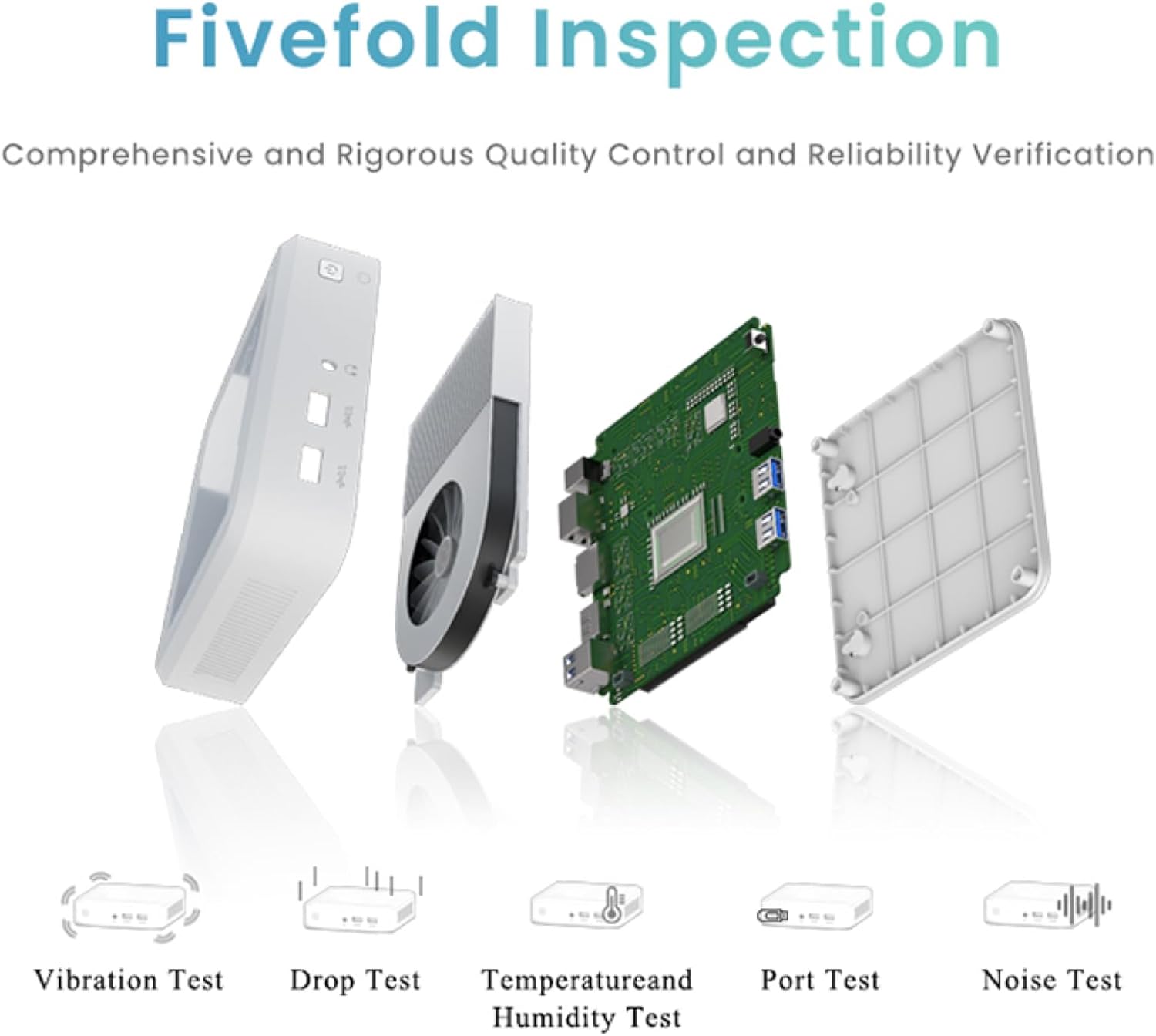
Figure 6.1: GenMachine's Fivefold Inspection process for quality control.
7 خرابیوں کا سراغ لگانا
اگر آپ کو اپنے منی پی سی کے ساتھ مسائل کا سامنا ہے، تو درج ذیل عام مسائل اور حل دیکھیں:
- کوئی طاقت نہیں:
- یقینی بنائیں کہ پاور اڈاپٹر منی پی سی اور ورکنگ پاور آؤٹ لیٹ دونوں سے محفوظ طریقے سے جڑا ہوا ہے۔
- ایک مختلف پاور آؤٹ لیٹ آزمائیں۔
- کوئی ڈسپلے نہیں:
- Verify that the HDMI or DisplayPort cable is securely connected to both the Mini PC and the monitor.
- یقینی بنائیں کہ مانیٹر آن ہے اور درست ان پٹ سورس پر سیٹ ہے۔
- اگر ممکن ہو تو ایک مختلف ڈسپلے کیبل یا مانیٹر آزمائیں۔
- System Freezes or Unresponsive:
- Perform a hard reset by holding the power button for 5-10 seconds until the device powers off, then restart.
- Ensure the operating system and drivers are up to date.
- زیادہ گرمی کے لیے چیک کریں؛ مناسب وینٹیلیشن کو یقینی بنائیں.
- Run a system diagnostic or memory test if the issue persists.
- کوئی انٹرنیٹ کنکشن نہیں:
- وائرڈ کنکشنز کے لیے، ایتھرنیٹ کیبل اور روٹر کی حیثیت چیک کریں۔
- For Wi-Fi, ensure Wi-Fi is enabled in the operating system and you are connected to the correct network with the correct password.
- اپنا راؤٹر/موڈیم دوبارہ شروع کریں۔
8. وضاحتیں
| فیچر | تفصیلات |
|---|---|
| پروسیسر | AMD Ryzen 7 3750H (4 cores, 8 threads, up to 4.0GHz) |
| رام | 8GB DDR4 |
| ذخیرہ | 256GB SSD (with M.2 NVMe support) |
| گرافکس کا پروسیسر | AMD Radeon Vega 10 گرافکس۔ |
| زیادہ سے زیادہ سکرین ریزولوشن | 3840 x 2160 پکسلز (4K) |
| وائرلیس قسم | 802.11ac (WiFi 6), Bluetooth 5.2 |
| USB پورٹس | 4 x USB 3.0 |
| ویڈیو آؤٹ پٹس | HDMI ، ڈسپلے پورٹ۔ |
| آپریٹنگ سسٹم | OS (Pre-installed) |
| شے کا وزن | 2.1 پاؤنڈ |
| مصنوعات کے طول و عرض | 4.9 x 4.9 x 1.4 انچ |
| رنگ | سیاہ |
9. وارنٹی اور سپورٹ
For warranty information and technical support, please refer to the warranty card included with your product or visit the official GenMachine webسائٹ وارنٹی دعووں کے لیے خریداری کے ثبوت کے طور پر اپنی خریداری کی رسید رکھیں۔
If you require further assistance, please contact GenMachine customer support through the channels provided on their official webسائٹ