
M5Stack Tough
M5Stack Tough ESP32 IoT Development Board Kit User Manual
Model: Tough
1. پروڈکٹ ختمview
The M5Stack Tough is an industrial-grade ESP32-based IoT development board kit designed for robust and reliable performance in harsh environments. It features a durable, dustproof, and water-resistant enclosure, a powerful dual-core processor, an integrated touch display, and versatile connectivity options.

Figure 1: M5Stack Tough Development Board Kit, showcasing its robust design with water resistance.
اہم خصوصیات:
- صنعتی درجے کی پائیداری: Designed to withstand harsh environments with full dustproof and water-resistant capabilities.
- Powerful Dual-Core Performance: Powered by the Espressif ESP32 dual-core processor, ensuring swift and efficient performance for demanding applications.
- انٹیگریٹڈ ڈسپلے: Features a 2.0-inch HD IPS capacitive multi-touch screen for intuitive interaction and data visualization.
- مضبوط رابطہ: Built-in Wi-Fi and versatile interfaces (RS485/I2C/GPIO/UART) provide seamless connectivity and expandability for various sensors and devices.
- Low Power Management: Incorporates advanced power management solutions, including RTC wake-up capabilities, for energy-efficient operation.
2. پیکیج کے مشمولات
تصدیق کریں کہ نیچے دی گئی تمام اشیاء آپ کے پیکیج میں شامل ہیں:
- 1x M5Stack TOUGH unit
- 1x Type-C USB cable (1m)
- 1x 2.5mm hexagon wrench
- 1x 1.25-2P single head terminal line
- 1x 1.25-4P single head terminal line
- 1x Waterproof O-ring
- 1x HY2.0-4P connector

Figure 2: Contents of the M5Stack Tough kit, including the main unit, cables, and tools.
3. سیٹ اپ اور پہلا استعمال
3.1 جسمانی تعلق
- پاور کنکشن: Connect the provided Type-C USB cable to the USB port on the M5Stack Tough unit and the other end to a 5V power source (e.g., computer USB port or USB power adapter). The device can also be powered via the RS485 interface (24V @ 1A).
- ابتدائی بوٹ: Upon connecting power, the device's 2.0-inch IPS display should light up, indicating successful power-on.
- بیرونی رابطے: Utilize the M12 RS485 interface, I2C, GPIO, and UART interfaces for connecting external sensors, actuators, or other development modules as required by your application.
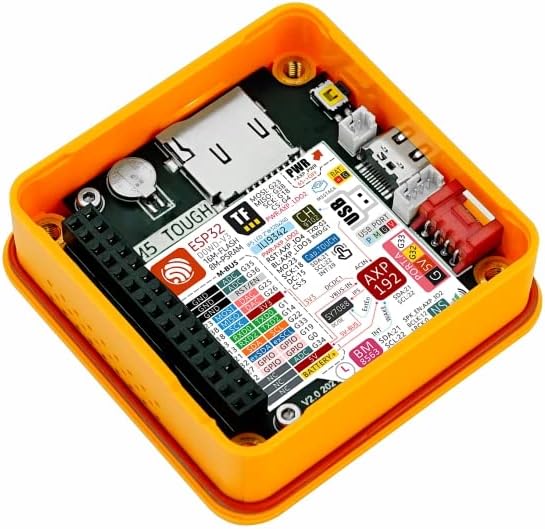
Figure 3: Internal components of the M5Stack Tough, highlighting the ESP32 module and various connection points.
3.2 سافٹ ویئر سیٹ اپ
The M5Stack Tough supports multiple development platforms, including UIFlow, Arduino, and ESP-IDF. For detailed programming guides and examples, refer to the official M5Stack documentation.

Figure 4: Steps to access online tutorials and documentation for M5Stack products.
To access tutorials and documentation:
- Visit the official M5Stack webسائٹ: m5stack.com
- نیویگیشن مینو میں "دستاویز" پر کلک کریں۔
- تلاش کریں۔ "Tough" or browse for your product.
- Scroll down to find the "Tutorial" section for specific guides and examples
4. ڈیوائس کو چلانا
The M5Stack Tough is designed for various industrial and IoT applications. Its 2.0-inch HD IPS capacitive multi-touch screen allows for direct interaction and data display. Programming the device determines its specific operational behavior.
4.1 Basic Interaction
- ٹچ اسکرین: Interact with on-screen elements by tapping or swiping, depending on the programmed interface.
- ڈیٹا ویژولائزیشن: The display can be used to show real-time sensor data, system status, or control interfaces.
4.2 درخواست سابق۔amples
The M5Stack Tough can be deployed in various scenarios, including:
- ڈیٹا کا حصول: Collecting and displaying data from various sensors in industrial or environmental monitoring.
- Timer Controller: Functioning as a programmable timer for industrial processes or fitness applications.
- آئی او ٹی کنٹرولر: Acting as a central control unit for smart home or industrial IoT systems.

Figure 5: Illustrative applications of the M5Stack Tough in different environments.
5 دیکھ بھال
The M5Stack Tough is designed for durability and requires minimal maintenance. Follow these guidelines to ensure its longevity:
- صفائی: ایک نرم استعمال کریں، ڈیamp cloth to clean the exterior. Avoid abrasive cleaners or solvents that could damage the enclosure or screen.
- ماحولیاتی تحفظ: While the device is dustproof and water-resistant, avoid prolonged immersion in water or exposure to extreme temperatures beyond its operating range. Ensure the M12 connector is properly sealed with the waterproof O-ring if used in wet environments.
- فرم ویئر اپ ڈیٹس: Regularly check the official M5Stack website for firmware updates to ensure optimal performance and access to new features. Follow the provided instructions carefully for any update procedures.
- کیبل مینجمنٹ: Ensure all connected cables are securely fastened and not under undue strain to prevent damage to the ports.
6 خرابیوں کا سراغ لگانا
This section addresses common issues you might encounter with your M5Stack Tough unit.
6.1 ڈیوائس آن نہیں ہو رہی ہے۔
- طاقت کا منبع چیک کریں: Ensure the USB Type-C cable is securely connected to a functional 5V power source or that the RS485 interface is receiving 24V power.
- کیبل کی سالمیت: Inspect the USB cable for any visible damage. Try a different USB cable if available.
- پاور بٹن: Ensure the power button (if applicable, though not explicitly mentioned for Tough, common for M5Stack devices) is pressed.
6.2 ڈسپلے جواب نہیں دے رہا ہے۔
- آلہ کو دوبارہ بوٹ کریں: Disconnect and reconnect the power to perform a hard reset.
- فرم ویئر کا مسئلہ: If the display remains unresponsive after a reboot, it might indicate a software issue. Refer to the M5Stack documentation for instructions on reflashing the firmware.
- جسمانی نقصان: Inspect the screen for any cracks or physical damage.
6.3 Connectivity Issues (Wi-Fi/RS485)
- سافٹ ویئر کی تشکیل: Verify that your code correctly initializes and configures the Wi-Fi or RS485 modules.
- نیٹ ورک ماحولیات: For Wi-Fi, ensure the network is active and the credentials are correct. For RS485, check wiring and termination.
- مداخلت: Minimize potential electromagnetic interference from other devices.
For more advanced troubleshooting or specific programming issues, consult the comprehensive documentation and community forums available on the official M5Stack webسائٹ
7. وضاحتیں
Detailed technical specifications for the M5Stack Tough ESP32 IoT Development Board Kit:
| فیچر | پیرامیٹر |
|---|---|
| پروسیسر | Espressif ESP32-D0WDQ6-V3, 240MHz dual-core |
| فلیش میموری | 16MB |
| PSRAM | 8MB |
| ان پٹ جلدtage | USB (5V @ 500mA) / RS485 interface power input (24V @ 1A) |
| انٹرفیس | Type-C x 1, Grove x 4 (RS485 / I2C / GPIO / UART interfaces) |
| ڈسپلے | 2.0" 320 x 240 ILI9342C full-color IPS LCD, max brightness 853 nits |
| ٹچ کنٹرولر۔ | CHSC6540 |
| اسپیکر سیٹ اپ | NS4168 16-bit I2S amplifier + 1W speaker |
| وائرلیس قسم | بلوٹوتھ ، وائی فائی |
| آپریٹنگ سسٹم | Linux (supported development environments) |
| شے کا وزن | 4.1 اونس (تقریباً 116 گرام) |
| پروڈکٹ کے طول و عرض (LxWxH) | 2.99 x 2.28 x 1.64 انچ (76 x 58 x 41 ملی میٹر) |
| رنگ | پیلا |
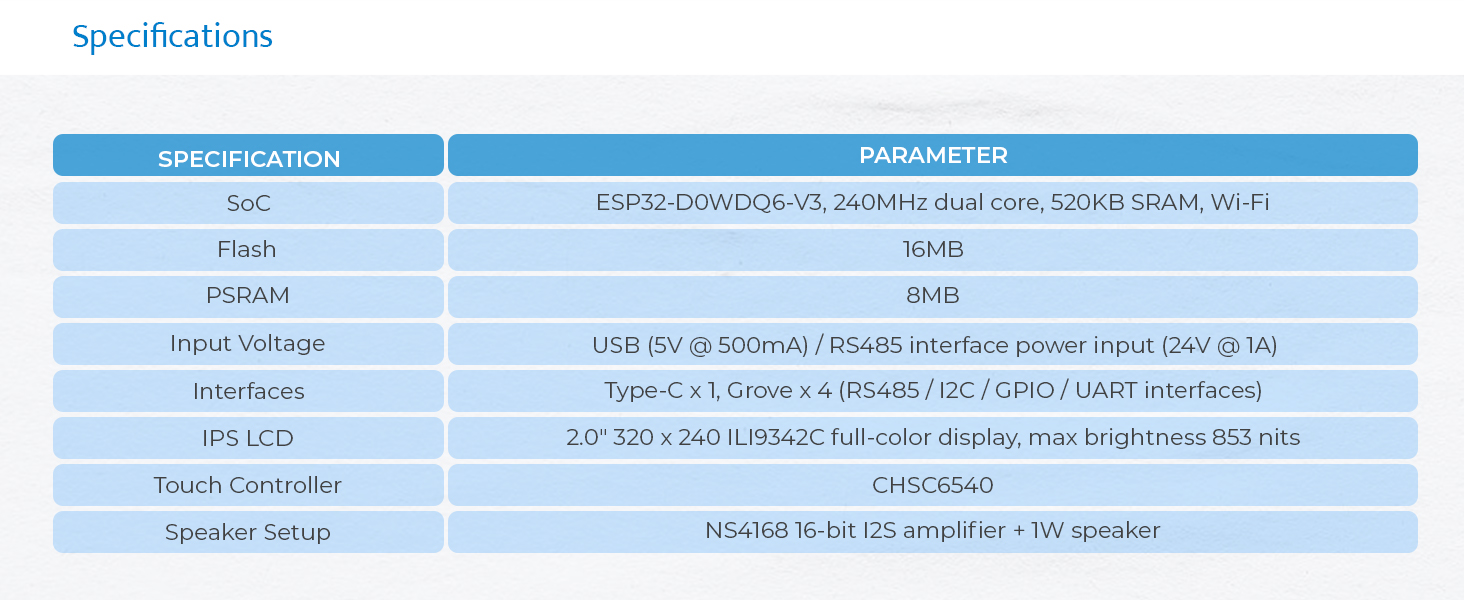
Figure 6: Visual representation of the M5Stack Tough's technical specifications.

Figure 7: Physical dimensions of the M5Stack Tough unit.

Figure 8: Weight of the M5Stack Tough unit.
8. وارنٹی اور سپورٹ
8.1 وارنٹی کی معلومات
M5Stack products typically come with a standard manufacturer's warranty covering defects in materials and workmanship. For specific warranty terms and duration, please refer to the warranty card included with your product or visit the official M5Stack webسائٹ کا سپورٹ سیکشن۔ وارنٹی کے دعووں کے لیے اپنی خریداری کا ثبوت رکھیں۔
8.2 تکنیکی معاونت
For technical assistance, programming inquiries, or advanced support, please utilize the following resources:
- سرکاری M5Stack Webسائٹ: m5stack.com - Provides extensive documentation, tutorials, and community forums.
- کمیونٹی فورمز: Engage with other developers and M5Stack experts for solutions and project ideas.
- سپورٹ سے رابطہ کریں: If you cannot find a solution through documentation or forums, contact M5Stack customer support directly via their webسائٹ
Ask a question about this manual
Ask about setup, troubleshooting, compatibility, parts, safety, or missing instructions. Manuals+ will review the question and use this page’s manual context to help answer it.