
1. تعارف
The UniFi Gateway Dream Wall (UDW) is an enterprise-grade UniFi OS Console designed for wall-mounted deployments. It integrates a high-performance security gateway, a UniFi Network Controller, and a multi-port switch with PoE capabilities, providing a comprehensive solution for managing and securing your network infrastructure. This manual provides essential information for the proper setup, operation, maintenance, and troubleshooting of your UDW device.
2. حفاظتی معلومات
براہ کرم ان ہدایات کو پڑھیں، ان پر عمل کریں اور ان پر عمل کریں۔ تمام انتباہات پر دھیان دیں۔ صرف مینوفیکچرر کی طرف سے مخصوص منسلکات/لوازمات استعمال کریں۔
- پانی کے قریب اس پروڈکٹ کا استعمال نہ کریں۔
- مصنوعات کو جدا نہ کریں۔ تمام سروسنگ کو اہل سروس اہلکاروں سے رجوع کریں۔
- وینٹیلیشن کے کسی بھی سوراخ کو مسدود نہ کریں۔
- Use only the power supply provided by the manufacturer.
- حفاظت کے لیے مناسب بنیاد کو یقینی بنائیں۔
- بجلی کی تار کو چلنے یا چوٹکی ہونے سے بچائیں۔
3. پیکیج کے مشمولات
تصدیق کریں کہ نیچے دی گئی تمام اشیاء آپ کے پیکج میں موجود ہیں:
- UniFi Gateway Dream Wall (UDW)
- پاور کورڈ (علاقہ مخصوص)
- وال ماؤنٹ بریکٹ
- بڑھتے ہوئے پیچ اور وال اینکرز
- کوئیک اسٹارٹ گائیڈ

Image: The UniFi Gateway Dream Wall device shown alongside its power cord, wall mount bracket, and mounting hardware.
4. پروڈکٹ ختمview
The UDW features a robust design with various ports and indicators for comprehensive network management.

تصویر: سامنے view of the UniFi Gateway Dream Wall, showcasing its sleek white design and central display screen.

تصویر: سائیڈ view of the UniFi Gateway Dream Wall, highlighting its slim profile when mounted.

Image: The UniFi Gateway Dream Wall with its front cover opened, revealing internal components and the touchscreen display.
4.1 فرنٹ پینل
- 4.7" Touchscreen Display: Provides real-time status, network statistics, and allows for basic device management.
- ایل ای ڈی اشارے: Indicates device status (e.g., booting, online, error).
4.2 پورٹس اور کنیکٹر
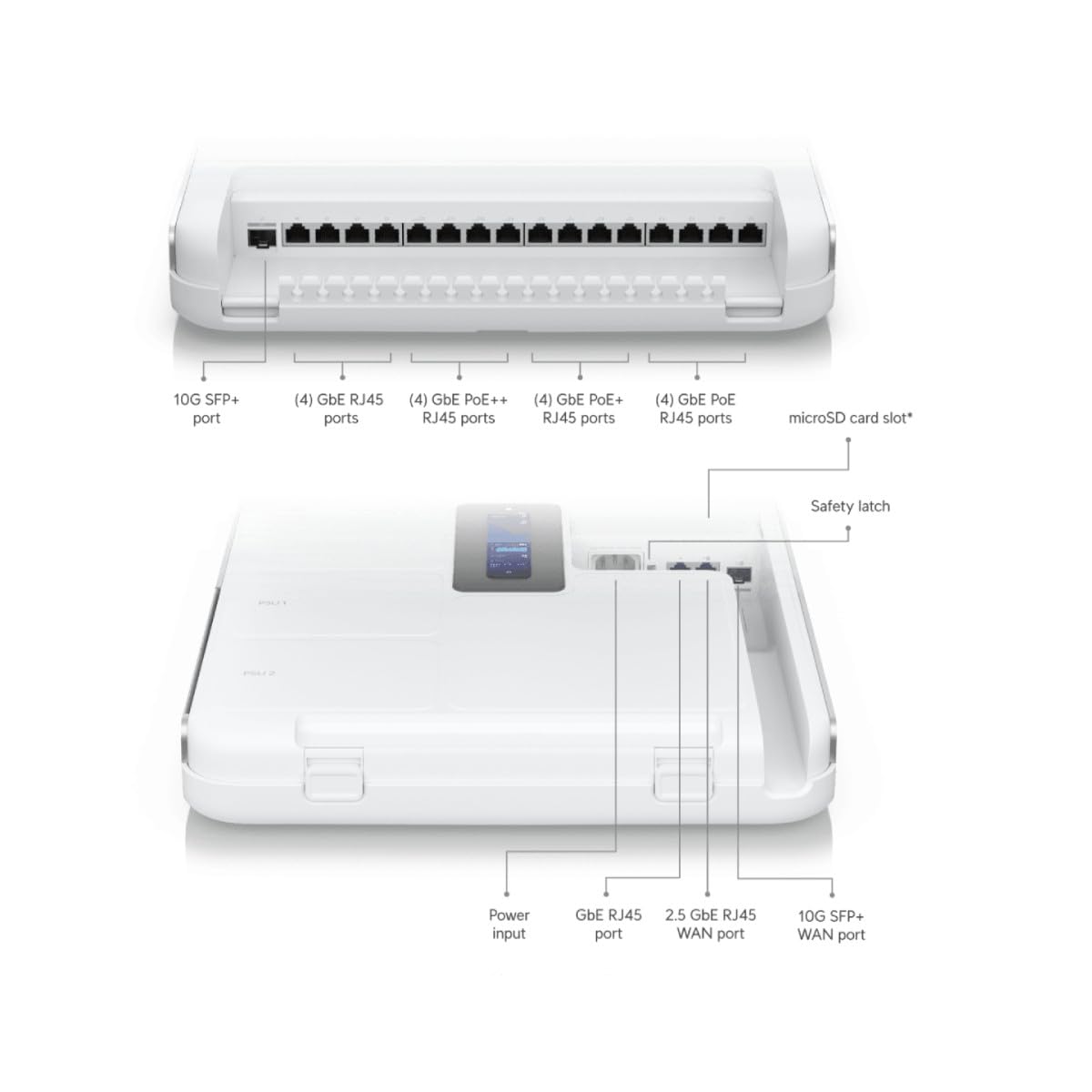
Image: Detailed diagram illustrating the various ports and connectors on the UniFi Gateway Dream Wall, including SFP+, RJ45, and power inputs.
| پورٹ/خصوصیت | تفصیل |
|---|---|
| 10G SFP+ پورٹ | High-speed fiber uplink/downlink. |
| (4) جی بی ای آر جے 45 پورٹس | Gigabit Ethernet ports for general network connections. |
| (4) GbE PoE++ RJ45 Ports | Gigabit Ethernet ports with Power over Ethernet Plus Plus (802.3bt) for high-power devices. |
| (4) GbE PoE+ RJ45 Ports | Gigabit Ethernet ports with Power over Ethernet Plus (802.3at) for standard PoE devices. |
| (4) GbE PoE RJ45 Ports | Gigabit Ethernet ports with Power over Ethernet (802.3af) for basic PoE devices. |
| مائیکرو ایسڈی کارڈ سلاٹ | For additional storage (e.g., UniFi Protect recordings). |
| پاور ان پٹ | Connects to the included power cord. |
| GbE RJ45 WAN Port | Gigabit Ethernet port for Wide Area Network connection. |
| 2.5 GbE RJ45 WAN Port | 2.5 Gigabit Ethernet port for high-speed Wide Area Network connection. |
| 10G SFP+ WAN Port | 10 Gigabit SFP+ port for high-speed fiber WAN connection. |
| ری سیٹ بٹن | Used for factory reset or recovery mode. |
5. سیٹ اپ
5.1 آلہ بڑھتے ہوئے
- Choose a suitable wall location, ensuring adequate ventilation and access to power outlets.
- Use the wall mount bracket as a template to mark drilling points.
- پائلٹ سوراخ ڈرل کریں اور اگر ضروری ہو تو دیوار کے اینکرز ڈالیں۔
- Secure the wall mount bracket to the wall using the provided screws.
- Carefully align the UDW with the bracket and slide it into place until it clicks securely.

Image: The UniFi Gateway Dream Wall shown mounted on a wall, with its cover open to reveal the internal structure and mounting points.
5.2 کنیکٹنگ پاور
Connect the included power cord to the power input port on the UDW and then to a grounded electrical outlet. The device will power on automatically.
5.3 نیٹ ورک کنکشن
Connect your internet service provider's modem or router to one of the WAN ports (GbE RJ45 WAN, 2.5 GbE RJ45 WAN, or 10G SFP+ WAN) on the UDW. Connect your local network devices (e.g., computers, switches, UniFi Access Points) to the available LAN ports (GbE RJ45, GbE PoE, GbE PoE+, GbE PoE++).

Image: A network diagram illustrating how the UniFi Dream Wall integrates into a network, connecting to the internet, security cameras, access points, phone systems, and door access.
5.4 ابتدائی کنفیگریشن
The UDW can be configured via the UniFi mobile app or a web براؤزر
- Using UniFi Mobile App: Download the UniFi Network application from your mobile app store. Ensure Bluetooth is enabled on your mobile device. The app should discover the UDW. Follow the on-screen prompts to complete the setup, including naming the device, setting up Wi-Fi, and creating an administrator password.
- استعمال کرنا Web براؤزر: Connect a computer directly to one of the UDW's LAN ports. Open a web browser and navigate to the default IP address (usually 192.168.1.1). Follow the setup wizard to configure your network.
6. آپریٹنگ
6.1 Accessing the UniFi Interface
Once configured, you can manage your UDW and UniFi network through the UniFi Network Controller interface. Access it via the UniFi mobile app or by navigating to the UDW's IP address in a web browser from a device on your local network.
6.2 نیٹ ورک مینجمنٹ
The UniFi Network Controller provides a centralized dashboard for managing all aspects of your network, including:
- Monitoring network performance and connected devices.
- Configuring VLANs and firewall rules.
- Managing user access and guest networks.
- Adopting and managing other UniFi devices (e.g., access points, switches).
6.3 وائی فائی کنفیگریشن
The UDW includes integrated Wi-Fi 6 capabilities. You can configure Wi-Fi networks (SSIDs), security settings, and advanced wireless features directly from the UniFi Network Controller.
7 دیکھ بھال
Regular maintenance ensures optimal performance and longevity of your UDW.
- فرم ویئر اپ ڈیٹس: Regularly check for and install the latest firmware updates through the UniFi Network Controller. This ensures you have the latest features, security patches, and bug fixes.
- صفائی: Keep the device clean and free of dust. Use a soft, dry cloth to wipe the exterior. Do not use liquid cleaners or aerosols.
- وینٹیلیشن: اس بات کو یقینی بنائیں کہ زیادہ گرمی سے بچنے کے لیے وینٹیلیشن کے سوراخوں میں رکاوٹ نہیں ہے۔
- بیک اپ کنفیگریشن: Periodically back up your UniFi Network Controller configuration to a safe location.
8 خرابیوں کا سراغ لگانا
This section addresses common issues you might encounter with your UDW.
- ڈیوائس آن نہیں ہو رہی ہے: Ensure the power cord is securely connected to both the UDW and a working electrical outlet. Verify the outlet has power.
- "Check Connection" Message on Display: If the UDW is stuck on a "Check Connection" screen after initialization, ensure your WAN connection is active and properly connected. If using the UniFi mobile app for setup, ensure Bluetooth is enabled and the app can discover the device. Sometimes, a factory reset (see below) may be required if initial setup fails repeatedly.
- انٹرنیٹ تک رسائی نہیں: Verify that your modem/ISP service is active. Check the WAN port connection on the UDW. Ensure proper network configuration within the UniFi Network Controller.
- Cannot Access UniFi Interface: Ensure your device is connected to the UDW's network. Try accessing the interface using the UDW's IP address. Restart the UDW.
- سست نیٹ ورک کی کارکردگی: Check for high network utilization in the UniFi Network Controller. Ensure firmware is up to date. Verify cable integrity.
- از سرے نو ترتیب: To perform a factory reset, locate the reset button (often a small pinhole) on the device. With the UDW powered on, use a paperclip or similar thin object to press and hold the reset button for approximately 10-15 seconds until the device reboots. This will revert all settings to their factory defaults.
9. وضاحتیں
Key technical specifications for the UniFi Gateway Dream Wall (UDW):

تصویر: ایک اندرونی view of the UniFi Gateway Dream Wall with key features and dimensions highlighted, including integrated SSD, Wi-Fi 6, routing speed, and power supply units.
| فیچر | تفصیل |
|---|---|
| ماڈل نمبر | یو ڈی ڈبلیو |
| طول و عرض (H x W x D) | 26.14 x 17.48 x 4.96 انچ (تقریباً 664 x 444 x 126 ملی میٹر) |
| وزن | 1.32 پاؤنڈ (تقریباً 0.6 کلوگرام) |
| انٹیگریٹڈ اسٹوریج | 128 جی بی ایس ایس ڈی |
| Wi-Fi معیار | Wi-Fi 6 (Enterprise dual-radio) |
| روٹنگ تھرو پٹ | 3.5+ Gbps |
| بجلی کی فراہمی | Integrated redundant power supply system |
| ڈسپلے | 4.7" touchscreen for management |
| سب سے پہلے دستیاب ہے۔ | 6 اگست 2023 |
10. وارنٹی کی معلومات
Ubiquiti products are covered by a limited warranty. For detailed warranty terms and conditions, please refer to the official Ubiquiti webسائٹ یا وارنٹی کارڈ آپ کے پروڈکٹ کے ساتھ شامل ہے۔ وارنٹی کے دعووں کے لیے اپنی خریداری کا ثبوت رکھیں۔
11. سپورٹ
For technical support, product documentation, and community forums, please visit the official Ubiquiti support webسائٹ:
You can also find additional resources and contact support directly through the UniFi Network Controller interface or the UniFi mobile app.