
1. تعارف
Thank you for choosing the SILENTWARE Air 1000 Black ATX Midi Tower PC Case. This manual provides essential information for the proper installation, operation, and maintenance of your new PC case. Please read this manual thoroughly before beginning the assembly process to ensure a smooth and successful build.
2. حفاظتی معلومات
- Always disconnect the power supply from the wall outlet before installing or removing any components inside the PC case.
- Handle components with care to avoid damage from electrostatic discharge (ESD). Consider using an anti-static wrist strap.
- Be cautious of sharp edges inside the case.
- کیس یا اس کے اجزاء میں ترمیم کرنے کی کوشش نہ کریں، کیونکہ اس سے آپ کی وارنٹی ختم ہو سکتی ہے اور حفاظتی خطرات لاحق ہو سکتے ہیں۔
- کیس کو پانی، نمی اور انتہائی درجہ حرارت سے دور رکھیں۔
3. پیکیج کے مشمولات
براہ کرم تصدیق کریں کہ تمام اشیاء آپ کے پیکیج میں موجود ہیں:
- SILENTWARE Air 1000 Black ATX Midi Tower PC Case
- Pre-installed 4x 120mm ARGB Fans
- Accessory box (screws, cable ties, standoffs, etc.)
- صارف دستی (یہ دستاویز)
4. پروڈکٹ ختمview
The SILENTWARE Air 1000 is an ATX Midi Tower PC case designed for optimal airflow and component compatibility. It features a mesh front panel for maximum ventilation and a tempered glass side panel to showcase your build.


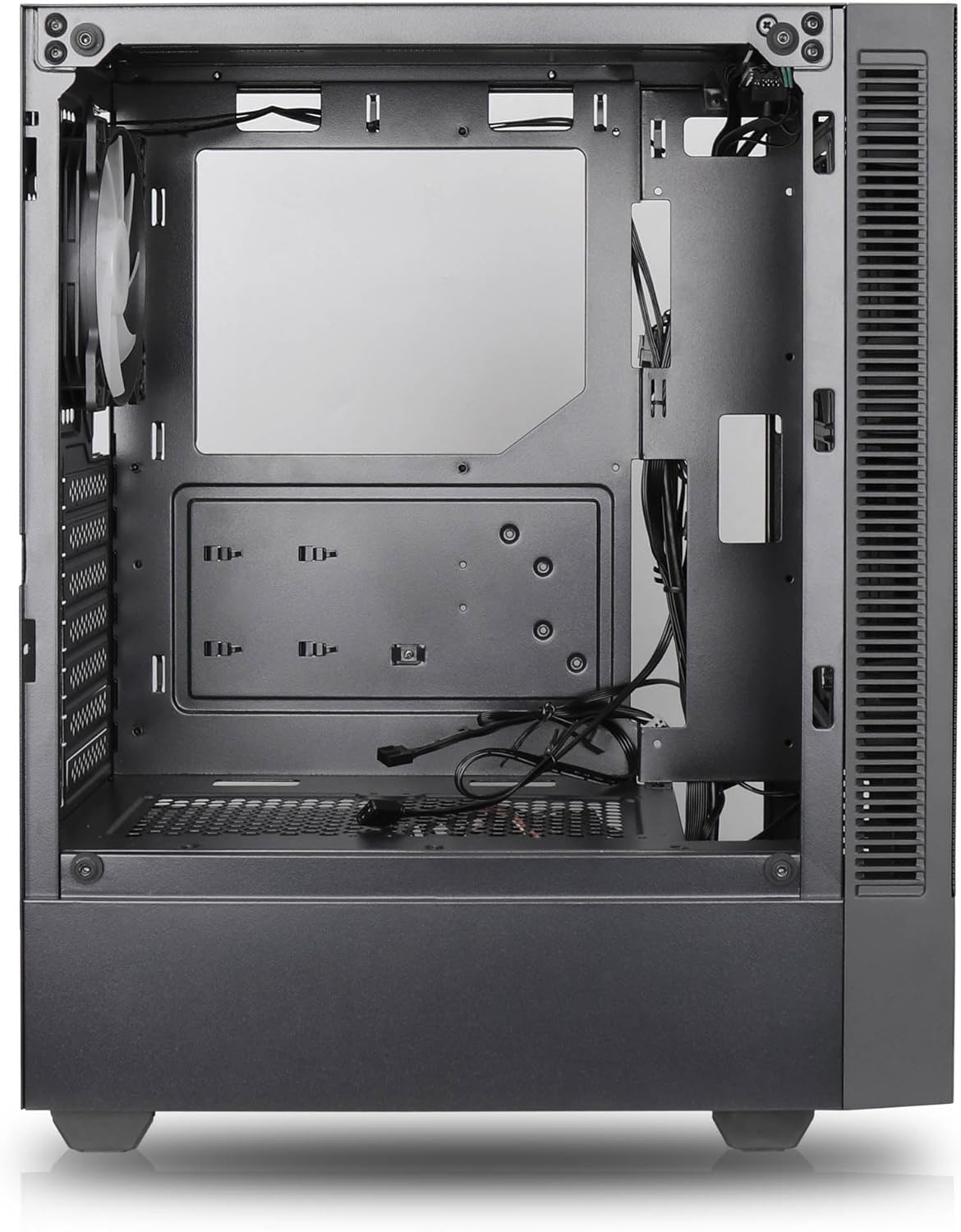

اہم خصوصیات:
- زیادہ سے زیادہ ایئر فلو: Large mesh front panel and four pre-installed 140mm A-RGB fans with hydraulic bearings ensure excellent ventilation.
- Easy PC Building: Thoughtful design with daisy-chain connections simplifies installation, eliminating the need for additional adapters or controllers.
- اعلی معیار کے ڈیزائن: Genuine tempered glass side panel showcases installed components and provides a minimalist, premium aesthetic.
- Flexible Lighting and Control: 3-pin A-RGB fans and 4-pin fan control allow for impressive lighting effects and easy adjustment of fan speed and curves directly from the motherboard.
- Powerful Component Compatibility: Supports GPUs up to 400mm long, radiators up to 360mm (front and top) and 140mm (rear), and space for up to 4 fans.
- Compact Case with Ampلی اسپیس: Midi tower format accommodates E-ATX, ATX, mATX, and ITX motherboards, up to two 2.5" SSDs, two 3.5" HDDs, and ATX power supplies.
5. انسٹالیشن گائیڈ
Follow these steps for component installation. Refer to your individual component manuals for specific instructions.
5.1 کیس کی تیاری
- کیس کو فلیٹ، مستحکم سطح پر رکھیں۔
- Carefully remove the tempered glass side panel by unscrewing the thumb screws and gently pulling it away. Set it aside on a soft, non-abrasive surface.
- Remove the solid right side panel by unscrewing the thumb screws and sliding it backward.
5.2. مدر بورڈ کی تنصیب
- کیس کے پچھلے حصے میں I/O شیلڈ انسٹال کریں۔
- Ensure the correct standoffs are installed for your motherboard form factor (E-ATX, ATX, mATX, ITX). Adjust or add standoffs as needed.
- احتیاط سے اپنے مدر بورڈ کو اسٹینڈ آف پر رکھیں، سکرو کے سوراخوں کو سیدھ میں رکھیں۔
- فراہم کردہ پیچ کے ساتھ مدر بورڈ کو محفوظ کریں۔ زیادہ تنگ نہ کریں۔
5.3. پاور سپلائی یونٹ (PSU) کی تنصیب
- Position the PSU in the dedicated compartment at the bottom rear of the case.
- Ensure the PSU fan faces downwards (if the case has a bottom vent) or upwards, depending on your cooling preference.
- Secure the PSU to the case with the provided screws from the rear.
5.4. اسٹوریج ڈرائیو کی تنصیب
2.5" SSDs:
- Locate the 2.5" drive mounts (typically behind the motherboard tray).
- Secure the SSDs using the provided screws.
3.5" HDDs:
- Locate the 3.5" drive cages (usually near the PSU shroud).
- Slide the HDDs into the drive trays and secure them with screws or tool-less mechanisms if available.
5.5۔ گرافکس کارڈ (GPU) کی تنصیب
- کیس کے عقبی حصے سے ضروری PCIe سلاٹ کور کو ہٹا دیں۔
- Align your GPU with the PCIe slot on the motherboard and press firmly until it clicks into place.
- Secure the GPU to the case with screws.
5.6. کیبل کا انتظام
کیبلز کا انتظام کرنے کے لیے مدر بورڈ ٹرے کے پیچھے کیبل روٹنگ کٹ آؤٹ اور ٹائی ڈاؤن پوائنٹس کا استعمال کریں۔ یہ ہوا کے بہاؤ اور جمالیات کو بہتر بناتا ہے۔
6. آپریشن
6.1. پاورنگ آن۔
After all components are installed and cables are connected, reattach the side panels. Connect the power cable to the PSU and a wall outlet, then press the power button on the top I/O panel of the case.
6.2 اے آر جی بی فین کنٹرول
The pre-installed ARGB fans feature 3-pin ARGB connectors for lighting control and 4-pin connectors for fan speed control. These can be connected directly to compatible headers on your motherboard. Use your motherboard's software or BIOS settings to customize lighting effects and fan curves.
7 دیکھ بھال
7.1. صفائی
- زیادہ سے زیادہ ہوا کے بہاؤ کو برقرار رکھنے کے لیے دھول کے فلٹرز (اگر موجود ہوں) کو باقاعدگی سے صاف کریں۔
- Use a can of compressed air to remove dust from inside the case and components.
- بیرونی سطحوں کو نرم سے صاف کریں، ڈیamp کپڑا سخت کیمیکلز سے پرہیز کریں۔
- For the tempered glass panel, use a glass cleaner and a microfiber cloth.
8 خرابیوں کا سراغ لگانا
- PC not powering on: Check all power connections, including the 24-pin motherboard power, 8-pin CPU power, and GPU power cables. Ensure the PSU switch is in the 'ON' position.
- Fans not spinning/RGB not working: Verify that fan and ARGB headers are correctly connected to the motherboard. Check motherboard software for fan speed and lighting control settings.
- زیادہ گرم ہونا: Ensure proper airflow by checking fan orientation and cleaning dust filters. Verify CPU cooler and GPU cooler are properly seated.
- کوئی ڈسپلے نہیں: Confirm the monitor cable is connected to the graphics card (not the motherboard integrated graphics, unless you are using integrated graphics). Reseat the graphics card and RAM modules.
9. وضاحتیں
| فیچر | تفصیلات |
|---|---|
| برانڈ | SILENTWARE |
| ماڈل کا نام | Silentware Flow 100 ARGB |
| آئٹم ماڈل نمبر | FLOW100 |
| ASIN | B0CB8CZ5GF |
| رنگ | سیاہ |
| کیس کی قسم | مڈ ٹاور۔ |
| مواد | ٹیمپرڈ گلاس |
| مدر بورڈ مطابقت | اے ٹی ایکس، مائیکرو اے ٹی ایکس، منی آئی ٹی ایکس |
| ہم آہنگ آلات | ATX, mATX, ITX motherboards, GPUs up to 325mm, radiators up to 360mm, 2.5" and 3.5" storage drives |
| تجویز کردہ استعمال | گیمنگ |
| کولنگ کا طریقہ | ہوا |
| پہلے سے نصب پرستار | 4x 120mm ARGB پرستار |
| پنکھے کا سائز | 140 Millimeters (Note: Product description mentions 140mm fans, while pre-installed are 120mm. Please verify with product packaging.) |
| پاور سپلائی بڑھتے ہوئے کی قسم | نیچے کا پہاڑ |
| زیادہ سے زیادہ GPU لمبائی | 400 ملی میٹر |
| Radiator Support (Front/Top) | 360 ملی میٹر تک |
| ریڈی ایٹر سپورٹ (پیچھے) | 140 ملی میٹر تک |
| 2.5" ڈرائیو بےز | 2 تک |
| 3.5" ڈرائیو بےز | 2 تک |
10. وارنٹی اور سپورٹ
For warranty information and technical support, please refer to the official SILENTWARE website or contact your retailer. Specific details regarding spare parts availability and software updates are not available in the provided product information.