
1. تعارف
خریداری کے لیے آپ کا شکریہasing the Dpofirs LMD-750 Portable DVD Player. This device is designed to provide versatile entertainment on the go, at home, or in the office. Featuring a 270° rotating HD LCD screen, multi-format disc support, USB/SD card playback, analog TV function, FM radio, and game capabilities, it offers a comprehensive multimedia experience. Please read this manual carefully to ensure proper use and to maximize the performance and longevity of your device.
2. حفاظتی معلومات
- آلے کو بارش، نمی، یا انتہائی درجہ حرارت کے سامنے نہ رکھیں۔
- آلہ کو گرمی کے ذرائع کے قریب یا براہ راست سورج کی روشنی میں رکھنے سے گریز کریں۔
- Use only the provided power adapter and car adapter.
- آلہ کو خود سے جدا کرنے یا مرمت کرنے کی کوشش نہ کریں۔ اہل سروس کے اہلکاروں سے رابطہ کریں۔
- ڈیوائس کو مضبوط مقناطیسی فیلڈز سے دور رکھیں۔
- Ensure proper ventilation when operating the device.
- Remove discs when transporting the player to prevent damage.
3. پیکیج کے مشمولات
براہ کرم درج ذیل اشیاء کے لیے پیکج چیک کریں:
- 1 x Dpofirs LMD-750 Portable DVD Player
- 1 ایکس ریموٹ کنٹرول
- 1 x Power Adapter (EU Plug)
- 1 ایکس کار اڈاپٹر
- 1 X اے وی کیبل
- 1 X اینٹینا
- 1 ایکس گیم پیڈ
- 1 x Game Disc
- 1 ایکس صارف دستی
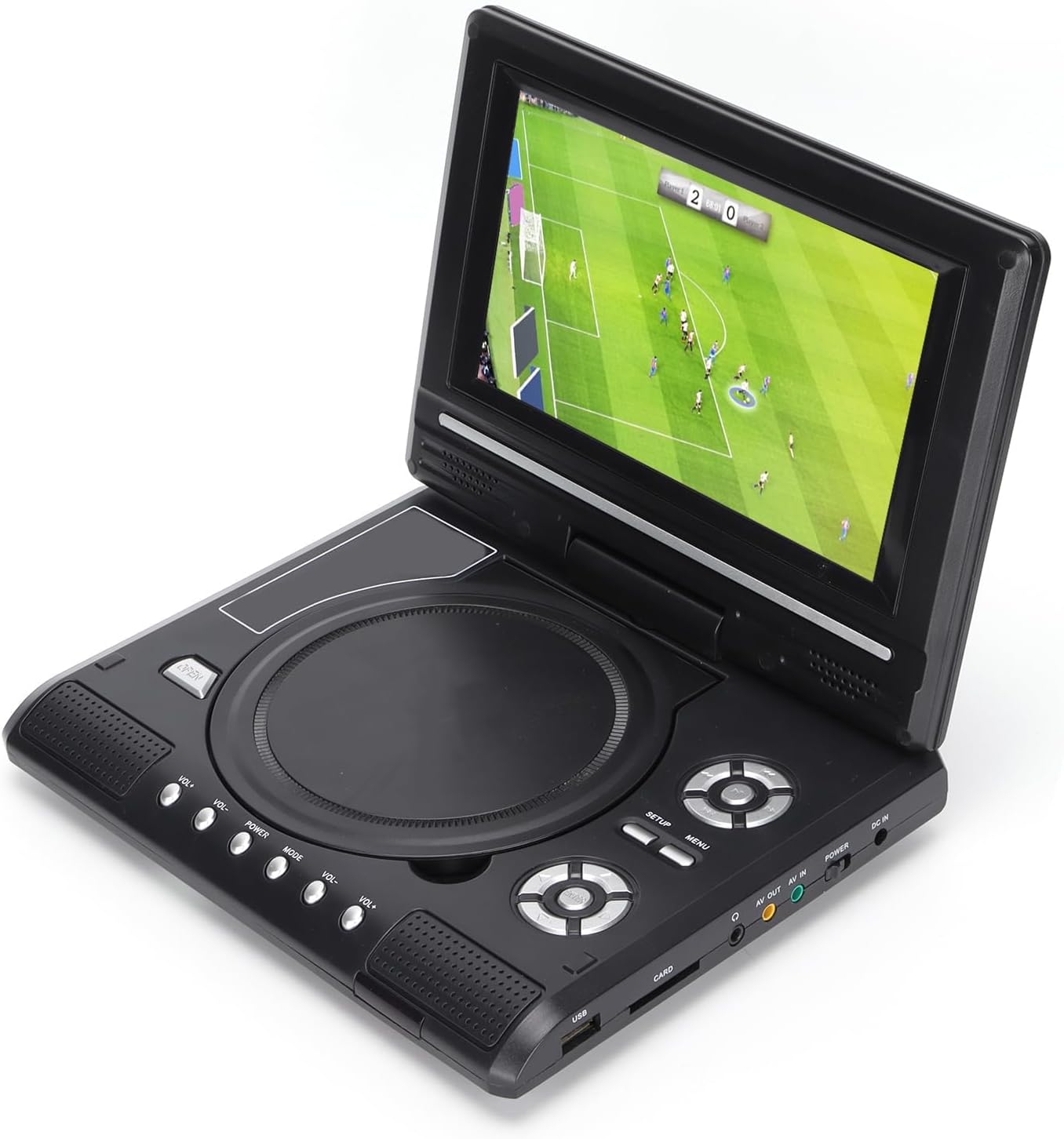
Image: All accessories included with the Dpofirs LMD-750 Portable DVD Player.
4. پروڈکٹ ختمview
The Dpofirs LMD-750 features a compact design with intuitive controls and multiple connectivity options.

تصویر: سامنے view of the Dpofirs LMD-750 Portable DVD Player with the screen open.

تصویر: سائیڈ view detailing the input/output ports.

تصویر: اوپر view of the player when closed.
کنٹرولز اور پورٹس:
- سکرین: 6.8"/8.5" HD LCD, 270° rotatable.
- ڈسک ٹرے: For DVD/CD media.
- کنٹرول بٹن: Play/Pause, Stop, Fast Forward/Rewind, Next/Previous, Setup, Menu, Volume +/-.
- USB پورٹ: USB فلیش ڈرائیوز کو جوڑنے کے لیے۔
- CARD Slot: For inserting memory cards (e.g., SD card).
- ہیڈ فون جیک: نجی سننے کے لیے۔
- اے وی آؤٹ: Audio/Video output to external display.
- اے وی میں: Audio/Video input from external source.
- بجلی کے سوئچ: To turn the device On/Off.
- ڈی سی ان: Power input for adapter.
5. سیٹ اپ
5.1 بیٹری چارج کرنا
Before first use, fully charge the built-in 1500mAh lithium battery. Connect the power adapter to the DC IN port on the player and plug it into a wall outlet (110-240V 50/60Hz). The charging indicator will illuminate. Once fully charged, the indicator may change color or turn off. A full charge provides approximately 30-60 minutes of continuous playback, depending on usage.
5.2 کنیکٹنگ پاور
- گھریلو استعمال: Connect the AC power adapter to the DC IN port and a wall socket.
- کار کا استعمال: Connect the car adapter to the DC IN port and your vehicle's cigarette lighter socket.
5.3 Connecting to an External Display (AV OUT)
کو view ایک بڑی اسکرین پر مواد:
- Connect one end of the AV cable to the AV OUT port on the DVD player.
- Connect the other end of the AV cable to the corresponding AV IN ports (Yellow for Video, White/Red for Audio) on your TV or monitor.
- Select the correct AV input source on your external display.
5.4 Connecting External Devices (AV IN)
To display content from an external source on the DVD player's screen:
- Connect one end of the AV cable to the AV IN port on the DVD player.
- Connect the other end of the AV cable to the AV OUT ports of your external device (e.g., another DVD player, game console).
- Switch the DVD player to AV IN mode (refer to Operating Instructions).
6. آپریٹنگ ہدایات
6.1 پاور آن/آف
سلائیڈ کریں۔ پاور switch to the "ON" position to turn on the player. Slide it to "OFF" to power down.
6.2 اسکرین کی گردش
The LCD screen can rotate up to 270 degrees. Gently adjust the screen to your desired viewing angle. This allows for flexible viewمختلف ماحول میں
6.3 والیوم کنٹرول
استعمال کریں۔ VOL+ اور والیوم- buttons on the player or remote control to adjust the audio volume.
6.4 مینو نیویگیشن
دبائیں مینو button to access the main menu. Use the directional buttons (up, down, left, right) to navigate and the OK انتخاب کی تصدیق کے لیے بٹن۔ دبائیں سیٹ اپ سسٹم کی ترتیبات تک رسائی حاصل کرنے کے لیے۔
7. میڈیا پلے بیک
7.1 ڈسک پلے بیک (DVD/CD)
- ڈسک کا احاطہ کھولیں۔
- Carefully place a compatible disc (DVD, DVD±R, DVD±RW, VCD, CD, CD±R, CD±RW) onto the spindle with the label side facing up.
- Close the disc cover securely.
- The player will automatically detect and begin playback. If not, press the کھیلیں بٹن

Image: Player displaying video content.

Image: Player displaying a sports event.
7.2 USB/SD کارڈ پلے بیک
- میں USB فلیش ڈرائیو داخل کریں۔ یو ایس بی port or a memory card into the کارڈ سلاٹ
- The player will automatically switch to USB/Card mode or prompt you to select the source.
- اپنے ذریعے تشریف لے جائیں۔ fileدشاتمک بٹن کا استعمال کرتے ہوئے اور دبائیں OK کھیلنے کے لیے
تعاون یافتہ فارمیٹس: DIVX, AV/VOB, MPG, MP3, MP4, WMA, JPEG, TXT, RMVB.
The player features an intelligent power-off memory function, resuming playback from where it stopped after a power interruption.
8. TV Function
The Dpofirs LMD-750 includes an analog TV tuner.
- Connect the included antenna to the antenna port on the player.
- Switch the player to TV mode (usually via the موڈ button or menu selection).
- Perform an automatic channel scan in the TV settings menu to find available analog channels.
- Channel reception quality depends on local signal strength.
Supported TV Standards: PAL, NTSC, SECAM (optional).
9. Game Function
Enjoy gaming with the included gamepad and game disc.
- Connect the gamepad to the designated game port on the player.
- Insert the game disc into the disc tray.
- Select the game function from the main menu.
- Choose from the available games on the disc (up to 300 games).
10 دیکھ بھال
10.1 ڈیوائس کی صفائی
- نرم، خشک کپڑے سے پلیئر کے بیرونی حصے کو صاف کریں۔
- مائع کلینر یا کھرچنے والے مواد کا استعمال نہ کریں۔
- For the screen, use a soft, lint-free cloth specifically designed for LCD screens.
10.2 ڈسک کی دیکھ بھال
- فنگر پرنٹس سے بچنے کے لیے ڈسکس کو ان کے کناروں سے ہینڈل کریں۔
- ڈسکس کو نرم، لنٹ سے پاک کپڑے سے صاف کریں، مرکز سے باہر کی طرف صاف کریں۔
- Store discs in their cases to prevent scratches.

Image: Internal disc mechanism.
11 خرابیوں کا سراغ لگانا
| مسئلہ | ممکنہ وجہ | حل |
|---|---|---|
| کوئی طاقت نہیں۔ | Battery drained; Power adapter not connected; Power switch OFF. | Charge the battery; Connect power adapter; Slide POWER switch to ON. |
| کوئی ڈسک پلے بیک نہیں۔ | Disc inserted incorrectly; Disc dirty or scratched; Incompatible disc format. | Insert disc correctly (label up); Clean or replace disc; Use supported disc format. |
| کوئی آواز نہیں۔ | Volume too low; Mute function active; Headphone connected. | Increase volume; Deactivate mute; Disconnect headphones if using speakers. |
| ناقص ٹی وی کا استقبال | Weak signal; Antenna not positioned correctly. | Adjust antenna position; Rescan channels; Check local signal strength. |
| ریموٹ کنٹرول کام نہیں کر رہا ہے۔ | Batteries drained or inserted incorrectly; Obstruction between remote and player. | Replace batteries (2x AAA); Ensure correct polarity; Remove obstructions. |
12. وضاحتیں
| ماڈل نمبر | LMD-750 (Dpofirsrgi5bmonx0-13) |
| مواد | ABS |
| رنگ | سیاہ |
| اسکرین کا سائز | 6.8" / 8.5" (diagonal, depending on variant) |
| ڈسپلے کی قسم | LCD |
| ڈسپلے ریزولوشن | 234 x 480 x RGB (native), supports up to 1280 x 720, 1366 x 768 |
| ان پٹ جلدtage | 110-240V 50/60Hz |
| آؤٹ پٹ والیمtage | 12V |
| بیٹری کی صلاحیت | 1500mAh لتیم بیٹری (بلٹ ان) |
| ریموٹ کنٹرول بیٹری | 2 x AAA بیٹریاں (شامل نہیں) |
| سپورٹڈ ڈسک فارمیٹس | DVD, DVD±R, DVD±RW, VCD, MP3, MP4, CD±R, CD±RW |
| Supported Media Formats (USB/Card) | DIVX, AV/VOB, MPG, MP3, MP4, WMA, JPEG, TXT, RMVB |
| ٹی وی سسٹم | PAL, NTSC, SECAM (full system) |
| موصول ہونے والے چینلز | LHF1-5, VHF6-12, UHF13-69, ATV |
| آڈیو انکوڈنگ ٹیکنالوجی | 96kHz/24bit |
| متحرک رینج | ≥ 80dB |
| سگنل ٹو شور کا تناسب | ≥ 70dB |
| چینل تنہائی | ≥ 70dB |
| کنیکٹوٹی ٹیکنالوجی | USB, Composite Video |
| کارخانہ دار | ڈیپوفرز |
| اصل ملک | چین |
13. وارنٹی اور سپورٹ
وارنٹی کی معلومات اور کسٹمر سپورٹ کے لیے، براہ کرم اپنی خریداری کے ساتھ فراہم کردہ دستاویزات دیکھیں یا اپنے خوردہ فروش سے رابطہ کریں۔ کسی بھی وارنٹی دعووں کے لیے اپنی خریداری کا ثبوت رکھیں۔