
1. تعارف
This manual provides essential information for the proper use and maintenance of your Reflex Active Series 23 Smart Watch. Please read it thoroughly before using your device to ensure optimal performance and longevity.
The Reflex Active Series 23 Smart Watch is designed to integrate seamlessly into your daily life, offering features such as communication, health monitoring, and activity tracking. It features a black strap and a black brushed alloy case.
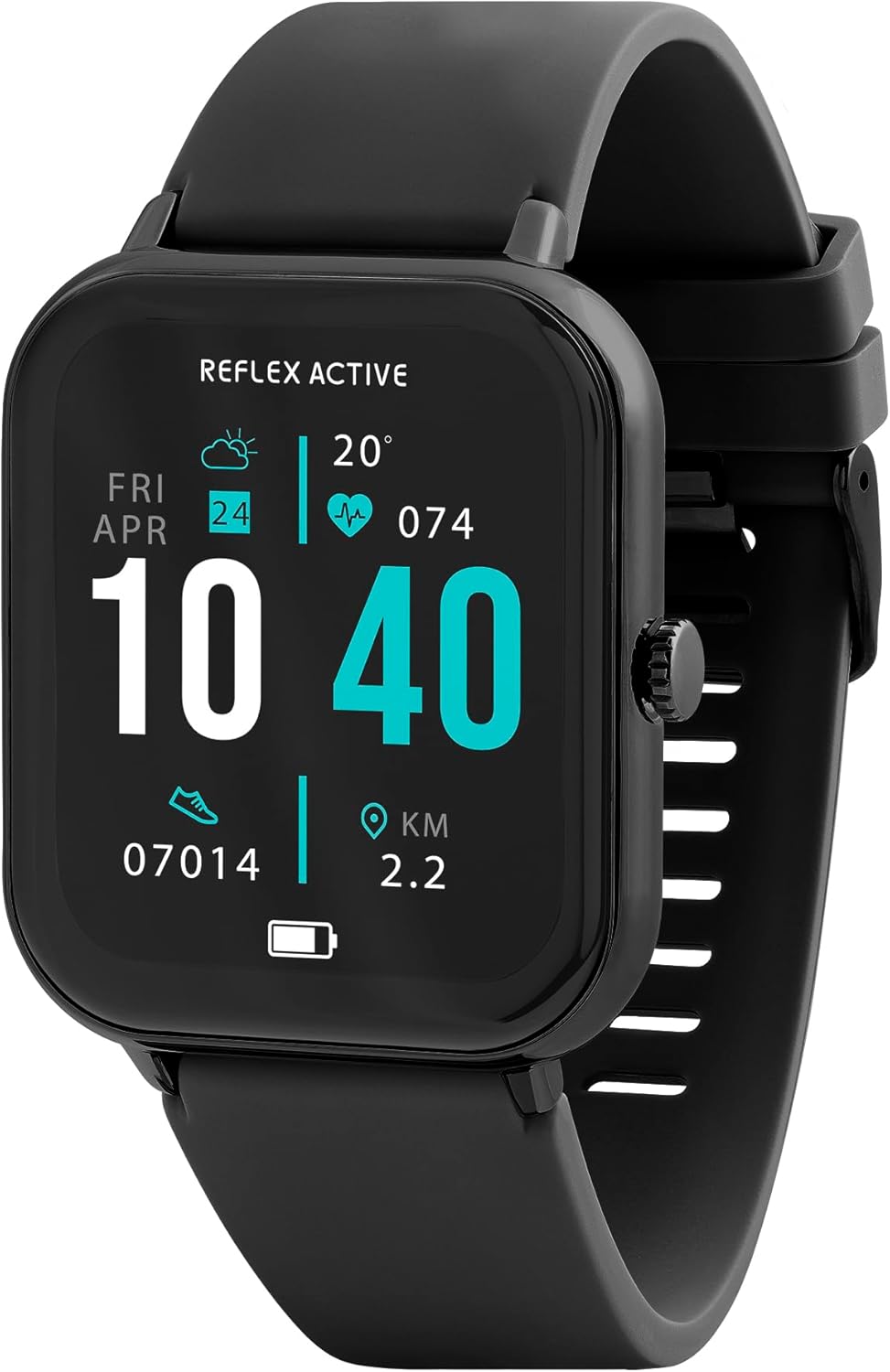
Image 1.1: Reflex Active Series 23 Smart Watch displaying key information.
2. حفاظتی معلومات
- طبی دستبرداری: This device is not a medical device. Data provided by the watch, including heart rate, blood oxygen, and activity tracking, is for reference only and should not be used for medical diagnosis or treatment. Consult a medical professional for any health concerns.
- بیٹری کی حفاظت: Do not attempt to replace the battery yourself. Improper battery replacement can lead to overheating, fire, or explosion.
- پانی کی مزاحمت: The device is IP68 water resistant. This means it is protected against immersion in water up to 1.5 meters for up to 30 minutes. It is suitable for everyday use and shallow-water activities but not for diving or high-pressure water activities. Avoid exposure to hot water, steam, or chemicals.
- دم گھٹنے کا خطرہ: ڈیوائس اور اس کے لوازمات کو چھوٹے بچوں کی پہنچ سے دور رکھیں۔
- ڈرائیونگ سیفٹی: Do not operate the watch or check notifications while driving or in situations that require full attention.
- جلد کی جلن: If you experience skin irritation, redness, or discomfort, discontinue use and consult a doctor. Ensure the watch is clean and dry before wearing.
3. سیٹ اپ
3.1. ان باکسنگ اور ابتدائی معائنہ
پیکیج کھولنے پر، تصدیق کریں کہ تمام اجزاء موجود ہیں:
- Reflex Active Series 23 Smart Watch
- USB چارجنگ کیبل
- ہدایت نامہ (یہ دستاویز)
- 2-Year Guarantee Information

Image 3.1: Package contents of the Reflex Active Smart Watch.
3.2. اسمارٹ واچ کو چارج کرنا
Before first use, fully charge your smart watch. Connect the magnetic charging cable to the charging points on the back of the watch and plug the USB end into a compatible power adapter (not included) or a computer's USB port. The watch display will indicate charging status.
3.3. ایپ کی تنصیب
To unlock the full functionality of your Reflex Active Series 23 Smart Watch, you need to install the free Reflex Active Red App on your smartphone. The app is compatible with both iOS and Android devices.
- Scan the QR code in the instruction guide or search for "Reflex Active Red App" in your device's app store.
- ایپ ڈاؤن لوڈ اور انسٹال کریں۔
- اکاؤنٹ بنانے اور اپنا پرو سیٹ اپ کرنے کے لیے اسکرین پر دی گئی ہدایات پر عمل کریں۔file.

Image 3.2: Reflex Active Red App download options.
3.4. اپنی سمارٹ واچ کو جوڑنا
After installing the app, follow these steps to pair your watch with your smartphone:
- یقینی بنائیں کہ آپ کی گھڑی چارج اور پاور آن ہے۔
- اپنے اسمارٹ فون پر بلوٹوتھ کو فعال کریں۔
- Open the Reflex Active Red App.
- Navigate to the device pairing section within the app.
- Select your Reflex Active Series 23 from the list of available devices.
- اپنی گھڑی اور اسمارٹ فون دونوں پر جوڑا بنانے کی درخواست کی تصدیق کریں۔
4. اپنی سمارٹ واچ کو چلانا
4.1. بنیادی نیویگیشن
The Reflex Active Series 23 features a responsive touchscreen and a side button for navigation:
- اوپر/نیچے سوائپ کریں: مینوز اور اطلاعات کے ذریعے سکرول کریں۔
- بائیں/دائیں سوائپ کریں: فوری رسائیview widgets or different watch faces.
- تھپتھپائیں: کوئی آئٹم منتخب کریں یا ایپلیکیشن کھولیں۔
- سائیڈ بٹن: Press to return to the home screen or wake the display. Long press for power options.
4.2. مواصلاتی خصوصیات
Stay connected directly from your wrist.
- کال کرنا اور وصول کرنا: Once paired, you can make and receive calls directly on your watch.
- پیغام کی اطلاعات: Receive alerts for incoming messages from various apps.

Image 4.1: Receiving an incoming call on the smart watch.

Image 4.2: Smart watch displaying a wellness feature.
4.3. Health and Activity Tracking
The watch offers comprehensive tracking features:
- دل کی شرح مانیٹر: آپ کے دل کی دھڑکن کو مسلسل ٹریک کرتا ہے۔
- مرحلہ کاؤنٹر: Records your daily steps and distance.
- نیند سے باخبر رہنا: آپ کی نیند کے نمونوں اور معیار کی نگرانی کرتا ہے۔
- کیلوری ٹریکنگ: سرگرمی کی بنیاد پر جلنے والی کیلوریز کا اندازہ لگاتا ہے۔
- سائیکل ٹریکنگ: Helps monitor menstrual cycles (via app).
- Multi-Activity Tracking: Supports various sports modes.
- سانس لینے کی مشقیں: آرام کے لیے گائیڈڈ سانس لینے کے سیشن۔
- ہائیڈریشن الرٹس: Reminders to drink water.
- بیہودہ یاد دہانیاں: غیرفعالیت کے ادوار کے بعد آپ کو منتقل ہونے کے لیے متنبہ کرتا ہے۔
- GPS کنکشن: Utilizes your phone's GPS for accurate route tracking during outdoor activities.

تصویر 4.3: ختمview of Reflex Active Smart Watch features.
4.4 اضافی خصوصیات
- موسیقی کنٹرول: براہ راست اپنی گھڑی سے اپنے اسمارٹ فون پر میوزک پلے بیک کو کنٹرول کریں۔
- کیمرہ کنٹرول: اپنے اسمارٹ فون کیمرہ کے لیے اپنی گھڑی کو ریموٹ شٹر کے طور پر استعمال کریں۔
- Personalised Photo Dials: Customize your watch face with your own photos via the app.
- Watch Locator: Use the app to find your watch if it's misplaced nearby.
- موسم کی تازہ ترین معلومات: Get real-time weather information.
- ٹارچ: A simple flashlight function on the watch display.
4.5. General Product Video
مندرجہ ذیل ویڈیو ایک جنرل اوور فراہم کرتا ہےview of Reflex Active smartwatch features, including calling, notifications, health tracking, and customization. While it may feature other series, the core functionalities are similar to your Series 23.
ویڈیو 4.1: جنرل اوورview of Reflex Active Smart Watch features (Note: Features shown may vary slightly by model series).
5 دیکھ بھال
5.1 اپنی اسمارٹ واچ کو صاف کرنا
اپنی گھڑی کی ظاہری شکل اور فعالیت کو برقرار رکھنے کے لیے:
- Wipe the screen and case with a soft, lint-free cloth.
- For the strap, use a damp cloth and mild soap if necessary, then rinse thoroughly and dry completely before wearing.
- سخت کیمیکلز یا کھرچنے والے مواد کے استعمال سے پرہیز کریں۔
5.2. پانی کی مزاحمت (IP68)
Your Reflex Active Series 23 Smart Watch is rated IP68 water resistant. This means it can withstand dust, dirt, and sand, and is resistant to submersion up to a maximum depth of 1.5m underwater for up to thirty minutes. It is suitable for everyday use, such as washing hands or light rain exposure. However, it is not recommended for swimming, showering, or prolonged water exposure, especially in hot water or with soap, as this can compromise the seals.
5.3. بیٹری کی دیکھ بھال
- گہری ڈسچارج کو روکنے کے لیے گھڑی کو باقاعدگی سے چارج کریں۔
- Avoid exposing the watch to extreme temperatures, which can degrade battery life.
- صرف فراہم کردہ چارجنگ کیبل استعمال کریں۔
6 خرابیوں کا سراغ لگانا
If you encounter issues with your Reflex Active Series 23 Smart Watch, try the following solutions:
- آن نہ ہونے کی گھڑی: یقینی بنائیں کہ گھڑی پوری طرح سے چارج ہے۔ اسے چارجر سے کم از کم 30 منٹ تک جوڑیں۔
- اسمارٹ فون کے ساتھ جوڑا نہ بنانا:
- یقینی بنائیں کہ آپ کے فون پر بلوٹوتھ فعال ہے۔
- یقینی بنائیں کہ گھڑی آپ کے فون کی حد کے اندر ہے۔
- اپنی گھڑی اور اسمارٹ فون دونوں کو دوبارہ شروع کریں۔
- Check if the Reflex Active Red App is updated to the latest version.
- اگر پہلے جوڑا بنایا گیا ہو، تو اپنے فون کی بلوٹوتھ سیٹنگز اور ایپ کے ذریعے ڈیوائس کا جوڑا ختم کرنے اور دوبارہ جوڑا بنانے کی کوشش کریں۔
- غلط سرگرمی سے باخبر رہنا:
- یقینی بنائیں کہ گھڑی آپ کی کلائی پر اچھی طرح پہنی ہوئی ہے، آپ کی کلائی کی ہڈی کے اوپر تقریباً ایک انگلی کی چوڑائی۔
- Calibrate your stride length in the Reflex Active Red App if steps or distance are consistently off.
- Ensure your personal information (height, weight, age) is accurate in the app.
- اطلاعات ظاہر نہیں ہو رہی ہیں:
- Check notification settings within the Reflex Active Red App to ensure desired apps are enabled.
- Verify that your phone's notification settings allow the Reflex Active Red App to send notifications.
- یقینی بنائیں کہ گھڑی بلوٹوتھ کے ذریعے منسلک ہے۔
- اسکرین غیر جوابدہ: Try restarting the watch by long-pressing the side button until power options appear, then select restart. If unresponsive, allow the battery to fully drain and then recharge.
7. وضاحتیں
| ماڈل نمبر | RA23-2170 |
| برانڈ | ریفلیکس ایکٹو |
| کیس کا مواد | Black Brushed Alloy |
| پٹا مواد | سیاہ سلیکون |
| پانی کی مزاحمت | آئی پی 68 |
| بیٹری کی قسم | 1 لتیم پولیمر (شامل) |
| پیکیج کے طول و عرض | 18.4 x 8.9 x 2.4 سینٹی میٹر |
| شے کا وزن | 38 گرام |
| مطابقت | iOS & Android (via Reflex Active Red App) |
8. وارنٹی اور سپورٹ
Your Reflex Active Series 23 Smart Watch comes with a 2 سال کی گارنٹی خریداری کی تاریخ سے، مینوفیکچرنگ نقائص کا احاطہ. وارنٹی کے دعووں کے لیے براہ کرم اپنی خریداری کا ثبوت اپنے پاس رکھیں۔
For further assistance, troubleshooting, or warranty inquiries, please contact the UK support team. Details can be found on the Reflex Active website or within the Reflex Active Red App.
آن لائن مدد: Visit the official Reflex Active webاکثر پوچھے گئے سوالات اور معاون وسائل کے لیے سائٹ۔
ایپ سپورٹ: The Reflex Active Red App often includes a support section or contact information.