
1. تعارف
Thank you for choosing the ieGeek 5MP Solar WiFi Outdoor PTZ Security Camera. This manual provides essential information for the proper installation, operation, and maintenance of your device. Please read it thoroughly before use and retain it for future reference.
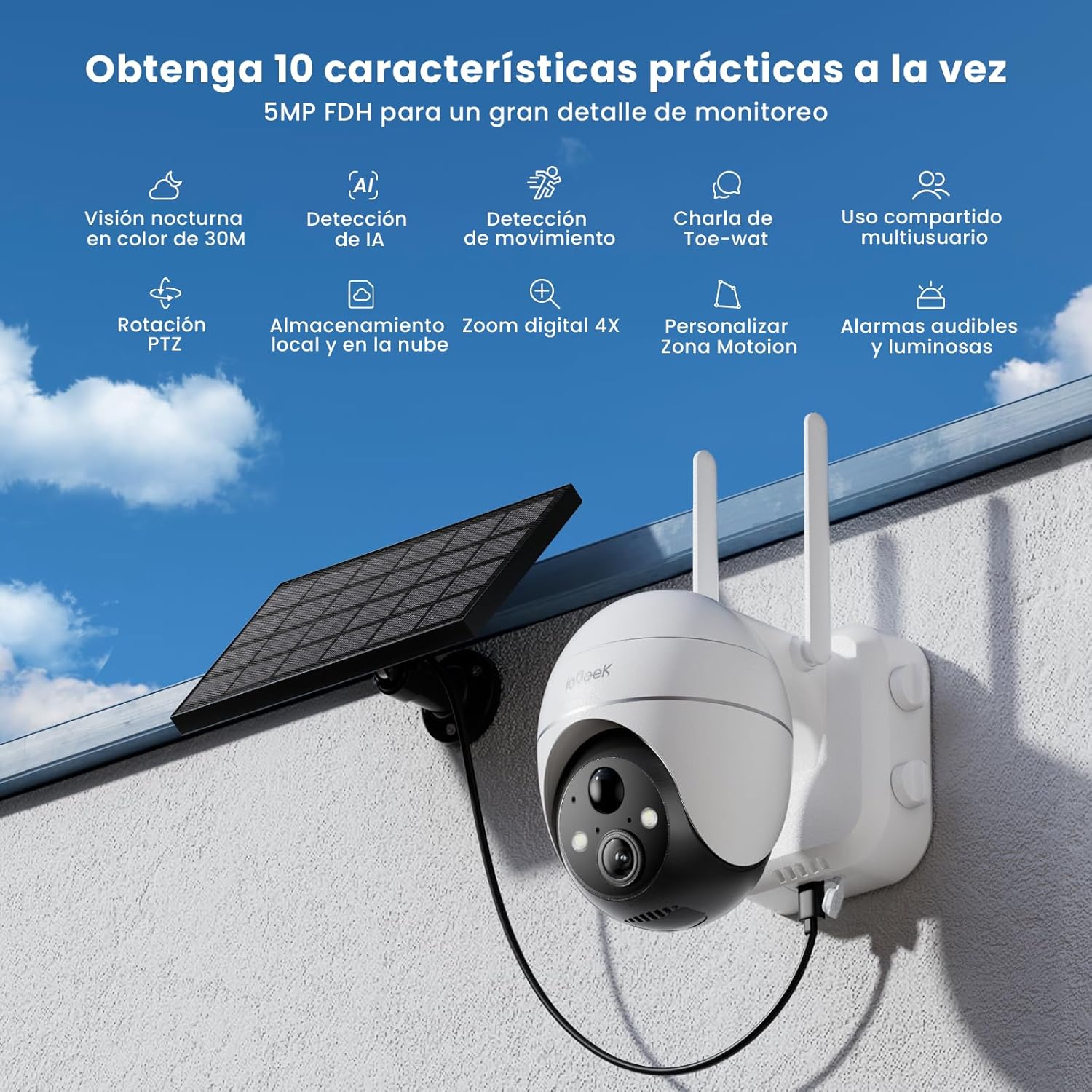
Figure 1: ieGeek 5MP Solar WiFi Outdoor PTZ Security Camera with solar panel, highlighting key features.
2. پروڈکٹ ختمview
2.1 کلیدی خصوصیات
- 5MP Ultra-Clear Resolution: Provides superior visual images with 4x digital zoom for detailed viewing
- Solar Power & Long-Lasting Battery: Operates using solar panels, eliminating power cables. The rechargeable battery lasts up to 60 days on a single charge.
- 355° پین اور 120° جھکاؤ: کا ایک وسیع میدان پیش کرتا ہے۔ view, ensuring comprehensive surveillance without blind spots.
- PIR Human Detection & Instant Alarms: Detects human shapes and sends alarm notifications within 2 seconds.
- کلر نائٹ ویژن: Equipped with motion-activated spotlights for full-color details day and night.
- دو طرفہ آڈیو: Enables real-time listening and speaking through the camera via the app.
- مقامی اور کلاؤڈ اسٹوریج: Supports up to 128GB Micro SD card and offers 7 days of free cloud service.
- Alexa Smart Function: Control the camera and view footage using Alexa Smart Voice.
- IP65 ویدر پروف: Designed for outdoor use, resistant to rain, snow, and varying temperatures (-20°C to 50°C).
2.2 پیکیج کے مشمولات

شکل 2: پروڈکٹ کے طول و عرض اور پیکیج کے مواد۔
- ieGeek 5MP PTZ Security Camera x 1
- Solar Panel with Bracket x 1
- یوزر مینوئل x 1
- Solar Panel User Manual x 1
- Mounting Screws and Expansion Screws x 7 sets
3. سیٹ اپ گائیڈ
3.1 بیٹری چارج کرنا
Before initial use, fully charge the camera's internal battery using the provided USB cable. The solar panel will maintain the charge during outdoor operation.
3.2 ایپ ڈاؤن لوڈ اور اکاؤنٹ بنانا
Download the 'ieGeek Cam' app from the Google Play Store or Apple App Store. Follow the in-app instructions to create an account and log in.

Figure 3: Download the 'ieGeek Cam' app.
3.3 کیمرہ پیئرنگ
- کیمرے پر پاور۔
- Open the 'ieGeek Cam' app and tap 'Add Device'.
- Follow the on-screen prompts to connect the camera to your 2.4GHz Wi-Fi network.
- Scan the QR code displayed on your phone with the camera lens.
- ایک بار منسلک ہونے کے بعد، اپنے کیمرے کو نام دیں اور سیٹ اپ مکمل کریں۔
3.4 تنصیب
Choose a location with good Wi-Fi signal and direct sunlight exposure for the solar panel. Use the provided screws and bracket to securely mount the camera and solar panel.

Figure 4: Flexible disassembly and easy installation.

Figure 5: Wireless setup with solar panel connection.
4. آپریٹنگ ہدایات
4.1 لائیو View اور PTZ کنٹرول
Access the live feed through the 'ieGeek Cam' app. Use the on-screen controls to pan 355° horizontally and tilt 120° vertically, adjusting the camera's view ضرورت کے مطابق

Figure 6: Remote PTZ control via smartphone app.
4.2 حرکت کا پتہ لگانا اور الرٹس
The camera features PIR human detection. When motion is detected, you will receive an instant alarm notification on your smartphone. Customize motion detection zones and sensitivity settings within the app to reduce false alerts.

Figure 7: Customizable motion detection zones.
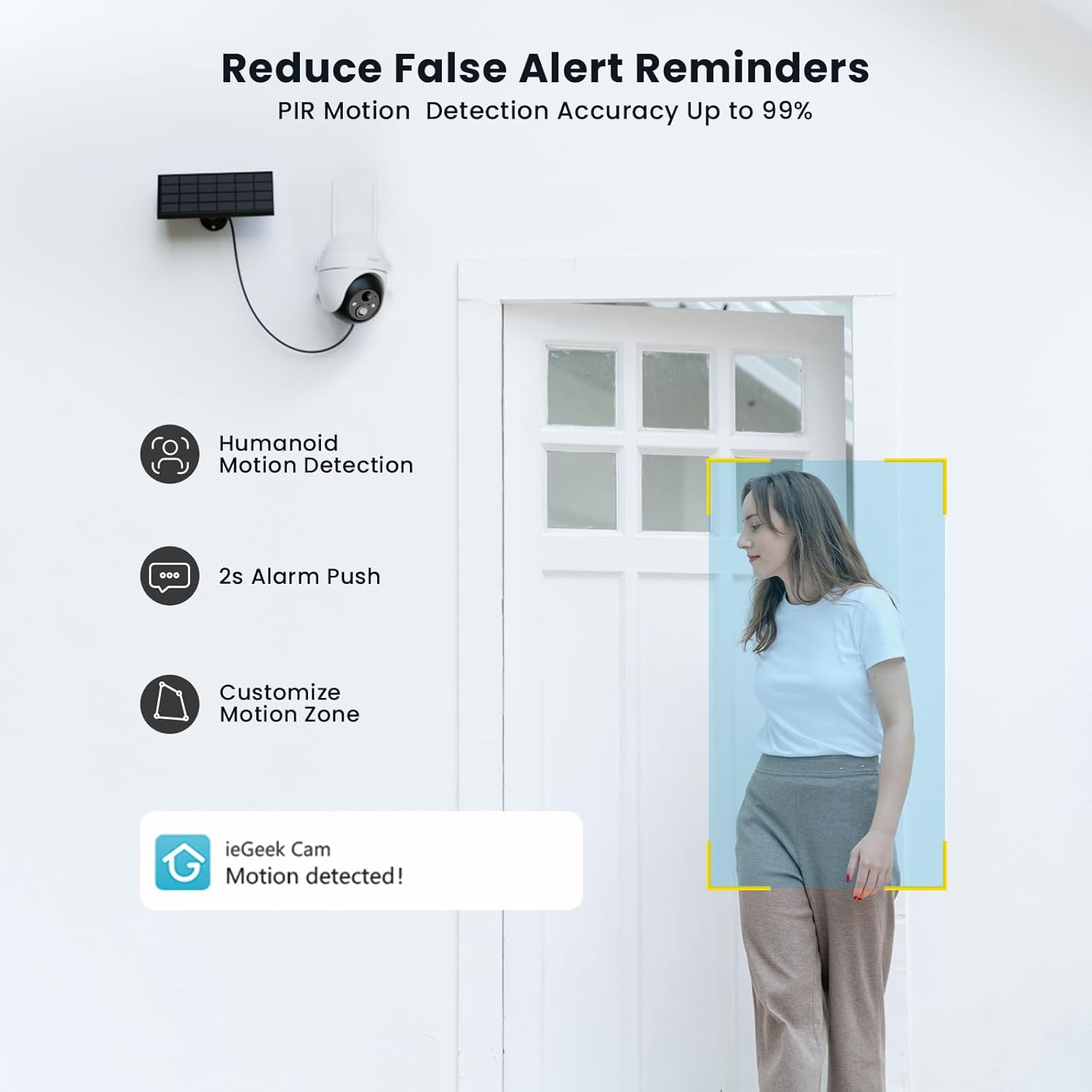
Figure 8: PIR Humanoid Motion Detection.
4.3 دو طرفہ آڈیو
Utilize the two-way audio feature to communicate with visitors or deter intruders. Tap the microphone icon in the app to speak, and listen through the camera's speaker.

Figure 9: Two-way audio communication.
4.4 اسٹوریج کے اختیارات
The camera supports local storage via a Micro SD card (up to 128GB, purchased separately) and offers 7 days of free cloud storage. Recorded events can be accessed and reviewایپ کے ذریعے ایڈ۔

Figure 10: Micro SD card slot for local storage.

Figure 11: Cloud storage options.
5 دیکھ بھال
- لینس صاف کریں: صاف تصویر کے معیار کو یقینی بنانے کے لیے کیمرہ لینس کو نرم، خشک کپڑے سے باقاعدگی سے صاف کریں۔
- سولر پینل صاف کریں: Keep the solar panel free of dust, dirt, and debris to maximize charging efficiency.
- بیٹری لیول چیک کریں: Monitor the battery status via the app and ensure the solar panel receives adequate sunlight.
- فرم ویئر اپ ڈیٹس: Keep the camera firmware updated through the app for optimal performance and security.
6 خرابیوں کا سراغ لگانا
| مسئلہ | ممکنہ وجہ | حل |
|---|---|---|
| کیمرہ Wi-Fi سے منسلک نہیں ہے۔ | غلط وائی فائی پاس ورڈ؛ کیمرہ روٹر سے بہت دور؛ صرف 2.4GHz Wi-Fi کو سپورٹ کرتا ہے۔ | Verify password; Move camera closer to router or use a Wi-Fi extender; Ensure your router is set to 2.4GHz. |
| خراب تصویر کا معیار | Dirty lens; Low light conditions; Network issues. | لینس صاف کریں؛ مناسب روشنی کو یقینی بنائیں یا کلر نائٹ ویژن پر انحصار کریں۔ Wi-Fi سگنل کی طاقت چیک کریں۔ |
| بیٹری چارج نہیں ہو رہی | Solar panel obstructed or dirty; Insufficient sunlight; Faulty cable. | Clear obstructions and clean solar panel; Relocate panel to receive more direct sunlight; Check cable connections. |
| کوئی حرکت کا پتہ لگانے کے انتباہات نہیں۔ | Motion detection disabled; Incorrect sensitivity settings; App notifications blocked. | Enable motion detection in app; Adjust sensitivity; Check phone notification settings for the 'ieGeek Cam' app. |
7. وضاحتیں
| فیچر | تفصیل |
|---|---|
| ماڈل کا نام | ieGeek ZS-GX4S |
| قرارداد | 5 MP |
| کنیکٹوٹی | وائرلیس (Wi-Fi 2.4GHz) |
| طاقت کا منبع | Battery, Solar Power |
| بیٹری کی صلاحیت | 2000 ایم اے ایچ |
| پین/جھکاؤ کی حد | 355° پین، 120° جھکاؤ |
| ڈیجیٹل زوم۔ | 4x |
| نائٹ ویژن | Color Night Vision (Infrared) |
| حرکت کا پتہ لگانا | پیر ہیومن ڈیٹیکشن |
| آڈیو | دو طرفہ آڈیو |
| ذخیرہ | مائیکرو ایس ڈی (128 جی بی تک)، کلاؤڈ اسٹوریج |
| ویدر پروف ریٹنگ | آئی پی 65 |
| آپریٹنگ درجہ حرارت | -20 ° C سے 50 ° C |
| طول و عرض | 18 x 17 x 12 سینٹی میٹر |
| مواد | پلاسٹک |
| کے ساتھ ہم آہنگ | ایمیزون الیکسا |
8. وارنٹی اور سپورٹ
ieGeek is committed to providing reliable products and excellent customer service.
- 2 سالہ وارنٹی: Your ieGeek camera is covered by a 2-year warranty from the date of purchase.
- 30 دن کی منی بیک گارنٹی: اگر آپ اپنی خریداری سے مطمئن نہیں ہیں، تو آپ اسے مکمل رقم کی واپسی کے لیے 30 دنوں کے اندر واپس کر سکتے ہیں۔
- لائف ٹائم ٹیکنیکل سپورٹ: ieGeek offers lifetime technical assistance for all its products.
For support, please contact us via email. Our customer service team is available 24/7 to assist you.

Figure 12: ieGeek Customer Support.