
symcode USA-6709DA-Green
Symcode Wireless Bluetooth Barcode Scanner User Manual
Model: USA-6709DA-Green
1. تعارف
This user manual provides comprehensive instructions for the Symcode Wireless Bluetooth Barcode Scanner, Model USA-6709DA-Green. This device is designed for accurate and efficient data capture, supporting various 1D and 2D barcode types. It offers versatile connectivity options including Bluetooth, 2.4G wireless, and USB wired connections, making it suitable for a wide range of business applications.

Image 1: Symcode Wireless Bluetooth Barcode Scanner and accessories.
2. پیکیج کے مشمولات
براہ کرم تصدیق کریں کہ تمام اشیاء آپ کے پیکیج میں موجود ہیں:
- Symcode Barcode Scanner (Model: USA-6706DA-Green)
- USB چارجنگ کیبل
- 2.4G USB ڈونگل
- صارف دستی

Image 2: Components included with the Symcode Barcode Scanner.
3. مصنوعات کی خصوصیات
- اعلی درجے کی سکیننگ ٹیکنالوجی: CMOS optical imaging for quick and precise scanning of 1D and 2D barcodes (QR, DataMatrix, PDF417, Aztec, Hanxin, etc.) even on damaged or poorly printed labels.
- Triple Connectivity Modes: Supports Bluetooth, 2.4G wireless, and USB wired connections for maximum flexibility.
- توسیعی وائرلیس رینج: Up to 200m in open environments and 30m indoors with the 2.4G USB dongle.
- لمبی بیٹری کی زندگی: 2000mAh battery provides up to 30 hours of continuous scanning, with a full recharge in approximately 2 hours.
- ورسٹائل کنفیگریشن: Features include hands-free intelligent sensor mode, trigger scan mode, vibration/buzzer settings, data storage/instant upload modes, multiple keyboard languages, and customizable prefix/suffix options.
- اعلی استحکام: Constructed with strong ABS material, designed to withstand drops of up to 2.4 meters (8 ft) and features an integrated dustproof housing (IP67 rated).
4. سیٹ اپ اور کنکشن
The scanner offers three primary connection methods:
4.1. 2.4G وائرلیس کنکشن
- Plug the 2.4G USB dongle into an available USB port on your computer.
- اسکینر آن کریں۔ یہ خود بخود ڈونگل کے ساتھ جوڑ جائے گا۔
- A successful connection is indicated by a specific beep sound and LED indicator.
4.2. بلوٹوت کنکشن
- Ensure your device (smartphone, tablet, computer) has Bluetooth enabled.
- Scan the Bluetooth pairing barcode (usually found in the user manual or on a setup card).
- On your device, search for Bluetooth devices and select "Symcode Scanner" (or similar name).
- جوڑا بنانے کی تصدیق کریں۔
4.3 USB وائرڈ کنکشن
- فراہم کردہ USB کیبل کا استعمال کرتے ہوئے سکینر کو اپنے کمپیوٹر سے جوڑیں۔
- اسکینر ایک وائرڈ ڈیوائس کے طور پر کام کرے گا اور بیک وقت چارج بھی ہوگا۔

Image 3: Connectivity options for the Symcode Barcode Scanner.

تصویر 4: آپریٹنگ سسٹم کی مطابقت۔
5. آپریٹنگ ہدایات
5.1 بنیادی سکیننگ آپریشن
To scan a barcode, point the scanner's window at the barcode and press the trigger button. A successful scan will be indicated by a beep and/or vibration, and the data will be transmitted to your connected device.
5.2 ڈیٹا اپ لوڈ موڈز
سکینر دو ڈیٹا اپ لوڈ طریقوں کی حمایت کرتا ہے:
- فوری اپ لوڈ موڈ: Data is transmitted to the connected device immediately after each scan. This is the default mode.
- Offline Storage Mode: Scanned data is stored in the scanner's internal memory (up to 10,000 codes). To upload stored data, scan the specific setup code for 'Upload Data' found in your detailed user manual.

Image 5: Instant Upload Mode vs. Offline Storage Mode.
5.3. Decoding Capabilities
The scanner can decode a wide array of barcode types, including:
- 1 ڈی بارکوڈ: UPC/EAN, Code 39, Code 128, Codabar, Interleaved 2 of 5, Code 93, MSI, Code 11, RSS variants, etc.
- 2 ڈی بارکوڈ: QR Code, Data Matrix, PDF417, Aztec, Hanxin.
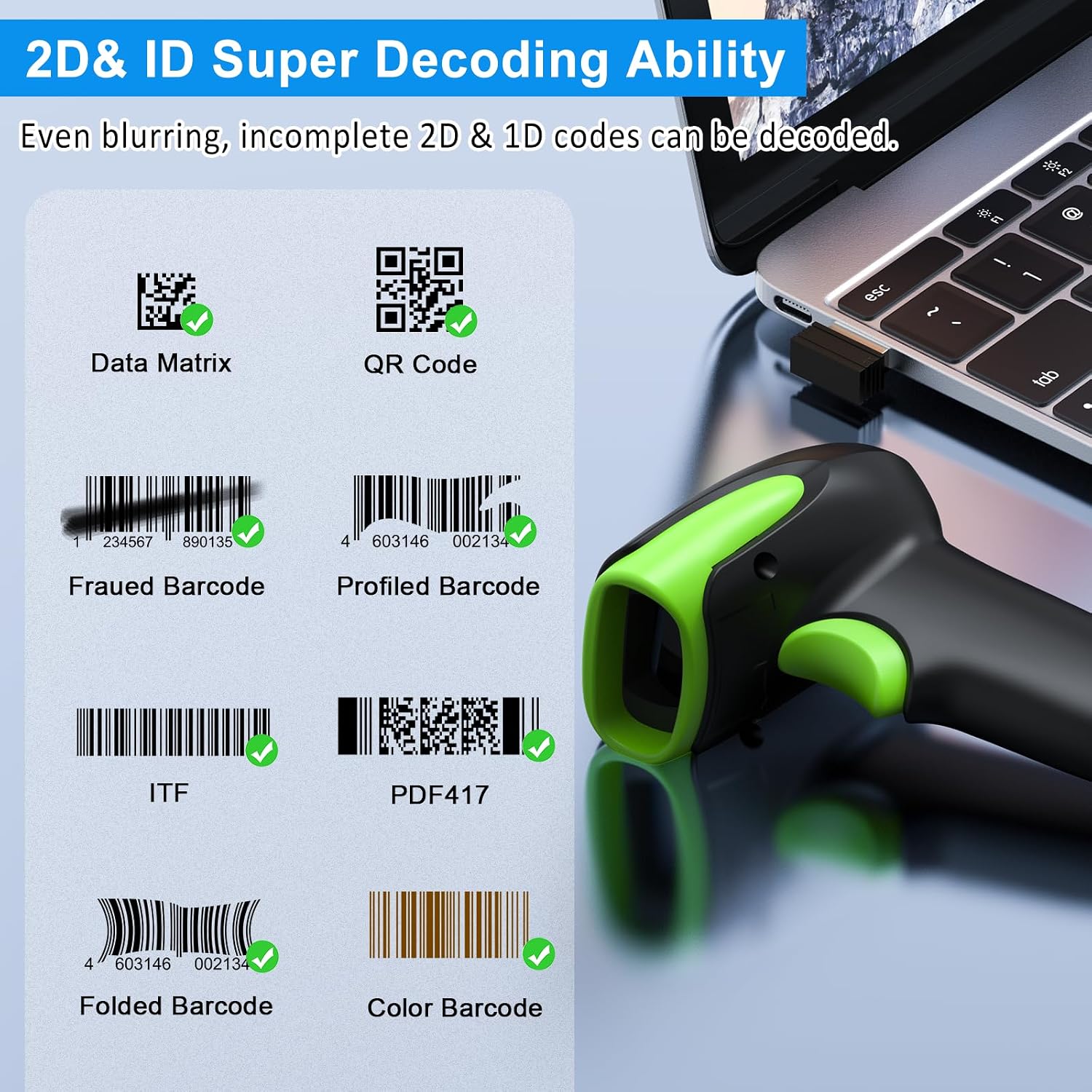
تصویر 6: مثال کے طور پرamples of decodable 1D and 2D barcodes.
6 دیکھ بھال
To ensure optimal performance and longevity of your scanner:
- صفائی: سکینر کے بیرونی حصے کو صاف کرنے کے لیے نرم، خشک کپڑا استعمال کریں۔ اسکیننگ ونڈو کے لیے، خروںچ سے بچنے کے لیے لینس صاف کرنے والا کپڑا استعمال کریں۔ کھرچنے والے کلینر یا سالوینٹس کا استعمال نہ کریں۔
- چارج کرنا: Recharge the battery using the provided USB cable. Avoid overcharging or completely draining the battery for extended periods.
- ذخیرہ: اسکینر کو براہ راست سورج کی روشنی اور انتہائی درجہ حرارت سے دور ٹھنڈی، خشک جگہ پر اسٹور کریں۔
- استحکام: While rugged, avoid intentional drops or impacts. The scanner is designed to withstand accidental drops up to 2.4 meters.

Image 7: The scanner's rugged design and drop resistance.
7 خرابیوں کا سراغ لگانا
If you encounter issues with your scanner, please refer to the following common problems and solutions:
- Scanner not connecting:
- یقینی بنائیں کہ اسکینر چارج ہے۔
- Verify the correct connection mode (Bluetooth, 2.4G, USB) is selected and properly set up.
- For 2.4G, ensure the dongle is securely plugged in. For Bluetooth, ensure your device's Bluetooth is on and the scanner is paired.
- اسکینر اور میزبان ڈیوائس دونوں کو دوبارہ شروع کرنے کی کوشش کریں۔
- سکینر بارکوڈز نہیں پڑھ رہا ہے:
- Ensure the barcode is not excessively damaged, smudged, or poorly printed.
- Check the distance and angle of the scanner to the barcode.
- تصدیق کریں کہ بار کوڈ کی قسم سکینر کے ذریعے تعاون یافتہ ہے۔
- Clean the scanning window if it is dirty.
- Data not transmitting:
- Confirm the scanner is successfully connected to your device.
- Check if the scanner is in 'Offline Storage Mode' and needs to be manually uploaded.
- Ensure the application on your device is ready to receive input.
For further assistance, please refer to the comprehensive troubleshooting section in the full user manual or contact Symcode customer support.
8. وضاحتیں
| فیچر | تفصیلات |
|---|---|
| ماڈل نمبر | USA-6709DA-Green |
| ان پٹ جلدtage | DC5V±0.25v |
| Current (Work/Instantaneous) | 25 ایم اے / 95 ایم اے |
| Decoding Speed | 100 بار / سیکنڈ |
| Wireless Range (2.4G) | Up to 200m (open air), 30m (indoors) |
| چارج کرنے کا وقت | تقریبا 2.5 گھنٹے |
| بیٹری کی زندگی | Up to 30 Hours (continuous scanning) |
| بیٹری کی قسم | 1 لتیم پولیمر بیٹری (شامل) |
| کنیکٹوٹی | Bluetooth 6.1, Wireless 2.4G, USB Cable |
| ہم آہنگ آلات | Desktop, Laptop, Smartphone, POS systems |
| آپریٹنگ سسٹمز | Windows 11/10/8/7/XP, Mac OS, iOS, Android, Linux |
| شے کا وزن | 10.2 اونس |
| پیکیج کے طول و عرض | 6.89 x 4.49 x 3.31 انچ |

Image 8: Wireless transmission range.
9. وارنٹی اور سپورٹ
This Symcode product is manufactured by USA Scanner. For any product inquiries, technical support, or warranty claims, please contact USA Scanner directly. Refer to the contact information provided in your product packaging or visit the official Symcode brand store on Amazon for support resources.
کا دورہ کریں۔ Symcode Store مزید معلومات کے لیے
Ask a question about this manual
Ask about setup, troubleshooting, compatibility, parts, safety, or missing instructions. Manuals+ will review the question and use this page’s manual context to help answer it.