
1. تعارف
The eppfun AK8675B Pro is a versatile Bluetooth 5.2 audio adapter designed to function as both a transmitter (TX) and a receiver (RX). It features advanced Qualcomm QCC3040 chip technology, supporting various aptX codecs including aptX-Adaptive, aptX HD, and aptX Low Latency, ensuring high-quality audio with minimal delay. This device allows you to wirelessly stream audio from non-Bluetooth devices (like TVs or PCs) to Bluetooth headphones/speakers, or from Bluetooth-enabled devices (like smartphones) to wired audio systems.
2. پیکیج کے مشمولات
تصدیق کریں کہ نیچے دی گئی تمام اشیاء آپ کے پیکیج میں شامل ہیں:
- eppfun AK8675B Pro Bluetooth Transmitter/Receiver
- USB-C چارجنگ کیبل
- 3.5 ملی میٹر آکس کیبل۔
- Optical Fiber Audio Cable
- صارف دستی (یہ دستاویز)

Image: Contents of the eppfun AK8675B Pro package, including the device, various cables, and the user manual.
3. پروڈکٹ ختمview اور کنٹرولز
ڈیوائس کے اجزاء اور کنٹرولز سے خود کو واقف کرو:

Image: Diagram of the eppfun AK8675B Pro device with key interfaces and buttons labeled.
- A: پاور بٹن۔ - Press and hold to turn the device on or off.
- B: RX/TX Mode Switching - Slide switch to select Transmitter (TX) or Receiver (RX) mode.
- C: Pairing Button - Press to initiate Bluetooth pairing mode.
- D: AUX 3.5mm Interface - For connecting audio devices via a 3.5mm audio cable.
- E: Volume Adjusting - Buttons to increase or decrease audio volume.
- F: One Click Mute, Double Click Audio Decoding Switch - Single press for mute/unmute; double press to cycle through audio decoding options.
- G: USB Charging - USB-C port for charging the device.
- H: Optical Interface - For connecting audio devices via an optical fiber cable.
4. Setup and Operation Modes
The AK8675B Pro operates in two primary modes: Transmitter (TX) and Receiver (RX). Select the appropriate mode using the RX/TX mode switching slider (B).

Image: Comparison of Transmitter and Receiver modes, showing usage time, compatible codecs, and simultaneous linking capabilities.
4.1۔ ٹرانسمیٹر موڈ (TX)
In TX mode, the device transmits audio from a non-Bluetooth source (e.g., TV, PC) to Bluetooth-enabled headphones or speakers.
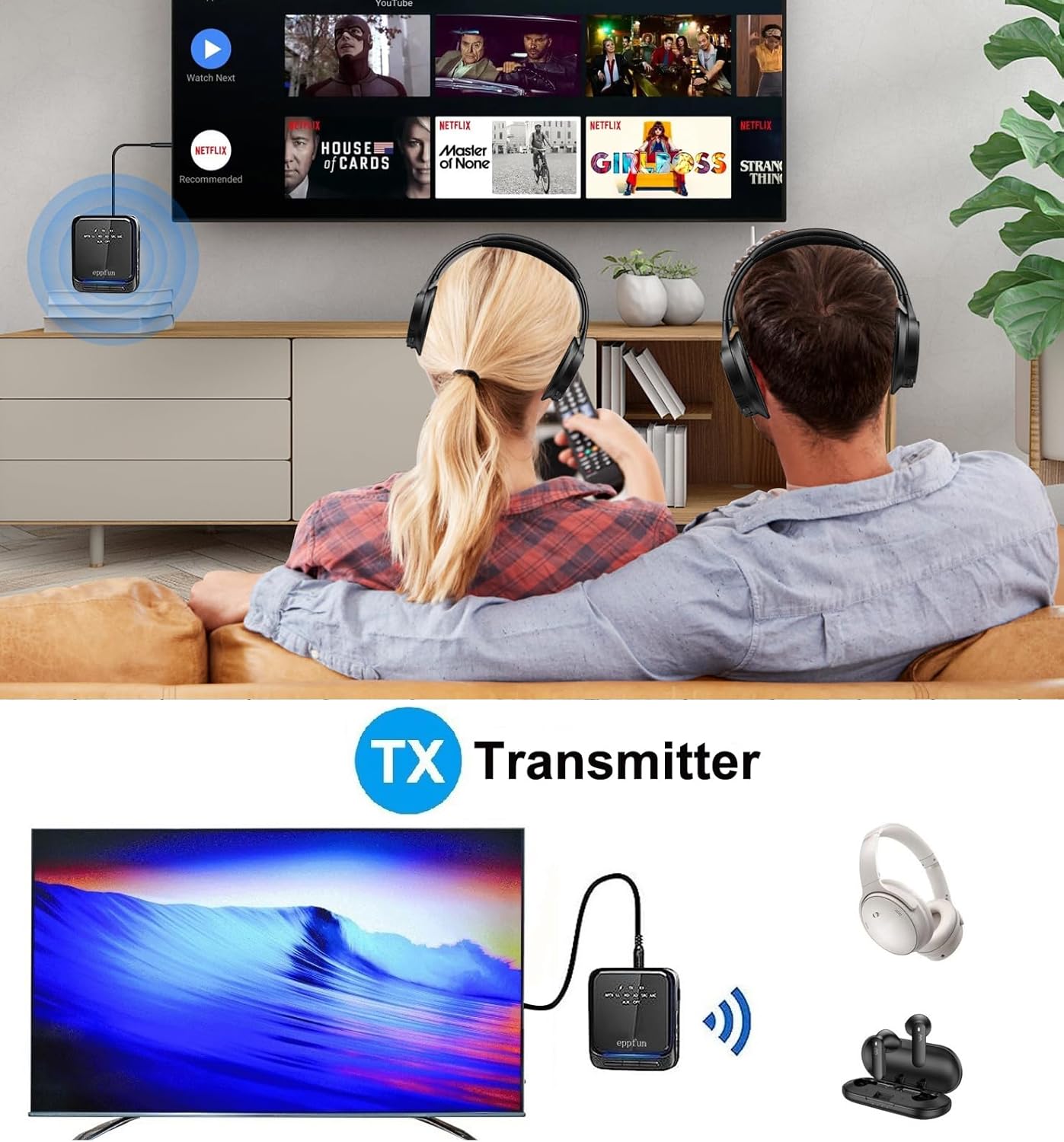
Image: An illustration of the eppfun AK8675B Pro connected to a TV, transmitting audio wirelessly to two pairs of Bluetooth headphones.
- Slide the mode switch (B) to TX.
- Connect the AK8675B Pro to your audio source (e.g., TV, PC) using either the 3.5mm AUX cable (D) or the Optical Fiber cable (H).
- Turn on the AK8675B Pro by pressing and holding the Power Button (A).
- اپنے بلوٹوتھ ہیڈ فون یا اسپیکر کو پیئرنگ موڈ میں رکھیں۔
- Press the Pairing Button (C) on the AK8675B Pro to initiate pairing. The LED indicator will show pairing status.
- Once connected, audio from your source will stream wirelessly to your Bluetooth device(s).
TX Mode Features:
- ہم آہنگ کوڈیکس: aptX, aptX-Adaptive, aptX LL (Low Latency), aptX HD, SBC.
- کام کے اوقات: مکمل چارج پر تقریباً 12 گھنٹے۔
- دوہری کنکشن: Supports connecting two Bluetooth headphones/earbuds simultaneously with aptX LL technology.
4.2. وصول کنندہ موڈ (RX)
In RX mode, the device receives audio wirelessly from a Bluetooth-enabled source (e.g., smartphone, tablet) and outputs it to a wired audio system (e.g., wired headphones, speakers).

Image: An illustration of the eppfun AK8675B Pro connected to wired speakers, receiving audio wirelessly from a smartphone.
- Slide the mode switch (B) to RX.
- Connect the AK8675B Pro to your wired audio output device (e.g., speakers, wired headphones) using the 3.5mm AUX cable (D).
- Turn on the AK8675B Pro by pressing and holding the Power Button (A).
- Enable Bluetooth on your smartphone or other Bluetooth audio source and search for available devices.
- Select "eppfun AK8675B Pro" from the list of available Bluetooth devices to pair. The LED indicator will confirm connection.
- Once connected, audio from your Bluetooth source will play through your wired audio system.
RX Mode Features:
- ہم آہنگ کوڈیکس: aptX, aptX-Adaptive, aptX HD, SBC, AAC.
- کام کے اوقات: مکمل چارج پر تقریباً 20 گھنٹے۔
5. ڈیوائس کو چارج کرنا
To charge the eppfun AK8675B Pro:
- Connect the supplied USB-C cable to the USB Charging port (G) on the device.
- USB-C کیبل کے دوسرے سرے کو معیاری USB پاور اڈاپٹر (شامل نہیں) یا کمپیوٹر کے USB پورٹ سے مربوط کریں۔
- The LED indicator will show the charging status. A full charge typically takes about 2 hours.
Note: The device cannot be used while it is charging.
6 دیکھ بھال
To ensure the longevity and optimal performance of your eppfun AK8675B Pro:
- ڈیوائس کو خشک رکھیں۔ نمی، بارش، یا مائع کی نمائش سے بچیں.
- آلے کو نرم، خشک کپڑے سے صاف کریں۔ سخت کیمیکل یا کھرچنے والے کلینر کا استعمال نہ کریں۔
- استعمال میں نہ ہونے پر آلہ کو ٹھنڈی، خشک جگہ پر اسٹور کریں۔
- انتہائی درجہ حرارت سے پرہیز کریں۔
- ڈیوائس کو الگ کرنے یا اس میں ترمیم کرنے کی کوشش نہ کریں، کیونکہ اس سے وارنٹی ختم ہو جائے گی اور نقصان ہو سکتا ہے۔
7 خرابیوں کا سراغ لگانا
If you encounter issues with your AK8675B Pro, refer to the following common solutions:
- ڈیوائس آن نہیں ہوگی:
- یقینی بنائیں کہ ڈیوائس پوری طرح سے چارج ہے۔ USB-C کیبل کا استعمال کرتے ہوئے اسے پاور سورس سے جوڑیں۔
- Press and hold the Power Button (A) for a few seconds.
- بلوٹوتھ ڈیوائس کے ساتھ جوڑا نہیں بنایا جا سکتا:
- Ensure the AK8675B Pro is in the correct mode (TX for transmitting, RX for receiving).
- Make sure both devices are in pairing mode and within the 10-meter communication range.
- Clear previous pairing records on both the AK8675B Pro and your Bluetooth device, then attempt to pair again.
- Restart both the AK8675B Pro and your Bluetooth device.
- کوئی آڈیو آؤٹ پٹ/ان پٹ نہیں:
- Check all cable connections (3.5mm AUX or Optical Fiber) to ensure they are secure and in the correct ports.
- Verify that the volume on both the AK8675B Pro (E) and the connected audio device is not muted or set too low.
- Ensure the correct audio input/output is selected on your source device (e.g., TV audio settings).
- Confirm that the AK8675B Pro is successfully paired and connected to the desired Bluetooth device.
- Audio delay or poor quality:
- Ensure both the AK8675B Pro and your connected Bluetooth device support aptX Low Latency (aptX LL) for minimal delay, especially in TX mode.
- Reduce the distance between the AK8675B Pro and the connected Bluetooth device, and remove any obstacles.
- دوسرے وائرلیس آلات سے ممکنہ مداخلت کی جانچ کریں۔
8. وضاحتیں
| فیچر | تفصیلات |
|---|---|
| ماڈل کا نام | AK8675B Pro |
| بلوٹوتھ ورژن | 5.2 |
| بلوٹوت چپ سیٹ | کوالکوم کیو سی سی 3040 |
| Supported Codecs (TX) | aptX, aptX-Adaptive, aptX LL, aptX HD, SBC |
| Supported Codecs (RX) | aptX, aptX-Adaptive, aptX HD, SBC, AAC |
| فریکوئنسی بینڈ | 2.402GHz - 2.480GHz |
| مواصلاتی فاصلہ | 10 میٹر (33 فٹ) تک |
| TX موڈ کام کرنے کا وقت | تقریبا 12 گھنٹے |
| RX موڈ کام کرنے کا وقت | تقریبا 20 گھنٹے |
| چارج کرنے کا وقت | تقریبا 2 گھنٹے |
| چارجنگ پورٹ | USB-C |
| آڈیو ان پٹ/آؤٹ پٹ | 3.5mm AUX, Optical TOSLINK |
| بیٹری کی قسم | لتیم آئن (شامل) |
| مصنوعات کے طول و عرض | 75mm x 66mm x 18mm (تقریبا) |
| پروڈکٹ کا وزن | 60.5 جی (تقریبا)) |
9. وارنٹی اور سپورٹ
eppfun products are designed for reliability and performance. For warranty information and technical support, please refer to the official eppfun webسائٹ یا اپنے خوردہ فروش سے رابطہ کریں۔ وارنٹی دعووں کے لیے خریداری کے ثبوت کے طور پر اپنی خریداری کی رسید رکھیں۔