
1. تعارف
خریداری کے لیے آپ کا شکریہasing the radius SOUND BUMP SP-S15BTW Portable Bluetooth Speaker. This manual provides essential information for setting up, operating, and maintaining your speaker. Please read it thoroughly before use to ensure optimal performance and safety.
The SOUND BUMP SP-S15BTW is a compact, versatile portable speaker designed for various audio needs. It features Bluetooth connectivity, microSD card playback, Wide FM radio, and IPX5 water resistance, making it suitable for both indoor and outdoor use.
2. پروڈکٹ ختمview
2.1 پیکیج کے مشمولات
- radius SOUND BUMP SP-S15BTW Speaker
- USB چارجنگ کیبل
- پٹا ۔
- صارف دستی
2.2 اسپیکر کے اجزاء اور کنٹرول
Familiarize yourself with the speaker's layout:

Image: Side panel with ports (microSD, AUX-IN, USB-C)
- پاور بٹن: اسپیکر کو آن یا آف کرنے کے لیے دبائیں اور تھامیں۔
- موڈ بٹن (M): Press to switch between Bluetooth, microSD, FM Radio, and AUX modes.
- پلے/پاز بٹن (►▮▮): Press to play or pause audio. In call mode, press to answer/end a call.
- والیوم اپ / نیکسٹ ٹریک بٹن (+): حجم بڑھانے کے لیے مختصر دبائیں اگلے ٹریک پر جانے کے لیے دیر تک دبائیں۔
- والیوم کم / پچھلا ٹریک بٹن (-): حجم کم کرنے کے لیے مختصر دبائیں پچھلے ٹریک پر جانے کے لیے دیر تک دبائیں۔
- مائیکرو ایسڈی کارڈ سلاٹ: Insert a microSD card for local music playback.
- AUX-IN پورٹ: بیرونی آڈیو ڈیوائسز کو 3.5 ملی میٹر آڈیو کیبل کے ذریعے جوڑیں۔
- USB-C چارجنگ پورٹ: Connect the USB cable for charging.
- ایل ای ڈی اشارے: پاور اسٹیٹس، چارجنگ اسٹیٹس، اور بلوٹوتھ پیئرنگ اسٹیٹس دکھاتا ہے۔
- ایل ای ڈی روشنی: Located on the side, provides visual effects.
3. سیٹ اپ
3.1 ابتدائی چارجنگ
Before first use, fully charge the speaker. Connect the provided USB charging cable to the speaker's USB-C port and the other end to a USB power adapter (not included) or a computer's USB port. The LED indicator will show charging status (e.g., red while charging, off when fully charged).
3.2 پاور آن/آف۔
- پاور آن کرنے کے لیے: Press and hold the Power button for approximately 3 seconds until the LED indicator lights up and you hear a power-on tone.
- پاور آف کرنا: Press and hold the Power button for approximately 3 seconds until the LED indicator turns off and you hear a power-off tone.
4. آپریٹنگ ہدایات
4.1 بلوٹوتھ جوڑی
- اسپیکر کو آن کریں۔ یہ خود بخود بلوٹوتھ پیئرنگ موڈ میں داخل ہو جائے گا، جس کی نشاندہی ایک چمکتی ہوئی نیلی LED سے ہوتی ہے۔
- اپنے آلے پر (اسمارٹ فون، ٹیبلیٹ وغیرہ)، بلوٹوتھ کو فعال کریں اور دستیاب آلات تلاش کریں۔
- Select "SOUND BUMP SP-S15BTW" from the list.
- جوڑا بننے کے بعد، LED اشارے ٹھوس نیلے رنگ کا ہو جائے گا، اور آپ کو ایک تصدیقی لہجہ سنائی دے گا۔
- اگر جوڑا بنانا ناکام ہوجاتا ہے، تو اسپیکر اور اپنے آلے کا بلوٹوتھ بند کردیں، پھر اقدامات کو دہرائیں۔
4.2 microSD Card Playback
- Insert a microSD card (up to 128GB, formatted with MP3/WAV files) into the microSD card slot.
- Press the Mode (M) button until the speaker enters microSD mode.
- Music playback will start automatically. Use the Play/Pause, Volume Up/Next Track, and Volume Down/Previous Track buttons to control playback.
4.3 Wide FM Radio

Image: Speaker in an indoor setting, suitable for FM radio
- Press the Mode (M) button until the speaker enters FM Radio mode.
- خودکار اسٹیشن اسکین: Long press the Play/Pause button to automatically scan and save available FM stations. The speaker will then play the first saved station.
- دستی ٹیوننگ: محفوظ کردہ اسٹیشنوں کے درمیان سوئچ کرنے کے لیے والیوم اپ (+) یا والیوم ڈاؤن (-) بٹن کو مختصر دبائیں۔
Note: As the speaker does not have an external antenna, FM reception may vary depending on location and environment.
4.4 AUX-IN موڈ
- Connect one end of a 3.5mm audio cable (not included) to the speaker's AUX-IN port and the other end to the audio output of your external device.
- Press the Mode (M) button until the speaker enters AUX mode.
- Control playback and volume directly from your connected external device.
4.5 ایل ای ڈی الیومینیشن
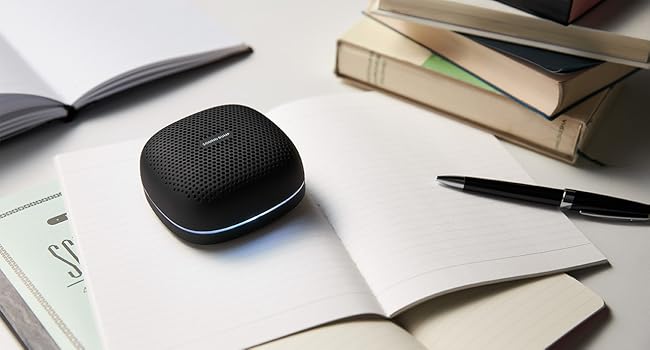
Image: Speakers displaying LED illumination
The speaker features LED illumination with 7 colors and various modes. To change the illumination mode or color, refer to the specific instructions in the full product manual (if available). Typically, a dedicated button or a combination of existing buttons controls this feature.
5. چارج کرنا
When the battery is low, the speaker will indicate this (e.g., flashing red LED, audible prompt). Connect the USB charging cable to the speaker's USB-C port and a power source. The LED indicator will show red during charging and turn off when fully charged. A full charge provides up to 20 hours of continuous playback.

Image: Speaker used outdoors, highlighting long battery life
6 دیکھ بھال
- صفائی: اسپیکر کو نرم، خشک کپڑے سے صاف کریں۔ کھرچنے والے کلینر یا سالوینٹس کا استعمال نہ کریں۔
- پانی کی مزاحمت (IPX5): The speaker is IPX5 splash-proof, meaning it can withstand water splashes from any direction. However, it is not designed for submersion. Do not use it in the bath or submerge it in water. Ensure the port cover is securely closed to maintain water resistance.
- ذخیرہ: اسپیکر کو ٹھنڈی، خشک جگہ پر براہ راست سورج کی روشنی اور انتہائی درجہ حرارت سے دور رکھیں۔
- بیٹری کی دیکھ بھال: To prolong battery life, charge the speaker periodically even if not in use for extended periods.

Image: Speaker with water droplets, illustrating IPX5 water resistance
7 خرابیوں کا سراغ لگانا
| مسئلہ | ممکنہ وجہ | حل |
|---|---|---|
| سپیکر آن نہیں ہوتا۔ | بیٹری ختم ہو گئی ہے۔ | اسپیکر کو پوری طرح سے چارج کریں۔ |
| کوئی آواز نہیں۔ | Volume is too low; device not connected; incorrect mode. | Increase volume on speaker and connected device. Ensure proper Bluetooth pairing or AUX cable connection. Switch to correct mode (Bluetooth, microSD, AUX, FM). |
| بلوٹوتھ جوڑی ناکام ہوجاتی ہے۔ | Speaker is not in pairing mode; device Bluetooth is off; too far from device. | Ensure speaker is in pairing mode (flashing blue LED). Turn on Bluetooth on your device. Move speaker closer to your device (within 10 meters). |
| ناقص ایف ایم ریڈیو کا استقبال۔ | Environmental interference; weak signal. | Move the speaker to a different location. Perform an automatic station scan again. |
| Audio/video synchronization issues (Bluetooth). | Bluetooth latency. | Bluetooth audio can have latency. For critical synchronization, use the AUX-IN connection if your device supports it. Some apps may offer audio delay compensation. |
8. وضاحتیں
- ماڈل: SP-S15BTW
- برانڈ: رداس
- کنیکٹوٹی: Bluetooth, USB (for charging), AUX-IN (3.5mm), microSD
- وائرلیس ٹیکنالوجی: بلوٹوتھ
- اسپیکر کی قسم: آؤٹ ڈور/پورٹ ایبل
- ووفر قطر: 66 ملی میٹر
- پانی کی مزاحمت: IPX5 (سپلیش پروف)
- مسلسل پلے بیک وقت: 20 گھنٹے تک
- microSD Card Support: Up to 128GB (MP3/WAV files)
- طول و عرض (L x W x H): تقریباً 9 x 9 x 4 سینٹی میٹر
- طاقت کا منبع: بیٹری (ریچارج قابل)
- تجویز کردہ استعمال: میوزک پلیئر
9. حفاظتی معلومات
- اسپیکر کو انتہائی درجہ حرارت، براہ راست سورج کی روشنی، یا زیادہ نمی کے سامنے نہ رکھیں۔
- سپیکر کو شدید اثرات سے گریز کرنے یا اس کے تابع کرنے سے گریز کریں۔
- Do not attempt to disassemble, repair, or modify the speaker yourself. Contact qualified service personnel for assistance.
- Keep the speaker away from medical devices, as it contains magnets.
- Dispose of the battery according to local regulations. Do not dispose of it in fire.
- انتباہ: Despite IPX5 rating, this product is not designed for use while submerged or in environments like a bath where it could be fully immersed.
10. وارنٹی اور سپورٹ
This radius product is covered by a warranty. For warranty service, please ensure your purchase was made from an authorized radius retailer. Products purchased from unauthorized sellers may not be eligible for warranty support.
For detailed warranty terms, product registration, and technical support, please visit the official radius webسائٹ یا ان کے کسٹمر سروس ڈیپارٹمنٹ سے رابطہ کریں۔ وارنٹی کے دعووں کے لیے اپنی خریداری کا ثبوت رکھیں۔