
1. پروڈکٹ ختمview
The AUVON TENS Electrostimulation Device is a professional, rechargeable unit designed to stimulate sensory nerves and muscles. It utilizes a special pain gate mechanism to help relax your body and provide pain relief. Featuring 24 easy-to-use pre-programmed massage modes and an adjustable timer, this multi-mode electrotherapy device offers a convenient solution for pain management.

تصویر 1: The AUVON TENS device provides targeted pain relief for various body areas.
2. اہم حفاظتی انتباہات
Read all warnings and instructions before use. Failure to do so may result in serious injury.
- استعمال مت کرو this product if you have an implanted defibrillator, pacemaker, or any other implanted metallic or electronic device.
- استعمال مت کرو this product if you have heart rhythm problems, seizures, cerebral diseases, or neurological disorders.
- استعمال مت کرو this product if you have undiagnosed chronic pain.
- استعمال مت کرو this product if you are pregnant or in labor.
- استعمال مت کرو this product if you have cancer.
- استعمال مت کرو this product if you are sensitive to electrotherapy.
- استعمال مت کرو this product excessively.
- استعمال مت کرو this product above the neck, especially on the head or throat.
- استعمال مت کرو this product if you are under 22 years old.
- Consult your doctor before use if you have any medical condition.
- Individual symptoms, situations, circumstances, and results may vary. The information provided is not intended for medical diagnosis or treatment, nor is it a substitute for professional medical advice.
3. پیکیج کے مشمولات
تمام اشیاء کی موجودگی کو یقینی بنانے کے لیے براہ کرم رسید کے بعد پیکیج کے مواد کو چیک کریں:
- 1 x AUVON TENS Electrostimulator Device
- 10 x 5 cm x 5 cm Electrode Pads
- 2 x Connection Wires (1/2 wire)
- 1 x Pad Holder
- 1 ایکس USB چارجنگ کیبل
- 1 ایکس اسٹوریج بیگ
- 1 x کثیر زبان کا صارف دستی

تصویر 2: All items included in your AUVON TENS device package.
4. سیٹ اپ گائیڈ
- ڈیوائس کو چارج کریں: Before first use, ensure the device is fully charged. Connect the provided USB cable to the device and a suitable USB power source. The power indicator will show the charging status. A full charge provides up to 10 hours of continuous use.
- لیڈ تاروں کو جوڑیں: Insert the 2mm pin connectors of the lead wires into the electrode pads. Ensure a secure connection.
- جلد کی تیاری: Clean and dry the skin area where you intend to place the electrodes. Avoid applying on broken or irritated skin.
- الیکٹروڈ کا اطلاق کریں: Remove the transparent film from the electrode pads and firmly press them onto your skin. Ensure the entire surface of the pad is in contact with the skin for optimal conductivity.
- ڈیوائس سے جڑیں: Plug the other end of the lead wires into the output ports on the AUVON TENS device.

تصویر 3: Visual guide for connecting electrodes and operating the device.
5. آپریٹنگ ہدایات
- پاور آن: Press and hold the Power button (usually the 'M' button) to turn on the device.
- موڈ منتخب کریں: Press the 'M' button to cycle through the 6 main massage modes. The device offers 24 pre-programmed sub-modes, which are accessible within these 6 main modes.
- Select Sub-Mode: Once a main mode is selected, use the '+' or '-' buttons to navigate through the available sub-modes if applicable.
- شدت کو ایڈجسٹ کریں: Use the '+' button to increase the intensity and the '-' button to decrease it. Start with a low intensity and gradually increase until you feel a comfortable, yet effective, sensation.
- ٹائمر مرتب کریں: Press the 'T' button to select your preferred massage duration. The timer is adjustable.
- علاج شروع کریں: The device will start the treatment according to your selected settings.
- بجلی بند: After your session, press and hold the Power button to turn off the device. Remove the electrodes from your skin.

تصویر 4: The device offers 24 mode choices and adjustable intensity for personalized treatment.
6 دیکھ بھال
6.1 Electrode Pad Care
The electrode pads feature an advanced American adhesive gel designed for durability and reusability. To maximize their lifespan:
- صفائی: After each use, gently clean the adhesive side of the pads with a small amount of water. Do not use soap or harsh chemicals. Allow them to air dry completely before storing.
- ذخیرہ: Always place the pads back onto the provided pad holder or their original protective film after use. This prevents them from drying out and losing their adhesive quality. Store them in a cool, dry place.
- متبادل: Replace electrode pads when they lose their stickiness or if you notice reduced conductivity. The pads are designed for approximately 45 uses with proper care.
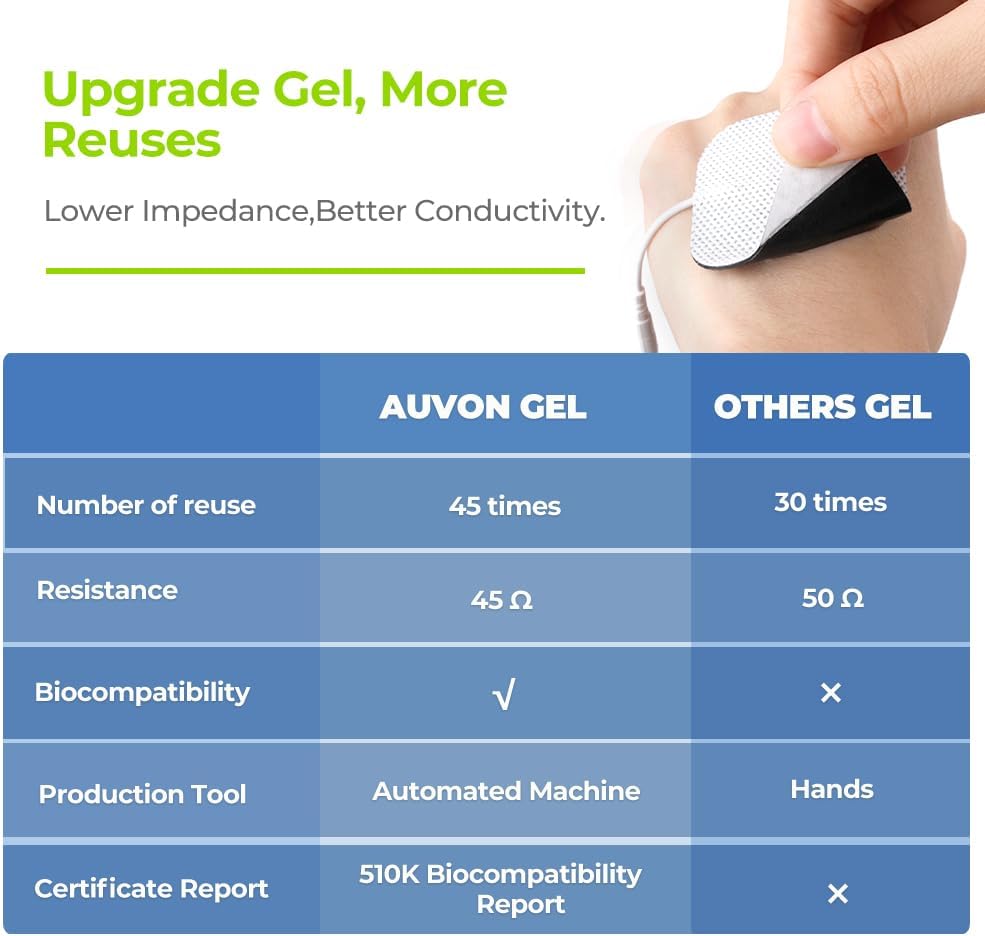
تصویر 5: AUVON electrode pads offer enhanced reusability and conductivity.
6.2 ڈیوائس کیئر
- صفائی: آلے کو نرم، خشک کپڑے سے صاف کریں۔ کھرچنے والے کلینر کا استعمال نہ کریں یا آلے کو پانی میں نہ ڈوبیں۔
- ذخیرہ: ڈیوائس کو فراہم کردہ اسٹوریج بیگ میں ٹھنڈی، خشک جگہ پر، براہ راست سورج کی روشنی اور انتہائی درجہ حرارت سے دور رکھیں۔
- بیٹری: The device contains a rechargeable Lithium-ion battery. Charge it regularly to maintain battery health, even if not used frequently.
7 خرابیوں کا سراغ لگانا
| مسئلہ | ممکنہ وجہ | حل |
|---|---|---|
| ڈیوائس آن نہیں ہوتی۔ | کم یا ختم ہونے والی بیٹری۔ | فراہم کردہ USB کیبل کا استعمال کرتے ہوئے ڈیوائس کو چارج کریں۔ |
| کوئی احساس یا کمزور احساس نہیں۔ |
|
|
| پیڈ چپک نہیں رہے ہیں۔ |
|
|
8. مصنوعات کی تفصیلات
| برانڈ | AUVON |
| ماڈل نمبر | AS1080 |
| ڈیوائس کی قسم | TENS Electrostimulation Device |
| چینلز | 2 آزاد چینلز |
| پروگرامز | 24 Pre-programmed Modes |
| الیکٹروڈس | 10 x 5cm x 5cm Electrode Pads (pin-style) |
| بیٹری کی قسم | Rechargeable Lithium-ion (included) |
| استعمال کا دورانیہ | 10 گھنٹے تک (مکمل چارج پر) |
| پیکیج کے طول و عرض | 14.6 x 9.2 x 7.7 سینٹی میٹر |
| وزن | 320 گرام |
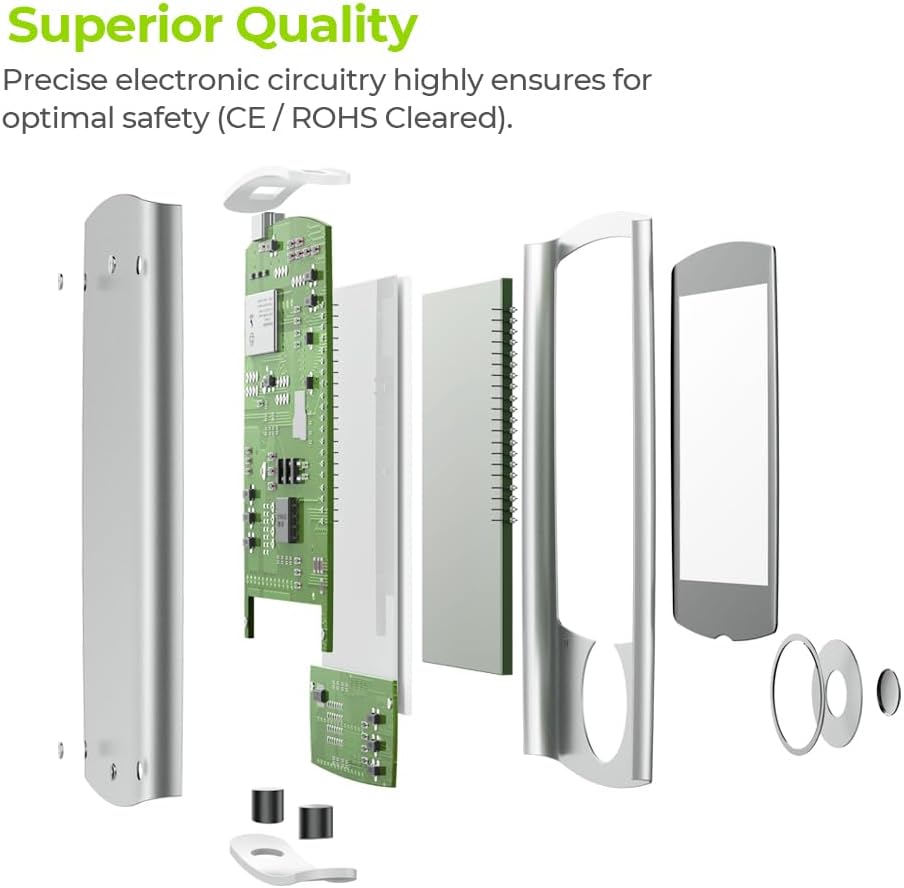
تصویر 6: Internal components demonstrating the superior quality and precise electronic circuitry.
9. وارنٹی اور کسٹمر سپورٹ
The AUVON TENS Electrostimulation Device AS1080 comes with a 24 ماہ کی وارنٹی خریداری کی تاریخ سے.
For any questions, concerns, or technical support, please contact AUVON customer service. You can also find additional resources, including a downloadable version of this manual, on the product details page where you purchased the device.
We are committed to providing friendly and helpful customer support.