
1. تعارف
This manual provides detailed instructions for the installation, operation, and maintenance of the CYSSJF Bathroom Pull Cord Alarm Kit, Model SJ-4L-W1P 1+1. This system is designed to provide a reliable emergency call solution for individuals requiring assistance in bathrooms or other critical areas, particularly for the elderly, disabled, and handicapped in various settings such as homes, hospitals, and nursing facilities.
2. پروڈکٹ ختمview اور اجزاء
The CYSSJF Bathroom Pull Cord Alarm Kit consists of an alarm receiver and an alarm transmitter with a pull cord. It also includes additional call buttons for versatile use.
2.1 اہم خصوصیات:
- Emergency Assistance Alarm: Designed for disabled individuals in public and residential toilets.
- قابل رسائی ڈیزائن: Features a red pull cord for easy activation.
- LED Emergency Siren: Built-in rechargeable backup battery for power outages (30-40 minutes continuous power).
- حسب ضرورت انتباہات: Five call tones, four mutable volume levels, and three light colors (red, blue, green) for visual alerts.
- Adjustable Siren Duration: 30 seconds, 300 seconds, or continuous until manually canceled.
- فنکشن منسوخ کریں: A dedicated "Cancel" key to stop the alarm after assistance is provided.
- آسان تنصیب: Suitable for disabled toilets, changing rooms, solariums, interview rooms, reception areas, homes, hotels, shopping malls, schools, hospitals, and nursing homes.
2.2 پیکیج کے مشمولات:
- 1 x Alarm Receiver (plug-in power required, built-in emergency backup battery)
- 1 x Assistance Call Button (with 1.5m pull cord, built-in battery)
- 1 ایکس دو طرفہ ٹیپس
- 1 ایکس انگریزی دستی

تصویر: ختمview of the CYSSJF Bathroom Pull Cord Alarm Kit components, including the receiver, call button with pull cord, and other accessories.

Image: Close-up of the call button, showing the "Cancel" button, the "Pull cord to call" instruction, and the flashing lantern indicator.
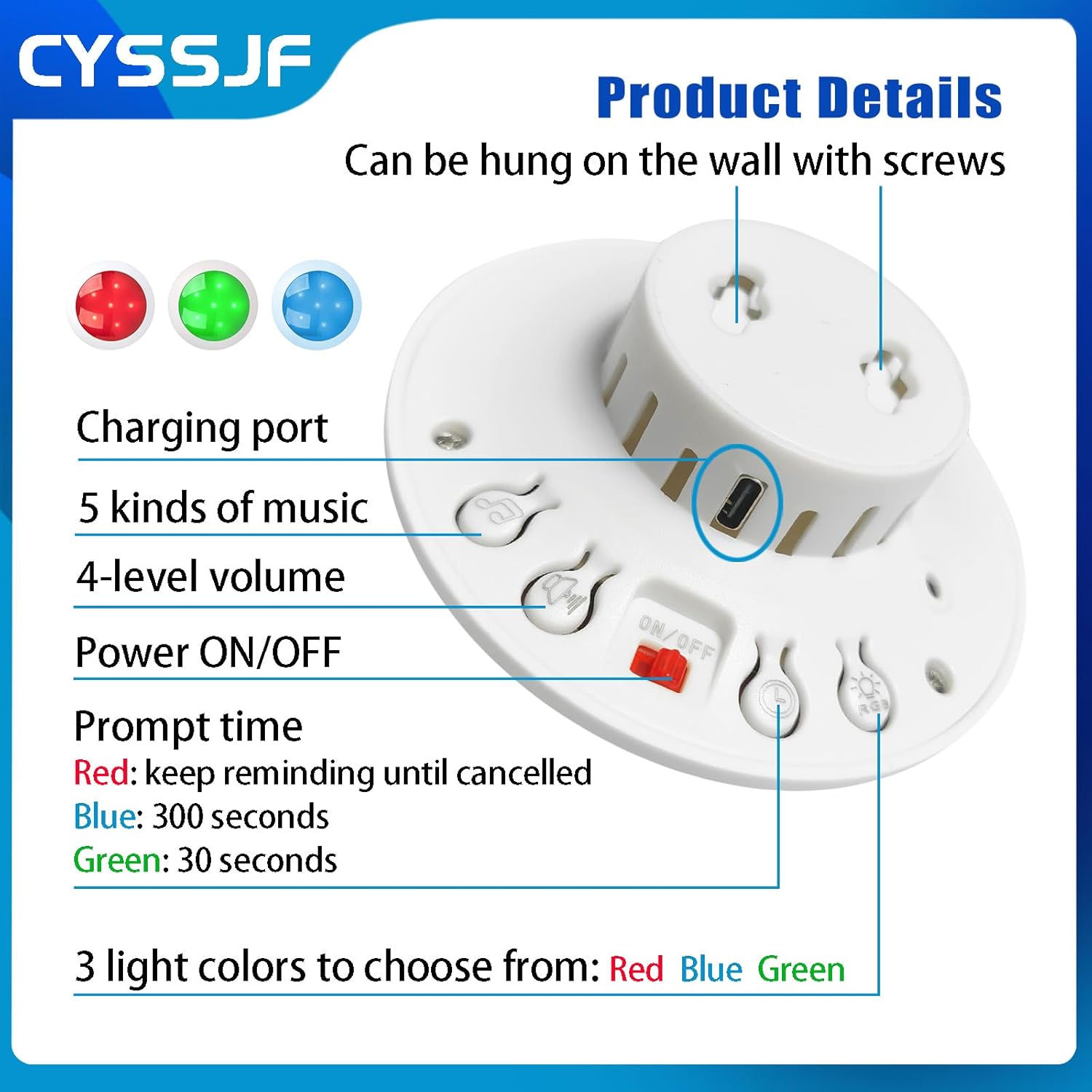
تصویر: تفصیلی view of the alarm receiver's underside, highlighting the charging port, music selection, volume control, power switch, prompt time settings, and light color options.
3. سیٹ اپ اور انسٹالیشن
Follow these steps to set up your CYSSJF Bathroom Pull Cord Alarm Kit:
- ان پیک اجزاء: Carefully remove all items from the packaging. Ensure all listed components in Section 2.2 are present.
- وصول کنندہ پر پاور: Locate the ON/OFF switch on the back of the alarm receiver and slide it to the "ON" position. The receiver will emit a sound and cycle through red, green, and blue lights.
- Mount the Call Button: The assistance call button can be mounted on a wall using the provided double-sided tapes or screws. Choose a location easily accessible to the user, such as near a toilet or bed. Ensure the pull cord hangs freely.
- وصول کنندہ پلگ ان کریں: Connect the alarm receiver to a standard power outlet. The built-in backup battery will activate automatically during power outages
Video: Demonstrates the unboxing and initial setup of the Bathroom Wireless SOS Bell for Elderly, showing how to locate the switch and place the button.
Video: Instructions on how to register the call button with the receiver, ensuring proper communication between devices.
4. آپریٹنگ ہدایات
4.1 Activating the Alarm:
- To activate the alarm, pull the red cord on the assistance call button.
- Alternatively, press the red button on the call transmitter (if included in your kit).
- The receiver will emit an audible alert and flash its lights to indicate an emergency.
4.2 Canceling the Alarm:
- After assistance has been provided, press the "Cancel" button on the call button unit to stop the alarm.
4.3 Customizing Settings:
- Changing Ringtone: On the receiver, press and hold the music note button until you hear a "Di~" sound. Continue pressing the music note button to cycle through the 5 available ringtones.
- حجم کو ایڈجسٹ کرنا: Use the volume control buttons on the receiver to select one of the four mutable volume levels.
- Selecting Light Color: Use the light control buttons on the receiver to choose between red, blue, or green light alerts.
- Setting Siren Duration: Adjust the siren duration to 30 seconds, 300 seconds, or continuous sounding until manually canceled using the dedicated button on the receiver.
Video: Demonstrates how to change the ringtone on the alarm receiver.
Video: Shows the ease of use of the alarm system, including activating and canceling calls.
5 دیکھ بھال
- صفائی: Wipe the surfaces of the receiver and call button with a soft, damp کپڑا کھرچنے والے کلینر کا استعمال نہ کریں یا آلات کو پانی میں ڈبو دیں۔
- بیٹری چیک: The call button has a built-in battery. The receiver has a built-in emergency backup battery that provides 30-40 minutes of continuous power during outages. Ensure the receiver is regularly plugged in to keep its backup battery charged.
- فنکشنلٹی ٹیسٹ: Periodically test the alarm system by activating the call button and ensuring the receiver responds with sound and light.
6 خرابیوں کا سراغ لگانا
If you encounter issues with your alarm system, refer to the following common problems and solutions:
| مسئلہ | ممکنہ وجہ | حل |
|---|---|---|
| Receiver does not sound/light up when button is pressed. |
|
|
| Alarm sounds randomly. |
|
|
| Cannot change ringtone/volume. |
|
|
Video: Guide on how to restore the alarm system to factory settings, which can resolve various operational issues.
7. وضاحتیں
| فیچر | تفصیل |
|---|---|
| برانڈ | سی وائی ایس ایس جے ایف |
| ماڈل | SJ-4L-W1P 1+1 |
| طاقت کا منبع | Battery Powered (Receiver requires plug-in power with backup battery) |
| بیٹری کی قسم | Alkaline (for call button), Built-in rechargeable (for receiver backup) |
| بیٹریوں کی تعداد | 1 غیر معیاری بیٹری (شامل) |
| والیومtage | 12 وولٹ |
| کنٹرول کا طریقہ | چھوئے۔ |
| قابل سماعت شور | 60 ڈیسیبل |
| چڑھنے کی قسم | وال ماؤنٹ |
| زیادہ سے زیادہ رینج | 150 میٹر |
| سینسر ٹیکنالوجی | رابطہ سینسر |
8. وارنٹی اور سپورٹ
For warranty information and technical support, please refer to the contact details provided with your product packaging or visit the official CYSSJF webسائٹ وارنٹی کے دعووں کے لیے اپنی خریداری کی رسید اپنے پاس رکھیں۔