
1. تعارف
This manual provides detailed instructions for the installation, operation, and maintenance of your EVGATSAUTO K2MRH3A Digital Programmable Thermostat. This device is designed for water heating systems, offering intelligent temperature control and energy-saving features. Please read this manual thoroughly before installation and use to ensure proper function and safety.
2. پیکیج کے مشمولات
پیک کھولنے پر، براہ کرم تصدیق کریں کہ نیچے دی گئی تمام اشیاء موجود ہیں اور اچھی حالت میں ہیں:
- 1 x Temperature Controller (Digital Thermostat)
- 1 ایکس یوزر مینوئل (یہ دستاویز)
- 2 ایکس بڑھتے ہوئے پیچ

Figure 1: EVGATSAUTO K2MRH3A Digital Thermostat and included mounting screws.
3. مصنوعات کی خصوصیات
- ذہین درجہ حرارت کنٹرول: Allows precise temperature management for water heating systems.
- توانائی کی بچت: Features low consumption touch buttons and intelligent programming to optimize energy use.
- متعدد کنٹرول موڈز: Supports intelligent timing, direct touch control, and programmable time control.
- پائیدار تعمیر: Made from flame-retardant PC material with an IP20 rating for safety and longevity.
- LCD ڈسپلے صاف کریں: Features a dark black LCD screen for easy readability of current and set temperatures, time, and operating modes.
- وسیع درخواست: Suitable for various environments including homes, offices, hospitals, and commercial spaces.
4. تکنیکی تفصیلات
| پیرامیٹر | قدر |
|---|---|
| آئٹم کی قسم | ڈیجیٹل ترموسٹیٹ |
| آئی پی کی درجہ بندی | آئی پی 20 |
| شیل مواد | شعلہ ریٹارڈنٹ پی سی |
| درجہ حرارت سینسر | این ٹی سی |
| درجہ حرارت کی درستگی | ±1℃ |
| ڈسپلے کی قسم | LCD |
| کام کرنے کا ماحول | -5 ~ 50℃ ۔ |
| بجلی کی کھپت | <1W |
| درجہ حرارت کی ترتیب کی حد | 5 ~ 60℃ |
| ڈسپلے کی حد | 0 سے 50℃ |
| ان پٹ جلدtage | AC 90-240V |
| زیادہ سے زیادہ لوڈ | 3A |
| زیادہ سے زیادہ طاقت | 3500W |
| کنٹرول موڈ | Intelligent timing; Touch control; Programming time control |
| رنگ | سیاہ |
5. حفاظتی معلومات
آلے کو پہنچنے والے نقصان یا ذاتی چوٹ کو روکنے کے لیے براہ کرم درج ذیل حفاظتی تدابیر پر عمل کریں:
- Installation should only be performed by a qualified electrician in accordance with local electrical codes.
- Ensure the power supply is disconnected before installation, maintenance, or removal of the thermostat.
- آلے کو پانی یا ضرورت سے زیادہ نمی کے سامنے نہ رکھیں۔
- Do not attempt to disassemble or repair the thermostat yourself. Contact qualified service personnel.
- Keep the device away from flammable materials and direct heat sources.
6. سیٹ اپ اور انسٹالیشن
This section outlines the general steps for installing your digital thermostat. For detailed wiring diagrams and specific installation requirements, consult a professional electrician.
6.1 تھرموسٹیٹ لگانا
- مقام کا انتخاب کریں: Select an indoor wall location, away from direct sunlight, drafts, or heat sources that could affect temperature readings.
- پاور منقطع کریں: سرکٹ بریکر پر اپنے ہیٹنگ سسٹم کو مین پاور سپلائی بند کر دیں۔
- وائرنگ تیار کریں: Follow the wiring diagram provided by your electrician or heating system manufacturer. Connect the AC 90-240V input and heating load wires to the appropriate terminals on the thermostat.
- دیوار سے محفوظ: Mount the thermostat base to the wall using the provided screws. Ensure it is level and securely fastened.
- Attach Display Unit: Carefully attach the display unit to the mounted base, ensuring all connections are secure.
- بجلی کی بحالی: Once installation is complete and verified, restore power to the heating system.

شکل 2: طرف view of the thermostat, illustrating its compact design for wall mounting.

شکل 3: سامنے view of the thermostat, showing the LCD display with current time and temperature settings.
7. آپریٹنگ ہدایات
The EVGATSAUTO K2MRH3A thermostat offers intuitive touch controls and programmable settings.
7.1 ڈسپلے ختمview
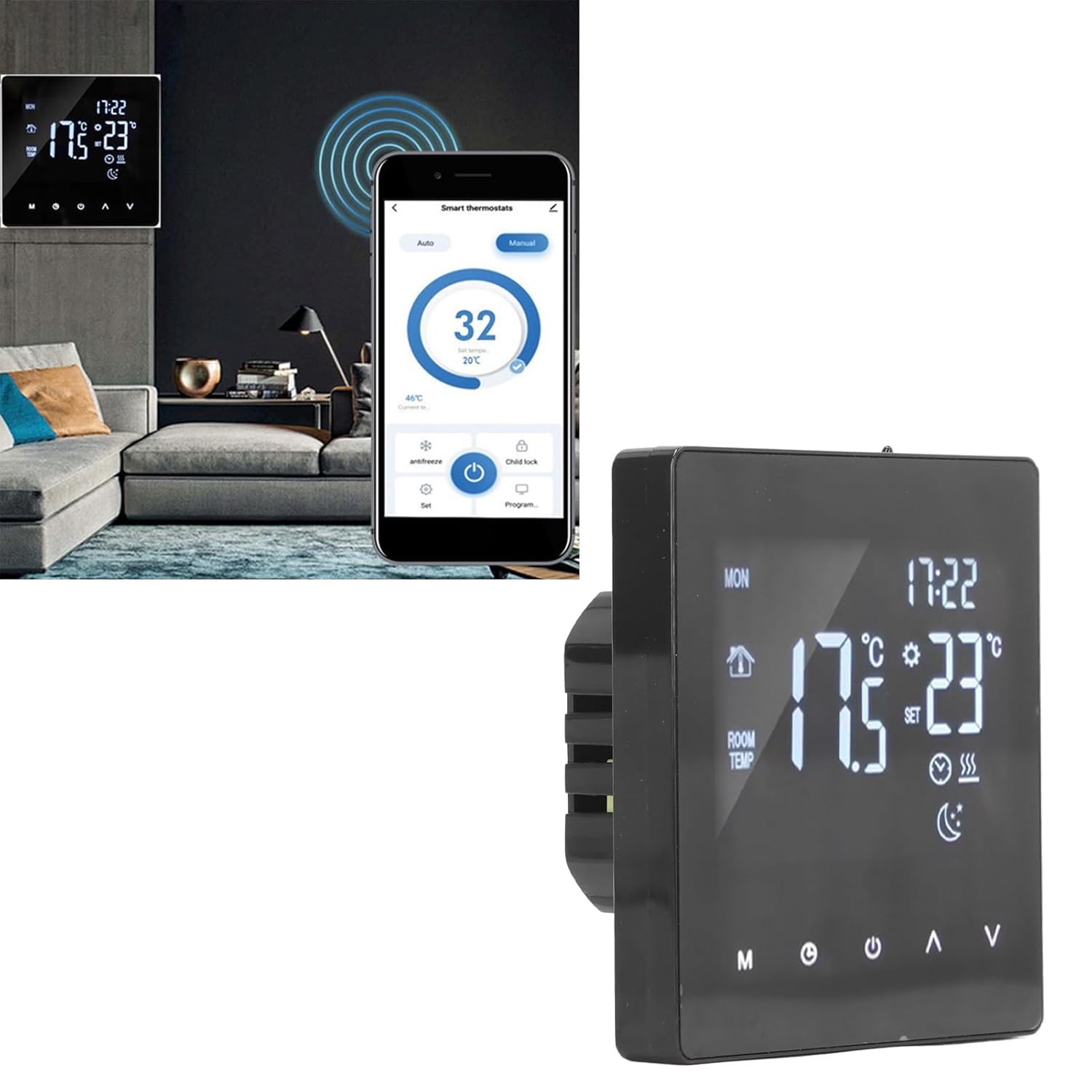
Figure 4: Close-up of the thermostat display, highlighting icons for mode, time, room temperature, set temperature, and heating status.
7.2 بنیادی آپریشن
- پاور آن/آف: دبائیں طاقت button (usually represented by a circle with a vertical line) to turn the thermostat on or off.
- درجہ حرارت کو ایڈجسٹ کریں: استعمال کریں۔ اوپر (▲) اور نیچے (▼) arrows to increase or decrease the desired set temperature.
- موڈ کا انتخاب: دبائیں موڈ (M) button to cycle through available operating modes (e.g., Manual, Auto, Program).
- Clock/Time Setting: دبائیں گھڑی button (often represented by a clock icon) to access time settings. Use the Up/Down arrows to adjust hours and minutes.
7.3 پروگرامنگ شیڈول
The thermostat allows you to set a weekly heating schedule to optimize comfort and energy efficiency. Refer to the specific programming instructions in the full user manual for detailed steps on setting daily schedules, temperature points, and periods.

شکل 5: سائیڈ پروfile of the thermostat, highlighting its slim design when mounted.
7.4 Advanced Features (If Applicable)
- چائلڈ لاک: Some models may feature a child lock function to prevent unauthorized changes to settings. Consult the full manual for activation.
- اینٹی فریز موڈ: This mode maintains a minimum temperature to prevent pipes from freezing.
- اسمارٹ ہوم انٹیگریشن: While this specific model is a standalone unit, some EVGATSAUTO thermostats may offer compatibility with smart home systems for remote control via an app.

Figure 6: The thermostat displayed alongside a smartphone showing a potential smart control application interface. Note: App control functionality may vary by model and region. Please refer to product specifications for confirmation.
8 دیکھ بھال
The EVGATSAUTO K2MRH3A thermostat requires minimal maintenance to ensure optimal performance.
- صفائی: آہستہ سے ڈسپلے کو صاف کریں اور casing ایک نرم، خشک کپڑے کے ساتھ. کھرچنے والے کلینر، سالوینٹس، یا براہ راست آلہ پر سپرے نہ کریں۔
- رکاوٹوں سے بچیں: Ensure that the thermostat's vents (if any) are not blocked by furniture or curtains, as this can affect temperature readings.
- باقاعدہ چیکس: پہننے یا ڈھیلے پن کی کسی بھی علامت کے لیے وقتاً فوقتاً وائرنگ کنکشن چیک کریں۔ (صرف اس صورت میں کارکردگی کا مظاہرہ کریں جب اہل ہو اور بجلی بند ہو)۔
9 خرابیوں کا سراغ لگانا
اگر آپ کو اپنے تھرموسٹیٹ کے ساتھ مسائل کا سامنا ہے، تو درج ذیل عام مسائل اور حل دیکھیں:
| مسئلہ | ممکنہ وجہ | حل |
|---|---|---|
| تھرموسٹیٹ ڈسپلے خالی ہے۔ | بجلی کی فراہمی نہیں ہے۔ | Check circuit breaker and wiring connections. Ensure power is restored. |
| حرارتی نظام جواب نہیں دے رہا ہے۔ | Incorrect settings; Wiring issue; System fault. | Verify thermostat mode (e.g., not in 'Off' mode). Check set temperature. Inspect wiring (if qualified). Consult heating system manual. |
| غلط درجہ حرارت پڑھنا۔ | تھرموسٹیٹ کا مقام ڈرافٹس/گرمی کے ذرائع سے متاثر ہوا۔ | Ensure thermostat is not exposed to direct sunlight, drafts, or heat-emitting appliances. |
| ترتیبات کو تبدیل نہیں کیا جا سکتا۔ | چائلڈ لاک چالو ہو گیا۔ | Refer to the full manual for instructions on deactivating the child lock feature. |
اگر ان حلوں کو آزمانے کے بعد بھی مسئلہ برقرار رہتا ہے، تو براہ کرم کسٹمر سپورٹ یا کسی مستند ٹیکنیشن سے رابطہ کریں۔
10. وارنٹی اور کسٹمر سپورٹ
EVGATSAUTO products are manufactured to high-quality standards. For specific warranty details, please refer to the warranty card included with your purchase or visit the official EVGATSAUTO website. For technical assistance, troubleshooting, or service inquiries, please contact EVGATSAUTO customer support through the contact information provided on our webسائٹ یا آپ کی خریداری کی دستاویزات۔
مینوفیکچرر: EVGATSAUTO
تاریخ پہلی دستیابی: 10 اگست 2023