
1. تعارف
This manual provides detailed instructions for the installation, operation, and maintenance of your KEMIMOTO UTV Overhead Sound System. Please read this manual thoroughly before installation and use to ensure proper function and safety. This system is designed to provide high-quality audio in UTV environments, featuring 6.5-inch speakers, Bluetooth connectivity, and a rugged, weatherproof enclosure.
2. حفاظتی معلومات
ہمیشہ درج ذیل حفاظتی تدابیر پر عمل کریں:
- Ensure the vehicle's power is off before beginning installation to prevent electrical shock or damage.
- Verify all connections are secure and properly insulated to avoid short circuits.
- Do not operate the sound system at excessively high volumes for prolonged periods, as this may cause hearing damage.
- Regularly inspect mounting hardware for tightness, especially after off-road use.
- This product is designed for UTVs. Ensure compatibility with your vehicle's roll cage dimensions (1.625''-1.9'' diameter, 450-720mm / 17.7-28.5in distance between parallel roll cages).
3. پیکیج کے مشمولات
تنصیب سے پہلے، براہ کرم چیک کریں کہ تمام اشیاء موجود ہیں:
- KEMIMOTO UTV Overhead Sound System (Main Unit with 6.5" Speakers)
- کنٹرول پینل
- USB/AUX Extender with Weatherproof Cover
- بڑھتے ہوئے ہارڈ ویئر (Clamps, Bolts, Nuts)
- وائرنگ کنٹرول
- ہدایت نامہ
Video: Unboxing the KEMIMOTO UTV Sound System components, including the amplifier, roll cage clamps, USB/AUX extender, and control panel.
4. سیٹ اپ اور انسٹالیشن
Follow these steps for proper installation of your UTV Overhead Sound System:
4.1. Mounting the Speaker Unit
- جگہ کا تعین کریں: Position the sound system on your UTV's roll cage to ensure it does not obstruct your rear view or interfere with head clearance. The system is designed to fit 1.625''-1.9'' roll cages, with a required distance of 450-720mm (17.7-28.5in) between parallel roll cages.
- Adjust Brackets: The mounting brackets on the speaker unit are adjustable. Slide them to match the width of your UTV's roll cage.
- Secure to Roll Cage: فراہم کردہ cl استعمال کریں۔amps to secure the speaker unit to the roll cage. Ensure all bolts are tightened securely to prevent movement during operation.
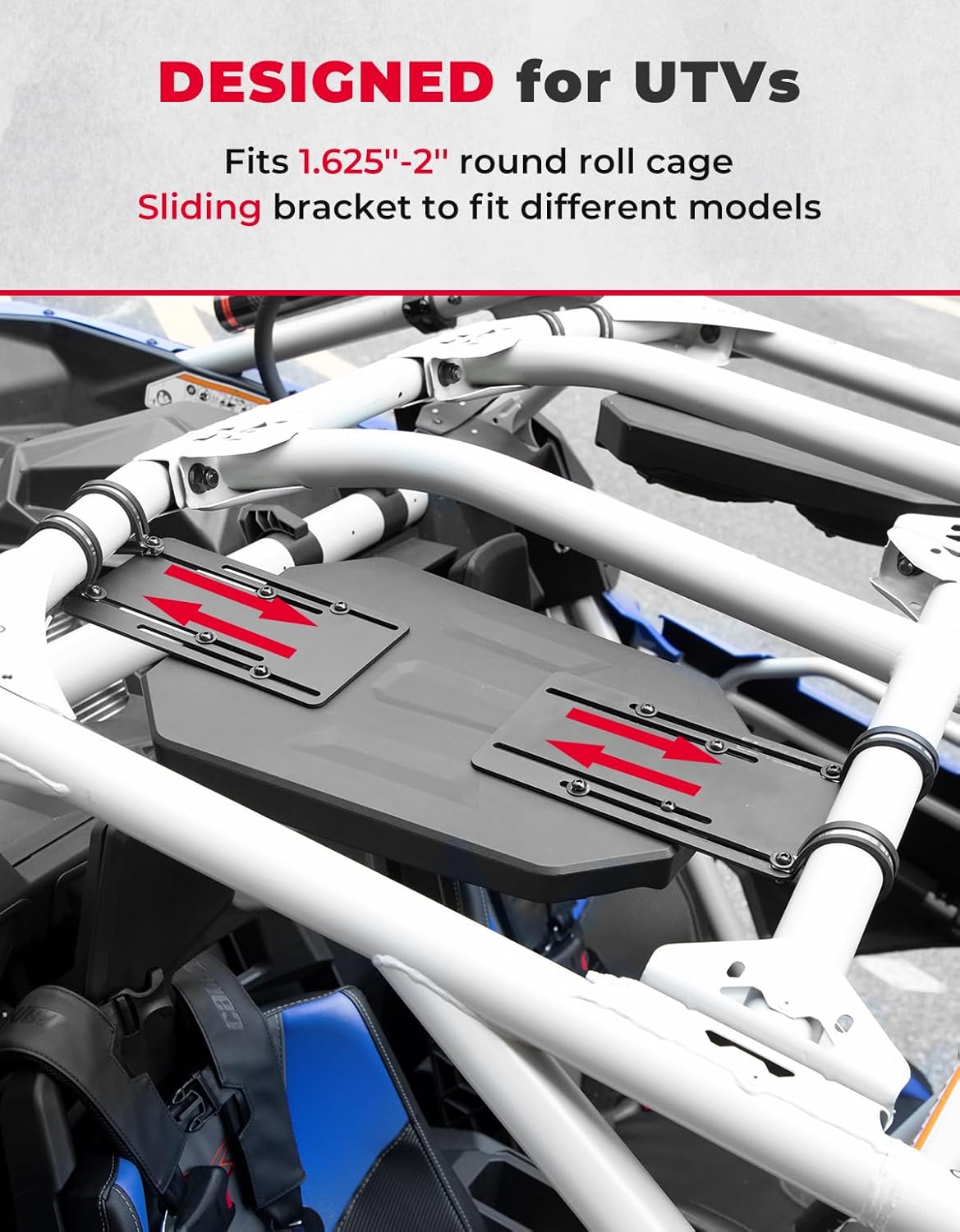
Image: The adjustable sliding brackets on the sound system, designed for flexible installation on various UTV roll cage widths.
Video: Demonstration of adjusting the speaker unit's width to fit the roll cage and securing it in place.

Image: The KEMIMOTO UTV sound system securely mounted to the vehicle's roll cage.
4.2. Wiring and Control Panel Installation
- وائرنگ ہارنس کو جوڑیں: Connect the main wiring harness to the sound system and route it to your power source (e.g., UTV's bus bar) and the control panel location.
- کنٹرول پینل انسٹال کریں: The control panel and USB/AUX extender are designed to fit into standard switch dash slots. Carefully insert them into the desired location on your dashboard.
- محفوظ کنکشن: Ensure all electrical connections are firm and protected from the elements.

Image: Close-up of the control panel, showing the USB input, AUX input, and control buttons.
Video: Installation of the power button and USB/AUX extender into the dashboard.
5. آپریٹنگ ہدایات
5.1. پاور آن/آف
دبائیں اور تھامیں۔ موڈ/پاور button on the control panel to turn the system on or off.
5.2. بلوٹوتھ کنیکٹیویٹی
- Ensure the sound system is powered on.
- اپنے موبائل ڈیوائس پر، بلوٹوتھ کو فعال کریں اور دستیاب آلات تلاش کریں۔
- منتخب کریں۔ "KEMIMOTO-T1" (or similar) from the list to pair. A confirmation tone will sound upon successful connection.
- ایک بار منسلک ہونے کے بعد، آپ اپنے آلے سے وائرلیس طور پر آڈیو کو سٹریم کر سکتے ہیں۔

Image: Visual representation of connecting a smartphone via Bluetooth to the sound system.
5.3 USB اور AUX ان پٹ
The USB/AUX extender on the switch dash allows for wired audio input:
- USB ان پٹ: Connect a USB device (e.g., MP3 player) for audio playback. The USB port can also be used for charging compatible devices.
- 3.5mm AUX-In: Connect any device with a 3.5mm audio jack using an AUX cable.
- استعمال کریں۔ موڈ/پاور button to switch between input sources (Bluetooth, USB, AUX).
5.4. کنٹرول پینل کے افعال
The control panel provides easy access to audio functions:
- والیوم اوپر/نیچے: دبائیں + or - buttons to adjust the volume. Hold to rapidly change volume.
- چلائیں/روکیں: دبائیں چلائیں/روکیں۔ پلے بیک کو روکنے یا دوبارہ شروع کرنے کے لیے بٹن۔
- Track Forward/Previous: دبائیں ٹریک فارورڈ or پچھلا ٹریک کریں۔ پٹریوں کو چھوڑنے کے لیے بٹن۔
Video: Demonstration of the control panel buttons for volume adjustment, track skipping, and play/pause functions.
6 دیکھ بھال
To ensure the longevity and optimal performance of your KEMIMOTO UTV Overhead Sound System:
- صفائی: یونٹ کو ایک نرم کے ساتھ مسح کریں، ڈیamp کپڑا سخت کیمیکلز یا کھرچنے والے کلینر سے پرہیز کریں۔
- موسم کی حفاظت: Although the unit has an IP67 weatherproof rating, prolonged exposure to extreme conditions should be minimized when possible. Ensure the weatherproof cover for the USB/AUX extender is always closed when not in use.
- کنکشن چیکس: Periodically check all wiring connections for corrosion or looseness. Tighten as necessary.

Image: The sound system demonstrating its IP67 waterproof capabilities, suitable for various outdoor conditions.
7 خرابیوں کا سراغ لگانا
| مسئلہ | ممکنہ وجہ | حل |
|---|---|---|
| کوئی طاقت نہیں۔ | Loose power connection, blown fuse, vehicle power off. | Check wiring, inspect fuse, ensure vehicle power is on. |
| کوئی آواز نہیں۔ | Volume too low, incorrect input source, device not paired (Bluetooth). | Increase volume, select correct input (Bluetooth/USB/AUX), re-pair Bluetooth device. |
| ناقص آواز کا معیار | Loose speaker connections, interference, low quality audio source. | Check speaker wiring, move away from interference sources, use high-quality audio files. |
| بلوٹوتھ کنیکٹ نہیں ہو رہا ہے۔ | Device too far, Bluetooth off on device, system already paired to another device. | Ensure device is within 66 feet, turn Bluetooth on, disconnect from other devices. |
8. وضاحتیں
- برانڈ: کیمیموٹو
- ماڈل نمبر: B0117-03001BK
- اسپیکر کی قسم: Outdoor, 6.5 Inches Coaxial Woofers (x4)
- اسپیکر زیادہ سے زیادہ آؤٹ پٹ پاور: 200 واٹ
- تعدد جواب: 20 KHz تک
- کنیکٹوٹی ٹیکنالوجی: بلوٹوتھ 5.0
- بلوٹوتھ کی حد: 66 فٹ
- آڈیو آؤٹ پٹ موڈ: سٹیریو
- چڑھنے کی قسم: Roll Cage Mount (Fits 1.625''-1.9'' roll cages, 450-720mm / 17.7-28.5in between parallel cages)
- انکلوژر مواد: پلاسٹک یا دھات
- اضافی خصوصیات: Dustproof, USB Port (charging capable), Waterproof (IP67 rated)
- کنٹرولر کی قسم: Button (Control panel with Mode/Power, Volume Up/Down, Play/Pause, Track Forward/Previous)
- رنگ: سیاہ
- ان پٹ جلدtage: 12 وولٹ
- آئٹم کا وزن: 12.15 کلوگرام
- ہم آہنگ آلات: Smartphone, MP3 Player, Tablet, Laptop
- طاقت کا منبع: گاڑی سے چلنے والا
9. وارنٹی اور سپورٹ
This KEMIMOTO product comes with a Limited Warranty. For specific warranty details, claims, or technical support, please refer to the warranty card included in your package or contact KEMIMOTO customer service directly. Keep your purchase receipt as proof of purchase.
For further assistance, visit the official KEMIMOTO webسائٹ یا ان کی سپورٹ ٹیم سے رابطہ کریں۔