
Xprinter XP-Q801K
Xprinter XP-Q801K تھرمل رسید پرنٹر صارف دستی
Model: XP-Q801K
1. تعارف
This manual provides comprehensive instructions for the setup, operation, and maintenance of your Xprinter XP-Q801K Thermal Receipt Printer. This printer is designed for efficient and reliable receipt printing in various business environments, featuring high-speed direct thermal printing and a USB interface for easy connectivity.

شکل 1: سامنے view of the Xprinter XP-Q801K Thermal Receipt Printer, showing the paper output slot and control buttons.
2. سیٹ اپ
2.1 پیک کھولنا
پیکیجنگ سے پرنٹر اور تمام لوازمات کو احتیاط سے ہٹا دیں۔ تصدیق کریں کہ تمام اجزاء موجود ہیں:
- Xprinter XP-Q801K Thermal Receipt Printer
- پاور اڈاپٹر
- USB کیبل
- Paper Roll (starter)
- صارف دستی (یہ دستاویز)
2.2 پرنٹر کو جوڑنا
Before connecting, ensure the printer is powered off. Locate the ports on the rear of the printer.
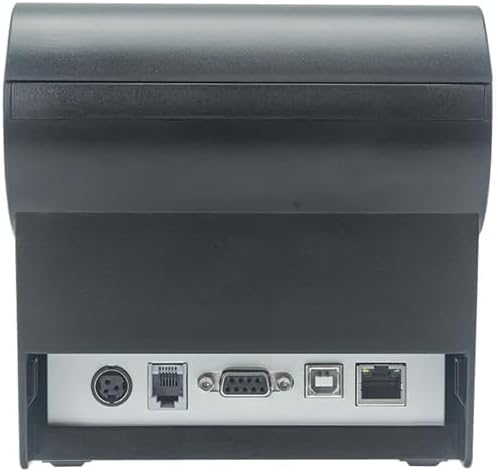
شکل 2: پیچھے view of the printer, highlighting the power, USB, and other interface ports.
- پاور سے رابطہ کریں: Insert the power adapter cable into the printer's power input port (DC 24V/2.5A) and plug the adapter into a suitable electrical outlet (AC 100-240V, 50-60Hz).
- USB سے جڑیں: Connect one end of the provided USB cable to the USB port on the printer and the other end to an available USB port on your computer.
- Cash Drawer (Optional): If using a cash drawer, connect its cable to the cash drawer port (DC 24V/1A) on the printer.
2.3 Loading the Paper Roll
The printer uses 80mm wide thermal paper rolls.
- Open the paper cover by pushing the cover open button (usually located on the side or front).
- Insert the thermal paper roll with the printing surface facing the print head. Ensure the roll is seated correctly in the paper compartment.
- کٹر کے پاس سے تھوڑی مقدار میں کاغذ نکالیں۔
- Close the paper cover firmly until it clicks into place.
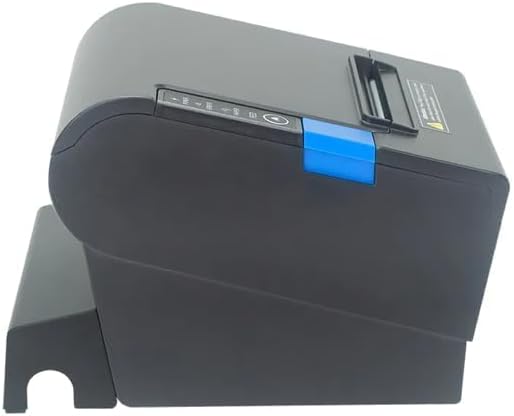
شکل 3: طرف view of the printer, illustrating the paper cover mechanism.
2.4 ڈرائیور کی تنصیب
The printer requires a driver to communicate with your computer. Drivers are typically available for Windows, Linux, Android, and Mac operating systems.
- For Windows users, the printer often supports plug-and-play installation or requires a specific Windows driver.
- For Linux, Android, and Mac, SDKs (Software Development Kits) are usually provided for integration.
مینوفیکچررز سے رجوع کریں۔ website or the included driver CD/USB drive for the latest drivers and installation instructions specific to your operating system.
3. پرنٹر چلانا
3.1 پاور آن/آف۔
Locate the power switch on the side or rear of the printer. Flip the switch to the 'ON' position to power on the printer. The 'POWER' indicator light will illuminate. Flip to 'OFF' to power down.
3.2 انڈیکیٹر لائٹس اور بٹن
The front panel typically features several indicator lights and buttons:
- طاقت: اشارہ کرتا ہے کہ پرنٹر آن ہے۔
- خرابی: Illuminates or flashes to indicate an error condition (e.g., paper out, print head overheating, cutter error).
- پیپر: Indicates that the paper roll is low or out.
- فیڈ بٹن: Press to manually feed paper. Hold to perform a self-test print (if supported by model).
3.3 بنیادی پرنٹنگ
Once the printer is connected and drivers are installed, you can print receipts from your POS software or application. Ensure the printer is selected as the default or active printer in your system settings.
The printer supports various print speeds up to 300 mm/s and automatic paper cutting after each print job.
4 دیکھ بھال
باقاعدگی سے دیکھ بھال بہترین کارکردگی کو یقینی بناتی ہے اور آپ کے پرنٹر کی زندگی کو بڑھاتی ہے۔
4.1 پرنٹ ہیڈ کو صاف کرنا
The print head should be cleaned regularly, especially if print quality degrades.
- پرنٹر کو بند کریں اور پاور کیبل کو منقطع کریں۔
- کاغذ کا احاطہ کھولیں۔
- روئی کی جھاڑی کو ہلکے سے استعمال کریں۔ampened with isopropyl alcohol (ethanol) to gently wipe the thermal elements of the print head.
- کور کو بند کرنے اور پاور کو دوبارہ جوڑنے سے پہلے پرنٹ ہیڈ کو مکمل طور پر خشک ہونے دیں۔
4.2 Cleaning the Cutter
Paper dust can accumulate around the cutter blade, affecting its performance.
- پرنٹر کو بند کریں اور پاور کیبل کو منقطع کریں۔
- Carefully remove any visible paper dust or debris from around the cutter blade using a soft brush or compressed air.
- Do not use liquids on the cutter.
4.3 عمومی صفائی
پرنٹر کے بیرونی حصے کو نرم سے صاف کریں، ڈیamp کپڑا سخت کیمیکلز یا کھرچنے والے کلینر کے استعمال سے پرہیز کریں۔
5 خرابیوں کا سراغ لگانا
یہ سیکشن عام مسائل کو حل کرتا ہے جن کا آپ کو اپنے پرنٹر کے ساتھ سامنا ہو سکتا ہے۔
| مسئلہ | ممکنہ وجہ | حل |
|---|---|---|
| پرنٹر آن نہیں ہوتا ہے۔ | پاور کیبل منسلک نہیں ہے؛ پاور آؤٹ لیٹ ناقص؛ پاور سوئچ آف۔ | Ensure power cable is securely connected. Test power outlet. Turn power switch to 'ON'. |
| No printing. | Paper out; Paper loaded incorrectly; Driver not installed or incorrect; USB cable loose; Printer not selected. | Load new paper roll. Re-load paper correctly. Install/reinstall correct driver. Check USB connection. Select printer in software. |
| ERROR light is on/flashing. | Paper out; Paper jam; Print head overheating; Cutter error. | Load paper. Clear paper jam. Allow printer to cool down. Check cutter for obstructions. |
| ناقص پرنٹ کوالٹی۔ | Dirty print head; Low quality paper; Old paper roll. | Clean the print head (see Section 4.1). Use high-quality thermal paper. Replace old paper rolls. |
اگر ان حلوں کو آزمانے کے بعد بھی مسئلہ برقرار رہتا ہے، تو براہ کرم کسٹمر سپورٹ سے رابطہ کریں۔
6. وضاحتیں
| فیچر | تفصیل |
|---|---|
| طباعت کا طریقہ | ڈائریکٹ تھرمل |
| کاغذ کی چوڑائی | 80 ملی میٹر |
| پرنٹ کی رفتار | 230 mm/s، 260 mm/s، 300 mm/s |
| انٹرفیس | یو ایس بی |
| لائن اسپیسنگ | 3.75 mm (adjustable by commands) |
| Character Size (ANK) | Font A: 1.5 × 3.0 mm (12 × 24 dots) Font B: 1.1 × 2.1 mm (9 × 17 dots) |
| Character Size (Chinese/Traditional Chinese) | 3.0 × 3.0 mm (24 × 24 dots) |
| بارکوڈ کی اقسام | UPC-A / UPC-E / JAN13 (EAN13) / JAN8 (EAN8) / CODE39 / ITF / CODABAR / CODE93 / CODE128 |
| 2D بارکوڈ | QR Code / PDF417 |
| NV Flash Memory | 256 KB |
| ان پٹ پاور | AC 100-240V ، 50-60 ہرٹج |
| آؤٹ پٹ پاور | DC 24V/2.5A |
| کیش دراز آؤٹ پٹ | DC 24V/1A |
| وزن | 1.0 کلوگرام |
| طول و عرض (D × W × H) | 194.5 × 145 × 146.4 ملی میٹر |
| آپریٹنگ درجہ حرارت | 0~45°C |
| آپریٹنگ نمی | 10~80% RH |
| کٹر زندگی | 1.5 ملین کٹوتی |
| پرنٹ ہیڈ لائف | 150 کلومیٹر |
| OS مطابقت | Windows, Linux, Android, Mac |
Ask a question about this manual
Ask about setup, troubleshooting, compatibility, parts, safety, or missing instructions. Manuals+ will review the question and use this page’s manual context to help answer it.