
Vorago BSP-500-V2
Vorago BSP-500-V2 Bluetooth Speaker User Manual
ماڈل: BSP-500-V2
برانڈ: ووراگو
1. پروڈکٹ ختمview
The Vorago BSP-500-V2 is a portable Bluetooth speaker designed for robust performance and durability. It features IPX5 water resistance, making it suitable for various environments, including outdoor adventures and parties. This manual provides detailed instructions for setting up, operating, and maintaining your speaker.
اہم خصوصیات:
- True Wireless Stereo (TWS) Connectivity: Connect two BSP-500-V2 speakers for an immersive stereo sound experience.
- توسیعی بیٹری کی زندگی: Enjoy up to 7 hours of music playback at 70% volume, thanks to its 2000 mAh battery.
- USB ٹائپ سی چارجنگ: Convenient and modern USB-C port for charging.
- ورسٹائل کنیکٹیویٹی: Supports Bluetooth for wireless streaming and a 3.5mm auxiliary input for wired connections.
- IPX5 پانی کی مزاحمت: کسی بھی سمت سے کم دباؤ والے پانی کے جیٹ طیاروں سے محفوظ۔
پیکیج کا مواد:
- Vorago BSP-500-V2 بلوٹوتھ اسپیکر
- USB ٹائپ سی چارجنگ کیبل
- 3.5 ملی میٹر آڈیو کیبل
- صارف دستی (یہ دستاویز)
پروڈکٹ ڈایاگرام:

شکل 1.1: سامنے view of the Vorago BSP-500-V2 Bluetooth speaker, showcasing its mesh grille and central Vorago logo.

شکل 1.2: زاویہ دار view of the speaker, highlighting its robust, rectangular design and integrated carrying strap.

تصویر 1.3: اوپر view showing the control panel with power, volume down, play/pause, and volume up buttons.
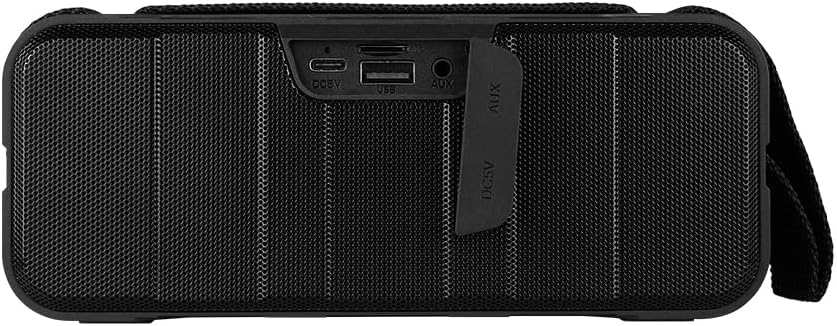
شکل 1.4: پیچھے view of the speaker, showing the protective flap covering the input ports.

Figure 1.5: Close-up of the input ports, including DC 5V (USB-C), USB-A, and AUX (3.5mm) inputs, protected by a rubber cover.
2. حفاظتی معلومات
- Do not expose the speaker to extreme temperatures (hot or cold).
- سپیکر کو شدید اثرات سے گریز کرنے یا اس کے تابع کرنے سے گریز کریں۔
- اسپیکر کو براہ راست سورج کی روشنی اور گرمی کے ذرائع سے دور رکھیں۔
- خود سپیکر کو جدا، مرمت یا ترمیم نہ کریں۔ اس سے وارنٹی ختم ہو جائے گی۔
- Ensure the port cover is securely closed when using the speaker near water to maintain IPX5 water resistance.
- Do not immerse the speaker in water. IPX5 rating protects against splashes and light rain, not submersion.
- Use only the provided charging cable or a certified USB Type-C cable for charging.
- اسپیکر کو نرم، خشک کپڑے سے صاف کریں۔ کھرچنے والے کلینر یا سالوینٹس کا استعمال نہ کریں۔
3. سیٹ اپ
3.1 اسپیکر کو چارج کرنا
- Open the protective rubber cover on the rear of the speaker to access the charging port.
- Connect the USB Type-C end of the charging cable to the speaker's DC 5V port.
- USB کیبل کے دوسرے سرے کو USB پاور اڈاپٹر (شامل نہیں) یا کمپیوٹر کے USB پورٹ سے مربوط کریں۔
- چارجنگ انڈیکیٹر لائٹ چارجنگ کے دوران روشن ہو جائے گی اور مکمل چارج ہونے پر بند ہو جائے گی۔
- Once charging is complete, securely close the protective rubber cover to maintain water resistance.
3.2 پاور آن/آف۔
- پاور آن کرنے کے لیے: دبائیں اور تھامیں۔ پاور بٹن on the top panel for approximately 3 seconds until you hear an audible prompt.
- پاور آف کرنا: دبائیں اور تھامیں۔ پاور بٹن for approximately 3 seconds until you hear an audible prompt.
3.3 بلوٹوتھ جوڑی
- Ensure the speaker is powered on. It will automatically enter Bluetooth pairing mode, indicated by a flashing LED light.
- اپنے آلے پر (اسمارٹ فون، ٹیبلیٹ، لیپ ٹاپ)، بلوٹوتھ کو فعال کریں اور دستیاب آلات تلاش کریں۔
- Select "BSP-500-V2" from the list of found devices.
- Once successfully paired, the speaker will emit an audible confirmation, and the LED light will stop flashing and remain solid.
- پاور آن ہونے پر اسپیکر خود بخود آخری جوڑی والے آلے سے دوبارہ جڑ جائے گا، اگر ڈیوائس رینج کے اندر ہے اور بلوٹوتھ فعال ہے۔
3.4 حقیقی وائرلیس سٹیریو (TWS) جوڑا
TWS allows you to connect two BSP-500-V2 speakers together for a true stereo sound experience.
- Ensure both BSP-500-V2 speakers are powered on and not connected to any other Bluetooth device.
- اسپیکرز میں سے ایک پر (یہ پرائمری اسپیکر ہوگا)، کو ڈبل دبائیں۔ پلے/پاز بٹن. اسپیکر TWS پیئرنگ موڈ میں داخل ہوگا۔
- The two speakers will automatically search for and connect to each other. You will hear an audible confirmation once they are successfully paired.
- Once TWS is established, connect your device to the primary speaker via Bluetooth as described in Section 3.3.
- TWS کو منقطع کرنے کے لیے، دو بار دبائیں۔ پلے/پاز بٹن کسی بھی اسپیکر پر
3.5 Auxiliary (AUX) Connection
For devices without Bluetooth, you can use the 3.5mm audio cable.
- Open the protective rubber cover on the rear of the speaker.
- Connect one end of the 3.5mm audio cable to the speaker's AUX port.
- کیبل کے دوسرے سرے کو اپنے آلے کے آڈیو آؤٹ پٹ جیک سے جوڑیں۔
- اسپیکر خود بخود AUX موڈ میں بدل جائے گا۔
- Once disconnected, securely close the protective rubber cover.
4. آپریٹنگ ہدایات
4.1 بٹن کے افعال:
| بٹن | فنکشن (شارٹ پریس) | فنکشن (لانگ پریس) |
|---|---|---|
| پاور بٹن | N/A | پاور آن/آف |
| والیوم ڈاؤن بٹن | والیوم کم کریں۔ | پچھلا ٹریک |
| پلے/پاز بٹن | میوزک چلائیں/روکیں، کال کا جواب دیں/ختم کریں۔ | Reject Call, Double-press for TWS Pairing |
| والیوم اپ بٹن | والیوم میں اضافہ کریں۔ | اگلا ٹریک |
5 دیکھ بھال
- صفائی: Use a soft, dry, lint-free cloth to clean the speaker's surface. For stubborn dirt, slightly dampen the cloth with water. Do not use harsh chemicals, cleaning solvents, or strong detergents.
- پانی کی مزاحمت کی دیکھ بھال: Always ensure the rubber port cover on the back of the speaker is fully and securely sealed when using the speaker outdoors or near water. This maintains its IPX5 water resistance. After exposure to water, wipe the speaker dry before opening the port cover for charging or auxiliary connections.
- ذخیرہ: When not in use for extended periods, store the speaker in a cool, dry place, away from direct sunlight and extreme temperatures. It is recommended to charge the speaker fully before storing and to recharge it every few months to maintain battery health.
- بیٹری کی دیکھ بھال: To prolong battery life, avoid fully discharging the battery frequently. Charge the speaker when the low battery indicator is active.
6 خرابیوں کا سراغ لگانا
| مسئلہ | ممکنہ وجہ | حل |
|---|---|---|
| سپیکر پاور آن نہیں کرتا۔ | کم بیٹری۔ | Charge the speaker fully using the provided USB Type-C cable. |
| بلوٹوتھ کے ذریعے جوڑا نہیں بنایا جا سکتا۔ | Speaker is not in pairing mode; Device's Bluetooth is off; Speaker is already connected to another device; Device is too far from speaker. | Ensure speaker is powered on and flashing (pairing mode). Turn on Bluetooth on your device. Disconnect from other devices. Move device closer to speaker (within 10 meters). |
| کوئی آواز یا کم والیوم نہیں۔ | اسپیکر یا ڈیوائس پر والیوم بہت کم ہے۔ غلط ان پٹ موڈ؛ اسپیکر منسلک نہیں ہے۔ | Increase volume on both speaker and connected device. Ensure correct mode (Bluetooth or AUX) is active. Verify successful Bluetooth pairing or AUX cable connection. |
| صوتی مسخ | حجم بہت زیادہ آلہ اسپیکر سے بہت دور؛ مداخلت | Reduce volume on speaker and/or device. Move device closer to speaker. Avoid obstacles between speaker and device. |
| TWS جوڑا ناکام ہوجاتا ہے۔ | Speakers are already paired to a device; Speakers are too far apart. | Ensure both speakers are disconnected from any Bluetooth devices. Place speakers close to each other during TWS pairing. |
7. وضاحتیں
| فیچر | تفصیل |
|---|---|
| ماڈل کا نام | BSP-500-V2 |
| اسپیکر کی قسم | ملٹی میڈیا |
| خصوصی خصوصیت | بلوٹوتھ |
| تجویز کردہ استعمال | میوزک پلیئرز کے لیے |
| ہم آہنگ آلات | لیپ ٹاپ، MP3 پلیئر، اسمارٹ فون، ٹیبلٹ |
| کنٹرولر کی قسم | بٹن |
| سراؤنڈ ساؤنڈ چینل کنفیگریشن | 5.0 |
| بیٹری کی زندگی | 7 گھنٹے |
| اجزاء شامل ہیں | سپیکر |
| مصنوعات کے طول و عرض | 5D x 15W x 18H سینٹی میٹر |
| پروڈکٹ کا وزن | 1 کلوگرام |
| واٹر پروف | ہاں (IPX5) |
| بیٹری کی صلاحیت | 2000 ایم اے ایچ |
| Ampزندگی کی قسم | فعال |
| طاقت کا منبع | بیٹری |
| تعدد رسپانس | 180 Hz |
| کنیکٹوٹی ٹیکنالوجی | بلوٹوتھ |
| آڈیو آؤٹ پٹ وضع | سٹیریو |
| چڑھنے کی قسم | ٹیبلٹاپ ماؤنٹ |
8. وارنٹی اور سپورٹ
The Vorago BSP-500-V2 Bluetooth Speaker comes with a limited warranty. Please refer to the warranty card included with your product for specific terms and conditions, or visit the official Vorago webمزید تفصیلات کے لیے سائٹ۔
For technical support, troubleshooting assistance, or warranty claims, please contact Vorago customer service through their official channels. You can find more information and contact details on the Vorago Brand Store on Amazon یا ان کے اہلکار؟ webسائٹ
وارنٹی مقاصد کے لیے براہ کرم اپنی خریداری کا ثبوت اپنے پاس رکھیں۔
Ask a question about this manual
Ask about setup, troubleshooting, compatibility, parts, safety, or missing instructions. Manuals+ will review the question and use this page’s manual context to help answer it.