
1. شروع کرنا
1.1 پیکیج کے مشمولات
شروع کرنے سے پہلے، براہ کرم یقینی بنائیں کہ تمام اشیاء آپ کے پیکیج میں موجود ہیں:
- 2 x QCY T13X Earbuds
- 1 ایکس چارجنگ کیس
- 3 x Pairs of Eartips (Small, Medium - pre-installed, Large)
- 1 X USB-C چارجنگ کیبل
- 1 ایکس صارف دستی
1.2 ابتدائی چارجنگ
The earbuds must be fully charged before first use. Place both earbuds into the charging case. Connect the USB-C cable to the charging case and a power source. A full charge takes approximately 120 minutes. If the earbuds are not used for more than two weeks, charge them regularly to maintain battery health.
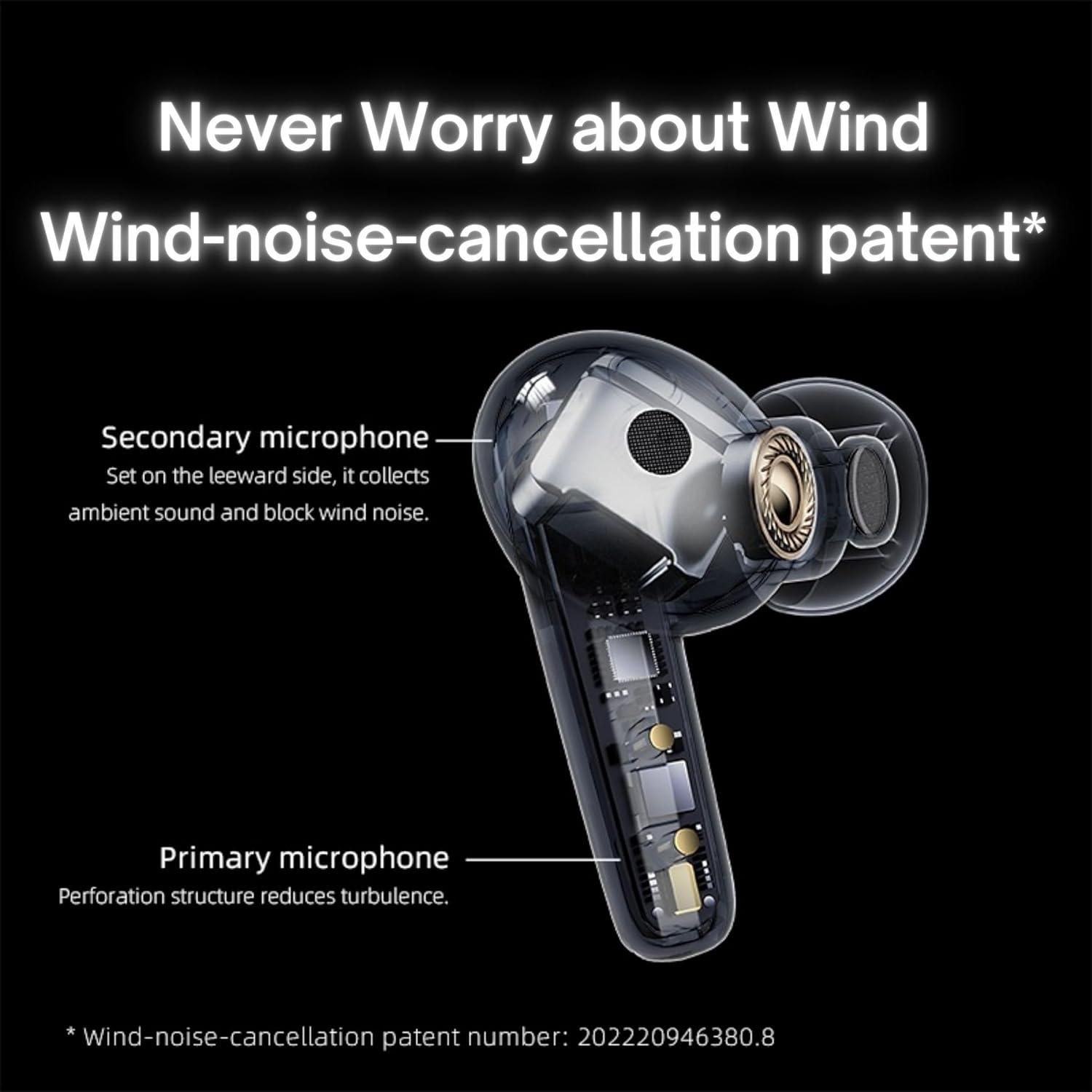
Image: QCY T13X Earbuds in their charging case, connected with a USB-C cable for charging. The image illustrates the charging process and the compact design of the case and earbuds.
1.3 Eartip Selection
For optimal sound quality and comfort, choose the eartips that best fit your ears. The package includes small, medium, and large sizes. The medium size is pre-installed. A proper seal is crucial for bass response and noise isolation.
1.4 اپنے آلے کے ساتھ جوڑا بنانا
- اس بات کو یقینی بنائیں کہ ایئربڈز چارج اور چارجنگ کیس میں رکھے گئے ہیں۔
- چارجنگ کیس کا ڈھکن کھولیں۔ ایئربڈز خود بخود پیئرنگ موڈ میں داخل ہو جائیں گے۔
- اپنے اسمارٹ فون یا بلوٹوتھ فعال ڈیوائس پر، بلوٹوتھ سیٹنگز پر جائیں۔
- تلاش کریں۔ available devices and select "QCY T13X" from the list.
- ایک بار منسلک ہونے کے بعد، آپ کو ایک تصدیقی ٹون سنائی دے گا۔

Image: QCY T13X Earbuds and their charging case, highlighting the Bluetooth 5.3 connectivity. This image demonstrates the wireless technology used for pairing.
2. آپ کے ایئربڈز کو آپریٹ کرنا
2.1 پاور آن/آف
- پاور آن: Open the charging case, and the earbuds will automatically power on. Alternatively, press and hold the touch panel on both earbuds for 1-2 seconds.
- بجلی بند: Place the earbuds back into the charging case and close the lid. They will automatically power off and begin charging. Alternatively, disconnect them from your device, and they will power off after a few minutes of inactivity.
2.2 میوزک پلے بیک کنٹرولز
The QCY T13X earbuds feature touch controls for easy management of your audio:
- چلائیں/روکیں: Double-tap the touch panel on either earbud.
- اگلا ٹریک: دائیں ایئربڈ کو تین بار تھپتھپائیں۔
- پچھلا ٹریک: بائیں ایئربڈ کو تین بار تھپتھپائیں۔

Image: A person wearing a QCY T13X earbud, demonstrating the discreet design and the area for touch controls. This image helps visualize how the earbuds are worn and interacted with.
2.3 کال مینجمنٹ
- جواب / کال ختم کریں: Double-tap the touch panel on either earbud.
- کال مسترد کریں: Press and hold the touch panel on either earbud for 1.5 seconds.
2.4 والیوم کنٹرول
Volume control is managed through the QCY application on your smartphone. Download the QCY app to customize settings and adjust volume levels directly.
2.5 QCY Application
For enhanced features and customization, download the official QCY app from your device's app store. The app allows you to:
- حجم کو ایڈجسٹ کریں۔
- ٹچ کنٹرولز کو حسب ضرورت بنائیں۔
- Select from various EQ presets (e.g., Pure Vocals, Boosted Original, Soft and Immersive).
- فرم ویئر کو اپ ڈیٹ کریں۔

Image: QCY T13X Earbuds with a graphic indicating three default EQ settings: Pure Vocals, Boosted Original, and Soft and Immersive. This highlights the sound customization options available through the app.
2.6 ملٹی ڈیوائس کنیکٹیویٹی
The QCY T13X supports seamless switching between multiple paired devices. Once paired with several devices, the earbuds can intelligently connect to the active audio source.

Image: QCY T13X Earbuds shown connected to both a smartphone and a tablet, illustrating the multi-device connectivity feature. This image demonstrates the flexibility of using the earbuds with different devices.
3. دیکھ بھال اور دیکھ بھال
3.1 ایئربڈز اور کیس کو چارج کرنا
The charging case has a capacity of 350 mAh, with each earbud having a 45 mAh battery. A single charge provides up to 8 hours of playback, and the charging case extends total playback time to up to 30 hours. The earbuds support fast charging. Ensure regular charging if not used for extended periods.
3.2 صفائی
Regularly clean your earbuds and charging case to ensure optimal performance and hygiene. Use a soft, dry, lint-free cloth. For eartips, remove them and gently wipe with a damp کپڑا، پھر دوبارہ جوڑنے سے پہلے اچھی طرح خشک کریں۔
3.3 اسٹوریج
Store your QCY T13X earbuds in their charging case when not in use. Avoid exposing them to extreme temperatures, such as below 10 degrees Celsius (50°F) or above 60 degrees Celsius (140°F), to prevent battery damage and ensure longevity.
4 خرابیوں کا سراغ لگانا
4.1 فیکٹری ری سیٹ
If you experience persistent connection or functionality issues, a factory reset may resolve them:
- Delete the previous connection record for "QCY T13X" from your phone's Bluetooth settings.
- Place both earbuds into the charging case and ensure they are charging.
- چارجنگ کیس کے بٹن کو 10 سیکنڈ تک دبائے رکھیں۔
- The red and blue LED indicators will flash alternately 3 times, indicating a successful reset.
4.2 کنکشن کے مسائل
- یقینی بنائیں کہ آپ کے آلے پر بلوٹوتھ فعال ہے۔
- Make sure the earbuds are charged and within the 10-meter Bluetooth range.
- Try restarting your device and the earbuds.
- جیسا کہ اوپر بیان کیا گیا ہے فیکٹری ری سیٹ انجام دیں۔
4.3 آواز کے مسائل
- Check the volume levels on both your device and through the QCY app.
- Ensure the eartips provide a proper seal in your ear.
- ایئربڈ اسپیکرز سے کوئی بھی ملبہ صاف کریں۔
- If only one earbud is working, try placing both back in the case, closing the lid, and then reopening to re-establish the connection between them.
5. وضاحتیں
| فیچر | تفصیلات |
|---|---|
| ماڈل کا نام | T13X (BH23QT26A) |
| ڈرائیور کا سائز | 7.2 ملی میٹر متحرک ڈرائیور |
| مائکروفونز | 4 (ENC Noise Reduction, Mic Amplification, Echo Cancellation) |
| بلوٹوتھ ورژن | 5.3 |
| بلوٹوتھ رینج | 10 میٹر تک |
| تعاون یافتہ پروٹوکول | HFP/A2DP/AVRCP |
| آڈیو کوڈیکس | اے اے سی، ایس بی سی |
| ایربود بیٹری کی گنجائش | 45 mAh (ہر ایک) |
| چارجنگ کیس بیٹری کی صلاحیت | 350 ایم اے ایچ |
| پلے بیک کا کل وقت | 30 گھنٹے تک (چارجنگ کیس کے ساتھ) |
| Single Use Playback Time | 8 گھنٹے تک |
| چارج کرنے کا وقت (کیس) | تقریبا 120 منٹ |
| پانی کی مزاحمت | IPX5 |
| وزن (Earbud) | 6.34 گرام |
| Total Weight (Case + Earbuds) | 48.15 گرام |
| کنٹرول کا طریقہ | چھوئے۔ |
| شور کنٹرول | فعال شور منسوخ کرنا (این این سی) |
| تعدد رسپانس | 20000 KHz |
| حساسیت | 105 ڈی بی |
| رکاوٹ | 100 اوہم |

Image: An exploded diagram of a QCY T13X earbud, illustrating the internal 7.2mm dynamic driver. This image provides insight into the audio technology within the earbud.

Image: A detailed diagram of a QCY T13X earbud, highlighting the placement of its multiple microphones for Environmental Noise Cancellation (ENC) and wind noise reduction. This image explains the technology behind clear calls.
6. وارنٹی اور سپورٹ
6.1 مینوفیکچرر کی وارنٹی
The QCY T13X Bluetooth Earbuds come with a 1 سالہ صنعت کار کی وارنٹی. کسی بھی وارنٹی دعووں کے لیے براہ کرم اپنے خریداری کا ثبوت اپنے پاس رکھیں۔ وارنٹی عام استعمال کے تحت مواد اور کاریگری میں نقائص کا احاطہ کرتی ہے۔
6.2 کسٹمر سپورٹ
For further assistance, technical support, or warranty inquiries, please visit the official QCY website or contact their customer service. You can also refer to the QCY app for additional resources and FAQs.