
تعارف
خریداری کے لیے آپ کا شکریہasing the SNAKEBYTE GAMEPAD RGB X SB922312 wired controller. This manual provides essential information for setting up, operating, and maintaining your new gaming controller. Please read this manual thoroughly before use to ensure optimal performance and longevity of your device.

سامنے والا view of the SNAKEBYTE GAMEPAD RGB X SB922312 wired controller, showcasing اس کا ایرگونومک ڈیزائن اور بٹن لے آؤٹ۔
پیکیج کے مشمولات
تصدیق کریں کہ تمام اشیاء پیکیج میں موجود ہیں:
- SNAKEBYTE GAMEPAD RGB X SB922312 Wired Controller
- USB-C Cable (3 meters)
- صارف دستی (یہ دستاویز)
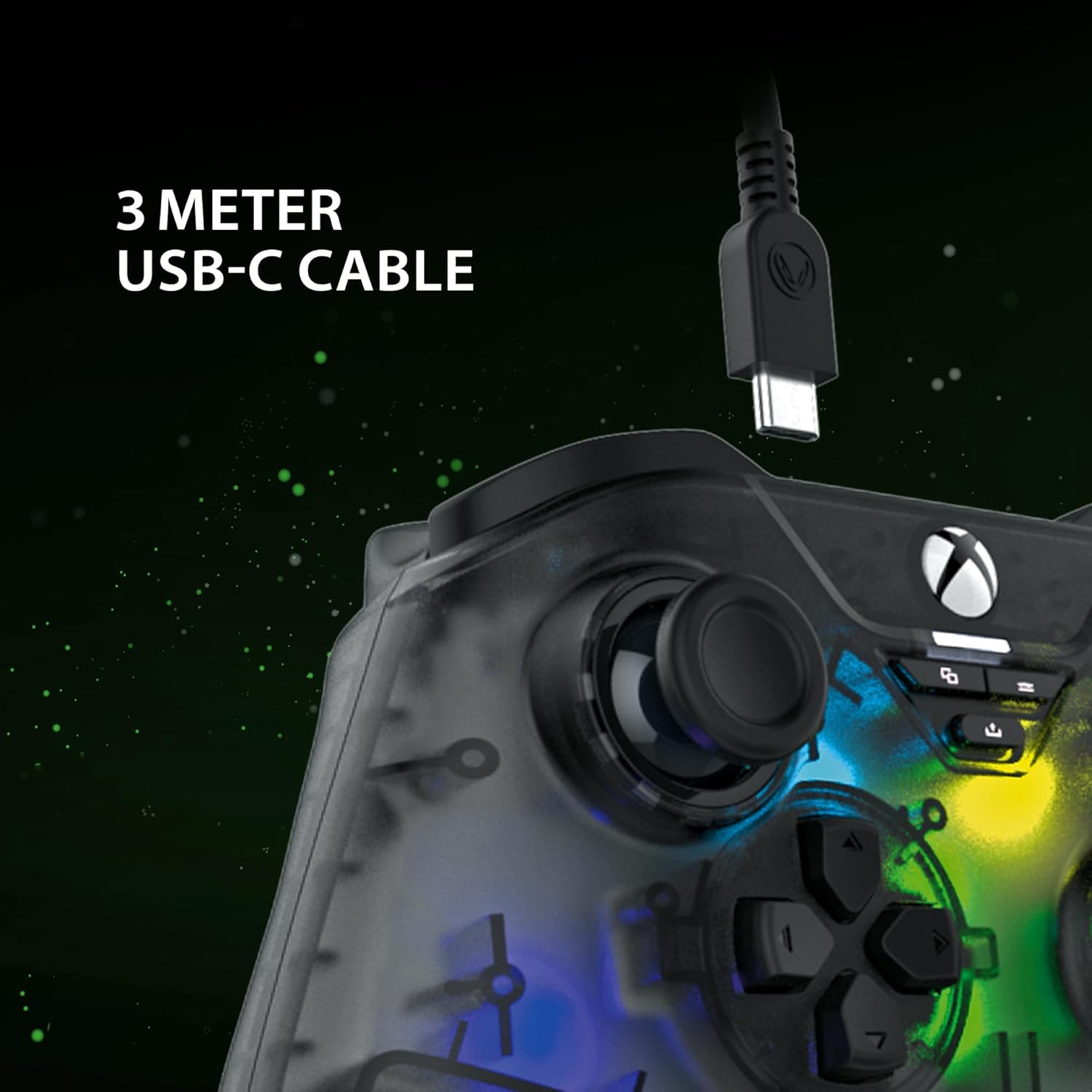
The included 3-meter USB-C cable for connecting the controller to your device.
سیٹ اپ کی ہدایات
- Connect to Xbox Series X:
- Plug the USB-C end of the cable into the controller.
- Plug the USB-A end of the cable into an available USB port on your Xbox Series X console.
- The controller will automatically connect and be ready for use.
- پی سی سے جڑیں:
- Plug the USB-C end of the cable into the controller.
- Plug the USB-A end of the cable into an available USB port on your PC.
- Your PC should automatically detect and install the necessary drivers. If not, please visit the SNAKEBYTE support webڈرائیور ڈاؤن لوڈ کے لیے سائٹ۔
- The controller is compatible with Windows operating systems.
آپریٹنگ ہدایات
بٹن لے آؤٹ اور فنکشنز
The controller features a standard Xbox-style button layout. Familiarize yourself with the following components:
- اینالاگ اسٹکس: Two clickable analog sticks for precise movement and camera control.
- ڈی پیڈ: Directional pad for menu navigation and specific game inputs.
- ایکشن بٹن (A, B, X, Y): درون گیم کمانڈز کے لیے معیاری ایکشن بٹن۔
- Shoulder Buttons (LB, RB): Located on the top edge for quick actions.
- Triggers (LT, RT): Analog triggers for variable input, such as acceleration or aiming.
- View بٹن: Access in-game maps or menus.
- مینو بٹن: Access game menus or system options.
- ایکس بکس بٹن: Power on/off the console or access the Xbox Guide.
- شیئر بٹن: Capture screenshots or record game clips.
- 3.5 ملی میٹر ہیڈسیٹ جیک: Connect a compatible headset for audio and chat.

The 3.5mm headset jack located at the bottom of the controller for audio connectivity.
آر جی بی لائٹنگ کنٹرول
The controller features customizable RGB lighting. Specific buttons or combinations of buttons can be used to cycle through different static and dynamic color modes. Refer to the controller's dedicated RGB control button (if present) or the manufacturer's software for detailed customization options.

The controller displaying its customizable RGB lighting effects.
کلیدی خصوصیات
- Hall Effect Sensors: The analog sticks and triggers utilize Hall Effect sensors, which provide precise input and reduce wear, minimizing stick drift over time.
- مرضی کے مطابق آرجیبی لائٹنگ: Personalize your gaming experience with multiple static and dynamic RGB color modes.
- وائرڈ کنیکٹوٹی: Ensures a stable, low-latency connection for competitive gaming.
- 3.5 ملی میٹر ہیڈسیٹ جیک: Conveniently connect your gaming headset directly to the controller.
- High Polling Rate (PC): Offers a 1000 Hz polling rate on PC for ultra-responsive input.

An illustration of the Hall Effect sensor technology used in the analog sticks for enhanced precision and durability.

The Hall Effect triggers, designed for responsive and accurate input.
دیکھ بھال
Proper maintenance ensures the longevity of your controller:
- صفائی: کنٹرولر کو صاف کرنے کے لیے نرم، خشک کپڑا استعمال کریں۔ ضدی گندگی کے لیے، قدرے ڈیampپانی کے ساتھ کپڑے. سخت کیمیکلز یا کھرچنے والے مواد سے پرہیز کریں۔
- ذخیرہ: کنٹرولر کو کسی ٹھنڈی، خشک جگہ پر براہ راست سورج کی روشنی اور انتہائی درجہ حرارت سے دور رکھیں۔
- کیبل کی دیکھ بھال: Avoid bending or twisting the USB-C cable excessively. Always grasp the plug, not the cable, when disconnecting.
خرابی کا سراغ لگانا
| مسئلہ | حل |
|---|---|
| Controller not recognized by Xbox/PC. |
|
| بٹن یا اینالاگ اسٹکس غیر جوابی ہیں۔ |
|
| Headset audio not working. |
|
وضاحتیں
| فیچر | تفصیل |
|---|---|
| ماڈل نمبر | ایس بی 922312 |
| کنیکٹوٹی | Wired USB (USB-C to USB-A cable) |
| کیبل کی لمبائی | 3 میٹر |
| مطابقت | Xbox Series X, PC (Windows) |
| خصوصی خصوصیات | RGB Lighting, Hall Effect Sensors (sticks & triggers), 3.5mm Headset Jack |
| Polling Rate (PC) | 1000 Hz |
| بٹنوں کی تعداد | 17 |
| طول و عرض | 10 x 5 x 1.27 سینٹی میٹر |
| وزن | 250 گرام |
| مواد کی قسم | ایکریلک |
آفیشل پروڈکٹ ویڈیو
یہ ویڈیو 360 ڈگری فراہم کرتا ہے۔ view of the SNAKEBYTE GAMEPAD RGB X SB922312 controller, showcasing تمام زاویوں سے اس کا ڈیزائن۔
وارنٹی اور سپورٹ
For warranty information, technical support, or further assistance, please visit the official SNAKEBYTE webسائٹ یا ان کی کسٹمر سروس سے رابطہ کریں۔ وارنٹی کے دعووں کے لیے اپنی خریداری کا ثبوت رکھیں۔
مینوفیکچرر: SNAKEBYTE
Webسائٹ: www.snakebyte.com (سابقampلی لنک، اصل لنک مختلف ہو سکتا ہے)