
تعارف
The COMPUTHERM E280 Wi-Fi Thermostat allows you to control connected heating or cooling devices, such as boilers or air conditioning systems, via your smartphone or tablet over the internet. This thermostat is compatible with any two-wire thermostatic connector and supports both 24V and 230V control circuits. It is particularly useful for managing heating/cooling in homes, apartments, or holiday residences, especially when occupancy schedules are irregular.
Equipped with a connectable floor temperature sensor, the E280 is ideal for controlling underfloor heating systems. It features two potential-free relays that can operate simultaneously, allowing independent control of two devices. This enables the thermostat to manage a pump and a zone valve in addition to the main boiler, facilitating multi-zone heating systems without requiring a separate zone control system.

Image: The Computherm E280 Wi-Fi Thermostat displaying room temperature and set temperature, alongside a smartphone showing the thermostat's control application.
پیکیج کے مشمولات
پیکج کو کھولنے پر، براہ کرم تصدیق کریں کہ تمام اجزاء موجود ہیں اور بغیر کسی نقصان کے۔
- Computherm E280 Wi-Fi Thermostat unit
- فرش درجہ حرارت سینسر۔
- بڑھتے ہوئے پیچ اور وال پلگ
- صارف دستی (یہ دستاویز)

Image: The Computherm E280 thermostat, its floor sensor, mounting hardware, and printed user manuals as found in the product packaging.
سیٹ اپ اور انسٹالیشن
اہم: Installation should only be performed by a qualified electrician or heating engineer. Ensure the main power supply is disconnected before commencing any wiring.
1 تھرموسٹیٹ لگانا
- Choose a suitable location on an interior wall, away from direct sunlight, drafts, or heat sources, at approximately 1.5 meters (5 feet) from the floor.
- Carefully separate the front panel from the backplate of the thermostat.
- Mark the drilling points on the wall using the backplate as a template.
- Drill holes, insert wall plugs, and secure the backplate to the wall using the provided screws.
2. وائرنگ کنکشن
The Computherm E280 features two potential-free relays (K1 and K2) for controlling heating/cooling systems and an optional floor sensor.

تصویر: پیچھے view of the Computherm E280 thermostat, detailing the terminal block for electrical connections, including power input, relay outputs (K1 and K2), and the floor sensor input.
- Power Supply (L, N): Connect the live (L) and neutral (N) wires of your 230V AC power supply.
- Relay K1 (COM, NO, NC): This relay is typically used for controlling the main heating/cooling device (e.g., boiler).
- COM: عام ٹرمینل۔
- نمبر: Normally Open (connect to this for heating applications where the circuit closes to activate).
- این سی: Normally Closed (connect to this for cooling applications where the circuit opens to activate).
- Relay K2 (COM, NO): This relay can be used for an auxiliary device, such as a pump or zone valve.
- COM: عام ٹرمینل۔
- نمبر: عام طور پر کھولیں۔
- فرش سینسر: Connect the wires from the external floor temperature sensor to the designated terminals.
3. فائنل اسمبلی
- Once wiring is complete and secure, carefully reattach the front panel of the thermostat to the backplate.
- Restore power to the system. The thermostat display should illuminate.
آپریٹنگ ہدایات
The Computherm E280 can be operated directly via its touch buttons or remotely via the dedicated smartphone application.
1 ابتدائی پاور آن اور وائی فائی کنکشن
- After power-on, the thermostat will display the current room temperature and default settings.
- Download the "Computherm" or "Smart Life" app from your smartphone's app store (iOS or Android).
- Follow the in-app instructions to add a new device and connect your E280 thermostat to your 2.4 GHz Wi-Fi network. This typically involves putting the thermostat into pairing mode (refer to the app or thermostat's quick start guide for specific button presses).
2. Basic Thermostat Functions (On-Device)

تصویر: ایک تفصیلی view of the Computherm E280 thermostat's digital display, showing current room temperature, set temperature, day, and time, along with the touch-sensitive control buttons below the screen.
- پاور بٹن (⏻): Press to turn the thermostat on or off.
- موڈ بٹن (↻): Cycle through operating modes (e.g., Heating, Cooling, Auto, Manual).
- Set Button (⏱): Access settings or programming menus.
- اوپر/نیچے تیر (▲ / ▼): Adjust temperature setpoints or navigate menu options.
3. Remote Control via Smartphone App
The smartphone app provides comprehensive control and monitoring capabilities:
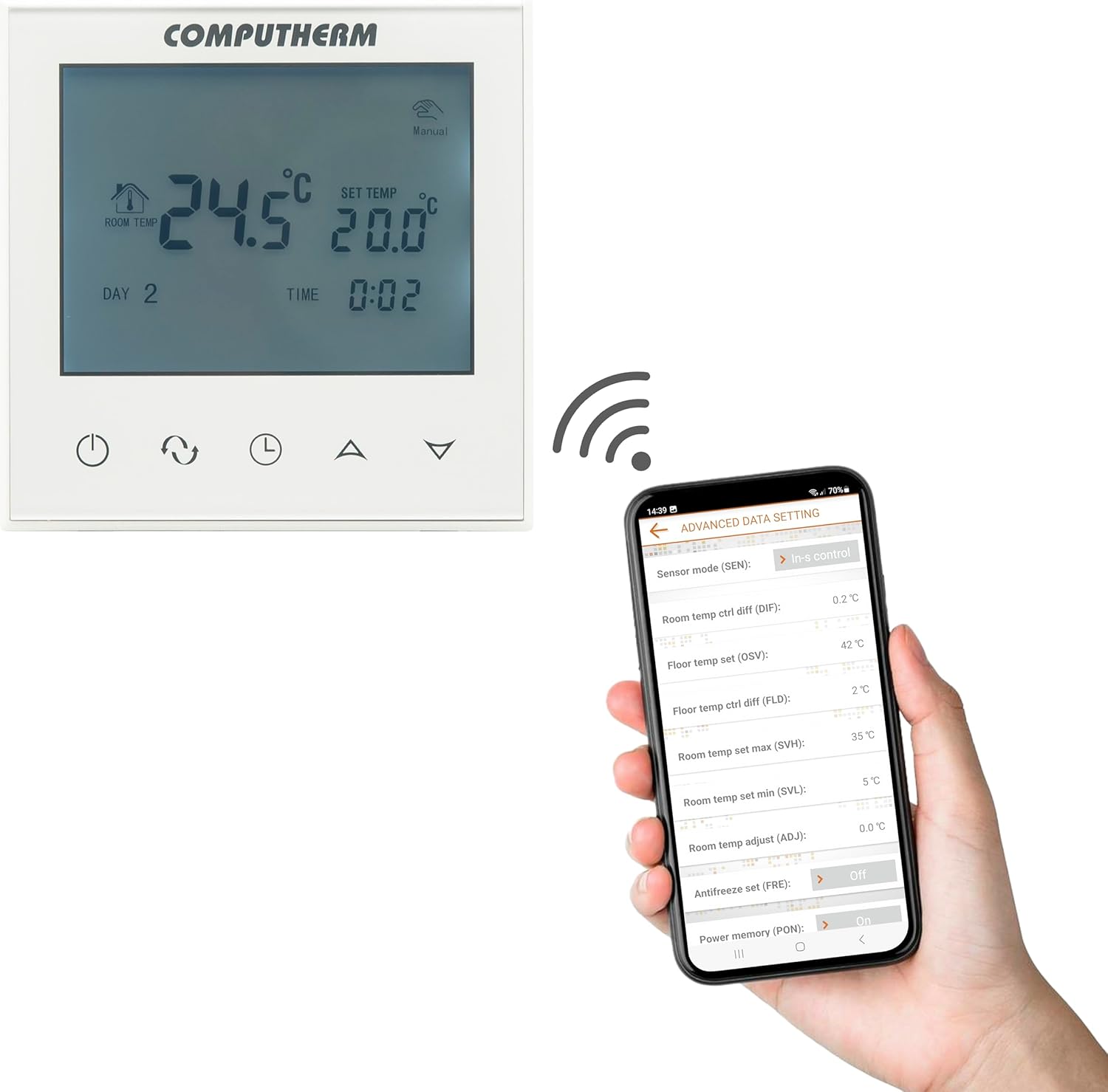
Image: A smartphone screen displaying the advanced settings interface of the Computherm E280 thermostat app, showing options like sensor mode, temperature differentials, and antifreeze settings.
- درجہ حرارت کی ایڈجسٹمنٹ: Easily change the set temperature from anywhere.
- شیڈولنگ: Create and modify weekly heating/cooling schedules.
- موڈ کا انتخاب: Switch between heating, cooling, and manual modes.
- اعلی درجے کی ترتیبات: Configure parameters such as temperature calibration, switching sensitivity, floor sensor limits, and antifreeze protection.
- نگرانی: View current room and floor temperatures, operating status, and historical data.
دیکھ بھال
The Computherm E280 thermostat requires minimal maintenance to ensure optimal performance.
- صفائی: Wipe the thermostat's display and casing with a soft, dry cloth. Avoid using abrasive cleaners, solvents, or chemical sprays, as these can damage the surface or internal components.
- سینسر چیک: Periodically ensure that the internal and external (floor) temperature sensors are free from obstructions or debris that could affect accurate readings.
- سافٹ ویئر اپ ڈیٹس: Keep the smartphone application updated to the latest version to benefit from new features and performance improvements. The thermostat's firmware may also receive updates via the app.
خرابی کا سراغ لگانا
If you encounter issues with your Computherm E280 thermostat, refer to the following common problems and solutions:
| مسئلہ | ممکنہ وجہ | حل |
|---|---|---|
| تھرموسٹیٹ ڈسپلے خالی ہے۔ | بجلی کی فراہمی نہیں ہے۔ | Check circuit breaker and wiring connections. Ensure power is restored. |
| Wi-Fi سے منسلک نہیں ہو سکتا۔ | غلط Wi-Fi پاس ورڈ، 5GHz نیٹ ورک، یا کمزور سگنل۔ | Verify Wi-Fi password. Ensure you are connecting to a 2.4 GHz network. Move thermostat closer to router or use a Wi-Fi extender. Restart thermostat and router. |
| حرارتی/کولنگ سسٹم جواب نہیں دے رہا ہے۔ | Incorrect wiring, system turned off, or thermostat in wrong mode. | Check wiring connections (refer to Setup section). Ensure heating/cooling system is powered on. Verify thermostat is in the correct operating mode (e.g., Heating). |
| درجہ حرارت کی غلط ریڈنگ۔ | Sensor obstruction, thermostat location, or calibration issue. | Ensure sensors are clear. Relocate thermostat if exposed to drafts/direct sunlight. Check app for temperature calibration options. |
If the problem persists, please contact Computherm customer support.
وضاحتیں
| فیچر | تفصیل |
|---|---|
| برانڈ | کمپیوٹر |
| ماڈل نمبر | E280 |
| رنگ | سفید |
| مواد | پلاسٹک |
| پروڈکٹ کے طول و عرض (L x W x H) | 1.7 x 8.6 x 8.6 سینٹی میٹر |
| شے کا وزن | 370 گرام |
| والیومtage | 240 Volts AC (max. 24V DC / 240V AC for relays) |
| طاقت کا منبع | کورڈڈ الیکٹرک |
| کنیکٹوٹی ٹیکنالوجی | Wi-Fi (b/g/n) 2.4 GHz |
| Temperature Measurement Range (Internal) | 0 °C - 50 °C (0.1 °C increments) |
| Temperature Measurement Range (Floor Sensor) | 0 °C - 99 °C (0.1 °C increments) |
| درجہ حرارت کی پیمائش کی درستگی | ± 0.5 °C |
| سایڈست درجہ حرارت کی حد | 5 °C - 99 °C (0.5 °C increments) |
| سوئچنگ حساسیت | ± 0.1 °C to ± 1.0 °C (0.1 °C increments) |
| Switchable Current (K1) | 8A (2A inductive load) |
| Switchable Current (K2) | 3A (1A inductive load) |
| Heat Sensor Type (Internal & Floor) | NTC 3950K 10kΩ at 25°C |
| خصوصی خصوصیات | Programmable, Wi-Fi Control, Floor Sensor Included |
| مخصوص استعمال | Radiator, Underfloor Heating |
وارنٹی اور سپورٹ
The Computherm E280 Wi-Fi Thermostat comes with a 2 سال کی وارنٹی خریداری کی تاریخ سے. یہ وارنٹی عام استعمال کے تحت مینوفیکچرنگ کے نقائص اور خرابیوں کا احاطہ کرتی ہے۔ وارنٹی کے دعووں کے لیے براہ کرم اپنی خریداری کا ثبوت اپنے پاس رکھیں۔
For technical support, troubleshooting assistance, or warranty inquiries, please contact your retailer or visit the official Computherm webرابطے کی معلومات کے لیے سائٹ۔