
1. تعارف
This manual provides essential information for the setup, operation, maintenance, and troubleshooting of your DELTACO GAMING WM87 Gaming Mouse. Please read these instructions carefully to ensure proper use and to maximize your gaming experience.
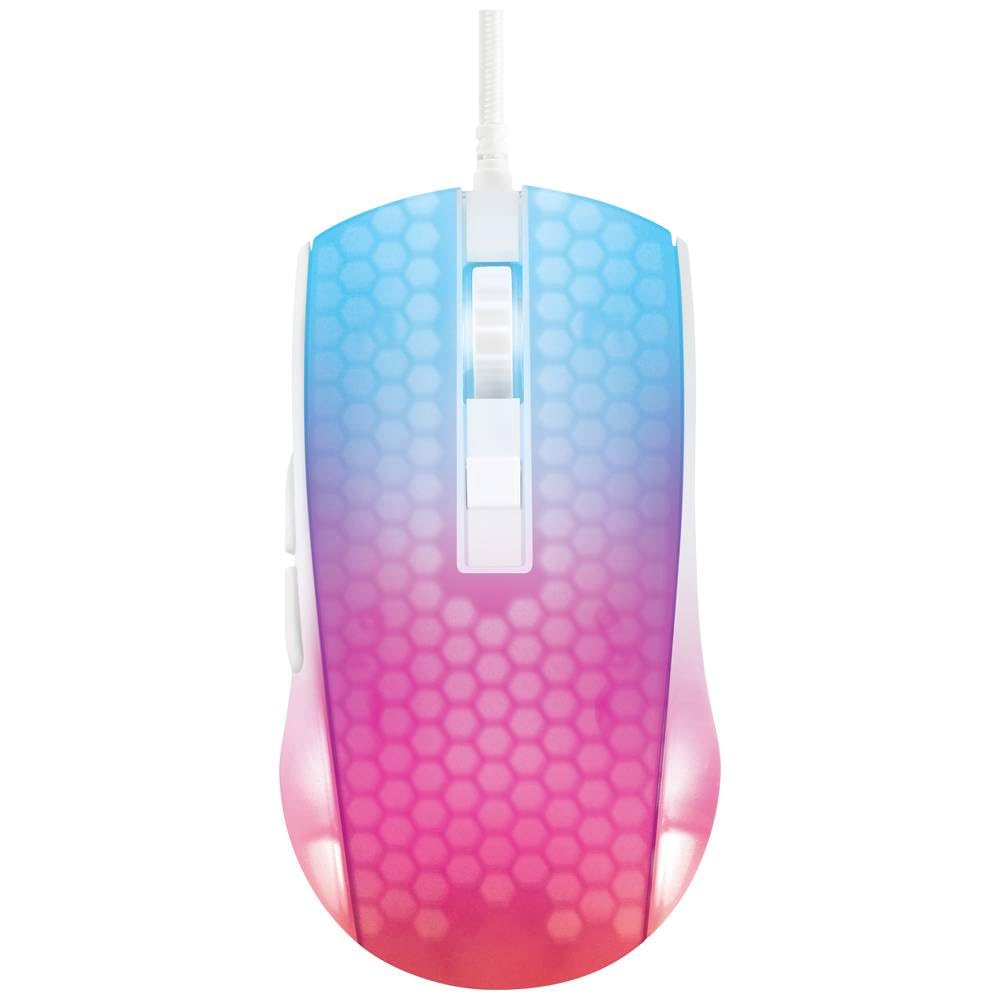
ایک اوور ہیڈ view of the DELTACO GAMING WM87 Gaming Mouse. The mouse features a translucent white body with an illuminated honeycomb pattern that transitions from blue at the front to pink and red at the rear. It has a scroll wheel and two main buttons, along with two side buttons visible on the left.
2. پروڈکٹ ختمview
The DELTACO GAMING WM87 is a high-performance gaming mouse designed for precision and comfort. It features a transparent design with integrated illumination, a high-accuracy optical sensor, and six programmable buttons.
اہم خصوصیات:
- کنیکٹوٹی: USB وائرڈ
- سینسر: Optical, up to 6200 DPI
- بٹن: 6 (Left, Right, Scroll Click, DPI Cycle, Forward, Back)
- ڈیزائن: Transparent shell with illuminated honeycomb pattern
- مطابقت: پرسنل کمپیوٹر، لیپ ٹاپ
3. سیٹ اپ ہدایات
- ماؤس کو کھولیں: Carefully remove the DELTACO GAMING WM87 mouse from its packaging.
- کمپیوٹر سے جڑیں: Locate an available USB port on your personal computer or laptop. Insert the USB connector of the mouse firmly into the USB port.
- ڈرائیور کی تنصیب: The mouse is plug-and-play. Your operating system should automatically detect and install the necessary drivers. No additional software installation is typically required for basic functionality.
- فعالیت کی تصدیق کریں: Once connected, move the mouse and click the buttons to ensure it is working correctly. The integrated illumination should light up.
4. آپریٹنگ ہدایات
بنیادی افعال:
- بائیں کلک: بنیادی کارروائی، انتخاب۔
- دائیں کلک کریں: سیاق و سباق کا مینو، ثانوی کارروائی۔
- اسکرول وہیل: Scroll up/down pages. Pressing the scroll wheel typically acts as a middle click.
- آگے/پیچھے بٹن: Located on the left side of the mouse, these buttons are commonly used for navigation in web براؤزر یا file متلاشی
ڈی پی آئی ایڈجسٹمنٹ:
The DELTACO GAMING WM87 mouse features adjustable DPI (Dots Per Inch) settings, allowing you to change the cursor sensitivity on the fly. A dedicated DPI button (often located behind the scroll wheel) cycles through preset DPI levels up to 6200 DPI. Press this button to adjust the sensitivity to your preference.
روشنی:
The mouse features integrated illumination. The lighting pattern and colors are typically pre-programmed and may change based on DPI settings or automatically cycle through colors. Refer to any potential software for advanced customization, if available.
5 دیکھ بھال
- صفائی: ماؤس کے بیرونی حصے کو صاف کرنے کے لیے نرم، خشک، لنٹ سے پاک کپڑا استعمال کریں۔ ضدی گندگی کے لیے، قدرے ڈیampen the cloth with water. Avoid using harsh chemicals, solvents, or abrasive materials.
- سینسر کی صفائی: Occasionally, dust or debris may accumulate around the optical sensor on the underside of the mouse. Use a cotton swab or compressed air to gently clean the sensor area.
- ذخیرہ: جب استعمال میں نہ ہو تو ماؤس کو انتہائی درجہ حرارت اور براہ راست سورج کی روشنی سے دور صاف، خشک ماحول میں محفوظ کریں۔
- کیبل کی دیکھ بھال: نقصان سے بچنے کے لیے USB کیبل کو ضرورت سے زیادہ موڑنے یا موڑنے سے گریز کریں۔
6 خرابیوں کا سراغ لگانا
- ماؤس جواب نہیں دے رہا ہے:
- یقینی بنائیں کہ USB کیبل محفوظ طریقے سے کام کرنے والے USB پورٹ میں لگائی گئی ہے۔
- اپنے کمپیوٹر پر ماؤس کو ایک مختلف USB پورٹ میں لگانے کی کوشش کریں۔
- اپنے کمپیوٹر کو دوبارہ شروع کریں۔
- بے ترتیب کرسر کی حرکت:
- ماؤس کے نیچے والے آپٹیکل سینسر کو صاف کریں۔
- یقینی بنائیں کہ آپ ماؤس کو مناسب سطح پر استعمال کر رہے ہیں (مثلاً ماؤس پیڈ)۔ انتہائی عکاس یا شفاف سطحوں سے پرہیز کریں۔
- Illumination Not Working:
- USB کنکشن چیک کریں۔
- If the mouse has a dedicated lighting control button or software, ensure it is enabled.
7. وضاحتیں
| فیچر | تفصیل |
|---|---|
| برانڈ | ڈیلٹاکو گیمنگ |
| ماڈل نمبر | GAM-144-W (WM87) |
| کنیکٹوٹی ٹیکنالوجی | یو ایس بی |
| موومنٹ ڈیٹیکشن ٹکنالوجی | آپٹیکل |
| بٹنوں کی تعداد | 6 |
| ڈی پی آئی | 6200 تک |
| ہاتھ کی واقفیت | ٹھیک ہے۔ |
| تجویز کردہ پروڈکٹ کا استعمال | گیمنگ |
| ہم آہنگ آلات | لیپ ٹاپ، پرسنل کمپیوٹر |
| مصنوعات کے طول و عرض | 180 x 0.07 x 0.12 cm (Note: These dimensions appear to be for the cable or packaging, not the mouse itself. Please refer to product packaging for accurate mouse dimensions.) |
| وزن | Approximately 65 Grams (Lithium battery weight, likely referring to overall mouse weight if no battery is present) |
| پہلی دستیاب تاریخ | 16 ستمبر 2023 |
8. وارنٹی اور سپورٹ
For warranty information, technical support, or service inquiries regarding your DELTACO GAMING WM87 Gaming Mouse, please refer to the warranty card included with your product or visit the official DELTACO GAMING webسائٹ وارنٹی کے دعووں کے لیے اپنی خریداری کا ثبوت رکھیں۔