
SUNOL K8
GM20 True Wireless Earbuds User Manual
ماڈل: K8
تعارف
Thank you for choosing the SUNOL GM20 True Wireless Earbuds. This manual provides detailed instructions on how to set up, operate, and maintain your earbuds to ensure optimal performance and longevity. Please read this manual thoroughly before using the product.
پروڈکٹ ختمview

Image: The GM20 True Wireless Earbuds in orange, shown with their matching charging case. The charging case features an LED display indicating battery percentage.
The GM20 True Wireless Earbuds are designed for a superior audio experience with advanced features:
- بلوٹوتھ 5.3 ٹیکنالوجی: Ensures faster pairing, more stable connection, and lower power consumption with an effective range of up to 10 meters.
- انٹیگریٹڈ مائیکروفون: High-quality microphone with environmental noise reduction for clear hands-free calls.
- توسیعی پلے بیک: Up to 48 hours of total playback time with the 600mAh charging case, which can recharge the earbuds four times.
- ایل ای ڈی ڈسپلے: The charging case features an LED display to show the power levels of both the earbuds and the charging case.
- پنروک ڈیزائن: IPX8 waterproof nano-coating makes the earbuds suitable for various activities, including sports.
- آرام دہ فٹ: Ergonomic in-ear design with multiple ear tip sizes for prolonged comfortable wear.
باکس میں کیا ہے۔
Upon opening your GM20 True Wireless Earbuds package, you should find the following items:
- GM20 True Wireless Earbuds (Left and Right)
- چارجنگ کیس
- چارجنگ کیبل
- Multiple sizes of Ear Tips
- صارف دستی (یہ دستاویز)
سیٹ اپ
1. ایئربڈز اور کیس کو چارج کرنا
پہلے استعمال سے پہلے، یقینی بنائیں کہ ایئربڈز اور چارجنگ کیس دونوں پوری طرح سے چارج ہیں۔
- Place the earbuds into the charging case. Ensure they are correctly seated; the LED display on the case will show charging status.
- Connect the charging cable to the charging port on the case and to a USB power source. The LED display will indicate the charging progress of the case.
- A full charge for the case typically takes a few hours. The earbuds will charge automatically when placed inside the powered case.

Image: The GM20 charging case displaying "100" on its LED screen, indicating a full charge. An earbud is shown next to it, ready for use.
2. آپ کے آلے کے ساتھ جوڑا بنانا (ایک قدمی جوڑا بنانا)
The GM20 earbuds feature automatic pairing for convenience.
- ابتدائی جوڑا:
- Open the charging case and take out both earbuds. They will automatically power on and enter pairing mode.
- اپنے آلے پر (اسمارٹ فون، ٹیبلیٹ وغیرہ)، بلوٹوتھ کو فعال کریں۔
- تلاش کریں۔ Bluetooth devices and select "GM20 TWS" from the list.
- ایک بار منسلک ہونے کے بعد، آپ کو ایک تصدیقی ٹون سنائی دے گا، اور ایئربڈز استعمال کے لیے تیار ہو جائیں گے۔
- دوبارہ جوڑا بنانا: The earbuds will automatically connect to the last paired device when taken out of the charging case.
- If the earbuds do not connect automatically, ensure Bluetooth is enabled on your device and select "GM20 TWS" from your Bluetooth settings.
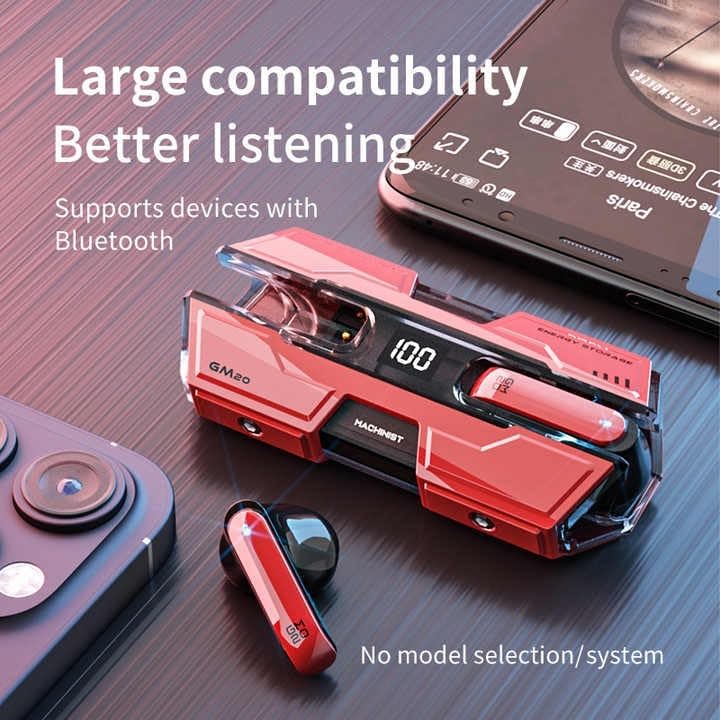
Image: The GM20 earbuds and charging case positioned near a smartphone, emphasizing their broad compatibility with Bluetooth-enabled devices.
آپریٹنگ ہدایات
ایئربڈ کنٹرولز
The GM20 earbuds feature a multifunction button on each earbud for easy control of audio playback and calls.
| ایکشن | فنکشن |
|---|---|
| Single Press (Left/Right Earbud) | میوزک چلائیں/روکیں، کال کا جواب دیں/ختم کریں۔ |
| ڈبل دبائیں (بائیں ایئربڈ) | پچھلا گانا |
| ڈبل دبائیں (دائیں ایئربڈ) | اگلا گانا |
| لانگ پریس (2 سیکنڈ) | کال کو مسترد کریں، وائس اسسٹنٹ کو فعال کریں۔ |
| لانگ پریس (5 سیکنڈ) | پاور آن/آف |
ایئربڈز پہننا
For optimal sound quality and comfort, ensure the earbuds are properly seated in your ears. Experiment with the different sizes of ear tips provided to find the best fit for your ears.

تصویر: ایک دھماکہ view diagram of an earbud, illustrating its internal components such as the 13mm moving coil and composite diaphragm, which contribute to high-resolution sound.
دیکھ بھال
Proper maintenance will extend the life of your GM20 earbuds.
- صفائی: ائیر بڈز اور چارجنگ کیس کو نرم، خشک، لنٹ سے پاک کپڑے سے باقاعدگی سے صاف کریں۔ کھرچنے والے کلینر یا سالوینٹس کا استعمال نہ کریں۔
- پانی کی مزاحمت: The earbuds are IPX8 waterproof, meaning they are protected against prolonged immersion in water. However, the charging case is not waterproof. Avoid exposing the charging case to liquids. Always ensure earbuds are dry before placing them back in the charging case.
- ذخیرہ: استعمال میں نہ ہونے پر، ایئربڈز کو ان کے چارجنگ کیس میں محفوظ کریں تاکہ ان کی حفاظت ہو اور انہیں چارج کیا جا سکے۔ انتہائی درجہ حرارت سے دور ٹھنڈی، خشک جگہ پر اسٹور کریں۔
- بیٹری کی دیکھ بھال: بیٹری کی زندگی کو محفوظ رکھنے کے لیے، ایئربڈز کو مکمل طور پر ڈسچارج کرنے اور کیس کو بار بار چارج کرنے سے گریز کریں۔ انہیں باقاعدگی سے چارج کریں، چاہے مسلسل استعمال میں نہ ہوں۔
خرابی کا سراغ لگانا
If you encounter issues with your GM20 earbuds, try the following solutions:
- ایئربڈس جوڑا نہیں بن رہے ہیں:
- یقینی بنائیں کہ دونوں ایئربڈس پوری طرح سے چارج ہیں۔
- اپنے آلے پر بلوٹوتھ کو آف کریں، پھر اسے دوبارہ آن کریں۔
- Forget "GM20 TWS" from your device's Bluetooth settings and attempt to re-pair.
- ایئربڈز کو کیس میں واپس رکھیں، ڈھکن بند کریں، چند سیکنڈ انتظار کریں، پھر کھولیں اور دوبارہ کوشش کریں۔
- کوئی آواز یا کم والیوم نہیں:
- اپنے آلے اور ایئربڈز دونوں پر والیوم لیول چیک کریں۔
- یقینی بنائیں کہ ایئربڈز آپ کے آلے سے صحیح طریقے سے جڑے ہوئے ہیں۔
- ایئربڈ اسپیکر میش سے کسی بھی ملبے کو صاف کریں۔
- Sound distortion or crackling:
- یقینی بنائیں کہ ایئربڈز آپ کے آلے کی 10 میٹر بلوٹوتھ رینج کے اندر ہیں۔
- دوسرے وائرلیس آلات یا مضبوط برقی مقناطیسی فیلڈز سے دور ہٹ کر مداخلت کو کم کریں۔
- ایئربڈز کو دوبارہ جوڑنے کی کوشش کریں۔
- ایئربڈز چارج نہیں ہو رہے ہیں:
- یقینی بنائیں کہ چارجنگ کیبل کیس اور پاور سورس دونوں سے محفوظ طریقے سے جڑی ہوئی ہے۔
- چیک کریں کہ آیا کیس پر چارجنگ پورٹ صاف اور ملبے سے پاک ہے۔
- ایک مختلف چارجنگ کیبل یا پاور اڈاپٹر آزمائیں۔
وضاحتیں
| فیچر | تفصیل |
|---|---|
| ماڈل کا نام | K8 |
| بلوٹوتھ ورژن | 5.3 |
| بلوٹوتھ رینج | 10 میٹر |
| بیٹری لائف (ایئر بڈز) | Approx. 8-10 hours (single charge) |
| بیٹری کی زندگی (چارجنگ کیس کے ساتھ) | 48 گھنٹے تک |
| چارجنگ کیس بیٹری کی صلاحیت | 600mAh |
| پانی کی مزاحمت کی سطح | IPX8 (صرف ایئربڈز) |
| تعدد رسپانس | 20 Hz - 20 KHz |
| رکاوٹ | 32 اوہم |
| کنٹرول کا طریقہ | ٹچ/بٹن |
| مواد | Acrylonitrile Butadiene Styrene (ABS) |
| شے کا وزن | 14.4 اونس (کل پیکج) |
وارنٹی اور سپورٹ
For warranty information and customer support, please refer to the documentation included with your purchase or visit the official SUNOL website. If you experience any issues not covered in this manual, please contact SUNOL customer service for assistance.
وارنٹی کے دعووں کے لیے براہ کرم اپنی خریداری کا ثبوت اپنے پاس رکھیں۔
Ask a question about this manual
Ask about setup, troubleshooting, compatibility, parts, safety, or missing instructions. Manuals+ will review the question and use this page’s manual context to help answer it.