
تعارف
Thank you for choosing the HyperGear Stealth2 ANC Wireless Headphones. This manual provides detailed instructions for setting up, operating, and maintaining your headphones to ensure optimal performance and longevity. Please read this manual thoroughly before use.

Image: HyperGear Stealth2 ANC Wireless Headphones, Bone color, showcasing key features like Active Noise Cancelling, 40mm Neodymium Drivers, Deep HD Stereo Sound, up to 24-hour playing time, rapid charge, and lightweight foldable design.
پیکیج کے مشمولات
تصدیق کریں کہ تمام اشیاء پیکیج میں موجود ہیں:
- HyperGear Stealth2 ANC Wireless Headphones
- USB-C چارجنگ کیبل
- صارف دستی (یہ دستاویز)
پروڈکٹ ختمview
Familiarize yourself with the various components and controls of your headphones.

Image: Detailed diagram of the HyperGear Stealth2 ANC Wireless Headphones, highlighting the on-ear controls. Labels include Power On/Off, Enter Pairing Mode, Volume Up/Next Track, Play/Pause/Answer/End Call, Reject Call, Activate Voice Assistant, Gaming Mode On/Off, Volume Down/Previous Track, and Active Noise Cancellation On/Off. Also shows Quick Pairing and Auto Reconnection features.
کان پر کنٹرول:
- پاور بٹن: Press and hold to power on/off. Press and hold to enter pairing mode.
- والیوم اپ / نیکسٹ ٹریک بٹن: حجم بڑھانے کے لیے دبائیں۔ اگلے ٹریک پر جانے کے لیے دبائے رکھیں۔
- Multi-function Button (Play/Pause): Press to play/pause audio. Press to answer/end calls. Press and hold to reject calls. Double-press to activate voice assistant. Triple-press to toggle Gaming Mode.
- والیوم کم / پچھلا ٹریک بٹن: والیوم کو کم کرنے کے لیے دبائیں۔ پچھلے ٹریک پر جانے کے لیے دبائے رکھیں۔
- ANC بٹن: Press to toggle Active Noise Cancellation on/off.
سیٹ اپ
1. ہیڈ فون چارج کرنا
پہلے استعمال سے پہلے، اپنے ہیڈ فون کو مکمل چارج کریں۔
- فراہم کردہ USB-C چارجنگ کیبل کو ہیڈ فون پر چارجنگ پورٹ سے جوڑیں۔
- کیبل کے دوسرے سرے کو USB پاور سورس سے جوڑیں (مثلاً وال اڈاپٹر، کمپیوٹر USB پورٹ)۔
- The LED indicator will show charging status. It typically takes about 2 hours for a full charge.
- A 10-minute rapid charge can provide approximately 3 hours of playback.

Image: A person wearing HyperGear Stealth2 ANC Wireless Headphones on an airplane, illustrating battery life: 18 hours with ANC on, 24 hours with ANC off. Also highlights rapid charge: 10 minutes of charging provides 3 hours of playback.
2. بلوٹوت جوڑی بنانا
Pair your headphones with your device for wireless audio.
- یقینی بنائیں کہ ہیڈ فون چارج اور پاور آف ہیں۔
- پاور بٹن کو دبائیں اور پکڑے رکھیں جب تک کہ LED اشارے نیلے اور سرخ نہ ہو جائیں، جو جوڑی کے موڈ کی نشاندہی کرتے ہیں۔
- اپنے آلے پر (اسمارٹ فون، ٹیبلیٹ، کمپیوٹر)، بلوٹوتھ کو فعال کریں اور دستیاب آلات تلاش کریں۔
- Select "HyperGear Stealth2" from the list of found devices.
- Once connected, the LED indicator will show a solid blue light or flash slowly.
فوری جوڑا بنانا: The headphones are designed for instant connection with your device in seconds after initial pairing.
آٹو سے رابطہ: The headphones will remember and automatically reconnect to the last paired device when powered on and within range.
آپریٹنگ ہدایات
پاور آن/آف
- پاور آن کرنے کے لیے، LED انڈیکیٹر روشن ہونے تک پاور بٹن کو دبائے رکھیں۔
- پاور آف کرنے کے لیے، پاور بٹن کو دبائے رکھیں جب تک کہ LED اشارے بند نہ ہو جائے۔
فعال شور منسوخ کرنا (این این سی)
- Press the dedicated ANC button to toggle Active Noise Cancellation on or off.
- When ANC is active, ambient noise is significantly reduced, providing a quieter listening experience.
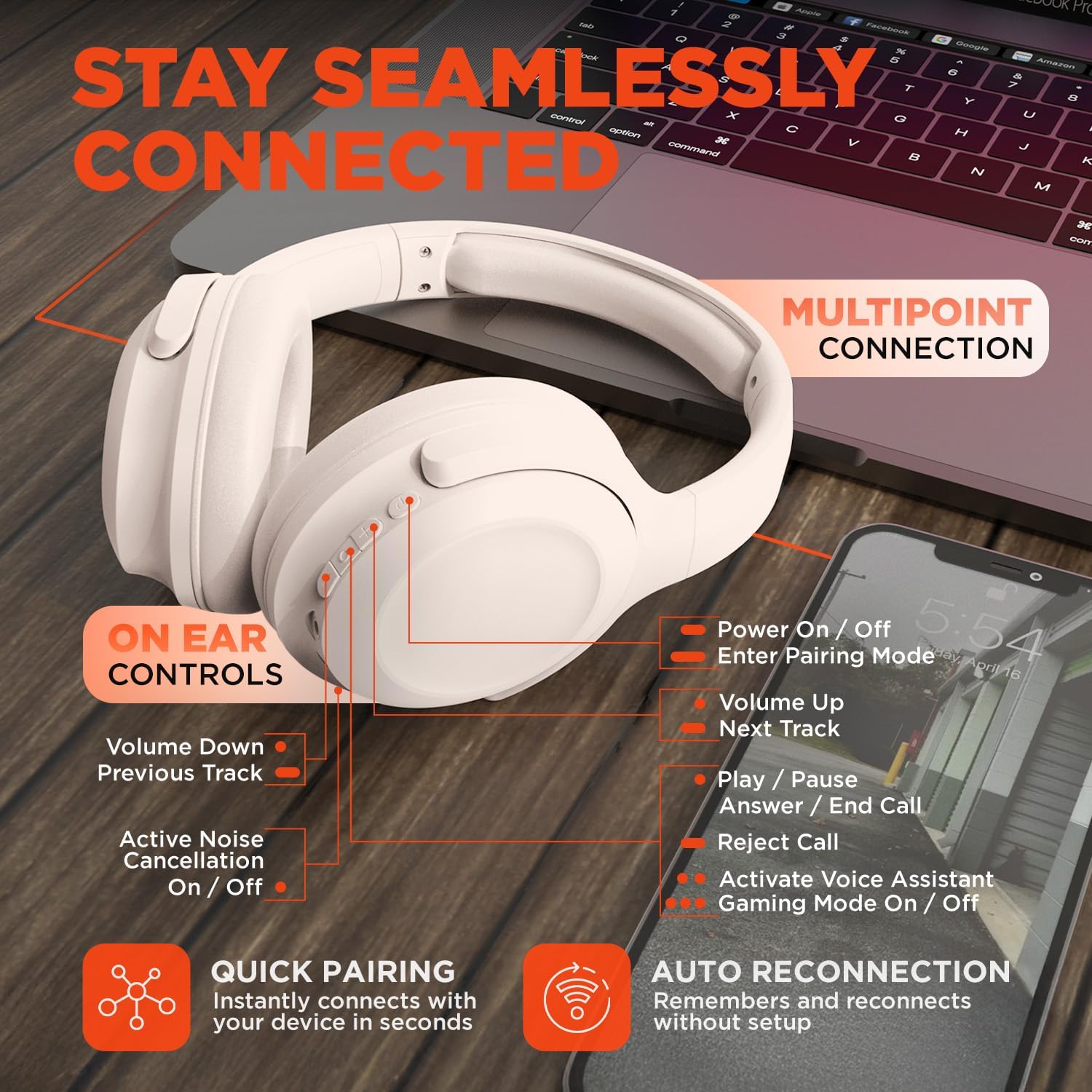
Image: HyperGear Stealth2 ANC Wireless Headphones highlighting "Pure Sound Anywhere" with Dual ANC Microphones for blocking unwanted noise and Adaptive Sound Control for real-time environment adjustment. Also shows compatibility with Siri and Google Assistant, and use cases for exercise, gaming, and travel.
آڈیو پلے بیک اور کالز
- چلائیں/روکیں: ایک بار ملٹی فنکشن بٹن دبائیں۔
- اگلا ٹریک: والیوم اپ بٹن کو دبائیں اور تھامیں۔
- پچھلا ٹریک: والیوم ڈاؤن کے بٹن کو دبائے رکھیں۔
- حجم کنٹرول: والیوم اپ یا والیوم ڈاون بٹن دبائیں۔
- جواب / کال ختم کریں: ایک بار ملٹی فنکشن بٹن دبائیں۔
- کال مسترد کریں: ملٹی فنکشن بٹن کو دبائیں اور تھامیں۔
وائس اسسٹنٹ
- Double-press the Multi-function button to activate your device's voice assistant (Siri, Google Assistant, etc.).
گیمنگ موڈ
- Triple-press the Multi-function button to toggle the no-lag Gaming Mode. This mode optimizes audio synchronization for enhanced gameplay.
ملٹی پوائنٹ کنکشن
The headphones support multipoint connection, allowing them to be connected to two Bluetooth devices simultaneously.
- ہیڈ فون کو پہلے ڈیوائس کے ساتھ جوڑیں جیسا کہ "بلوٹوتھ پیئرنگ" سیکشن میں بیان کیا گیا ہے۔
- پہلے ڈیوائس پر بلوٹوتھ کو غیر فعال کریں۔
- Put the headphones back into pairing mode and pair them with the second device.
- پہلے ڈیوائس پر بلوٹوتھ کو دوبارہ فعال کریں۔ ہیڈ فون اب دونوں ڈیوائسز سے منسلک ہونا چاہیے۔
- Audio will play from the device that is actively playing content.

Image: HyperGear Stealth2 ANC Wireless Headphones positioned between a laptop and a smartphone, demonstrating the multipoint connection feature. This allows the headphones to stay seamlessly connected to multiple devices.
دیکھ بھال
مناسب دیکھ بھال آپ کے ہیڈ فون کی لمبی عمر اور کارکردگی کو یقینی بناتی ہے۔
- Keep the headphones dry. Do not expose them to water or excessive moisture. They are not water resistant.
- Clean the earcups and headband with a soft, dry cloth. Avoid using harsh chemicals or abrasive materials.
- استعمال میں نہ ہونے پر ہیڈ فونز کو ٹھنڈی، خشک جگہ پر رکھیں۔ فولڈ ایبل ڈیزائن کمپیکٹ اسٹوریج کی اجازت دیتا ہے۔
- انتہائی درجہ حرارت سے پرہیز کریں۔
- ہیڈ فون کو الگ کرنے یا ان میں ترمیم کرنے کی کوشش نہ کریں، کیونکہ اس سے وارنٹی ختم ہو جائے گی۔
خرابی کا سراغ لگانا
اگر آپ کو مسائل درپیش ہیں تو درج ذیل عام حلوں کا حوالہ دیں۔
| مسئلہ | حل |
|---|---|
| ہیڈ فون آن نہیں ہوں گے۔ | یقینی بنائیں کہ ہیڈ فون پوری طرح سے چارج ہیں۔ USB-C کیبل کا استعمال کرتے ہوئے پاور سورس سے جڑیں۔ |
| کسی آلے کے ساتھ جوڑا نہیں بنایا جا سکتا۔ |
|
| کوئی آواز یا کم والیوم نہیں۔ |
|
| ANC مؤثر نہیں ہے۔ |
|
وضاحتیں
| فیچر | تفصیل |
|---|---|
| ماڈل کا نام | HyperGear Stealth2 ANC Headphones |
| ماڈل نمبر | 15860 |
| کنیکٹوٹی ٹیکنالوجی | وائرلیس (بلوٹوتھ) |
| بلوٹوتھ ورژن | 5.2 |
| بلوٹوتھ رینج | 10 میٹر |
| آڈیو ڈرائیور کا سائز | 40 ملی میٹر |
| تعدد کی حد | 20 Hz - 20,000 Hz |
| شور کنٹرول | فعال شور منسوخی |
| بیٹری کی زندگی | 24 گھنٹے تک (ANC آف) |
| چارج کرنے کا وقت | 2 گھنٹے |
| چارجنگ پورٹ | USB-C |
| مواد | پلاسٹک |
| شے کا وزن | 0.38 کلوگرام (13.3 اونس) |
| مصنوعات کے طول و عرض | 7.88 x 2.25 x 10.51 انچ |
| پانی کی مزاحمت کی سطح | پانی مزاحم نہیں |
| یو پی سی | 633755158605 |
وارنٹی اور سپورٹ
HyperGear products are designed for reliability and performance. For warranty information and customer support, please refer to the warranty card included with your purchase or visit the official HyperGear webسائٹ
واپسی کی پالیسی: This product typically includes a 30-day return policy for refunds or replacements. Please check your purchase details for specific terms.
مینوفیکچرر: ہائپر گیئر