
1. اہم حفاظتی معلومات
Please read all instructions carefully before using the EVTSCAN Projection Clock. Keep this manual for future reference.
- ڈیوائس کو انتہائی درجہ حرارت، براہ راست سورج کی روشنی، یا زیادہ نمی کے سامنے نہ رکھیں۔
- گھڑی کو گرانے یا اسے مضبوط اثرات سے مشروط کرنے سے گریز کریں۔
- آلہ کو خود سے جدا کرنے یا مرمت کرنے کی کوشش نہ کریں۔ اہل سروس کے اہلکاروں سے رابطہ کریں۔
- Use only the specified power adapter (DC 5.0V, 1.2A) or appropriate batteries (2xAAA, not included).
- بچوں کی پہنچ سے دور رکھیں۔
2. پروڈکٹ ختمview
The EVTSCAN Projection Clock is a versatile digital alarm clock featuring a 3-inch backlit LCD screen that displays time, date, day of the week, temperature, and humidity. It includes a projection function to display time and temperature on a wall or ceiling, dual alarms with snooze, and a USB port for charging mobile phones.
اہم خصوصیات:
- 12/24-hour time format display.
- Date and day of the week display (7 languages for week).
- Temperature detection (-9℃ to +50℃) and humidity detection (20% to 95%).
- Projection function with 180-degree rotation for time and temperature.
- Dual alarm clocks with slowly increasing حجم
- 5 منٹ کا اسنوز فنکشن۔
- موبائل آلات کے لیے USB چارجنگ پورٹ۔
- Adjustable backlight with 4 levels (high, medium, low, off).

تصویر 2.1: سامنے والا view of the EVTSCAN Projection Clock, showing the LCD display and projection lens.
3. پیکیج کے مشمولات
پیک کھولنے پر، براہ کرم یقینی بنائیں کہ ذیل میں دی گئی تمام اشیاء موجود ہیں اور اچھی حالت میں ہیں:
- 1 x EVTSCAN Projection Clock
- 1 ایکس USB کیبل
- 1 ایکس انگریزی صارف دستی
Note: 2xAAA batteries are required for battery power and are not included in the package.
4. سیٹ اپ
4.1 ڈیوائس کو پاور کرنا
The EVTSCAN Projection Clock can be powered by either AAA batteries or via the included USB cable.
4.1.1 بیٹری کی تنصیب
- گھڑی کے پچھلے حصے میں بیٹری کے ٹوکری کا احاطہ تلاش کریں۔
- Slide open the cover.
- درست قطبیت (+/-) کو یقینی بناتے ہوئے دو (2) AAA بیٹریاں داخل کریں۔
- بیٹری کے کمپارٹمنٹ کور کو محفوظ طریقے سے بند کریں۔
Note: When powered by batteries, the backlight will only light up for 8 seconds when activated to conserve power. The projection lamp will also light up for 8 seconds.
4.1.2 USB Power Connection
- Connect the small end of the provided USB cable to the DC 5.0V 1.2A input port on the back of the clock.
- Connect the larger end of the USB cable to a compatible USB power adapter (not included) or a powered USB port.
Note: When powered by USB, the backlight and projection lamp can remain continuously on, with adjustable brightness for the backlight.
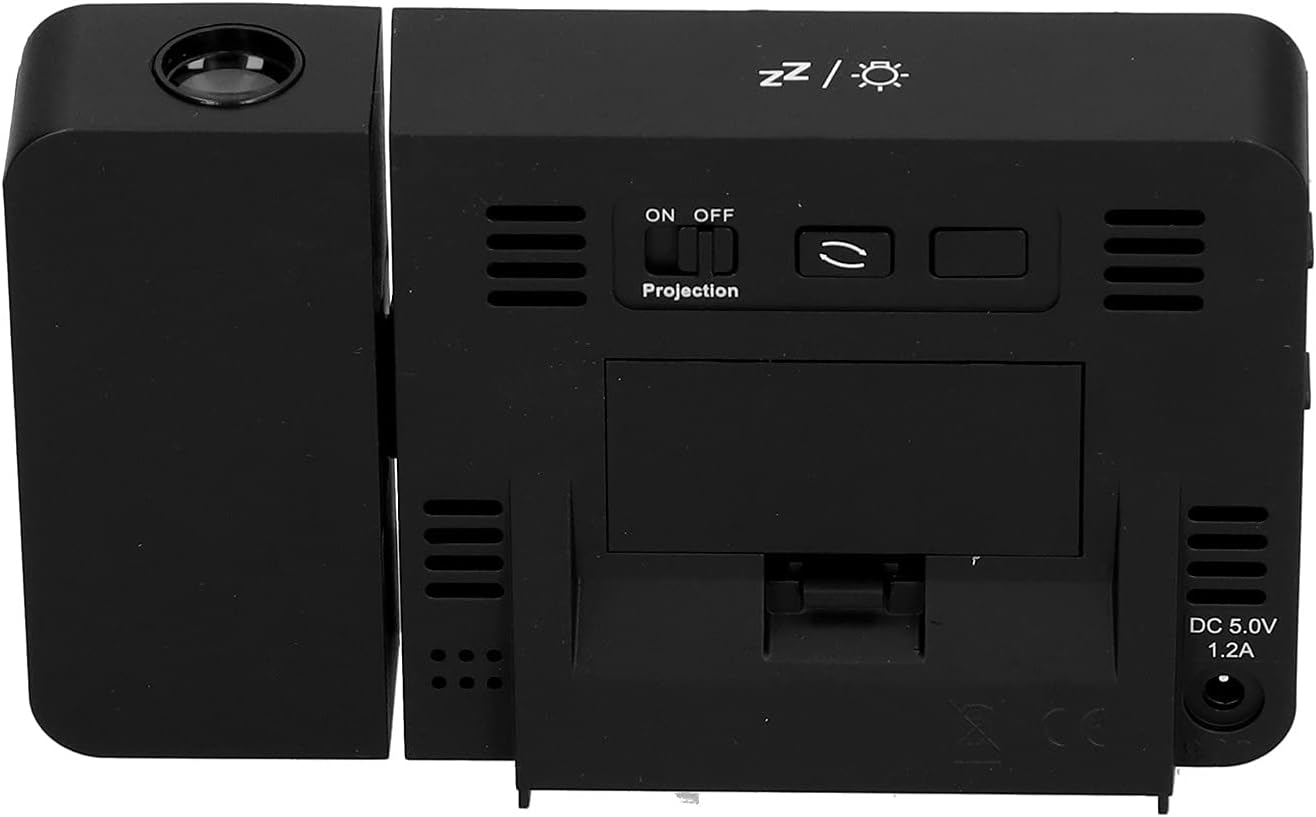
تصویر 4.1: پیچھے view of the clock, indicating the battery compartment and DC 5.0V 1.2A power input.
5. آپریٹنگ ہدایات
5.1 بٹن کے افعال
Familiarize yourself with the control buttons located on the front and sides of the clock:
- وقت: ٹائم سیٹنگ موڈ میں داخل ہوتا ہے۔
- الارم: الارم سیٹنگ موڈ میں داخل ہوتا ہے۔
- +: Increases values, switches 12/24HR format, adjusts backlight.
- -: Decreases values, switches temperature units (℃/℉).
- Projection ON/OFF Switch: Activates or deactivates the projection. (Located on the back/side)
- Alarm 1 ON/OFF Switch: Activates or deactivates Alarm 1. (Located on the side)
- Alarm 2 ON/OFF Switch: Activates or deactivates Alarm 2. (Located on the side)
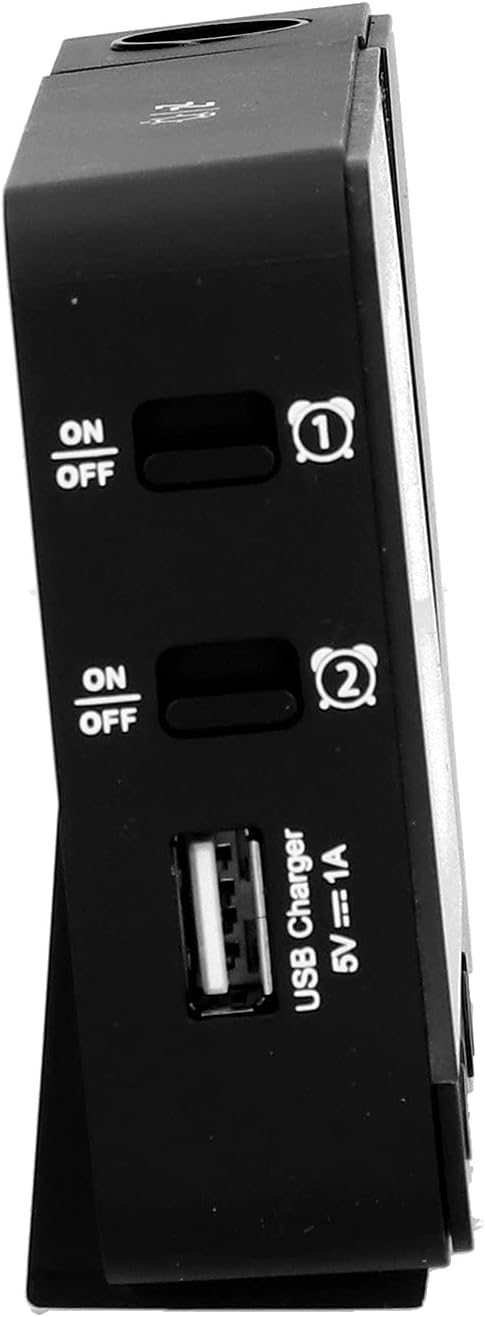
تصویر 5.1: طرف view showing Alarm 1 and Alarm 2 ON/OFF switches, and the USB charging port.
5.2 وقت اور تاریخ کی ترتیب
- دبائیں اور تھامیں۔ TIME button to enter time setting mode. The hour display will flash.
- استعمال کریں۔ + or - گھنٹے کو ایڈجسٹ کرنے کے لیے بٹن۔
- دبائیں TIME again to confirm the hour and move to minute setting. Adjust with + or -.
- دبانا جاری رکھیں TIME to cycle through setting year, month, and day. Adjust each with + or -.
- دن مقرر کرنے کے بعد، دبائیں TIME سیٹنگ موڈ سے باہر نکلنے کے لیے ایک آخری بار۔
- 12-hour اور 24-hour فارمیٹ کے درمیان سوئچ کرنے کے لیے، دبائیں۔ + button during normal time display.
- To switch between Celsius (℃) and Fahrenheit (℉) for temperature, press the - button during normal time display.
5.3 الارم سیٹ کرنا
گھڑی میں دو آزاد الارم ہیں (الارم 1 اور الارم 2)۔
- دبائیں اور تھامیں۔ الارم button to enter Alarm 1 setting mode. The Alarm 1 hour display will flash.
- استعمال کریں۔ + or - الارم گھنٹے کو ایڈجسٹ کرنے کے بٹن۔
- دبائیں الارم again to confirm the hour and move to Alarm 1 minute setting. Adjust with + or -.
- دبائیں الارم again to move to Alarm 2 hour setting, and repeat the process for Alarm 2.
- After setting Alarm 2 minutes, press الارم سیٹنگ موڈ سے باہر نکلنے کے لیے ایک آخری بار۔
- To activate or deactivate an alarm, use the corresponding الارم 1 آن/آف or الارم 2 آن/آف switch on the side of the clock. An alarm icon will appear on the display when active.
5.3.1 اسنوز فنکشن۔
When an alarm sounds, press any button (except the alarm ON/OFF switch) to activate the 5-minute snooze function. The alarm will sound again after 5 minutes. To turn off the alarm completely, slide the corresponding alarm ON/OFF switch to OFF.
5.4 پروجیکشن فنکشن
The clock can project the time and temperature onto a wall or ceiling.
- تلاش کریں۔ پروجیکشن آن/آف switch on the back of the clock. Slide it to ON to activate the projection.
- Adjust the angle of the projection arm (the part with the lens) to direct the projection as desired. The arm can rotate nearly 180 degrees.
- The projection will display the current time and temperature in a soft red color.

تصویر 5.2: طرف view showing the projection arm extended and ready for use.

تصویر 5.3: The clock projecting time and temperature onto a wall in a bedroom setting.
5.5 بیک لائٹ ایڈجسٹمنٹ
When the clock is powered by USB, the backlight can be adjusted to four levels: high, medium, low, or off. Repeatedly press the + button during normal time display to cycle through the brightness levels.
When powered by batteries, the backlight will illuminate for 8 seconds when any button is pressed, then turn off to conserve power.
5.6 USB چارجنگ پورٹ
The clock features a USB charging port (5V=1A) on its side. You can use this port to charge your mobile phone or other small electronic devices while the clock is connected to USB power.
Note: The USB charging port only functions when the clock is powered via the USB cable. It does not work when the clock is running on battery power.
6 دیکھ بھال
6.1 صفائی
- گھڑی کی سطح کو نرم، خشک کپڑے سے صاف کریں۔
- Do not use abrasive cleaners, solvents, or chemical sprays, as these may damage the finish or electronic components.
- Keep the projection lens clean for clear projection. Use a soft, lint-free cloth.
6.2 بیٹری کی تبدیلی
When the display becomes dim or the clock functions erratically while on battery power, it's time to replace the AAA batteries. Refer to Section 4.1.1 for battery installation instructions. Always replace both batteries at the same time with new ones.
7 خرابیوں کا سراغ لگانا
| مسئلہ | ممکنہ وجہ | حل |
|---|---|---|
| گھڑی کا ڈسپلے خالی یا مدھم ہے۔ | No power, low batteries, or USB cable not connected. | Check battery installation and replace if necessary. Ensure USB cable is securely connected to a power source. |
| Projection is unclear or not visible. | Projection switch is OFF, lens is dirty, or projection distance is too far/close. | Ensure Projection switch is ON. Clean the projection lens. Adjust the clock's distance from the projection surface. |
| الارم نہیں بجتا ہے۔ | Alarm is not set or is deactivated. | Verify alarm time is set correctly. Ensure the corresponding Alarm ON/OFF switch is in the ON position. |
| USB چارجنگ پورٹ کام نہیں کر رہا ہے۔ | Clock is running on battery power, or USB cable is not connected to a power source. | Ensure the clock is powered via the USB cable and connected to a functional power adapter. |
| غلط وقت/تاریخ۔ | وقت/تاریخ درست طریقے سے سیٹ نہیں ہے۔ | Refer to Section 5.2 to reset the time and date. |
8. وضاحتیں
| ماڈل: | B0CLGDFCGX |
| برانڈ: | EVTSCAN |
| مواد: | ABS (Acrylonitrile Butadiene Styrene) |
| مصنوعات کے طول و عرض: | تقریبا 13.5 x 8 x 2.5 سینٹی میٹر (5.3 x 3.1 x 1.0 انچ) |
| وزن: | تقریبا. 242 گرام (8.5 آانس) |
| ڈسپلے کی قسم: | بیک لائٹ کے ساتھ ڈیجیٹل LCD |
| طاقت کا منبع: | 2xAAA batteries (not included) or DC 5.0V 1.2A via USB cable |
| USB چارجنگ آؤٹ پٹ: | 5V=1A |
| درجہ حرارت کا پتہ لگانے کی حد: | -9℃ to +50℃ (1℃ resolution) |
| نمی کا پتہ لگانے کی حد: | 20% to 95% (1% resolution) |
| Temperature/Humidity Calibration Time: | 30 سیکنڈ |
| بیک لائٹ لیولز: | 4 levels (High, Medium, Low, Off) when USB powered; 8s illumination when battery powered. |
| پروجیکشن ایل۔amp: | Always on when USB powered; 8s illumination when battery powered. |

تصویر 8.1: Product dimensions: 5.3 inches wide by 3.1 inches high.
9. وارنٹی اور سپورٹ
EVTSCAN products are manufactured to high quality standards. For specific warranty information, please refer to the warranty card included with your purchase or contact your retailer.
If you encounter any issues or have questions regarding your EVTSCAN Projection Clock, please contact the seller or EVTSCAN customer support for assistance. Please have your model number (B0CLGDFCGX) ready when contacting support.
مزید مدد کے لیے، آپ ملاحظہ کر سکتے ہیں۔ EVTSCAN Store on Amazon.