
تعارف
Thank you for choosing the HotYeah 16.1in 1080P FHD Portable Monitor. This device is designed to enhance your productivity and entertainment experience by providing a versatile external display. Its lightweight and slim design makes it ideal for travel, work, and gaming. This manual provides essential information on setting up, operating, and maintaining your new portable monitor.
اہم خصوصیات:
- 1080P FHD IPS اسکرین: 16.1-inch 1080P IPS panel with 178° viewing angle, 100% sRGB color gamut, 16.7M color display, and 6800K color temperature for accurate colors and excellent details. Features no-flickering low blue light technology to reduce eyestrain.
- USB-C & HDMI Compatibility: Equipped with 2 full-function USB-C ports and 1 Mini-HDMI port for broad compatibility with laptops, PCs, phones, tablets, and gaming devices (Switch, PS5/4, XBOX, Wii). Plug and play functionality with single USB-C cable connection for compatible devices (Thunderbolt 3.0/4.0 or USB 3.1 Type-C DP ALT-MODE required).
- Multiple Flexible Modes: Supports extended, mirror, and second screen modes. Offers optional landscape and portrait orientations for various tasks.
- 2-in-1 Smart Stand: Durable, scratch-proof, and water-proof PU leather cover doubles as a magnetic stand with two grooves for adjustable viewزاویہ
- ہلکا پھلکا اور پورٹ ایبل: Weighs 1.38 lbs with a 0.23-inch slim frame, making it highly travel-friendly.
- بلٹ ان ڈوئل اسپیکر: Offers rich and loud sound for an immersive audio experience.
باکس میں کیا ہے۔
تصدیق کریں کہ تمام اشیاء آپ کے پیکیج میں شامل ہیں:
- 1 x 16.1-inch Portable Monitor
- 1 x USB-C سے USB-C کیبل
- 1 x USB-C to USB-A Cable (Only For Power Supply)
- 1 x Mini HDMI سے HDMI کیبل
- 1 ایکس پاور اڈاپٹر
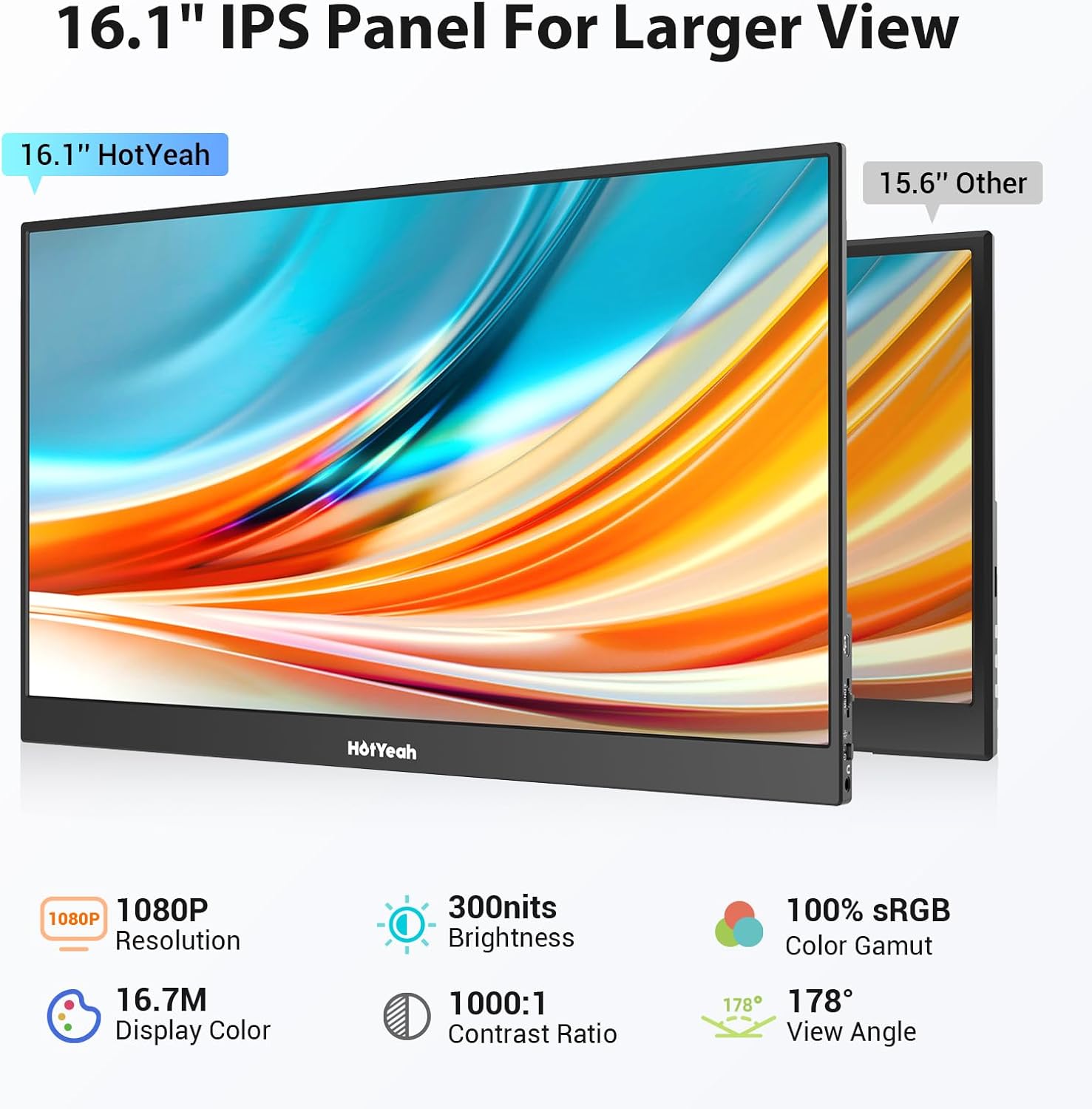
Image: HotYeah 16.1in Portable Monitor and its included accessories, such as cables and power adapter.
پروڈکٹ ختمview
Familiarize yourself with the monitor's components and ports.

تصویر: سائیڈ view of the HotYeah Portable Monitor, highlighting the OTG Port, Menu Trackwheel, Indicator Light, Power Button, 3.5mm Audio Jack, Mini-HDMI Port, and Full-function Type-C Ports.

Image: Close-up of the HotYeah Portable Monitor's ports, showing the Micro USB Port, OSD Trackwheel, Power Return Button, 3.5mm Audio Output, Indicator Light, and two Full-function Type-C Ports, along with the Mini-HDMI Port.

Image: The HotYeah Portable Monitor showcasing its built-in dual speakers, emphasizing enhanced audio for games and videos.
سیٹ اپ
Follow these steps to connect and set up your HotYeah Portable Monitor.
اپنے آلے کو جوڑنا:
The monitor supports both USB-C and HDMI connections.

Image: A laptop connected to the HotYeah Portable Monitor using a single USB-C to USB-C cable for both video and power. Note: Your device should support Thunderbolt 3.0/4.0 or USB 3.1 Type-C DP ALT-MODE.
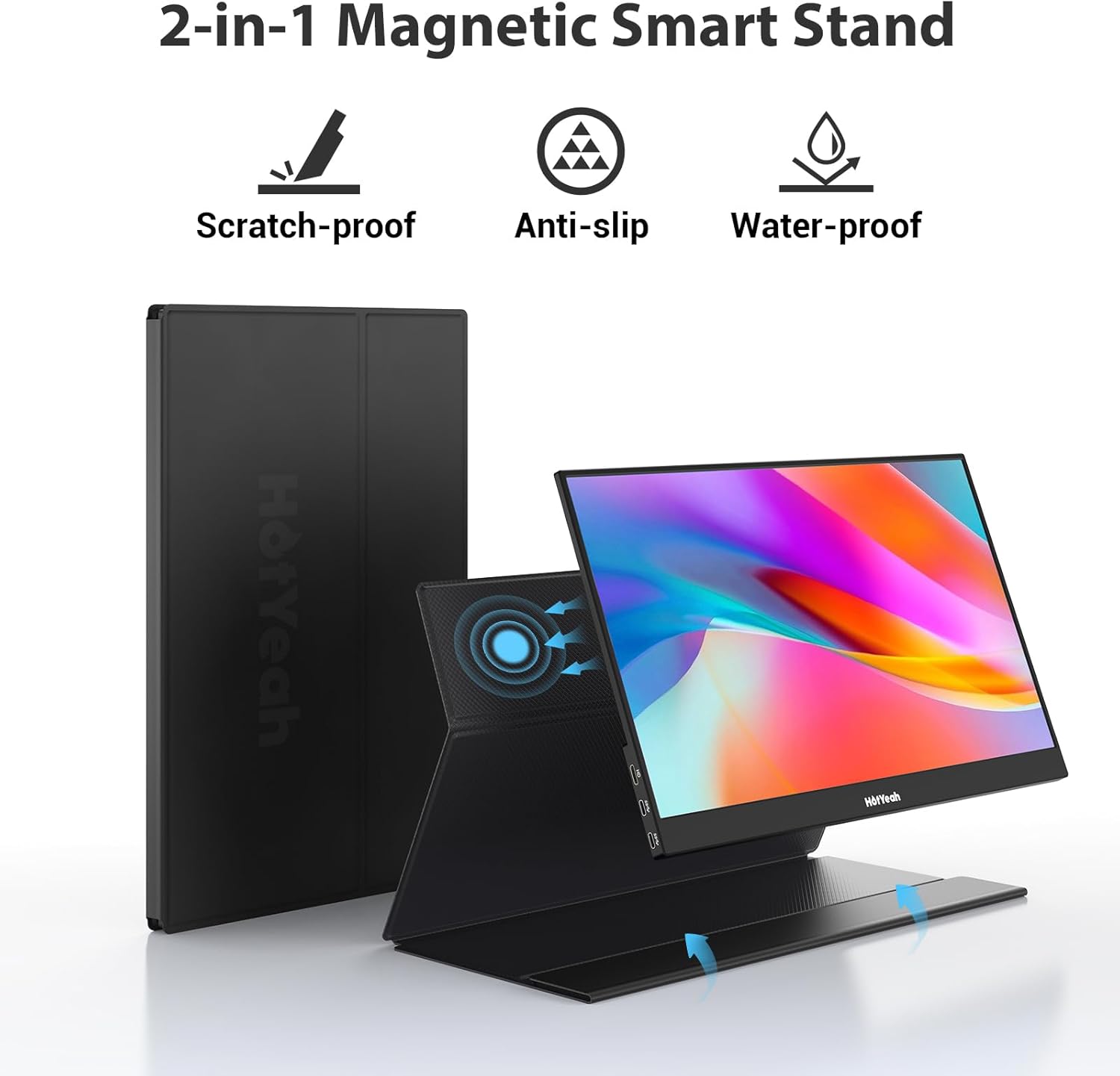
Image: A laptop connected to the HotYeah Portable Monitor using a Mini-HDMI to HDMI cable for video and a USB-C to USB-A cable for external power. Note: HDMI port does not supply power; the monitor requires an external power supply (20W or above).
Using the Smart Cover as a Stand:
The included smart cover can be folded to create a stable stand for your monitor, offering different viewزاویہ

Image: The HotYeah Portable Monitor positioned on its 2-in-1 magnetic smart stand, demonstrating its scratch-proof, anti-slip, and water-proof features.

Image: The 2-in-1 magnetic cover for the HotYeah Portable Monitor, showing how it can be folded into two different grooves to provide varied viewing angles for the monitor.
ویڈیو گائیڈز:
ویڈیو: ختمview of the HotYeah Portable Monitor, 16.1in 1080P FHD. This video provides a general overview of the monitor's features and basic setup.
Video: HotYeah Portable Monitor, 1080P 16.1'' REVIEW. یہ دوبارہview video demonstrates the monitor's functionality and ease of use with various devices.
Video: HotYeah Portable Monitor | FHD HDR USBC and HDMI. This video showcases the monitor's Full HD, HDR capabilities, and its versatile USB-C and HDMI connectivity.
آپریٹنگ موڈز
The HotYeah Portable Monitor offers several display modes to suit your needs:

Image: Illustration of multiple display modes: Extended Mode (extending laptop screen), Mirror Mode (mirroring phone screen), and 2nd Screen Mode (using the portable monitor as the main display).
لینڈ اسکیپ اور پورٹریٹ موڈز:
Adjust the monitor's orientation for optimal viewing, whether browsing, editing, or analyzing data.

Image: The HotYeah Portable Monitor displayed in both landscape and portrait modes, demonstrating its versatility for different viewing preferences and tasks.
فون کنیکٹیویٹی:
Expand your phone screen for a larger view of content.

Image: A smartphone connected to the HotYeah Portable Monitor, expanding the phone's display to the larger screen for enhanced viewing. Note: iPhone (before 15 Gen) requires a lightning to HDMI adapter.

Image: Demonstrates connecting an iPhone 15 directly with a USB-C cable and an older iPhone (before 15th generation) requiring a lightning to HDMI adapter for connection to the portable monitor.
گیمنگ کا تجربہ:
Connect your gaming consoles for an immersive gaming experience.

Image: The HotYeah Portable Monitor displaying a vibrant game scene, with a hand holding a PS5 controller, indicating its use as a gaming display.

Image: The HotYeah Portable Monitor connected to a Nintendo Switch, enhancing the gaming experience with its 16.1-inch screen and 60Hz refresh rate.
ڈسپلے کی خصوصیات
The HotYeah Portable Monitor boasts advanced display technologies for superior visual quality.

Image: The HotYeah Portable Monitor emphasizing its 16.1-inch IPS panel for a larger view, along with key specifications like 1080P resolution, 300 nits brightness, 100% sRGB, 16.7M display color, 1000:1 contrast ratio, and 178° view زاویہ

Image: The HotYeah Portable Monitor showcasing 'Real Pics on Eyes', illustrating its ability to restore accurate colors and provide a better multimedia streaming experience without noticeable individual pixels, with specifications like 1080P Resolution, 16.7M Display Color, and 1000:1 Contrast Ratio.

Image: The HotYeah Portable Monitor in HDR Mode for Game, showing brighter highlights, better contrast, and more true-to-life colors for an enhanced viewing or gaming experience.

Image: The HotYeah Portable Monitor demonstrating its 178° Ultra Wide View, ensuring the image is not distorted from any angle, and highlighting its Low Blue Light and Flicker-Free features for reduced eye fatigue.
دیکھ بھال
To ensure the longevity and optimal performance of your HotYeah Portable Monitor, follow these maintenance guidelines:
- سکرین کی صفائی: تھوڑا سا نرم، لنٹ سے پاک کپڑا استعمال کریں۔ampپانی یا اسکرین کو صاف کرنے والے محلول کے ساتھ ختم کریں۔ سخت کیمیکلز یا کھرچنے والے مواد سے پرہیز کریں۔
- سی کی صفائیasing: مانیٹر کی سی کو صاف کریں۔asing ایک نرم، خشک کپڑے کے ساتھ.
- ذخیرہ: When not in use, store the monitor in its smart cover to protect it from dust and scratches. Avoid placing heavy objects on top of it.
- ہینڈلنگ: Handle the monitor with care to prevent drops or impacts. Avoid applying excessive pressure to the screen.
- درجہ حرارت: Operate and store the monitor within recommended temperature ranges to prevent damage.
خرابی کا سراغ لگانا
Refer to the following common issues and solutions. For further assistance, please contact customer support.

Image: A Frequently Asked Questions (FAQ) table for the HotYeah Portable Monitor, addressing common queries such as Bluetooth/wireless/WiFi support, touchscreen functionality, device compatibility, charging issues, and cable functions.
عام مسائل:
- سگنل نہیں ہیں: Ensure all cables are securely connected. Verify your device supports video output via the connected port (e.g., Thunderbolt 3.0/4.0 or USB 3.1 Type-C DP ALT-MODE for single USB-C connection).
- کوئی طاقت نہیں: Ensure the monitor is connected to a sufficient power source (20W or above) if using HDMI or if your USB-C device does not provide enough power. The monitor does not have an internal battery.
- Touchscreen Not Working (Windows): Go to Control Panel > Tablet PC Settings > Setup and follow the on-screen instructions to identify the touchscreen.
- Touchscreen Not Working (macOS): Mac and MacBook only support one-point touch screen. iPhone and iPad do not support touch function.
- چمکتی ہوئی سکرین: Check cable connections. Try a different cable or power source. Adjust display settings on your connected device.
وضاحتیں
| فیچر | تفصیلات |
|---|---|
| اسکرین کا سائز | 16.1 انچ |
| قرارداد | 1920 x 1080 پکسلز (FHD 1080p) |
| پینل کی قسم | آئی پی ایس ایل سی ڈی |
| پہلو کا تناسب | 16:9 |
| تصویر کی چمک | 300 Candela (300cd/m²) |
| کنٹراسٹ ریشو | 1000:1 |
| ڈسپلے کا رنگ | 16.7M |
| رنگین درجہ حرارت | 6800K |
| Viewآئی اینگل | H 85°/Min V 85°/Min (178°) |
| مصنوعات کے طول و عرض | 0.39 x 14.45 x 9.01 انچ |
| شے کا وزن | 1.38 پاؤنڈ |
| آئٹم ماڈل نمبر | P161A10D |
وارنٹی اور سپورٹ
HotYeah is committed to providing excellent customer service and product reliability.

Image: HotYeah Warranty Claim details, stating a 30-day Refund policy and a 1-year Replacement policy and Warranty, along with 24/7 Support.
- وارنٹی: We provide a 30-day Refund policy and a 1-year Replacement policy and Warranty.
- کسٹمر سپورٹ: For any questions or assistance, please feel free to contact us via Amazon message or email us at support@hotyeahmonitor.com. Our online support is available 24/7.
حفاظتی معلومات
Please be careful with electricity. If there is any question about HotYeah portable monitor, please feel free to contact us via Amazon message.