1. تعارف
Thank you for choosing the HK10 Pro Max Smartwatch. This device combines advanced technology with a sleek design to enhance your daily life. Featuring a vibrant 2.02-inch AMOLED display, integrated ChatGPT, Bluetooth calling, and comprehensive health monitoring, your smartwatch is designed for convenience and performance. Please read this manual carefully to ensure proper use and to fully utilize all its functions.
2. باکس میں کیا ہے۔
Upon unboxing your HK10 Pro Max Smartwatch, please verify that all the following items are included:
- HK10 Pro Max Smartwatch
- Charging Cable (Wireless Charger)
- Two Watch Straps (Orange and Black)
- صارف دستی
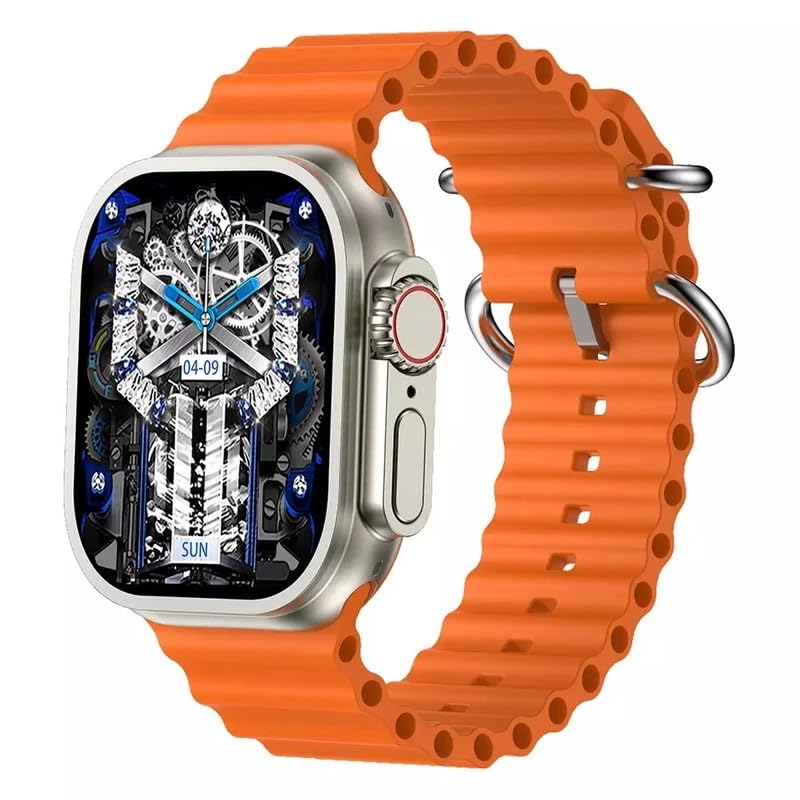
Image: The HK10 Pro Max Smartwatch packaging box, indicating the model and key features.
3. سیٹ اپ
3.1 اسمارٹ واچ کو چارج کرنا
Before first use, fully charge your smartwatch. Place the watch on the wireless charging pad. The charging icon will appear on the screen. A full charge typically takes approximately 2-3 hours.

Image: The HK10 Pro Max Smartwatch being charged wirelessly on its charging pad.
3.2 پاور آن/آف
- پاور آن: سائیڈ پاور بٹن کو دبائے رکھیں جب تک کہ اسکرین روشن نہ ہو۔
- بجلی بند: سائیڈ پاور بٹن کو دبائیں اور تھامیں، پھر اسکرین پر 'پاور آف' کو منتخب کریں۔
3.3 ایپ انسٹال کرنا اور جوڑا بنانا
اپنی سمارٹ واچ کی پوری صلاحیت کو غیر مقفل کرنے کے لیے، ڈاؤن لوڈ اور انسٹال کریں۔ WearFit Pro آپ کے اسمارٹ فون پر درخواست.
- Scan the QR code provided in the manual or on the watch screen, or search for 'WearFit Pro' in your smartphone's app store (App Store for iOS, Google Play Store for Android).
- Install and open the WearFit Pro app.
- اپنے اسمارٹ فون پر بلوٹوتھ کو فعال کریں۔
- In the WearFit Pro app, navigate to 'Device' and select 'Add Device'.
- Select 'HK10 Pro Max' from the list of available devices to pair.
- اپنے اسمارٹ فون اور اسمارٹ واچ دونوں پر جوڑی کی درخواست کی تصدیق کریں۔
4. آپریٹنگ ہدایات
4.1 بنیادی نیویگیشن
- اوپر کھینچنا: Access quick settings/notifications.
- نیچے سوائپ کریں: View اطلاعات
- بائیں/دائیں سوائپ کریں: Navigate through widgets and main functions.
- تھپتھپائیں: کوئی آئٹم منتخب کریں یا ایپلیکیشن کھولیں۔
- سائیڈ بٹن: Press to return to the home screen or access the app menu.
4.2 بلوٹوتھ کالنگ
اپنے اسمارٹ فون کے ساتھ جوڑا بنانے کے بعد، آپ براہ راست اپنی سمارٹ واچ سے کالز کر اور وصول کر سکتے ہیں۔
- کال کرنا: کال شروع کرنے کے لیے اپنی گھڑی پر ڈائل پیڈ یا رابطوں کی فہرست تک رسائی حاصل کریں۔
- کال وصول کرنا: جب کوئی کال آتی ہے، تو آپ اسے براہ راست واچ اسکرین سے جواب یا مسترد کر سکتے ہیں۔

Image: The smartwatch screen showing a dial pad and call logs, demonstrating the Bluetooth call feature.
4.3 گھڑی کے چہروں کو حسب ضرورت بنانا
Personalize your smartwatch with a variety of watch faces available through the WearFit Pro app or directly on the watch.
- واچ پر: Long-press the home screen, then swipe left or right to browse and select a new watch face.
- Via WearFit Pro App: Open the app, go to 'Dial Market' to explore and download additional watch faces.
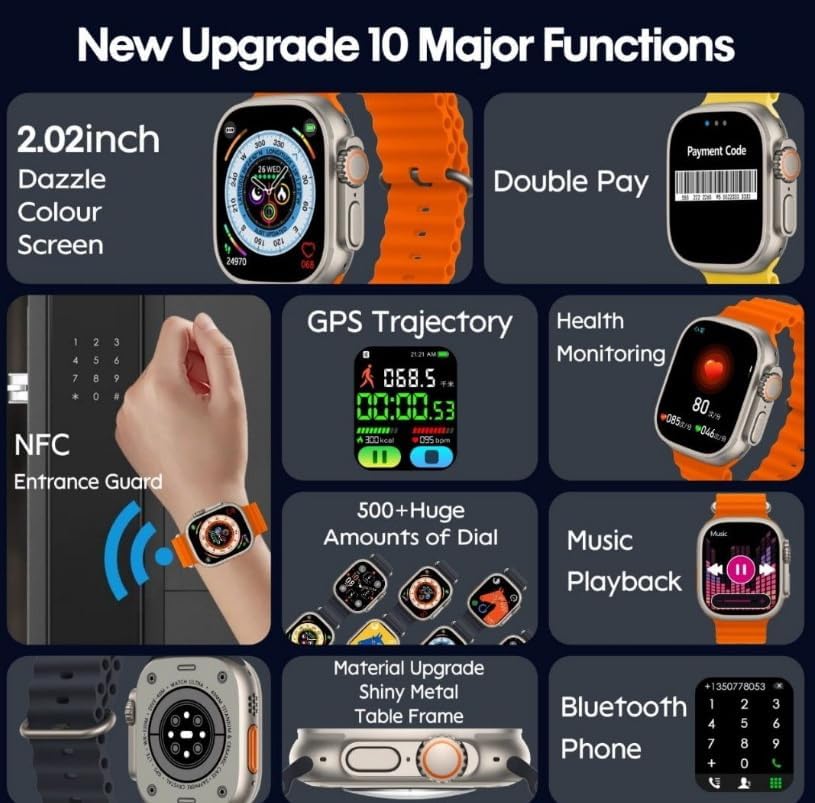
Image: A collection of diverse and colorful watch faces displayed on the HK10 Pro Max Smartwatch.
4.4 ChatGPT Feature
The HK10 Pro Max Smartwatch integrates ChatGPT, allowing for interactive AI communication directly from your wrist. Access the ChatGPT application from the app menu to engage in conversations, ask questions, and receive information.
4.5 NFC فعالیت
The smartwatch supports NFC (Near Field Communication) for convenient access control or other compatible NFC applications. Refer to the WearFit Pro app for setup and usage details related to NFC features.
4.6 صحت کی نگرانی
Your smartwatch continuously monitors various health metrics. Access these features through the watch's menu or the WearFit Pro app:
- دل کی شرح کی نگرانی
- بلڈ آکسیجن مانیٹرنگ
- نیند سے باخبر رہنا
- Step Counter (Pedometer)
- کیلوری برن ٹریکنگ
4.7 دیگر افعال
- میوزک پلے بیک: Control music playing on your smartphone.
- آڈیو ریکارڈنگ: Utilize the built-in microphone for voice recordings.
- میرا فون تلاش کریں: Locate your paired smartphone by triggering an alarm sound.
- اطلاعات: کالز، پیغامات اور ایپ کی اطلاعات کے لیے الرٹس موصول کریں۔
5 دیکھ بھال
To ensure the longevity and optimal performance of your HK10 Pro Max Smartwatch, follow these maintenance guidelines:
- صفائی: گھڑی کی سکرین اور جسم کو نرم، خشک کپڑے سے صاف کریں۔ ضدی دھبوں کے لیے، تھوڑا سا استعمال کریں۔amp cloth and immediately dry. Avoid harsh chemicals or abrasive materials.
- پانی کی مزاحمت: The watch is IP68 water-resistant, meaning it can withstand dust and immersion in water up to 1.5 meters for 30 minutes. It is suitable for daily use and light water activities, but not recommended for swimming, diving, or hot showers.
- پٹے کی دیکھ بھال: Clean the watch straps regularly. If using silicone straps, wash with mild soap and water, then air dry.
- ذخیرہ: استعمال میں نہ ہونے پر گھڑی کو ٹھنڈی، خشک جگہ پر رکھیں۔ انتہائی درجہ حرارت سے پرہیز کریں۔
6 خرابیوں کا سراغ لگانا
اگر آپ کو اپنی سمارٹ واچ کے ساتھ مسائل کا سامنا ہے، تو درج ذیل عام مسائل اور حل دیکھیں:
| مسئلہ | حل |
|---|---|
| گھڑی آن نہیں ہوتی | Ensure the watch is fully charged. If it still doesn't turn on, try resetting by holding the power button for 10-15 seconds. |
| Unable to pair with smartphone | Make sure Bluetooth is enabled on your phone and the watch. Restart both devices. Ensure the WearFit Pro app has necessary permissions. |
| صحت کا غلط ڈیٹا | اس بات کو یقینی بنائیں کہ گھڑی آپ کی کلائی پر اچھی طرح سے پہنی ہوئی ہے، زیادہ تنگ یا زیادہ ڈھیلی نہیں۔ گھڑی کے پیچھے سینسر کو صاف کریں۔ |
| اطلاعات موصول نہیں ہوئیں | Check notification settings in the WearFit Pro app and on your phone. Ensure the app is running in the background and has notification access. |
| مختصر بیٹری کی زندگی | Reduce screen brightness, disable unnecessary features (e.g., continuous heart rate monitoring if not needed), and limit frequent screen wake-ups. |
7. وضاحتیں
| فیچر | تفصیل |
|---|---|
| ماڈل کا نام | HK10 Pro Max |
| برانڈ کا نام | عام |
| اسکرین کا سائز | 2.02 انچ AMOLED |
| قرارداد | 390 x 435 پکسلز |
| مصنوعات کے طول و عرض | 49 x 44 x 14.4 ملی میٹر |
| بیٹری کی صلاحیت | 320 ایم اے ایچ |
| پانی کی مزاحمت | آئی پی 68 |
| کنیکٹوٹی ٹیکنالوجی | یو ایس بی |
| وائرلیس معیار | بلوٹوتھ |
| خصوصی خصوصیات | ChatGPT, NFC, Bluetooth Calling, Audio Recording, Find My Phone |
| جی پی ایس | کوئی GPS نہیں ہے۔ |
| آئٹم کی شکل | مستطیل |
| ہم آہنگ ایپ | WearFit Pro |
8. حفاظتی معلومات
Please read and follow these safety precautions to prevent injury or damage to your device:
- ڈیوائس کو جدا کرنے، مرمت کرنے یا اس میں ترمیم کرنے کی کوشش نہ کریں۔ یہ نقصان، آگ، یا بجلی کے جھٹکے کا سبب بن سکتا ہے۔
- ڈیوائس کو انتہائی درجہ حرارت، براہ راست سورج کی روشنی اور زیادہ نمی سے دور رکھیں۔
- آلے کو گرانے یا اسے سخت اثرات کے تابع کرنے سے گریز کریں۔
- گاڑی چلاتے یا بھاری مشینری چلاتے وقت ڈیوائس کا استعمال نہ کریں۔
- Consult a medical professional before starting any new exercise regimen or if you have pre-existing health conditions that may be affected by using a smartwatch.
- بچوں کی پہنچ سے دور رکھیں۔
9. وارنٹی اور سپورٹ
وارنٹی کی معلومات اور کسٹمر سپورٹ کے لیے، براہ کرم خریداری کے وقت فراہم کردہ دستاویزات دیکھیں یا اپنے خوردہ فروش سے رابطہ کریں۔ کسی بھی وارنٹی دعووں کے لیے اپنی خریداری کا ثبوت رکھیں۔


