
تعارف
This manual provides essential instructions for the proper setup, operation, and maintenance of your SingularXYZ Aluminum GPS Rover Rod Telescopic Survey Pole. Designed for land surveying and engineering, this pole is a robust accessory for RTK GPS/GNSS receivers, ensuring precise measurements. Please read this manual thoroughly before using the product to ensure safe and efficient operation.
پروڈکٹ ختمview اور خصوصیات
The SingularXYZ Aluminum GPS Rover Rod is engineered for durability and ease of use. It features a one-piece design with dual locking systems for quick and secure setup. The pole is constructed from high-quality aluminum alloy, providing both strength and a lightweight profile پورٹیبلٹی کے لئے.
- آسان سیٹ اپ: Features a one-piece design and dual locking systems for quick assembly.
- Multiple Locking Positions: Offers versatile height adjustments within the 1.6m/5.24ft to 1.8m/5.91ft range.
- ایلومینیم کی تعمیر: Crafted from high-quality aluminum alloy for durability and precise measurements.
- Removable Tip: Includes a steel tip with a rubber cover for protection, which is also replaceable.
- پورٹیبل: Collapses to 70cm/27.6 inches and comes with a carrying bag for easy transport.
- اعلی مطابقت: Equipped with a 5/8" thread, compatible with mainstream GNSS RTK receivers.
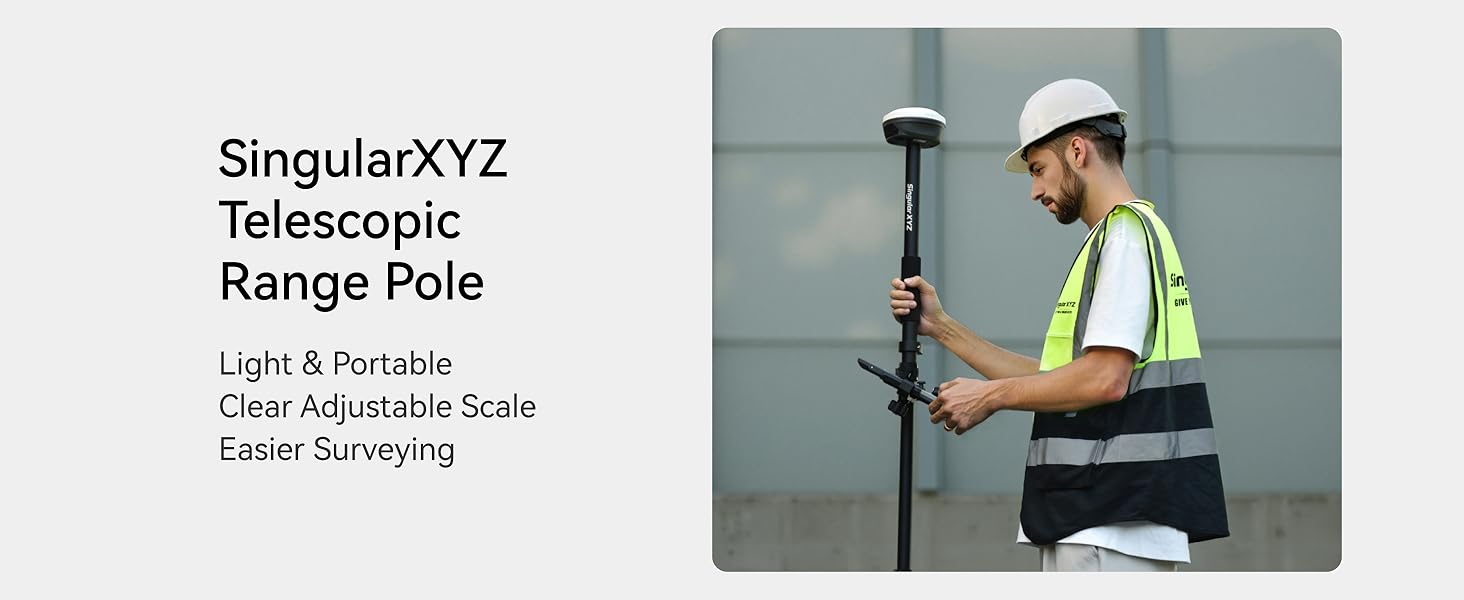
Image: The SingularXYZ Telescopic Range Pole highlighting its light, portable, and adjustable features for easier surveying.

Image: Detailed features of the GPS Rover Rod, including the comfortable grip, laser engraving for measurements, secure latch design, and the 5/8"-11 thread mount for receiver attachment.

Image: A visual summary of the pole's main features: easy setup, multiple locking positions, portability, and durable aluminum construction.
سیٹ اپ کی ہدایات
Follow these steps to set up your SingularXYZ GPS Rover Rod:
- Unpack the Pole: Remove the pole from its carrying bag. The pole is designed for compact storage, collapsing to 70cm (27.6 inches).
- قطب کو بڑھانا: The pole consists of multiple telescopic sections. To extend a section, twist the locking collar counter-clockwise to loosen it, pull the section to the desired length, and then twist the collar clockwise to secure it. Repeat for all sections until the desired height is reached. The pole can extend from 1.6m (5.24ft) to 1.8m (5.91ft).
- Attach GNSS Receiver: The top of the pole features a 5/8" thread. Carefully screw your compatible GNSS RTK receiver onto this thread until it is secure.
- سطح چیک کریں: Utilize the built-in bubble level to ensure the pole is perfectly vertical (plumb) for accurate measurements.
- ٹپ کو محفوظ کریں: The steel tip is designed for ground penetration. Ensure the rubber cover is removed before use. If the tip feels loose, use the provided hex (Allen) key to tighten the locking screw on the pole for stable fixation.
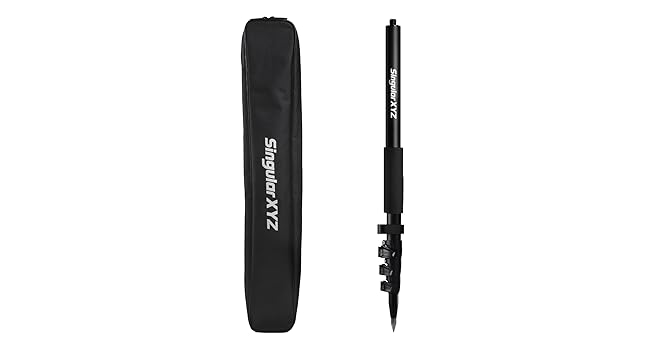
Image: The SingularXYZ GPS Rover Rod shown alongside its compact carrying bag, emphasizing portability.

Image: A diagram illustrating the use of the included hex (Allen) key to tighten the locking screw, ensuring the pole's stability during use.
Video: This video demonstrates the unboxing and extension of the SingularXYZ GPS Rover Rod, showcasing its telescopic sections and ease of adjustment.
آپریٹنگ ہدایات
Once the GPS Rover Rod is set up and your GNSS receiver is attached, you can begin surveying:
- پوزیشننگ: Place the steel tip firmly on the desired measurement point.
- لیولنگ: Observe the built-in bubble level to ensure the pole is held perfectly vertical. Adjust your stance or the pole's position until the bubble is centered.
- ڈیٹا اکٹھا کرنا: Operate your GNSS RTK receiver according to its specific instructions to collect accurate positional data. The stable and plumb positioning provided by the rover rod is crucial for high-precision results.
- اونچائی کو ایڈجسٹ کرنا: If different measurement heights are required, loosen the locking collars, adjust the pole sections, and re-secure the collars. Always re-check the bubble level after any height adjustment.
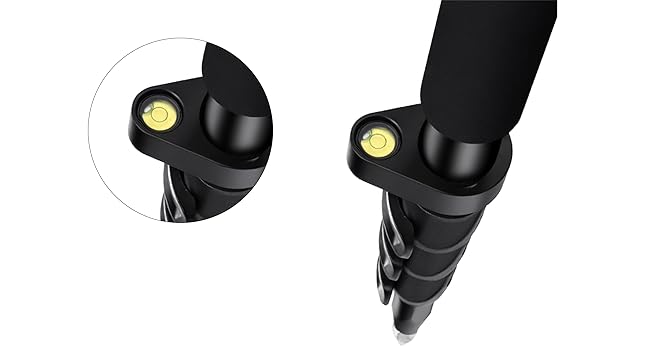
تصویر: ایک قریبی اپ view of the built-in bubble level, essential for achieving perfectly vertical positioning during surveying.

Image: A person demonstrating the use of the SingularXYZ GPS Rover Rod with an attached GNSS receiver for surveying tasks.
Video: This video illustrates the process of surveying using the SingularXYZ Telescopic Range Pole, demonstrating its practical application in the field.
دیکھ بھال
Regular maintenance ensures the longevity and accuracy of your GPS Rover Rod:
- صفائی: After each use, wipe down the pole with a clean, damp cloth to remove dirt, dust, and moisture. Avoid abrasive cleaners.
- ٹپ کیئر: The steel tip should be kept sharp. Use the included rubber cover to protect the point when not in use. The tip is removable for easy replacement if it becomes dull or damaged.
- چکنا: Periodically inspect the telescopic sections and locking collars. If they become stiff, apply a small amount of silicone-based lubricant to ensure smooth operation.
- ذخیرہ: Always store the pole in its carrying bag when not in use. Store in a dry, cool place away from direct sunlight and extreme temperatures.
- معائنہ: Regularly check all components for signs of wear, damage, or loose connections. Ensure all locking mechanisms function correctly.
خرابی کا سراغ لگانا
If you encounter issues with your GPS Rover Rod, refer to the following common problems and solutions:
- Pole sections do not hold position: Ensure the locking collars are twisted clockwise firmly after extending each section. If they still slip, check for dirt or debris within the locking mechanism and clean as necessary. The hex (Allen) key can be used to tighten the internal locking screw if it has loosened over time.
- Difficulty extending or collapsing sections: Clean the pole sections and apply a small amount of silicone lubricant to the moving parts. Avoid forcing the sections.
- Inaccurate leveling: Verify that the built-in bubble level is clean and free from obstruction. Ensure the pole is placed on a stable surface and held steady when checking the level.
- Damaged steel tip: The steel tip is removable and replaceable. Contact SingularXYZ support for replacement parts.
وضاحتیں
| فیچر | تفصیل |
|---|---|
| برانڈ | سنگولر ایکس وائی زیڈ |
| ماڈل کا نام | Survey Pole |
| مواد | ایلومینیم کھوٹ (Note: Product title and features indicate Aluminum, while some specifications list Carbon Fiber. This manual refers to the Aluminum version.) |
| رنگ | سیاہ |
| کم از کم اونچائی | 2.13 فٹ (تقریباً 0.65 میٹر) |
| زیادہ سے زیادہ اونچائی | 5.91 فٹ (تقریباً 1.8 میٹر) |
| فولڈ سائز | 27.6 انچ (تقریباً 70 سینٹی میٹر) |
| شے کا وزن | 1.01 کلوگرام (2.22 پونڈ) |
| وزن کی حد | 10000 گرام (10 کلوگرام) |
| ہم آہنگ آلات | GNSS Receiver (5/8" thread) |
| خصوصی خصوصیات | Lightweight, Telescopic, Built-in Bubble Level, Removable Tip |
| باکس میں کیا ہے۔ | 1.8m/5.91ft Telescopic Survey Pole, Carrying Bag, Hex (Allen) Key |
وارنٹی اور سپورٹ
The SingularXYZ GPS Rover Rod comes with a 1 سال کی وارنٹی. For any product inquiries, technical support, or warranty claims, please contact SingularXYZ customer service. Refer to the official SingularXYZ webرابطے کی تفصیلات کے لیے سائٹ یا آپ کی خریداری کی دستاویزات۔