
Zenwire A10
Zenwire A10 Mini Portable Projector User Manual
ماڈل: A10
1. تعارف
خریداری کے لیے آپ کا شکریہasing the Zenwire A10 Mini Portable Projector. This device is designed to provide a versatile and convenient projection experience, allowing you to display content from various sources, including smartphones, tablets, and computers. Please read this manual carefully before using the projector to ensure proper operation and to maximize its lifespan.
2. اہم حفاظتی ہدایات
- براہ راست پروجیکٹر کے لینس میں مت دیکھیں جب ایلamp پر ہے
- زیادہ گرمی سے بچنے کے لیے پروجیکٹر کے ارد گرد مناسب وینٹیلیشن کو یقینی بنائیں۔ وینٹیلیشن کے سوراخوں کو مسدود نہ کریں۔
- پروجیکٹر کے ساتھ فراہم کردہ پاور اڈاپٹر ہی استعمال کریں۔
- پروجیکٹر کو پانی، نمی اور آتش گیر مواد سے دور رکھیں۔
- پروجیکٹر کو خود سے جدا کرنے یا مرمت کرنے کی کوشش نہ کریں۔ مدد کے لیے اہل سروس اہلکاروں سے رابطہ کریں۔
- پروجیکٹر کو ایک مستحکم سطح پر رکھیں۔
- بجلی کے طوفان کے دوران یا طویل عرصے تک غیر استعمال ہونے پر پروجیکٹر کو ان پلگ کریں۔
3. پیکیج کے مشمولات
براہ کرم ان باکسنگ پر پیکیج کے مواد کو چیک کریں۔ اگر کوئی چیز غائب یا خراب ہو تو اپنے خوردہ فروش سے رابطہ کریں۔
- Zenwire A10 Mini Portable Projector
- ریموٹ کنٹرول
- پاور اڈاپٹر
- صارف دستی
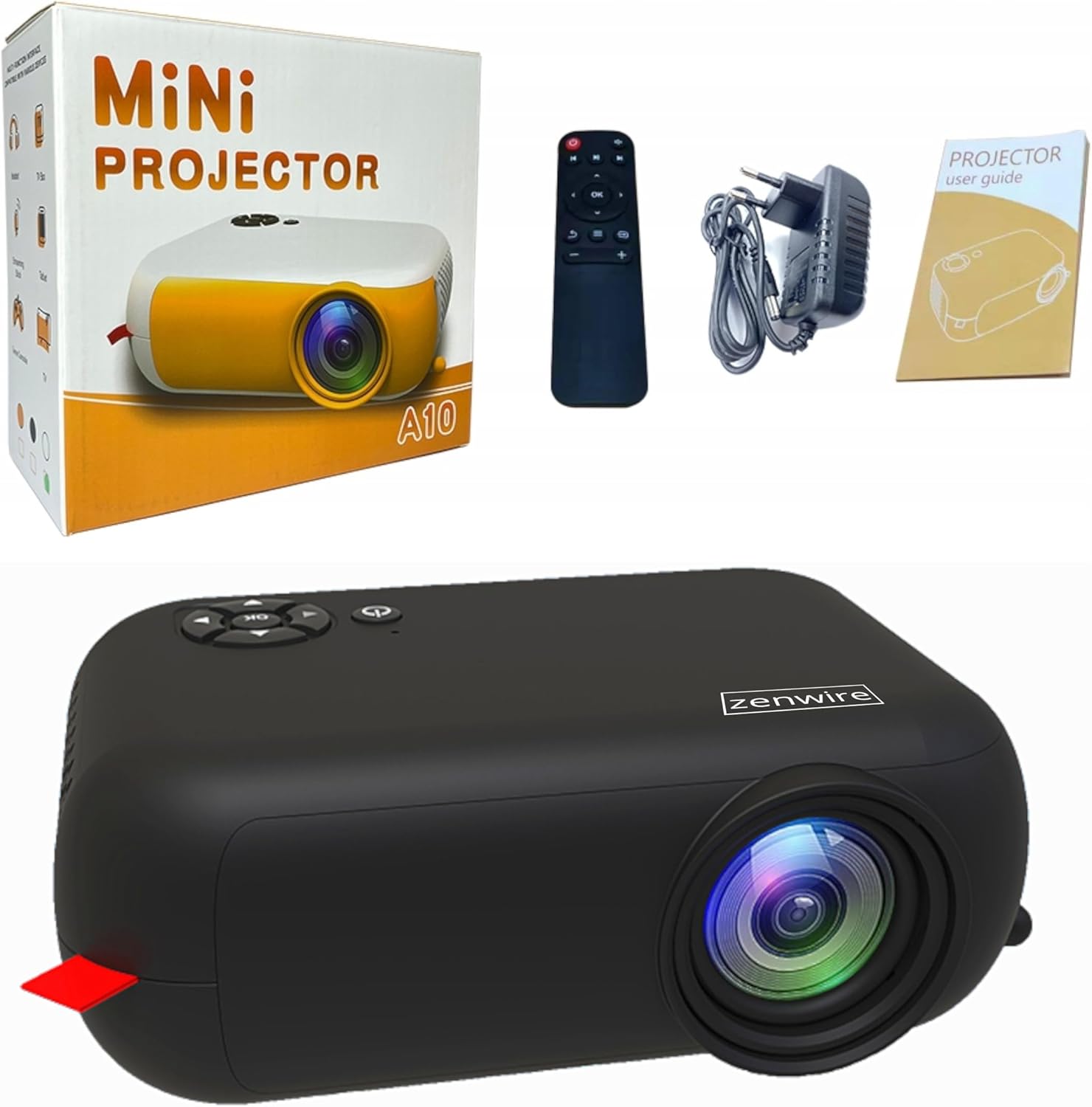
Image: Contents of the Zenwire A10 Mini Projector package, including the projector, remote control, power adapter, and user manual.
4. پروڈکٹ ختمview
4.1 Projector Dimensions and Design
The Zenwire A10 is designed for portability, featuring a compact and lightweight form factor. Its dimensions are approximately 14cm x 10cm x 5.5cm, making it easy to carry and set up in various locations.

Image: The Zenwire A10 Mini Projector held in a hand, illustrating its compact size and portability.
4.2 پورٹس اور کنٹرولز
The projector features a range of input and output ports for versatile connectivity, along with intuitive controls.

Image: Rear panel of the Zenwire A10 Mini Projector, showing the 5V-IN DC power input, IR receiver, USB port, 3.5mm audio jack, HDMI port, and SD card slot.
- 5V-IN DC: Power input for the projector.
- IR: ریموٹ کنٹرول کے لیے اورکت رسیور۔
- USB: میڈیا پلے بیک کے لیے USB اسٹوریج ڈیوائسز کو جوڑیں۔
- ہیڈ فون جیک (3.5 ملی میٹر): بیرونی اسپیکر یا ہیڈ فون کو جوڑیں۔
- HDMI: Connect devices such as laptops, gaming consoles, or streaming sticks.
- SD: میڈیا پلے بیک کے لیے مائیکرو ایس ڈی کارڈ داخل کریں۔
- فوکس وہیل: Adjust image sharpness (located on the side).
- کنٹرول پینل: Buttons on top for navigation and selection.
5. سیٹ اپ
5.1 پاور کنکشن
- فراہم کردہ پاور اڈاپٹر کو اس سے جوڑیں۔ 5V-IN DC پروجیکٹر پر پورٹ۔
- پاور اڈاپٹر کو وال آؤٹ لیٹ میں لگائیں۔
- اسے آن کرنے کے لیے پروجیکٹر یا ریموٹ کنٹرول پر پاور بٹن دبائیں۔
5.2 Placement and Focus Adjustment
- Place the projector on a stable surface or mount it according to your preference. Ensure the projector lens is facing the projection surface (wall or screen).
- Adjust the distance between the projector and the screen to achieve your desired image size. The projector supports screen sizes up to 100 inches.
- Rotate the focus wheel (typically located near the lens) until the projected image appears clear and sharp.

Image: Diagram illustrating the Zenwire A10 Mini Projector's capability to project various screen sizes, from 13 inches up to 100 inches, depending on the projection distance.
6. پروجیکٹر چلانا
6.1 Wireless Connection (Miracast & Airplay)
The Zenwire A10 supports wireless screen mirroring via 2.4/5GHz WiFi, compatible with Android (Miracast) and iOS (Airplay) devices.
- یقینی بنائیں کہ آپ کا پروجیکٹر اور موبائل ڈیوائس ایک ہی Wi-Fi نیٹ ورک سے جڑے ہوئے ہیں۔
- On the projector's main menu, select the 'Screen Mirroring' or 'Wireless Display' option.
- اینڈرائیڈ کے لیے: On your Android phone/tablet, enable 'Wireless Display', 'Screen Mirroring', 'Smart View', or similar function (names may vary by device). Select the projector from the list of available devices.
- iOS کے لیے: On your iPhone/iPad, open Control Center and tap 'Screen Mirroring'. Select the projector from the list of available devices.
- The content from your mobile device should now be mirrored on the projector screen.
6.2 وائرڈ کنکشنز
The projector offers multiple wired input options for various devices.

Image: The Zenwire A10 Mini Projector connected to various devices such as smartphones, tablets, laptops, desktop computers, gaming consoles, and media players, highlighting its versatile connectivity.
- HDMI: Connect a laptop, PC, gaming console (e.g., Xbox, PlayStation), or streaming device (e.g., Amazon Fire TV Stick, Google Chromecast) using an HDMI cable. Select the HDMI input source on the projector.
- USB: Insert a USB flash drive or external hard drive into the USB port. The projector's media player will allow you to browse and play supported video, audio, and image files.
- مائیکرو ایس ڈی: Insert a Micro SD card into the SD card slot. Similar to USB, you can access media files through the projector's interface.
- آڈیو آؤٹ (3.5 ملی میٹر جیک): Connect external speakers or headphones to enhance the audio experience.
6.3 مینو نیویگیشن
Use the remote control or the buttons on the projector to navigate through the on-screen menu. Select input sources, adjust picture settings (brightness, contrast, color), sound settings, and other system preferences.
7 دیکھ بھال
- لینس کی صفائی: Use a soft, lint-free cloth specifically designed for optical lenses to gently wipe the projector lens. Avoid using abrasive cleaners or excessive force.
- دھول ہٹانا: Regularly clean the projector's exterior with a soft, dry cloth. Use a small brush or compressed air to clear dust from the ventilation openings to ensure proper airflow.
- ذخیرہ: When not in use, store the projector in a cool, dry place, away from direct sunlight and extreme temperatures. Use the original packaging or a protective case to prevent dust accumulation and damage.
8 خرابیوں کا سراغ لگانا
If you encounter issues with your Zenwire A10 projector, refer to the following common problems and solutions:
| مسئلہ | ممکنہ وجہ | حل |
|---|---|---|
| اسکرین پر کوئی تصویر نہیں ہے | Power not connected; Incorrect input source; Device not connected properly. | Check power cable; Select correct input source (HDMI, USB, etc.); Reconnect source device. |
| تصویر دھندلی ہے | فوکس ایڈجسٹ نہیں ہوا؛ پروجیکٹر اسکرین سے بہت قریب/دور۔ | Adjust the focus wheel; Adjust projection distance. |
| کوئی آواز نہیں۔ | حجم بہت کم؛ خاموش؛ بیرونی آڈیو ڈیوائس منسلک/منتخب نہیں ہے۔ | Increase volume; Unmute; Check external speaker connection or select internal speaker. |
| وائرلیس کنکشن کے مسائل | Not on same Wi-Fi network; Device not compatible; Interference. | Ensure both devices are on the same Wi-Fi; Verify device compatibility; Try moving closer to Wi-Fi router. |
9. وضاحتیں
| فیچر | تفصیل |
|---|---|
| برانڈ | زین وائر |
| ماڈل نمبر | A10 |
| پروڈکٹ کی قسم | Compact and Portable Projector |
| مقامی قرارداد | 480 x 360p |
| زیادہ سے زیادہ ڈسپلے ریزولوشن | 1920 x 1080 (مکمل ایچ ڈی) |
| چمک | 1800lm / 60 ANSI |
| کنٹراسٹ ریشو | 2000:1 |
| ڈسپلے کی قسم | ایل ای ڈی |
| کنیکٹوٹی ٹیکنالوجی | Wi-Fi (2.4/5GHz), HDMI, USB, Micro SD, 3.5mm Audio Jack |
| وائرلیس خصوصیات | میراکاسٹ، ایئر پلے |
| ہم آہنگ آلات | Smartphones (Android, iOS), Tablets, Laptops, PCs, Gaming Consoles |
| تجویز کردہ استعمال | ہوم سنیما |
| طول و عرض (تقریبا) | 14cm x 10cm x 5.5cm |
10. وارنٹی اور سپورٹ
The Zenwire A10 Mini Portable Projector comes with a standard manufacturer's warranty. For specific warranty terms and conditions, please refer to the documentation provided at the time of purchase or contact your retailer. For technical support or service inquiries, please reach out to Zenwire customer service through their official webسائٹ یا آپ کے پروڈکٹ کے ساتھ فراہم کردہ رابطے کی معلومات۔
Ask a question about this manual
Ask about setup, troubleshooting, compatibility, parts, safety, or missing instructions. Manuals+ will review the question and use this page’s manual context to help answer it.