
تعارف
خریداری کے لیے آپ کا شکریہasing the Volkano Griffin Series Dual Party Speaker. This manual provides essential information for the safe and optimal use of your speaker. Please read these instructions thoroughly before operating the device and retain them for future reference.
حفاظتی ہدایات
- اسپیکر کو پانی، نمی، یا انتہائی درجہ حرارت کے سامنے نہ رکھیں۔
- اسپیکر کو گرمی کے ذرائع کے قریب یا براہ راست سورج کی روشنی میں رکھنے سے گریز کریں۔
- خود یونٹ کو جدا کرنے یا مرمت کرنے کی کوشش نہ کریں۔ تمام خدمات کو اہل اہلکاروں سے رجوع کریں۔
- زیادہ گرمی سے بچنے کے لیے اسپیکر کے ارد گرد مناسب وینٹیلیشن کو یقینی بنائیں۔
- سپیکر کو بچوں اور پالتو جانوروں سے دور رکھیں۔
- صرف فراہم کردہ پاور اڈاپٹر اور لوازمات استعمال کریں۔
پیکیج کے مشمولات
تصدیق کریں کہ تمام اشیاء پیکیج میں موجود ہیں:
- Volkano Griffin Series Dual Party Speaker
- پاور اڈاپٹر
- ہدایت نامہ
- معاون کیبل (3.5 ملی میٹر)
- ریموٹ کنٹرول (اگر شامل ہو)
- Wired Microphone (if included)

Image: The Volkano Griffin Series Dual Party Speaker shown with its instruction manual and auxiliary cable, illustrating the typical package contents.
اسپیکر ختمview
پینل کے اوپر کنٹرول
تصویر: ایک تفصیلی view of the speaker's top control panel, featuring various buttons, knobs, and sliders for audio adjustments and mode selection.
- پاور بٹن: اسپیکر کو آن/آف کرتا ہے۔
- موڈ بٹن: Switches between Bluetooth, FM Radio, USB, SD, and AUX modes.
- حجم کنٹرول: ماسٹر والیوم ایڈجسٹ کرتا ہے۔
- باس/ٹریبل کنٹرولز: باس اور ٹریبل لیولز کو ایڈجسٹ کرتا ہے۔
- Microphone Volume/Echo: Controls microphone input volume and echo effect.
- USB پورٹ: USB فلیش ڈرائیو پلے بیک کے لیے۔
- SD کارڈ سلاٹ: SD کارڈ پلے بیک کے لیے۔
- پلے/پاز بٹن: میڈیا پلے بیک کو کنٹرول کرتا ہے۔
- پچھلا/اگلا ٹریک بٹن: پٹریوں سے گزرتا ہے۔
- LED Light Mode Button: Changes or turns off the LED lighting effects.
ریئر پینل کنکشنز

Image: The back panel of the speaker, displaying the power input, auxiliary input, and other connection ports.
- ڈی سی پاور ان پٹ: پاور اڈاپٹر کو یہاں جوڑیں۔
- AUX ان پٹ: 3.5 ملی میٹر کی معاون کیبل کا استعمال کرتے ہوئے بیرونی آڈیو ڈیوائسز کو جوڑیں۔
- مائیکروفون ان پٹ (6.35 ملی میٹر): Connect a wired microphone.
سیٹ اپ
سپیکر پر پاورنگ
- Connect the provided power adapter to the DC Power Input port on the rear of the speaker.
- پاور اڈاپٹر کو ایک معیاری وال آؤٹ لیٹ میں لگائیں۔
- دبائیں اور تھامیں۔ پاور بٹن on the top panel for a few seconds until the speaker powers on and the LED lights illuminate.
ابتدائی بلوٹوتھ جوڑا
- یقینی بنائیں کہ اسپیکر آن ہے۔
- دبائیں موڈ بٹن until "Bluetooth" mode is announced or displayed. The speaker will enter pairing mode, indicated by a flashing Bluetooth indicator light.
- اپنے موبائل ڈیوائس (اسمارٹ فون، ٹیبلیٹ، وغیرہ) پر، بلوٹوتھ کو فعال کریں اور دستیاب آلات تلاش کریں۔
- Select "Volkano Griffin" (or similar name) from the list of found devices.
- Once paired, the speaker will confirm with an audible prompt, and the Bluetooth indicator light will become solid.
- اب آپ اسپیکر کے ذریعے اپنے آلے سے آڈیو چلا سکتے ہیں۔
آپریٹنگ ہدایات
Changing Playback Modes
دبائیں موڈ بٹن repeatedly to cycle through available input sources: Bluetooth, FM Radio, USB, SD Card, and AUX Input.
Adjusting Volume and Audio
- ماسٹر حجم: Rotate the main والیوم کنٹرول knob to increase or decrease the overall sound level.
- باس/ٹریبل: وقف کا استعمال کریں۔ باس اور تگنا knobs to fine-tune the audio equalization.
USB/SD کارڈ پلے بیک
- USB فلیش ڈرائیو یا SD کارڈ داخل کریں (MP3 آڈیو کے ساتھ files) into the respective port/slot on the top panel.
- The speaker will automatically switch to USB or SD mode and begin playing the first compatible track. If not, press the موڈ بٹن صحیح ذریعہ کو منتخب کرنے کے لئے.
- استعمال کریں۔ چلائیں/روکیں۔, پچھلا ٹریک، اور اگلا ٹریک پلے بیک کو کنٹرول کرنے کے لیے بٹن۔
ایف ایم ریڈیو آپریشن
- دبائیں موڈ بٹن to select FM Radio mode.
- دبائیں اور تھامیں۔ پلے/پاز بٹن to initiate an automatic scan for available FM stations. The speaker will save all found stations.
- استعمال کریں۔ پچھلا ٹریک اور اگلا ٹریک محفوظ کردہ اسٹیشنوں کے درمیان نیویگیٹ کرنے کے لیے بٹن۔
وکس ان پٹ
- Connect one end of the 3.5mm auxiliary cable to the AUX Input port on the rear of the speaker.
- دوسرے سرے کو ہیڈ فون جیک یا اپنے بیرونی ڈیوائس کے آڈیو آؤٹ پٹ سے جوڑیں۔
- دبائیں موڈ بٹن AUX موڈ کو منتخب کرنے کے لیے۔
- اپنے بیرونی ڈیوائس سے پلے بیک اور والیوم کو کنٹرول کریں۔
مائیکروفون کا استعمال
- Plug a wired microphone into the 6.35mm Microphone Input port on the rear panel.
- Adjust the microphone volume using the dedicated مائیکروفون والیوم سب سے اوپر پینل پر knob.
- استعمال کریں۔ بازگشت knob to add an echo effect to your voice.
ایل ای ڈی روشنی کے اثرات

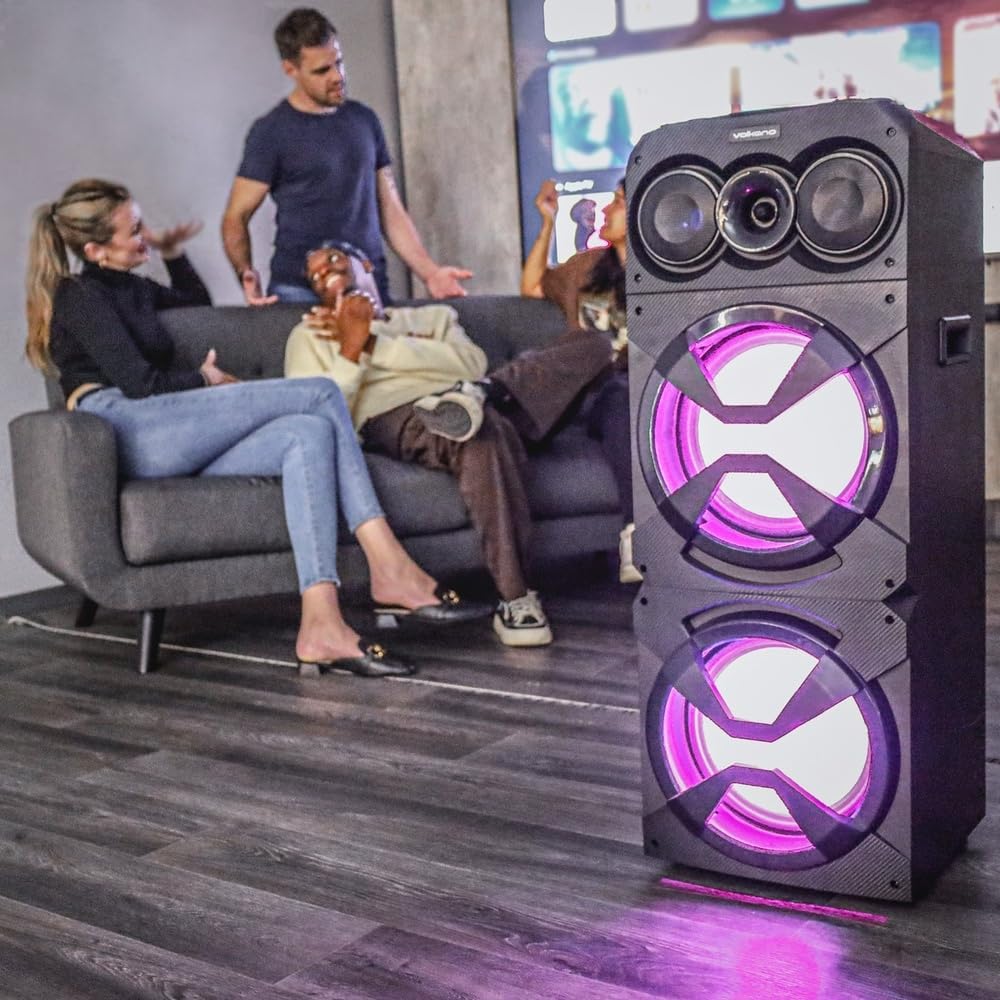
Image: The Volkano Griffin Series Dual Party Speaker in a social setting, showcasing its dynamic LED lighting effects in purple.

Image: The front of the speaker with its woofers illuminated by vibrant red LED lights, demonstrating another lighting option.
دبائیں ایل ای ڈی لائٹ موڈ بٹن to cycle through different lighting patterns or to turn the lights off.
دیکھ بھال
- صفائی: اسپیکر کے بیرونی حصے کو صاف کرنے کے لیے نرم، خشک کپڑا استعمال کریں۔ کھرچنے والے کلینر، موم یا سالوینٹس کا استعمال نہ کریں۔
- ذخیرہ: جب لمبے عرصے تک استعمال نہ ہو تو، اسپیکر کو براہ راست سورج کی روشنی اور انتہائی درجہ حرارت سے دور، ٹھنڈی، خشک جگہ پر محفوظ کریں۔
- وینٹیلیشن: اس بات کو یقینی بنائیں کہ زیادہ گرم ہونے سے بچنے کے لیے اسپیکر کے وینٹیلیشن کے سوراخوں کو مسدود نہیں کیا گیا ہے۔
خرابی کا سراغ لگانا
| مسئلہ | ممکنہ وجہ | حل |
|---|---|---|
| سپیکر پاور آن نہیں کرتا۔ | کوئی پاور کنکشن یا ناقص پاور اڈاپٹر۔ | Ensure the power adapter is securely connected to both the speaker and a working power outlet. Try a different outlet. |
| اسپیکر کی طرف سے کوئی آواز نہیں۔ | Volume too low, incorrect input mode, or device not connected properly. | Increase the master volume. Press the Mode Button to select the correct input source. Re-pair Bluetooth or re-connect AUX cable. Check volume on the connected device. |
| بلوٹوتھ آلہ جوڑا نہیں بن سکتا۔ | اسپیکر جوڑا بنانے کے موڈ میں نہیں ہے، آلہ بہت دور ہے، یا مداخلت نہیں ہے۔ | Ensure the speaker is in Bluetooth pairing mode (flashing indicator). Move your device closer to the speaker. Turn off other Bluetooth devices to reduce interference. Try restarting both the speaker and your device. |
| USB/SD کارڈ نہیں چل رہا ہے۔ | غلط file format, card/drive not inserted correctly, or corrupted media. | آڈیو کو یقینی بنائیں files are in a compatible format (e.g., MP3). Re-insert the USB drive or SD card. Try a different USB drive or SD card. |
وضاحتیں
| ماڈل کا نام: | Griffin Series Dual Party Speaker |
| برانڈ: | وولکانو |
| اسپیکر کا سائز: | دوہری 12 انچ ووفرز |
| کنیکٹوٹی: | Bluetooth, USB, SD Card, AUX Input, FM Radio, Microphone Input |
| پاور آؤٹ پٹ: | (Typical for similar speakers, e.g., 80W RMS) |
| تعدد جواب: | (Typical for similar speakers, e.g., 40Hz - 20kHz) |
| بجلی کی فراہمی: | AC 100-240V، 50/60Hz |
| طول و عرض: | (Approximate, based on dual 12-inch design) |
| وزن: | (تقریباً) |
Note: Specifications are subject to change without prior notice. Values marked with (Typical...) are estimates for general guidance.
وارنٹی کی معلومات
Volkano products are backed by a 1 سال کی محدود کوریج from the date of purchase, reflecting our commitment to quality and dependable performance.
You may be eligible for an additional 12-month extension, for a total of 24 months coverage, by registering your product. Please visit the official Volkano webرجسٹریشن کی تفصیلات اور شرائط و ضوابط کے لیے سائٹ۔
This warranty covers manufacturing defects and workmanship under normal use. It does not cover damage caused by misuse, accidents, unauthorized modifications, or normal wear and tear.
کسٹمر سپورٹ
Your satisfaction is important to us. If you have any questions, require assistance with your Volkano Griffin Series Dual Party Speaker, or need to claim warranty service, please contact us:
- آن لائن: Message us via the official Volkano Page on Amazon or visit the Volkano webسائٹ
- Webسائٹ: Visit the Volkano Store on Amazon
Please have your product model name (Griffin Series Dual Party Speaker) and purchase details ready when contacting support.