تعارف
This manual provides essential information for the proper use and maintenance of your Infinix Smart 8 X6525 mobile phone. Please read it carefully to ensure optimal performance and longevity of your device.
The Infinix Smart 8 features a 6.6-inch HD+ display, 13MP AI dual rear camera, 8MP front camera, 5000 mAh battery, and runs on Android 13. It supports dual nano SIM cards and Type-C charging.
سیٹ اپ
1 سم کارڈ اور میموری کارڈ کی تنصیب
To install your SIM card(s) and an optional microSD card:
- آلہ کے سائیڈ پر سم ٹرے کا پتہ لگائیں۔
- سم ایجیکٹر ٹول کو ٹرے کے آگے چھوٹے سوراخ میں داخل کریں اور ٹرے کے باہر آنے تک آہستہ سے دھکیلیں۔
- Place your Nano-SIM card(s) and/or microSD card into the tray with the gold contacts facing down, ensuring they are correctly oriented as indicated on the tray.
- Carefully push the tray back into the slot until it is flush with the phone's body.
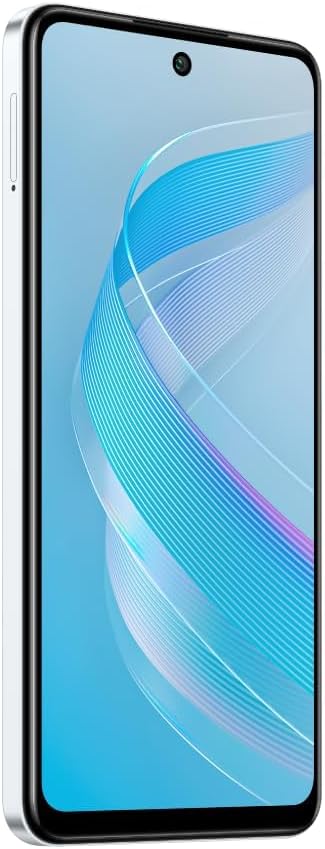
تصویر: سائیڈ view of the Infinix Smart 8 X6525, illustrating the location of the SIM card tray.
2. ابتدائی پاور آن
Press and hold the Power button (located on the right side of the device) until the Infinix logo appears. Follow the on-screen instructions to complete the initial setup, including language selection, Wi-Fi connection, and Google account setup.
3. ڈیوائس کو چارج کرنا
Connect the USB Type-C cable to the phone's charging port and the other end to the power adapter. Plug the power adapter into a wall outlet. The battery indicator on the screen will show the charging status. For optimal battery life, use the provided charger and cable.
آپ کے آلے کو آپریٹ کرنا
1. بنیادی نیویگیشن
Your Infinix Smart 8 X6525 uses a touchscreen for navigation. Swipe up, down, left, or right to move between screens and menus. Tap icons to open applications. Use gestures or the navigation bar at the bottom of the screen for Home, Back, and Recent Apps functions.

تصویر: سامنے view of the Infinix Smart 8 X6525, showing the display and front camera.
2. کیمرے کا استعمال
To open the camera, tap the Camera icon on your home screen or lock screen. The device features a 13MP AI dual rear camera and an 8MP front camera. Switch between modes like Photo, Video, Portrait, and Panorama. Tap the shutter button to capture images or start/stop video recording. The AI features automatically optimize settings for various scenes.
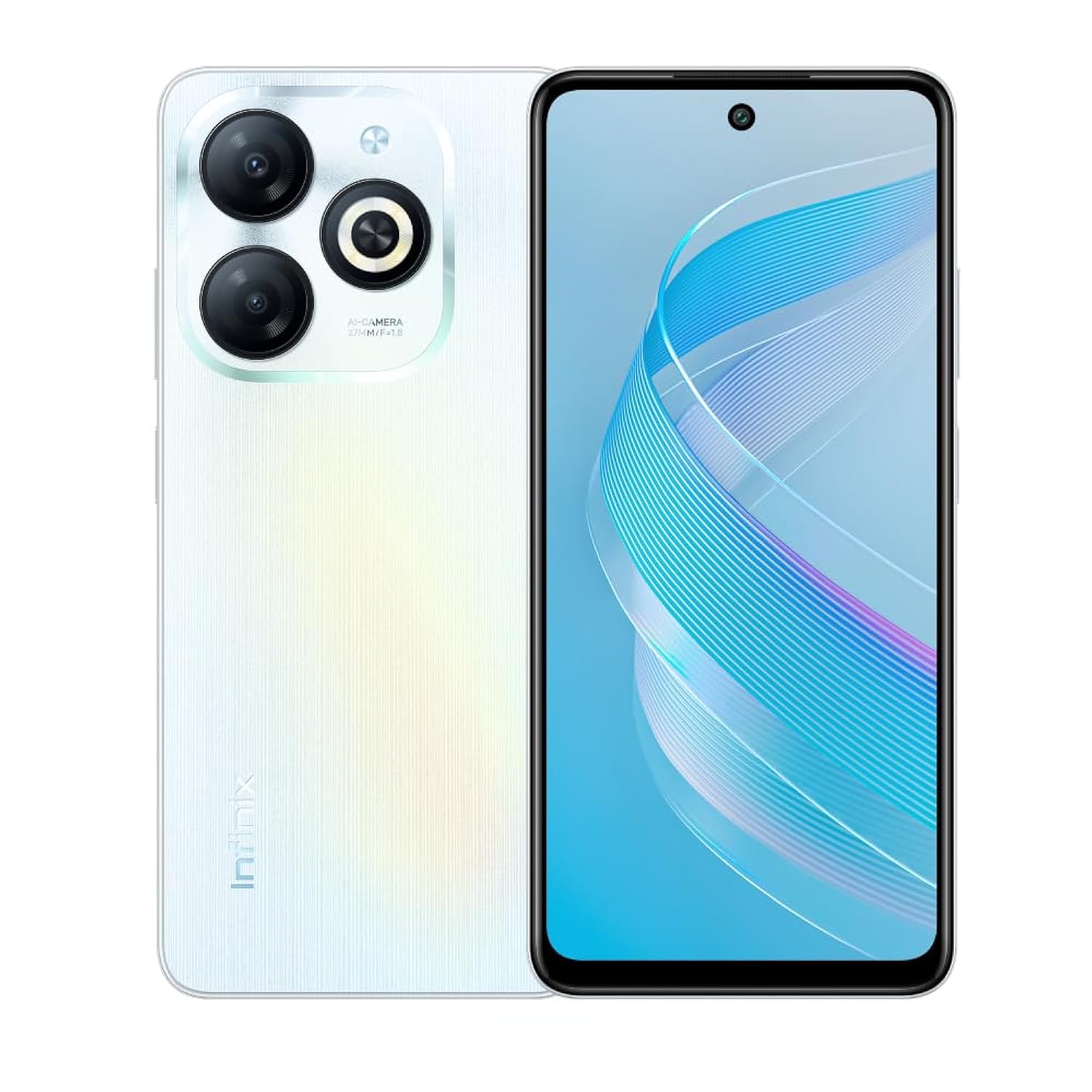
تصویر: پیچھے view of the Infinix Smart 8 X6525, highlighting the dual camera module and ring flashlight.
3. کنیکٹیویٹی
- وائی فائی: دستیاب وائرلیس نیٹ ورکس سے منسلک ہونے کے لیے ترتیبات > نیٹ ورک اور انٹرنیٹ > Wi-Fi پر جائیں۔
- بلوٹوتھ: Go to Settings > Connected devices > Connection preferences > Bluetooth to pair with Bluetooth devices.
- موبائل ڈیٹا: Ensure your SIM card is active and go to Settings > Network & internet > Mobile network to enable or disable mobile data.
4. حفاظتی خصوصیات
The device supports a side-mounted fingerprint sensor and face unlock for enhanced security. To set them up, go to Settings > Security > Fingerprint Unlock or Face Unlock and follow the on-screen instructions.
دیکھ بھال
1. بیٹری کی دیکھ بھال
- آلے کو انتہائی درجہ حرارت کے سامنے لانے سے گریز کریں۔
- بیٹری کو باقاعدگی سے پوری طرح سے خارج نہ کریں۔
- صرف اصلی یا تصدیق شدہ چارجرز اور کیبلز استعمال کریں۔
- If the device will not be used for an extended period, charge it to about 50% before storing.
2. سافٹ ویئر اپڈیٹس
Regularly check for and install software updates to ensure your device has the latest features, security patches, and performance improvements. Go to Settings > System > System update to check for updates.
3۔ اپنے آلے کو صاف کرنا
فون کی سکرین اور باڈی کو صاف کرنے کے لیے نرم، لنٹ سے پاک کپڑا استعمال کریں۔ سخت کیمیکلز یا کھرچنے والے مواد کے استعمال سے پرہیز کریں۔ ضدی smudges کے لئے، تھوڑا سا dampur پانی کے ساتھ کپڑا یا الیکٹرانکس کے لیے ڈیزائن کیا گیا سکرین کلینر۔
خرابی کا سراغ لگانا
مشترکہ مسائل اور حل
- ڈیوائس آن نہیں ہو رہی ہے: یقینی بنائیں کہ بیٹری چارج ہے۔ چارجر کو جوڑیں اور دوبارہ پاور آن کرنے کی کوشش کرنے سے پہلے چند منٹ انتظار کریں۔
- ایپس کا کریش ہونا یا جمنا: Close and restart the app. If the issue persists, clear the app's cache (Settings > Apps > [App Name] > Storage & cache > Clear cache).
- خراب بیٹری کی زندگی: Reduce screen brightness, close unused apps, disable unnecessary connectivity features (Wi-Fi, Bluetooth, GPS) when not in use.
- نیٹ ورک کنیکٹیویٹی کے مسائل: Check if your SIM card is properly inserted. Try restarting the device. Ensure mobile data or Wi-Fi is enabled.
- آلہ غیر جوابدہ: زبردستی دوبارہ شروع کرنے کے لیے پاور بٹن کو تقریباً 10-15 سیکنڈ تک دبائے رکھیں۔
وضاحتیں
| فیچر | تفصیل |
|---|---|
| برانڈ کا نام | انفینکس |
| ماڈل کا نام | اسمارٹ 8 |
| آپریٹنگ سسٹم | اینڈرائیڈ 13.0 |
| انسٹال شدہ RAM | 4 جی بی |
| میموری ذخیرہ کرنے کی صلاحیت | 128 جی بی |
| اسکرین کا سائز | 6.6 انچ |
| قرارداد | 720 x 1612 پکسلز |
| ریفریش ریٹ | 90 Hz |
| رنگ | سفید |
| سم کارڈ سلاٹ کاؤنٹ | ڈوئل سم |
| کنیکٹر کی قسم | USB Type-C پورٹ |
| Biometric Security Feature | فنگر پرنٹ کی شناخت |
| Front Photo Sensor Resolution | 8 میگا پکسلز |
| Rear Camera Photo Sensor Resolution | 13 میگا پکسلز |
| کیمرے کی تفصیل | 13MP rear camera, AI dual camera with ring flashlight |
| ویڈیو کیپچر ریزولوشن | 1080ص |
| ڈسپلے کی قسم | LCD |
| سیلولر ٹیکنالوجی | 4G |
| کنیکٹوٹی ٹیکنالوجی | بلوٹوتھ ، وائی فائی |
| بیٹری کی صلاحیت | 5000 ایم اے ایچ |
| شے کا وزن | 184 گرام |
| آئٹم کے طول و عرض | 16.4 x 0.8 x 7.6 سینٹی میٹر |
| شامل اجزاء | Headset, Phone Cover, USB Cable, Power Adapter, Screen Protector |
حفاظتی معلومات
- آلہ کو الگ نہ کریں یا خود اس کی مرمت کرنے کی کوشش نہ کریں۔
- آلے کو پانی اور نمی سے دور رکھیں۔
- آلے کو براہ راست سورج کی روشنی یا اعلی درجہ حرارت کے سامنے لانے سے گریز کریں۔
- Use only accessories approved by Infinix.
- آلہ اور اس کی بیٹری کو مقامی ضابطوں کے مطابق ذمہ داری کے ساتھ ٹھکانے لگائیں۔
وارنٹی اور سپورٹ
Your Infinix Smart 8 X6525 comes with a standard manufacturer's warranty. Please refer to the warranty card included in the product packaging for specific terms and conditions, including warranty period and coverage details.
For technical support, service, or further inquiries, please visit the official Infinix webسائٹ یا ان کی کسٹمر سروس سے رابطہ کریں۔ وارنٹی کے دعووں کے لیے اپنی خریداری کا ثبوت رکھیں۔