
1. تعارف اور اوورview
Welcome to the world of aerial photography and exploration with your new Holy Stone HS360S GPS Drone. This special edition drone, celebrating Holy Stone's 10th Anniversary, features a vibrant dark green paint scheme and is designed for both beginners and experienced pilots. Weighing under 249g, it is FAA compliant, meaning no registration is needed, allowing you to focus on the joy of flight.
The HS360S is equipped with a 4K UHD camera, offering high-resolution photos (3840x2160P) and videos, an 85° FOV lens, and a 90° adjustable camera for capturing breathtaking aerial footage. Its superior 5G transmission technology provides a reliable connection up to 10,000 feet. Advanced GPS functions ensure stable flight and safe return, while intelligent flight modes like Follow Me, Tap Fly, Point of Interest, and Hand Gesture Shots enhance your flying experience.
Video: Holy Stone 10th Anniversary Special Edition Drone. This video showcases the drone's design and some of its key features in action.
Video: Holy Stone HS360S Special Edition. A detailed look at the special edition HS360S drone and its capabilities.
2. سیٹ اپ اور اسمبلی
2.1 باکس میں کیا ہے۔
- Holy Stone HS360S Drone
- ریموٹ کنٹرولر
- Intelligent Flight Batteries (2 included in this version)
- USB Charging Cables (for drone and controller)
- اسپیئر پروپیلرز۔
- سکریو ڈرایور
- کیری کیس
- صارف دستی (یہ دستاویز)

Image: All components included with the Holy Stone HS360S drone, neatly arranged in its carry case.
2.2 ابتدائی سیٹ اپ
- بیٹریاں چارج کریں: Fully charge both the drone's flight batteries and the remote controller's internal battery using the provided USB cables.
- Unfold Drone: Gently unfold the drone's arms until they click into place.
- بیٹری داخل کریں: Insert a fully charged intelligent flight battery into the drone's battery compartment until it is securely latched.
- Prepare Remote Controller: Extend the phone holder on the remote controller. Attach your smartphone to the holder and connect it using the appropriate data cable (USB-C, Lightning, or Micro USB).
- اپلی کیشن ڈاؤن لوڈ کریں: Download and install the 'HS Fly' app from your smartphone's app store.
3. آپریٹنگ ہدایات
3.1 ریموٹ کنٹرولر اوورview
The remote controller is your primary interface for controlling the HS360S drone. Familiarize yourself with its layout and functions:
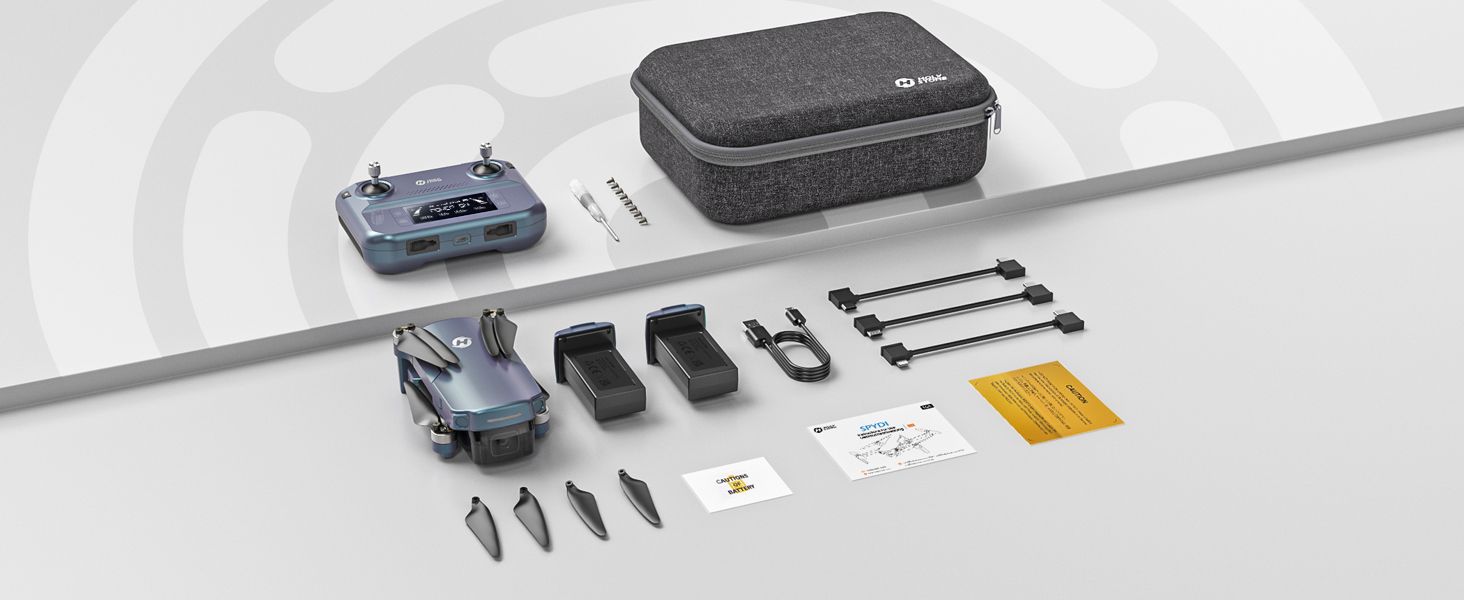
Image: Detailed diagram of the Holy Stone HS360S remote controller, highlighting all buttons and ports.
- بائیں جوائس اسٹک: Controls altitude (up/down) and rotation (yaw left/right).
- دائیں جوائس اسٹک: آگے/پیچھے اور بائیں/دائیں حرکت کو کنٹرول کرتا ہے۔
- Takeoff/Landing Button: Short press for automatic takeoff/landing.
- ایمرجنسی اسٹاپ: Long press to immediately stop motors (use only in emergencies).
- رفتار سوئچ: Short press to cycle through speed modes (Beginner, Normal, Sport).
- GPS سوئچ: Long press to toggle GPS mode.
- گھر پر واپسی (RTH): Initiates automatic return to the takeoff point.
- تصویر لیں بٹن: ایک ساکن تصویر کیپچر کرتا ہے۔
- Record Video Button: ویڈیو ریکارڈنگ شروع / روکتا ہے۔
- زوم ڈائل: Adjusts camera zoom.
- Camera Adjustment Dial: Tilts the camera up or down.
- LCD سکرین: Displays flight information and battery status.
- کنکشن پورٹ: For connecting your smartphone.
3.2 بنیادی فلائٹ آپریشنز
- پاور آن: Turn on the drone first, then the remote controller. Wait for them to connect (indicated by solid lights and a beep).
- GPS سگنل: Ensure the drone has acquired sufficient GPS satellites before takeoff for stable flight and RTH functionality.
- ٹیک آف: Place the drone on a flat, open surface. Short press the Takeoff/Landing button. The drone will automatically ascend and hover.
- پرواز کو کنٹرول کرنا: Use the joysticks to control the drone's movement. Start with slow, gentle movements, especially in Beginner Mode.
- لینڈنگ: Short press the Takeoff/Landing button. The drone will automatically descend and land. Alternatively, you can manually land using the left joystick.
3.3 انٹیلجنٹ فلائٹ موڈز
The HS360S offers several intelligent flight modes to enhance your aerial photography and videography:
- مجھے فالو موڈ: The drone will automatically follow the remote controller (and your connected smartphone) at a set distance and altitude.
- ٹیپ فلائی: Tap a point on the map in the HS Fly app, and the drone will fly to that location.
- دلچسپی کا مقام: Select a central point, and the drone will circle around it, capturing footage.
- Hand Gesture Shots: Use specific hand gestures to trigger photo or video capture.
- Auto Return (RTH): The drone will return to its takeoff point if the battery is low, connection is lost, or the RTH button is pressed.

Image: Visual representation of the drone performing various intelligent flight functions like Follow Me, Point of Interest, Trajectory Flight, and Waypoint Flight.

Image: Diagram illustrating the Smart Return Home feature, showing the drone returning to its home point due to low voltage, smart RTH activation, or failsafe RTH.
3.4 کیمرہ آپریشن
The integrated 4K UHD camera allows you to capture stunning visuals:
- تصویر/ویڈیو کیپچر: Use the dedicated buttons on the remote controller or the HS Fly app to take photos or start/stop video recording.
- کیمرہ زاویہ ایڈجسٹمنٹ: Use the camera adjustment dial on the remote to tilt the camera for different perspectives.
- قرارداد: Photos are captured at 3840x2160P, and videos are recorded in 4K.

تصویر: کلوز اپ view of the Holy Stone HS360S drone's 4K UHD camera, highlighting its 90° remotely adjustable feature and 85° FOV.
Video: Holy Stone HS360S Green GPS 4K Drone with Camera for Adults. This video demonstrates the drone's camera capabilities and flight stability.
4 دیکھ بھال
- پروپیلر معائنہ: Regularly check propellers for any damage (cracks, bends). Replace damaged propellers immediately using the provided spare parts and screwdriver.
- صفائی: Keep the drone and camera lens clean from dust and debris. Use a soft, dry cloth.
- بیٹری کی دیکھ بھال: بیٹریوں کو ٹھنڈی، خشک جگہ پر اسٹور کریں۔ زیادہ چارج یا زیادہ خارج نہ کریں۔
- ذخیرہ: When not in use, fold the drone and store it in its carry case to protect it from damage.
5 خرابیوں کا سراغ لگانا
اگر آپ کو کوئی مسئلہ درپیش ہے، تو براہ کرم مندرجہ ذیل عام ٹربل شوٹنگ ٹپس دیکھیں:
- ڈرون جواب نہیں دے رہا: Ensure both the drone and controller are fully charged and properly paired. Re-calibrate the drone if necessary.
- غیر مستحکم پرواز: Ensure GPS signal is strong. Calibrate the gyroscope and compass as per the app instructions. Avoid flying in strong winds.
- No Camera Feed: Check the smartphone connection cable and ensure the HS Fly app is running correctly.
- مختصر پرواز کا وقت: یقینی بنائیں کہ بیٹریاں پوری طرح سے چارج ہیں۔ پرواز کا وقت جارحانہ پرواز یا تیز ہواؤں سے متاثر ہو سکتا ہے۔
For more detailed troubleshooting or persistent issues, please contact Holy Stone Customer Support.
6. وضاحتیں
| فیچر | تفصیلات |
|---|---|
| ماڈل کا نام | HS Gradient Color Edition |
| شے کا وزن | 8.7 اونس (249 گرام) |
| ویڈیو کیپچر ریزولوشن | 4K UHD (3840x2160P) |
| زیادہ سے زیادہ رینج | 10,000 Feet (Transmission) |
| کنیکٹوٹی ٹیکنالوجی | 5G WiFi Repeater |
| خصوصی خصوصیات | 4K UHD Camera, Time-lapse Photography, FPV, GPS Follow Me, Auto Return, Lightweight, No Need FAA/Remote ID |
| بیٹری سیل کمپوزیشن | لتیم پولیمر |
| کنٹرول کی قسم | ریموٹ کنٹرول |
| مواد | پلاسٹک |
| آئٹم کے طول و عرض (L x W x H) | 11.6"L x 8.4"W x 2.2"H |
7. وارنٹی اور سپورٹ
Holy Stone is committed to providing excellent customer service. If you have any questions, concerns, or require assistance with your HS360S drone, please do not hesitate to contact our support team.
Our HS Fly App also ensures continuous improvements and updates to the drone's functions, offering an ever-improving flight experience. For further guidance, you can refer to in-app tutorials and official YouTube guidance videos.
Image: A customer support representative ready to assist, symbolizing Holy Stone's commitment to flight guidance and after-sales support.
رابطہ کی معلومات: Please refer to your product packaging or the official Holy Stone webسب سے تازہ ترین کسٹمر سپورٹ رابطہ کی تفصیلات کے لیے سائٹ۔