
radius HP-H100BT
radius HP-H100BT Wireless Open-Ear Earphones
Model: HP-H100BT
برانڈ: رداس
تعارف
خریداری کے لیے آپ کا شکریہasing the radius HP-H100BT Wireless Open-Ear Earphones. This manual provides essential information for the safe and effective use of your new earphones. Please read it thoroughly before use and retain it for future reference.
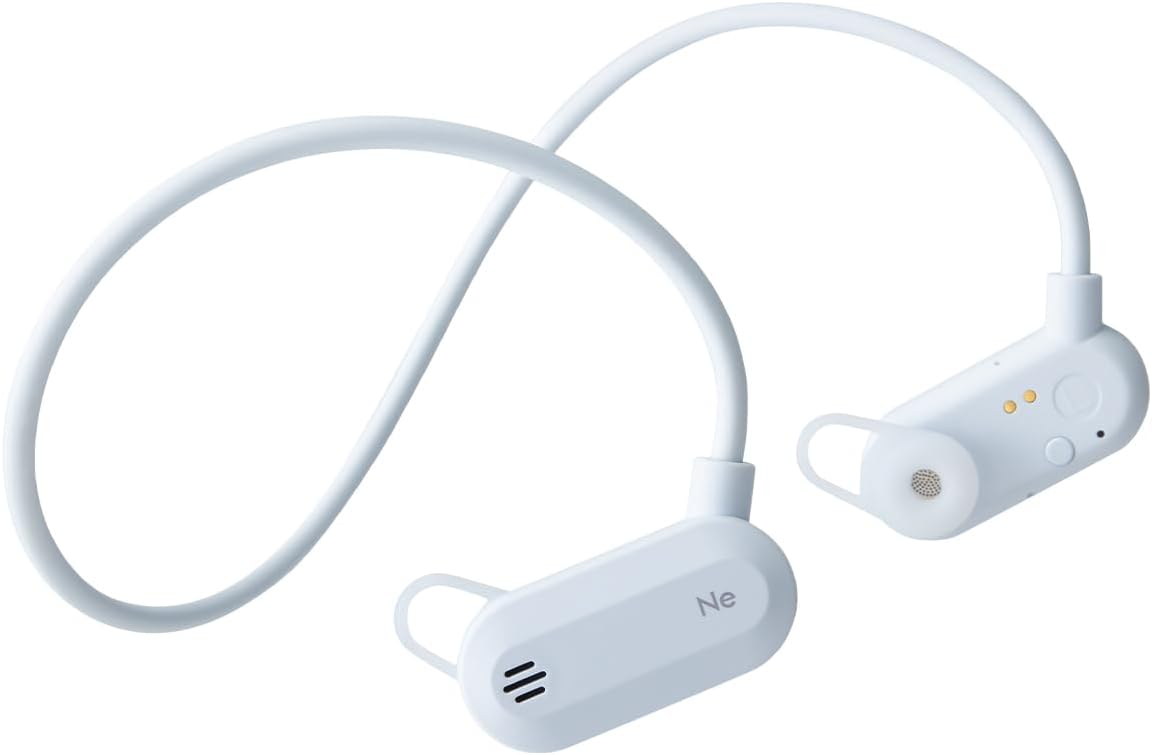
The HP-H100BT earphones are designed for active use, allowing you to enjoy audio while remaining aware of your surroundings. Key features include:
- کھلے کان کا ڈیزائن: Allows ambient sounds to be heard for enhanced safety during outdoor activities.
- "Listen-While-You-Hear" Structure: Ensures your ears are not fully blocked.
- Carbon Fiber Paper Dome Dynamic Driver: Delivers rich bass and clear mid-high tones.
- ہلکا پھلکا اور کمپیکٹ: Features a shape-memory neckband for easy portability and storage.
- IPX4 Drip-Proof: Suitable for sports and exercise, resistant to sweat and light rain.
حفاظتی معلومات
محفوظ آپریشن کو یقینی بنانے اور نقصان کو روکنے کے لیے، براہ کرم درج ذیل احتیاطی تدابیر پر عمل کریں:
- Do not disassemble, modify, or attempt to repair the device. This may void the warranty and cause electric shock or fire.
- Keep the earphones away from water, moisture, and extreme temperatures.
- سماعت کو پہنچنے والے نقصان کو روکنے کے لیے زیادہ حجم کی سطح پر طویل نمائش سے گریز کریں۔
- Do not use the earphones in situations where inability to hear ambient sounds could be dangerous, such as driving or cycling in traffic. The open-ear design helps, but caution is still advised.
- بچوں اور پالتو جانوروں کی پہنچ سے دور رکھیں۔ چھوٹے حصوں سے دم گھٹنے کا خطرہ ہو سکتا ہے۔
IPX4 Drip-Proof Rating
The HP-H100BT earphones are rated IPX4, meaning they are protected against splashing water from any direction. This makes them suitable for use during exercise where sweat may occur, or in light rain. نوٹ: IPX4 does not mean the device is fully waterproof. Do not submerge the earphones in water.

پیکیج کے مشمولات
تصدیق کریں کہ تمام اشیاء پیکیج میں موجود ہیں:
- radius HP-H100BT Wireless Open-Ear Earphones
- Earpieces (S, M, L sizes - 1 set each)
- چارجنگ کیبل
- کیرینگ کیس
- Instruction Manual (with Warranty Card)

پروڈکٹ ختمview
Familiarize yourself with the components of your HP-H100BT earphones.

کنٹرول اور اشارے
The earphones feature intuitive controls for power, volume, and call management. Refer to the diagrams on the product packaging or official website for specific button locations.
سیٹ اپ
1. ائرفون چارج کرنا
Before first use, fully charge the earphones. Use the dedicated magnetic charging cable provided.
- Connect the charging cable to a USB power source (e.g., computer USB port, USB wall adapter).
- Align the magnetic end of the charging cable with the charging connector on the L-side earphone unit. The magnets will attract, and charging will begin.
- اشارے کی روشنی چارج کرنے کی حالت دکھائے گی (مثال کے طور پر، چارج کرنے کے لیے سرخ، مکمل طور پر چارج ہونے کے لیے نیلا)۔

2. بلوٹوت جوڑی بنانا
اپنے ائرفون کو کسی ڈیوائس سے جوڑنے کے لیے:
- یقینی بنائیں کہ ائرفون بند ہیں۔
- Press and hold the power button until the indicator light flashes (e.g., alternating red and blue), indicating pairing mode.
- اپنے آلے پر (اسمارٹ فون، ٹیبلیٹ وغیرہ)، بلوٹوتھ کو فعال کریں اور دستیاب آلات تلاش کریں۔
- Select "HP-H100BT" from the list of found devices.
- Once connected, the indicator light will change (e.g., solid blue) and a confirmation tone may sound.
3 ائرفون پہننا
The HP-H100BT features an open-ear design with a neckband for a secure and comfortable fit.
- Place the neckband around the back of your neck.
- Position the earphone units over your ears, ensuring the earpieces rest gently without fully blocking your ear canals.
- Adjust the fit for comfort and stability. The flexible neckband will conform to your head shape.


آپریٹنگ ہدایات
پاور آن/آف
- پاور آن: پاور بٹن کو تقریباً 3 سیکنڈ تک دبائے رکھیں جب تک کہ اشارے کی روشنی روشن نہ ہو جائے۔
- بجلی بند: پاور بٹن کو تقریباً 5 سیکنڈ تک دبائے رکھیں جب تک کہ اشارے کی روشنی بند نہ ہوجائے۔
میوزک پلے بیک
- چلائیں/روکیں: ایک بار ملٹی فنکشن بٹن دبائیں۔
- اگلا ٹریک: ملٹی فنکشن بٹن کو دو بار دبائیں۔
- پچھلا ٹریک: ملٹی فنکشن بٹن کو تین بار دبائیں۔
کال مینجمنٹ
- جواب / کال ختم کریں: آنے والی کال یا ایکٹو کال کے دوران ایک بار ملٹی فنکشن بٹن دبائیں۔
- کال مسترد کریں: آنے والی کال کے دوران ملٹی فنکشن بٹن کو 2 سیکنڈ تک دبائے رکھیں۔
والیوم کنٹرول
- اواز بڑھایں: والیوم + بٹن دبائیں۔
- آواز کم: والیوم - بٹن دبائیں۔
دیکھ بھال
صفائی
باقاعدگی سے صفائی کارکردگی اور حفظان صحت کو برقرار رکھنے میں مدد کرتی ہے۔
- ائرفون کو نرم، خشک کپڑے سے صاف کریں۔
- ضدی گندگی کے لیے، ہلکے سے ڈیampur کپڑے کو پانی سے صاف کریں اور پھر اچھی طرح خشک کریں۔
- Do not use abrasive cleaners, alcohol, or solvents, as these can damage the surface.
- Clean the earpieces regularly with a soft cloth.
ذخیرہ
When not in use, store the earphones in the provided carrying case to protect them from dust and damage. The shape-memory neckband allows for compact folding.

خرابی کا سراغ لگانا
اگر آپ کو مسائل درپیش ہیں تو درج ذیل حل آزمائیں:
| مسئلہ | ممکنہ وجہ | حل |
|---|---|---|
| پاور آن نہیں ہو سکتی | بیٹری کم ہے یا ختم ہو گئی ہے۔ | ائرفون کو پوری طرح سے چارج کریں۔ |
| آلہ کے ساتھ جوڑا نہیں بنایا جا سکتا | ائرفون پیئرنگ موڈ میں نہیں ہیں۔ ڈیوائس پر بلوٹوتھ آف؛ آلہ بہت دور ہے. | Ensure earphones are in pairing mode. Turn on Bluetooth on your device. Move device closer to earphones. |
| کوئی آواز یا کم حجم نہیں | Volume too low; earphones not connected; audio source issue. | Increase volume on earphones and device. Reconnect Bluetooth. Check audio source. |
| آواز کٹ جاتی ہے۔ | مداخلت; آلہ بہت دور؛ کم بیٹری. | Move closer to device. Avoid strong interference sources. Charge earphones. |
اگر مسئلہ برقرار رہتا ہے، تو براہ کرم سپورٹ سیکشن سے رجوع کریں یا کسٹمر سروس سے رابطہ کریں۔
وضاحتیں
| برانڈ | رداس |
| ماڈل نمبر | HP-H100BT |
| رنگ | بلیو گرے |
| کان کی جگہ کا تعین | کھلے کان |
| ہیڈ فون اسٹائل | ائرفون |
| رکاوٹ | 16 اوہم |
| شامل اجزاء | Earpieces (S, M, L) x 1 set each, Case, Charging Cable, Instruction Manual (Warranty Card) |
| عمر کی حد | بالغ |
| شور کنٹرول | کوئی نہیں۔ |
| پانی کی مزاحمت | IPX4 (پانی مزاحم) |
| اضافی خصوصیات | Sports & Exercise, Microphone, Shape Memory, Lightweight, Waterproof/Drip-proof |
| کنیکٹوٹی ٹیکنالوجی | وائرلیس |
| وائرلیس قسم | بلوٹوتھ |
وارنٹی اور سپورٹ
کوالٹی اشورینس
radius products undergo inspection, firmware updates, and periodic recharging before shipment to ensure quality. Therefore, some products may appear to have been temporarily opened; however, they are unused and their quality is not affected. We appreciate your understanding.
وارنٹی کی معلومات
The warranty for radius products applies to items purchased from authorized radius retailers, such as the official radius store, Kojima, Sofmap, e☆earphone, and Yamada Denki. Products purchased from other sellers are not covered by our warranty. Please confirm the seller before making a purchase.
For detailed warranty terms and conditions, please visit the official radius webسائٹ
کسٹمر سپورٹ
For further assistance or inquiries, please visit the official radius support page or contact your local authorized service center. Contact details can typically be found on the official radius webسائٹ یا آپ کے پروڈکٹ کا وارنٹی کارڈ۔
Ask a question about this manual
Ask about setup, troubleshooting, compatibility, parts, safety, or missing instructions. Manuals+ will review the question and use this page’s manual context to help answer it.