تعارف
Welcome to the user manual for your new Infinix Smart 8 smartphone. This guide provides essential information on setting up, operating, maintaining, and troubleshooting your device. The Infinix Smart 8 is designed for efficient performance, featuring a G36 processor, 4GB RAM, 64GB internal storage, a 50MP main camera, and a long-lasting 5000 mAh battery. Please read this manual thoroughly to ensure optimal use of your device.
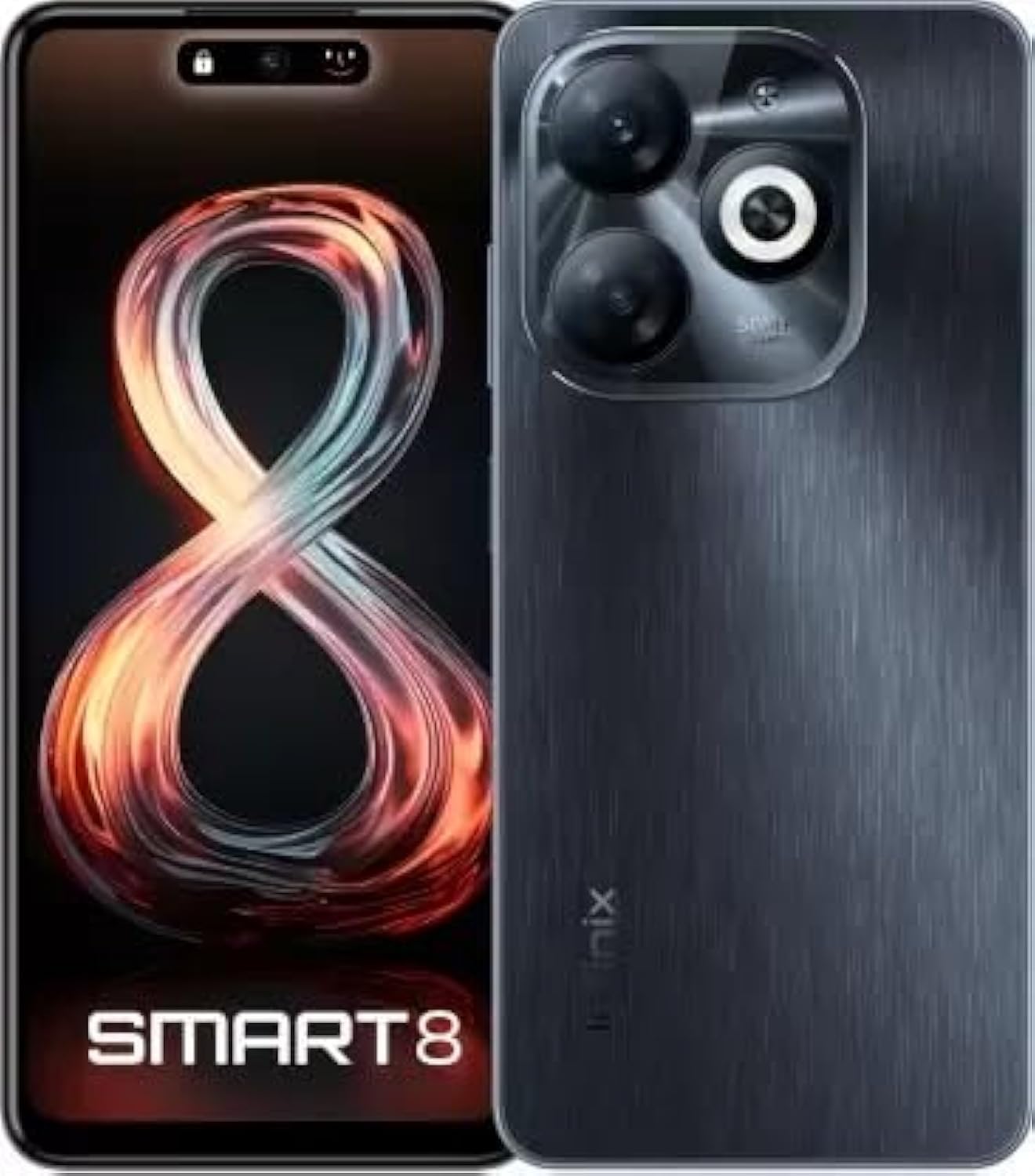
Image: Infinix Smart 8 smartphone in Timber Black, showcasing اس کا چیکنا ڈیزائن اور کیمرہ ماڈیول۔
باکس میں کیا ہے۔
Upon unboxing your Infinix Smart 8, please verify that all the following items are included:
- ہینڈ سیٹ
- اڈاپٹر
- USB ٹائپ سی کیبل
- ٹی پی یو کیس
- سم ایجیکٹر پن
- کوئیک اسٹارٹ گائیڈ
- وارنٹی کارڈ
- Xclub Card
سیٹ اپ گائیڈ
1 سم کارڈ اور میموری کارڈ داخل کرنا
Locate the SIM card tray on the side of your device. Use the provided SIM ejector pin to open the tray. Insert your Nano-SIM card(s) and/or a microSD card (for expandable storage up to 1 TB) into the designated slots. Ensure the cards are correctly oriented as shown in the diagram in the Quick Start Guide. Gently push the tray back into the device until it clicks into place.
2. پر / آف پاور
- پاور آن کرنے کے لیے: Press and hold the Power button (usually on the right side) until the Infinix logo appears.
- پاور آف کرنا: پاور بٹن کو دبائیں اور تھامیں، پھر اسکرین پر ظاہر ہونے والے اختیارات میں سے "پاور آف" کو منتخب کریں۔
- دوبارہ شروع کرنے کے لیے: پاور بٹن کو دبائیں اور تھامیں، پھر اختیارات میں سے "دوبارہ شروع کریں" کو منتخب کریں۔
3. ابتدائی سیٹ اپ
The first time you power on your device, you will be guided through an initial setup process. This includes selecting your language, connecting to a Wi-Fi network, setting up your Google account, and configuring security features like fingerprint unlock. Follow the on-screen prompts to complete the setup.
آپریٹنگ ہدایات
بنیادی نیویگیشن
- ٹچ: ایپ کھولنے کے لیے آئیکن کو تھپتھپائیں یا کوئی آئٹم منتخب کریں۔
- سوائپ: اسکرینوں کے درمیان سکرول کرنے یا نیویگیٹ کرنے کے لیے اپنی انگلی کو اسکرین پر گھسیٹیں۔
- چوٹکی: تصاویر کو زوم ان یا آؤٹ کرنے کے لیے دو انگلیوں کا استعمال کریں۔ web صفحات
- لانگ پریس: مزید اختیارات کے لیے یا اسے منتقل کرنے کے لیے کسی آئٹم کو دبا کر رکھیں۔
کال کرنا اور پیغامات بھیجنا
To make a call, open the Phone app, enter the number, and tap the call icon. To send a message, open the Messages app, tap the new message icon, enter the recipient's number or select from contacts, type your message, and tap send.
نیٹ ورکس سے جڑ رہا ہے۔
- وائی فائی: Go to Settings > Network & internet > Wi-Fi. Turn Wi-Fi on, select your desired network, and enter the password if required.
- بلوٹوتھ: ترتیبات > منسلک آلات > بلوٹوتھ پر جائیں۔ بلوٹوتھ کو آن کریں، پھر دستیاب آلات کے ساتھ جوڑا بنائیں۔
- موبائل ڈیٹا: Ensure your SIM card is active. Go to Settings > Network & internet > Mobile network to manage data usage and settings.
کلیدی خصوصیات
The Infinix Smart 8 offers a range of features designed to enhance your mobile experience:
- میموری اور اسٹوریج: Equipped with 4 GB RAM and 64 GB internal storage, expandable up to 1 TB via microSD card.
- ڈسپلے: Features a 16.76 cm (6.6 inch) HD+ Display with a 90 Hz refresh rate and 5000 Nits brightness for clear and vibrant visuals.
- کیمرہ سسٹم: A powerful 50MP main camera with AI Lens and a 5MP front camera for high-quality photos and selfies.
- بیٹری: A large 5000 mAh battery ensures extended usage on a single charge.
- پروسیسر: Powered by a G36 Processor for smooth performance and multitasking.
- کنیکٹوٹی: Supports 4G cellular networks, Bluetooth, USB, and Wi-Fi.
- سیکورٹی: Includes a fingerprint sensor for secure and convenient unlocking.
کیمرے کا استعمال
Your Infinix Smart 8 comes with an advanced camera system to capture your moments.
پیچھے والا کیمرہ
The main rear camera is 50 Megapixels, complemented by an AI Lens for enhanced image processing. It features a Quad-LED Flashlight for improved low-light photography.
سامنے والا کیمرہ
The front camera is 5 Megapixels, perfect for clear selfies and video calls.

تصویر: تفصیلی view of the Infinix Smart 8's rear camera setup, highlighting the 50MP dual camera and Quad-LED flashlight.
To access the camera, tap the Camera app icon. You can switch between photo, video, and other modes. Tap the shutter button to take a picture or start/stop recording a video.
معلومات ڈسپلے کریں۔
The Infinix Smart 8 features a vibrant 6.6-inch HD+ display.
- سائز: 16.76 سینٹی میٹر (6.6 انچ)
- قرارداد: 1600 x 720 پکسلز
- ریفریش ریٹ: 90 Hz for smoother scrolling and gaming.
- چمک: Up to 5000 Nits, ensuring visibility even in bright sunlight.
- قسم: Punch-Hole Display design.

Image: The Infinix Smart 8's 6.6-inch HD+ display, illustrating its punch-hole design and high brightness.
تکنیکی وضاحتیں
Below are the detailed technical specifications for the Infinix Smart 8:
| فیچر | تفصیلات |
|---|---|
| آپریٹنگ سسٹم | اینڈرائیڈ |
| رام | 4 جی بی |
| اندرونی اسٹوریج | 64 جی بی |
| قابل توسیع اسٹوریج | 1 ٹی بی تک |
| پروسیسر | G36 Processor |
| ڈسپلے سائز | 16.76 cm (6.6 inch) HD+ |
| ڈسپلے ریزولوشن | 1600 x 720 پکسلز |
| پیچھے والا کیمرہ | 50MP + AI Lens |
| سامنے والا کیمرہ | 5MP |
| بیٹری کی صلاحیت | 5000 ایم اے ایچ |
| فون ٹاک ٹائم | 25 گھنٹے |
| وائرلیس کمیونیکیشن | Cellular (4G Ready) |
| کنیکٹیویٹی ٹیکنالوجیز | بلوٹوتھ، یو ایس بی، وائی فائی |
| جی پی ایس | گلوناس |
| آڈیو جیک | جی ہاں |
| شے کا وزن | 350 گرام |
| آئٹم ماڈل نمبر | smart 8 |

Image: A visual summary of the Infinix Smart 8's technical specifications, including RAM, storage, battery, and processor details.
بیٹری کی معلومات
The Infinix Smart 8 is equipped with a 5000 mAh battery, providing ampروزانہ استعمال کے لئے طاقت.
- صلاحیت: 5000 ملی۔amp گھنٹے
- گفتگو کا وقت: مکمل چارج پر 25 گھنٹے تک۔
- چارج کرنا: Use the provided Adaptor and USB Type-C Cable for optimal charging.
For best battery life, avoid fully discharging the battery frequently and use the original charger.
خرابی کا سراغ لگانا
If you encounter issues with your Infinix Smart 8, refer to the following common solutions:
- ڈیوائس آن نہیں ہو رہی ہے: Ensure the battery is charged. Connect the charger and wait a few minutes before attempting to power on again. If unresponsive, try a forced restart by holding the power button for 10-15 seconds.
- ایپس کا کریش ہونا/جمنا: Close the problematic app and reopen it. If the issue persists, clear the app's cache (Settings > Apps > [App Name] > Storage & cache > Clear cache). Consider updating the app or the phone's software.
- ناقص نیٹ ورک سگنل: چیک کریں کہ آیا آپ کا سم کارڈ صحیح طریقے سے ڈالا گیا ہے۔ آلہ کو دوبارہ شروع کرنے کی کوشش کریں۔ یقینی بنائیں کہ آپ نیٹ ورک کوریج والے علاقے میں ہیں۔
- بیٹری کا تیزی سے ختم ہونا: Reduce screen brightness, close unused apps running in the background, disable unnecessary notifications, and turn off Wi-Fi/Bluetooth when not in use.
- ٹچ اسکرین غیر ذمہ دار: Restart the device. If the issue continues, ensure the screen is clean and free of moisture.
For more complex issues, refer to the official Infinix support webسائٹ یا کسٹمر سروس سے رابطہ کریں۔
دیکھ بھال اور دیکھ بھال
To ensure the longevity and optimal performance of your Infinix Smart 8, follow these maintenance guidelines:
- صفائی: اسکرین اور جسم کو صاف کرنے کے لیے نرم، لنٹ سے پاک کپڑا استعمال کریں۔ سخت کیمیکلز یا کھرچنے والے مواد سے پرہیز کریں۔
- درجہ حرارت: طویل عرصے تک آلہ کو انتہائی درجہ حرارت (گرم یا ٹھنڈا) یا براہ راست سورج کی روشنی کے سامنے نہ رکھیں۔
- پانی کی نمائش: ڈیوائس واٹر پروف نہیں ہے۔ پانی یا دیگر مائعات کے ساتھ رابطے سے گریز کریں۔
- سافٹ ویئر اپ ڈیٹس: Regularly check for and install software updates to benefit from performance improvements and security patches.
- ذخیرہ: Avoid overfilling your device's storage. Regularly clear unnecessary files and app caches.
وارنٹی اور سپورٹ
Your Infinix Smart 8 is covered by a 7-day service center replacement/repair policy from the date of purchase. Please retain your purchase receipt and the warranty card for service claims.
- مینوفیکچرر: Infinix (G mobile devices private ltd)
- ٹول فری سپورٹ: 18004190525
- آن لائن مدد: Visit the official Infinix webFAQs، امدادی وسائل، اور رابطہ کی معلومات کے لیے سائٹ۔
For any issues or queries, please contact the manufacturer's support team.
اہم حفاظتی معلومات
اپنے آلے کو چوٹ یا نقصان سے بچنے کے لیے براہ کرم درج ذیل حفاظتی معلومات کو احتیاط سے پڑھیں:
- Do not attempt to disassemble, repair, or modify the device yourself. This can cause damage, fire, or electric shock.
- Use only original or certified compatible chargers and accessories.
- Avoid exposing the device to open flames or extreme heat.
- آلے کو آگ یا پانی میں ضائع نہ کریں۔
- Keep the device and its accessories out of reach of children and pets.
- Observe all local laws and regulations regarding mobile phone use, especially while driving.
پروڈکٹ ختمview ویڈیو
بصری اوور کے لیے اس آفیشل پروڈکٹ کی ویڈیو دیکھیںview of the Infinix Smart 8's features and capabilities.
ویڈیو: ایک آفیشل اوورview of the Infinix Smart 8 smartphone, detailing its technical specifications, key features, camera, and display.