
symcode 1D Laser Blue white
Symcode 1D Barcode Scanner User Manual
Model: 1D Laser Blue white
1. تعارف
Thank you for choosing the Symcode USB 1D Barcode Scanner. This handheld wired CCD laser barcode reader is designed for efficient and accurate scanning of 1D barcodes from both printed materials and digital screens. It is an ideal solution for various applications including warehouses, libraries, supermarkets, and point-of-sale (POS) systems.
This manual provides comprehensive instructions on setting up, operating, and maintaining your scanner to ensure optimal performance and longevity.

مجموعی طور پر view of the Symcode 1D Barcode Scanner with its USB cable.
2. کلیدی خصوصیات
- 1D CCD Image Scanning Technology: Equipped with an advanced CCD sensor for quick and accurate capture of 1D codes from paper and screens, including deformed, smudged, damaged, fuzzy, or reflective barcodes.
- ورسٹائل سکیننگ موڈز: Features Key Trigger mode, Auto-induction mode, and Continuous Mode for flexible operation.
- پائیدار تعمیر: Ergonomic design with high-quality ABS material ensures resistance to drops from 2m high, providing long service life.
- Extensive 1D Barcode Support: Compatible with UPC/EAN, UCC/EAN 128, Code 39, Code 93, Code 128, Codabar, Interleaved 2 of 5, Discrete 2 of 5, MSI, Code 11, RSS variants, Chinese 2 of 5, and more.
- مرضی کے مطابق آؤٹ پٹ: Offers 180 configurable options for prefix, suffix, and termination strings.
- درخواست کی وسیع رینج: Suitable for use in supermarkets, convenience stores, warehouses, libraries, bookstores, drugstores, and retail shops for various management tasks.
3. پیکیج کے مشمولات
براہ کرم تصدیق کریں کہ تمام اشیاء آپ کے پیکیج میں موجود ہیں:
- 1 x Symcode CCD Barcode Scanner
- 1 ایکس یوزر مینوئل (یہ دستاویز)
- 1 ایکس USB کیبل
4. سیٹ اپ
4.1 سکینر کو جوڑنا
The Symcode 1D Barcode Scanner is a plug-and-play device. No drivers are typically required for most operating systems.
- Locate an available USB port on your computer (Desktop, Laptop) or compatible device.
- Insert the USB connector of the scanner's cable into the USB port.
- The scanner will typically emit a short beep and/or a light indicator will turn on, signifying successful connection and readiness for use.

The scanner connects to a laptop via its 1.6m (5.2ft) USB cable, compatible with Linux, Windows, iOS, and Android operating systems.
5. سکینر چلانا
5.1 بنیادی اسکیننگ
To scan a barcode, point the scanner's laser beam at the barcode you wish to read and press the trigger button (if in Key Trigger mode). The scanner will emit a successful scan beep and the data will be transmitted to your connected device as if typed by a keyboard.

The scanner can read 1D barcodes from both printed labels and digital screens, such as a smartphone display.
5.2 اسکیننگ موڈز
سکینر تین بنیادی سکیننگ طریقوں کی حمایت کرتا ہے:
- کلیدی محرک موڈ: Press the trigger to activate the scan. Release to stop.
- آٹو انڈکشن موڈ: The scanner automatically detects a barcode within its field of view and scans it without needing to press the trigger.
- مسلسل موڈ: The scanner continuously emits the laser beam, scanning any barcode that passes through its field.
Refer to the included configuration guide (often a set of barcodes) to switch between these modes. If auto-sensing is inactive, scan the appropriate configuration barcode to enable it.
5.3 آواز کی ترتیبات
The scanner provides audible feedback for successful scans. You can turn this sound on or off according to your preference by scanning specific configuration barcodes.
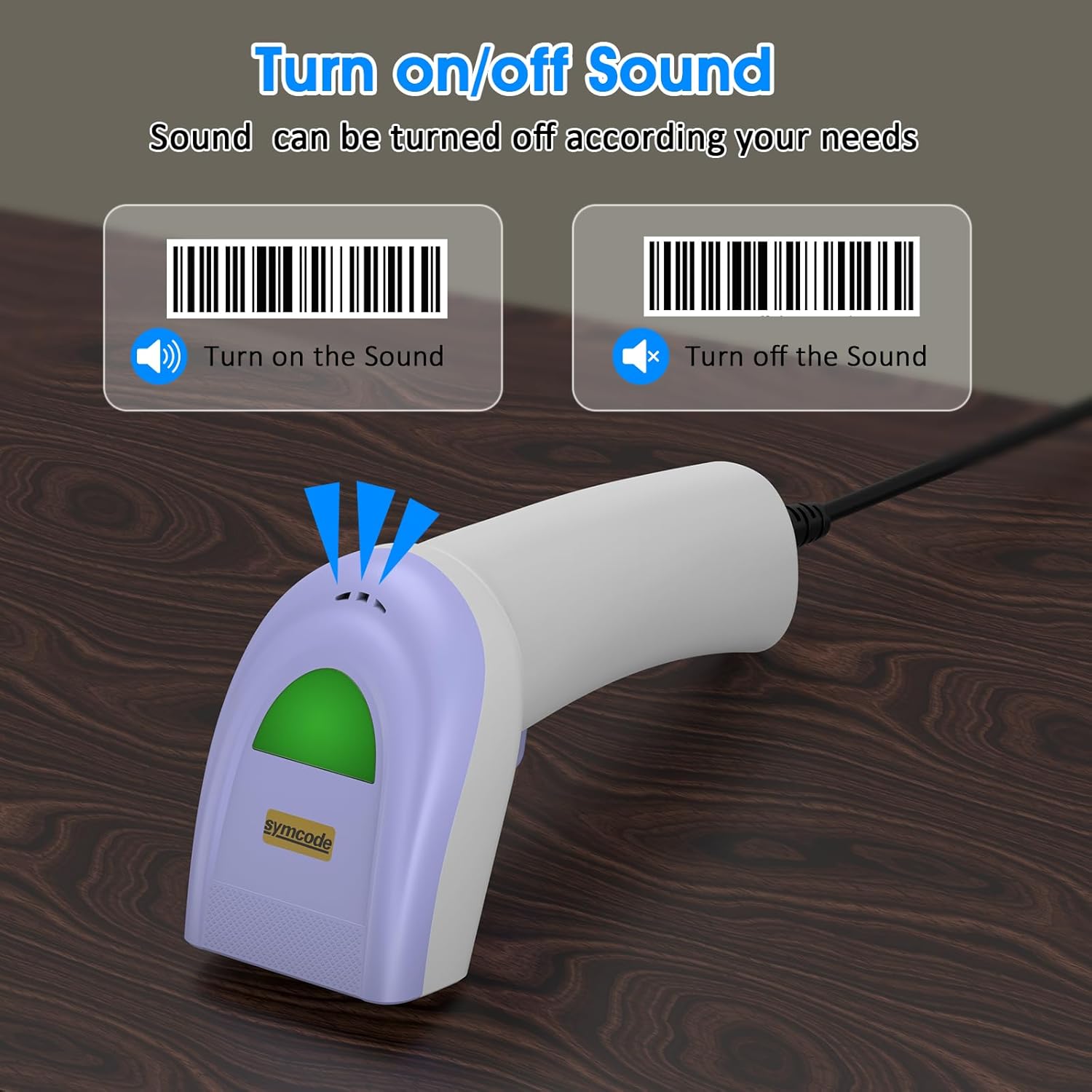
Scan specific barcodes to enable or disable the scanner's sound feedback.
5.4 Customizing Data Output (Prefix/Suffix)
The scanner allows you to add custom prefixes or suffixes to the scanned barcode data. This feature is useful for integrating scanned data into specific software or databases that require additional identifiers.

The scanner can customize scanned data by adding prefixes or suffixes. Examples: RL123456789 (with prefix), 12345RL6789 (with middle text), 123456789RL (with suffix).
5.5 تعاون یافتہ بارکوڈ کی اقسام
The Symcode 1D Barcode Scanner has excellent decoding ability for a wide range of common 1D barcodes.

The scanner supports various 1D barcode types, including CODE 128 (1234567890), UPC A (123456789012), Frauded Barcode (1234567890135), Profiled Barcode (4603146002134), Industrial 2 of 5 (987612), ITF, Folded Barcode, and Color Barcode.
6 دیکھ بھال
To ensure the longevity and optimal performance of your barcode scanner, follow these simple maintenance guidelines:
- صفائی: Use a soft, dry cloth to clean the scanner's exterior. For the scanning window, use a lens cleaning cloth or a soft cloth lightly dampened with a mild, non-abrasive cleaner. Avoid harsh chemicals or abrasive materials.
- ذخیرہ: اسکینر کو براہ راست سورج کی روشنی اور انتہائی درجہ حرارت سے دور ٹھنڈی، خشک جگہ پر اسٹور کریں۔
- ہینڈلنگ: While the scanner is designed to be durable, avoid unnecessary drops or impacts. Do not pull the cable excessively or bend it sharply.
7 خرابیوں کا سراغ لگانا
If you encounter issues with your Symcode barcode scanner, please refer to the following common problems and solutions:
| مسئلہ | ممکنہ وجہ | حل |
|---|---|---|
| Scanner does not power on or respond. | USB کیبل مناسب طریقے سے منسلک نہیں ہے یا خراب USB پورٹ ہے۔ | Ensure the USB cable is securely plugged into both the scanner and the computer. Try a different USB port. |
| Scanner beeps but no data is transmitted. | Incorrect output mode or software not ready to receive input. | Ensure your cursor is in a text field or application ready to receive input. Check scanner configuration for output mode (e.g., HID Keyboard Emulation). |
| Scanner does not read certain barcodes. | Barcode type not enabled, damaged barcode, or insufficient lighting. | Refer to the configuration guide to enable all necessary barcode types. Ensure the barcode is clear and well-lit. Try scanning from a different angle or distance. |
| Scanner reads slowly or intermittently. | Dirty scanning window or interference. | Clean the scanning window as described in the Maintenance section. Ensure no obstructions are blocking the laser. |
If the problem persists after trying these solutions, please contact Symcode customer support for further assistance.
8. وضاحتیں
| فیچر | تفصیلات |
|---|---|
| طول و عرض | 165 x 63 x 87 ملی میٹر (6.5 x 2.48 x 3.43 انچ) |
| وزن | 156 گرام (5.5 آانس) |
| روشنی کا ذریعہ | 650nm~670nm visible laser |
| اسکین کی رفتار | 100 اسکینز/سیکنڈ |
| Read Preciseness | 0.1 ملی میٹر (4 ملی میٹر) |
| پرنٹ کنٹراسٹ | 30% کم از کم |
| فیلڈ کی گہرائی | 0~600mm (0.33mm, PCS 90%) |
| Scan Scope | 10 ملی میٹر ~ 250 ملی میٹر |
| پڑھنے کا فاصلہ | 2.5~600mm (100% UPC/EAN) |
| ڈیکوڈ کی اہلیت | EAN-8/13, UPC-A/E, Code 39/93/128, EAN-128, Codabar, Industrial 2 of 5, Interleave 2 of 5, Matrix 2 of 5, MSI etc. |
| بٹ ایرر ریٹ | 1/5 ملین |
| موجودہ کھپت | 85mA (working), 36mA (storage) |
| انٹرفیس | یو ایس بی |
| آپریٹنگ درجہ حرارت | 0℃~45℃ (32°F~113°F) |
| اسٹوریج کا درجہ حرارت | -20 ~ ~ 60 ℃ (-4 ° F ~ 140 ° F) |
| نمی | 5%~95% نان کنڈینسنگ |
| مواد | ABS+PC |
| ہم آہنگ آلات | ڈیسک ٹاپ، لیپ ٹاپ |
| طاقت کا منبع | کورڈڈ الیکٹرک |

The scanner is compact, with dimensions of 1.97in/5cm width, 2.76in/7cm depth, and 5.5in/14cm height, and weighs only 181g (excluding cable).

The compact and streamlined design of the Symcode scanner (left) offers a more comfortable and practical user experience compared to larger, heavier alternatives (right).
9. وارنٹی اور سپورٹ
Symcode products are manufactured to high-quality standards. This product comes with a standard manufacturer's warranty against defects in materials and workmanship. Please refer to the warranty card included in your package or visit the official Symcode webتفصیلی وارنٹی شرائط و ضوابط کے لیے سائٹ۔
For technical support, troubleshooting assistance, or any inquiries regarding your Symcode 1D Barcode Scanner, please contact Symcode customer service through the contact information provided on the product packaging or the official Symcode webسائٹ سپورٹ سے رابطہ کرتے وقت براہ کرم اپنے پروڈکٹ کا ماڈل اور خریداری کی تفصیلات تیار رکھیں۔
Ask a question about this manual
Ask about setup, troubleshooting, compatibility, parts, safety, or missing instructions. Manuals+ will review the question and use this page’s manual context to help answer it.