
IXITAB FS8233Pro
FS8233Pro Touch Smart Digital Multimeter User Manual
Model: FS8233Pro | Brand: IXITAB
1. تعارف
The IXITAB FS8233Pro is an advanced, automatic smart digital multimeter designed for professional electricians and DIY enthusiasts. Featuring an intelligent sensing touch screen, this device offers convenient operation and clear display for various electrical measurements. Its rechargeable lithium battery ensures long-lasting performance without the need for frequent battery replacements. The FS8233Pro is equipped with intelligent anti-burning fuse protection and a durable silicone protective case, enhancing both safety and hardware longevity. This manual provides comprehensive instructions for safe and effective use of your multimeter.
2. حفاظتی معلومات
Always adhere to safety precautions when operating electrical testing equipment. Failure to do so may result in injury or damage to the device.
- ہر پیمائش کی حد کے لیے متعین زیادہ سے زیادہ ان پٹ اقدار سے تجاوز نہ کریں۔
- Ensure test leads are in good condition and properly connected before making measurements.
- Avoid using the multimeter in wet environments or with wet hands.
- جلد کی پیمائش کرنے کی کوشش نہ کریں۔tage or current on circuits exceeding the device's rated capacity.
- مزاحمت، اہلیت، یا تسلسل کی پیمائش کرنے سے پہلے ہمیشہ سرکٹ سے بجلی منقطع کریں۔
- Use caution when working with live circuits.
- Refer to local electrical codes and safety standards.
3. پیکیج کے مشمولات
تصدیق کریں کہ تمام اشیاء آپ کے پیکیج میں موجود ہیں:
- 1 x FS8233Pro Digital Multimeter
- 1 ایکس انسٹرکشن دستی
- 1 ایکس چارجنگ کیبل (USB)
- ٹیسٹ لیڈز کا 1 x جوڑا

Image: The FS8233Pro multimeter shown with its standard accessories, including the red and black test leads and a USB charging cable.
4. پروڈکٹ ختمview
The FS8233Pro features a large, clear LCD display and intuitive touch controls for ease of use.

تصویر: ایک قریبی اپ view of the FS8233Pro's front panel, highlighting its large digital display and touch-sensitive buttons for various functions like HOLD, AUTO, NCV, Live, and input jacks.
4.1 اہم خصوصیات:
- Intelligent Sensing Touch Screen: For convenient operation and clear display.
- ریچارج ایبل لتیم بیٹری: Long life, USB charging.
- خودکار کھوج: Eliminates the need for manual gear shifting.
- Intelligent Anti-Burning Fuse: Enhanced safety protection.
- سلیکون حفاظتی کیس: Prevents shock and protects hardware.
- بیک لائٹ: Allows clear viewتاریک حالات میں
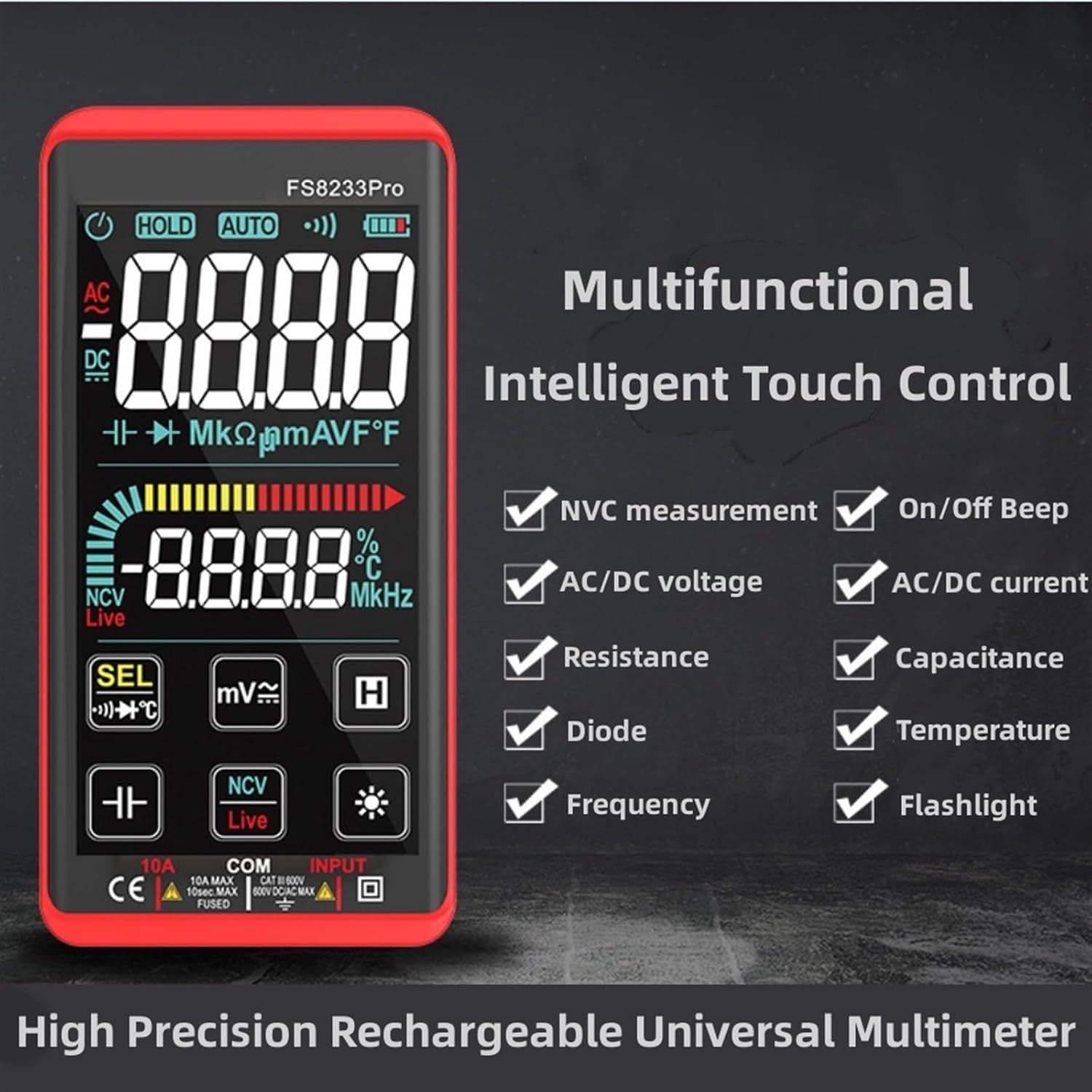
Image: A promotional image showcasing the multifunctional intelligent touch control features of the FS8233Pro, including NVC measurement, AC/DC voltage, resistance, diode, frequency, on/off beep, AC/DC current, capacitance, temperature, and flashlight.
5. سیٹ اپ
5.1 ابتدائی چارجنگ
Before first use, fully charge the multimeter's internal lithium battery. Connect the provided USB charging cable to the multimeter's charging port and to a standard USB power adapter (not included) or a computer USB port. The battery indicator on the display will show charging status.
5.2 ٹیسٹ لیڈز کو جوڑنا
Insert the red test lead into the "INPUT" jack and the black test lead into the "COM" (common) jack. Ensure they are securely inserted.
6. آپریٹنگ ہدایات
The FS8233Pro features automatic detection, simplifying measurement selection. Simply turn on the device and it will automatically identify the measurement type for most common functions.

Image: A hand interacting with the touch-sensitive display of the FS8233Pro multimeter, demonstrating its "Intelligent Movement Touch Sensing" for sensitive and fast measurements.
6.1 پاور آن/آف
Press the power button (usually indicated by a power symbol) to turn the multimeter on or off. The device will automatically shut down after approximately 15 minutes of inactivity to conserve battery life.
6.2 AC والیومtage (ACV) پیمائش
- ٹیسٹ لیڈز کو AC والیوم کے متوازی طور پر جوڑیں۔tagای ذریعہ
- The multimeter will automatically detect AC voltage.
- Range: 0.5V-750V (Accuracy: 1%+5)
6.3 DC والیومtage (DCV) پیمائش
- ٹیسٹ لیڈز کو DC والیوم کے متوازی طور پر جوڑیں۔tage source, observing polarity.
- The multimeter will automatically detect DC voltage.
- Range: 0.5V-1000V (Accuracy: 0.5%+3)
6.4 مزاحمتی پیمائش
- مزاحمت کی پیمائش کرنے سے پہلے اس بات کو یقینی بنائیں کہ سرکٹ ڈی انرجائزڈ ہے۔
- ٹیسٹ لیڈز کو جزو کے پار جوڑیں تاکہ پیمائش کی جائے۔
- Range: 0.1Ω-99.999MΩ (Accuracy: 1%+3)
6.5 تعدد کی پیمائش
- ٹیسٹ لیڈز کو سگنل سورس کی طرف جوڑیں۔
- Range: 40Hz-10000Hz (Accuracy: 0.5%+3)
6.6 صلاحیت کی پیمائش
- Ensure the capacitor is discharged before measurement.
- کیپسیٹر ٹرمینلز میں ٹیسٹ لیڈز کو جوڑیں۔
- Range: 10nF-60000μF (Accuracy: 4.5%+5)
6.7 درجہ حرارت کی پیمائش
- Use the appropriate temperature probe (if included, or purchased separately) and connect it to the multimeter.
- Range: -40°C to 1000°C (Accuracy: 2%+5)
6.8 On & Off Beep (Continuity)
- ٹیسٹ لیڈز کو پورے سرکٹ یا جزو میں جوڑیں۔
- If the resistance of the tested circuit is less than 50Ω, the auxiliary buzzer will sound, indicating continuity.
6.9 ڈایڈڈ ٹیسٹ
- ٹیسٹ لیڈز کو ڈایڈڈ میں جوڑیں۔
- The display will show the approximate diode forward voltagای قدر
6.10 NCV (غیر رابطہ والیومtage) پتہ لگانا
- Select the NCV function.
- Bring the top of the multimeter close to the AC voltagای ذریعہ
- There are three alarm modes (visual and audible) according to the detected voltage طاقت.
6.11 Live Line Identification
- Select the Live function.
- Insert the red test lead into the suspected live line.
- If it is a live line, "Live" will appear on the screen, and an alarm sound will be emitted.
7 دیکھ بھال
7.1 صفائی
Wipe the multimeter's casing اشتہار کے ساتھamp cloth. Do not use abrasive cleaners or solvents. Ensure the device is off and disconnected from any power source before cleaning.
7.2 اسٹوریج
Store the multimeter in a cool, dry place, away from direct sunlight and extreme temperatures. If storing for extended periods, ensure the battery is partially charged (around 50%) to prolong its lifespan.
7.3 بیٹری کی دیکھ بھال
The built-in lithium battery is designed for long life. Avoid fully discharging the battery frequently. Recharge as needed. If the device will not be used for a long time, charge it every 3 months to maintain battery health.
8 خرابیوں کا سراغ لگانا
| مسئلہ | ممکنہ وجہ | حل |
|---|---|---|
| ملٹی میٹر آن نہیں ہوتا ہے۔ | بیٹری ختم ہو گئی ہے۔ | Charge the multimeter using the provided USB cable. |
| غلط ریڈنگ۔ | Incorrect measurement mode; Damaged test leads; Environmental interference. | Ensure correct mode is selected (though often automatic); Check test leads for damage; Move away from strong electromagnetic fields. |
| کوئی تسلسل بیپ نہیں۔ | Resistance is too high; Test leads not making good contact. | Ensure resistance is below 50Ω; Re-seat test leads firmly. |
| Automatic shutdown occurs too quickly. | Inactivity timer. | The device is designed to shut down after approximately 15 minutes of inactivity. This is normal operation. |
9. وضاحتیں
| پیرامیٹر | حد / قدر | درستگی |
|---|---|---|
| AC جلدtage (ACV) | 0.5V-750V | (1٪ + 5) |
| ڈی سی والیومtage (DCV) | 0.5V-1000V | (0.5٪ + 3) |
| مزاحمت | 0.1Ω-99.999MΩ | (1٪ + 3) |
| تعدد | 40Hz-10000Hz | (0.5٪ + 3) |
| اہلیت | 10nF-60000μF | (4.5٪ + 5) |
| درجہ حرارت | -40 ° C سے 1000 ° C | (2٪ + 5) |
| Continuity Beep Threshold | <50Ω | N/A |
| خودکار شٹ ڈاؤن | تقریبا 15 منٹ کی غیرفعالیت | N/A |
| طاقت کا منبع | ریچارج ایبل لتیم بیٹری | N/A |
| کارخانہ دار | IXITAB | N/A |
| ماڈل | FS8233Pro | N/A |
10. وارنٹی اور سپورٹ
For warranty information and technical support, please refer to the contact details provided by your retailer or visit the official IXITAB webسائٹ وارنٹی دعووں کے لیے خریداری کے ثبوت کے طور پر اپنی خریداری کی رسید رکھیں۔
For additional assistance, you may contact the seller directly through the platform where the product was purchased.
Ask a question about this manual
Ask about setup, troubleshooting, compatibility, parts, safety, or missing instructions. Manuals+ will review the question and use this page’s manual context to help answer it.