
تعارف
This manual provides essential information for the installation, operation, maintenance, and troubleshooting of the Cisco Catalyst C9300L-24P-4X-E Network Essentials Switch. This device is designed for enterprise-grade access, offering 24 Gigabit PoE+ ports and four 10 Gbps SFP+ uplinks for robust network connectivity.
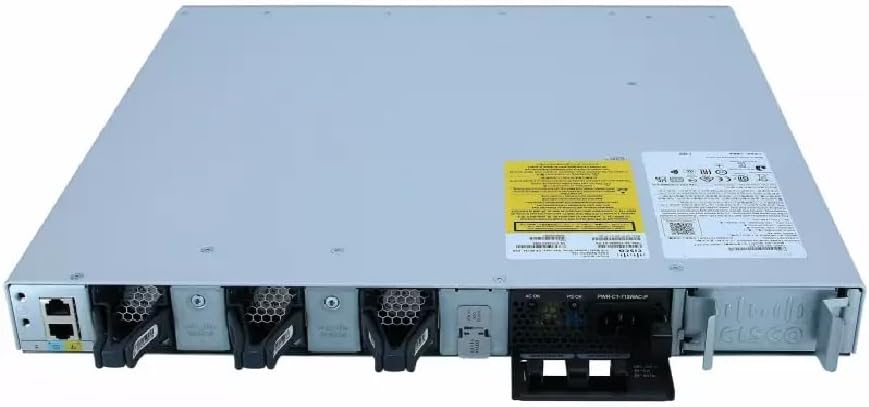
This image displays the rear panel of the Cisco Catalyst C9300L-24P-4X-E switch, highlighting the various ports, cooling fans, and the power supply unit.
حفاظتی معلومات
چوٹ اور سامان کو پہنچنے والے نقصان کو روکنے کے لیے درج ذیل حفاظتی تدابیر پر عمل کریں:
- بجلی کو جوڑنے سے پہلے مناسب گراؤنڈنگ کو یقینی بنائیں۔
- Do not operate the switch in wet or excessively humid environments.
- صرف منظور شدہ بجلی کی تاریں اور لوازمات استعمال کریں۔
- زیادہ گرمی سے بچنے کے لیے مناسب وینٹیلیشن کو یقینی بنائیں۔
- کسی بھی بحالی یا تنصیب کے طریقہ کار کو انجام دینے سے پہلے بجلی منقطع کریں۔
پیکیج کے مشمولات
تصدیق کریں کہ آپ کے پیکیج میں درج ذیل آئٹمز ہیں:
- Cisco Catalyst C9300L-24P-4X-E Switch
- پاور کی ہڈی
- ریک ماؤنٹ کٹ (اگر قابل اطلاق ہو)
- کنسول کیبل (RJ-45 سے DB-9)
- دستاویزات (کوئیک سٹارٹ گائیڈ، حفاظتی معلومات)
جسمانی تفصیل
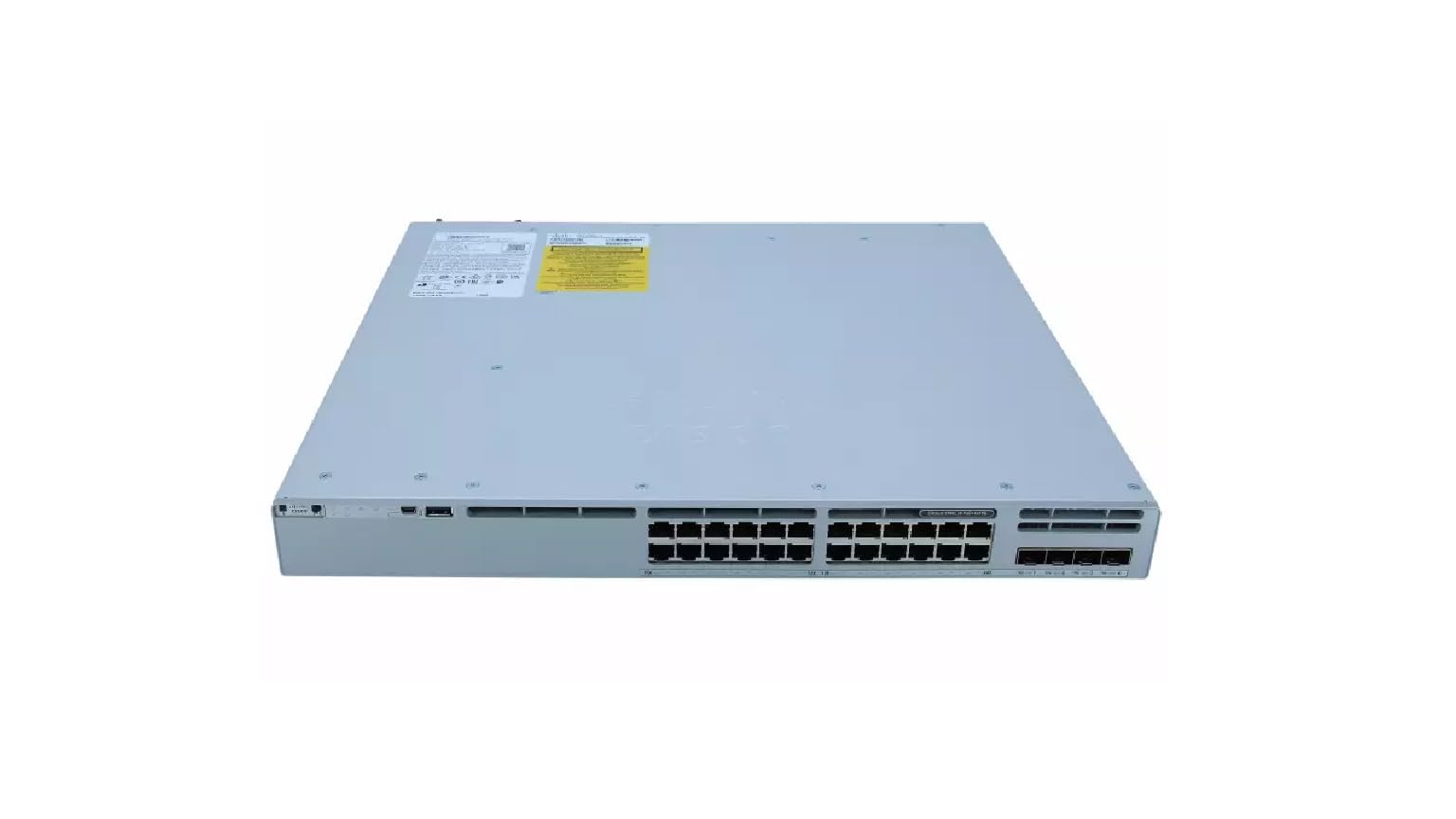
The Cisco Catalyst C9300L-24P-4X-E switch features a robust design for network deployments. The rear panel includes:
- 24 Gigabit Ethernet PoE+ Ports: For connecting network devices and providing power over Ethernet.
- 4x 10Gbps SFP+ Uplink Ports: For high-speed connections to the distribution or core layer.
- کنسول پورٹ: For command-line interface access.
- USB پورٹس: کے لیے file management and system configuration.
- Modular Power Supply Bay: For installing power supply units.
- کولنگ پنکھے: تھرمل مینجمنٹ کے لیے۔
ایک مفصل view of the rear panel of the Cisco Catalyst C9300L-24P-4X-E switch, illustrating the 24 Gigabit PoE+ ports, four 10Gbps SFP+ uplink ports, and the modular power supply bay.
سیٹ اپ
1 پیک کھولنا اور معائنہ
Carefully remove the switch from its packaging. Inspect the device for any signs of physical damage. If damage is found, contact your supplier immediately.
2. سوئچ لگانا
The switch can be mounted in a standard 19-inch equipment rack or placed on a desktop.
- ریک ماؤنٹ کی تنصیب: فراہم کردہ ریک ماؤنٹ بریکٹ کو سکرو کا استعمال کرتے ہوئے سوئچ کے اطراف میں جوڑیں۔ مناسب ریک پیچ کا استعمال کرتے ہوئے ریک میں سوئچ کو محفوظ کریں۔
- ڈیسک ٹاپ کی تنصیب: Ensure the surface is flat, stable, and allows for adequate ventilation around the switch. Attach the rubber feet (if provided) to the bottom of the switch.
3. کنیکٹنگ پاور
Insert the power cord into the AC power connector on the rear of the switch. Connect the other end of the power cord to a grounded electrical outlet. Ensure the power supply is properly seated in its bay.
4. نیٹ ورک کنکشنز
- PoE+ پورٹس: Connect Ethernet cables from your network devices (e.g., IP phones, access points, surveillance cameras) to the 24 Gigabit PoE+ ports. These ports will provide both data connectivity and power.
- SFP+ Uplink Ports: Insert compatible SFP+ transceivers into the four 10Gbps SFP+ uplink ports. Connect fiber optic cables from these transceivers to your distribution or core network devices.
- کنسول پورٹ: For initial configuration or troubleshooting, connect a console cable from your management workstation to the console port on the switch.
سوئچ کو آپریٹ کرنا
1. ابتدائی پاور آن
After connecting power, the switch will automatically power on. Observe the system LED indicators for boot status. The system LED should turn green once the boot process is complete.
2۔ بنیادی ترتیب
The Cisco Catalyst C9300L-24P-4X-E runs on Cisco IOS XE. Initial configuration can be performed via the console port using a command-line interface (CLI) or through a web-based graphical user interface (GUI) if enabled. Refer to Cisco's official documentation for detailed configuration guides.
3. ایل ای ڈی کے اشارے
The switch features various LED indicators to provide status information:
- سسٹم ایل ای ڈی: Indicates overall system status (e.g., green for normal operation, amber for warning).
- PoE ایل ای ڈی: Indicates Power over Ethernet status for the ports.
- پورٹ اسٹیٹس ایل ای ڈی: Indicate link status and activity for each network port.
دیکھ بھال
باقاعدگی سے دیکھ بھال آپ کے سوئچ کی بہترین کارکردگی اور لمبی عمر کو یقینی بناتی ہے:
- صفائی: وقتاً فوقتاً سوئچ کے بیرونی حصے کو نرم، خشک کپڑے سے صاف کریں۔ اس بات کو یقینی بنائیں کہ وینٹیلیشن کے سوراخ دھول اور ملبے سے پاک ہوں۔ مائع کلینر کو براہ راست ڈیوائس پر استعمال نہ کریں۔
- فرم ویئر اپ ڈیٹس: Keep the switch firmware updated to the latest version provided by Cisco. This ensures access to new features, security patches, and performance improvements.
- ماحولیاتی کنٹرول: Maintain the operating environment within specified temperature and humidity ranges to prevent hardware failure.
- کیبل مینجمنٹ: Ensure all cables are neatly organized and properly secured to prevent accidental disconnections or damage.
خرابی کا سراغ لگانا
اگر آپ کو اپنے سوئچ کے ساتھ مسائل کا سامنا کرنا پڑتا ہے، تو درج ذیل ٹربل شوٹنگ کے اقدامات پر غور کریں:
- کوئی طاقت نہیں: Verify the power cord is securely connected to both the switch and the power outlet. Check the power source and any circuit breakers. Ensure the power supply unit is correctly installed.
- کوئی نیٹ ورک کنیکٹیویٹی نہیں: Check the link status LEDs on the affected ports. Ensure Ethernet cables are properly connected and undamaged. Verify connected devices are powered on and functioning correctly.
- PoE ڈیوائس آن نہیں ہے: Confirm the PoE+ port is enabled and the device is PoE compatible. Check the PoE budget and ensure it's not exceeded.
- سست کارکردگی: Check for network congestion, duplex mismatches, or errors on ports. Ensure uplink bandwidth is sufficient.
- Accessing the Switch: If unable to access via network, try connecting directly to the console port for CLI access.
وضاحتیں
| فیچر | تفصیل |
|---|---|
| برانڈ | سسکو |
| ماڈل نمبر | C9300L-24P-4X-E |
| بندرگاہوں کی تعداد | 24 Gigabit PoE+ ports, 4x 10Gbps SFP+ uplinks |
| انٹرفیس | PoE، SFP+ |
| ڈیٹا کی منتقلی کی شرح | 1 Gigabits Per Second (Gigabit Ethernet), 10 Gigabits Per Second (Uplinks) |
| والیومtage | 240 وولٹ (AC) |
| سوئچ کی قسم | Managed, Fixed, PoE+, Layer 2 |
| کیس کے مواد کی قسم | پلاسٹک |
| ہم آہنگ آلات | Desktop, Laptop, Printer (and other network devices) |
وارنٹی کی معلومات
یہ پروڈکٹ ایک کے ساتھ آتا ہے۔ 90 دن کی محدود وارنٹی. Please refer to the warranty documentation provided with your purchase for specific terms and conditions. For warranty claims, contact your reseller or the manufacturer's support channels.
ٹیکنیکل سپورٹ
For further assistance, technical support, or advanced configuration guidance, please refer to the official Cisco documentation available on their website. You may also contact your authorized Cisco reseller or support provider for specialized assistance.
سسکو سپورٹ Webسائٹ: https://www.cisco.com/c/en/us/support/index.html