
1. تعارف
The bonkyo F999 Live Streaming Sound Card is a professional audio mixer designed for live streaming, podcasting, gaming, and music recording. It integrates audio mixing equipment into a comprehensive solution, featuring a built-in digital DSP chip for stable and clear sound effects. This manual provides detailed instructions for setting up, operating, and maintaining your F999 sound card.

Figure 1: bonkyo F999 Live Streaming Sound Card (White model)
2. پروڈکٹ ختمview
The F999 sound card offers a range of features to enhance your audio experience:
- Integrated Digital DSP Chip: 120 کلو ہرٹزampling rate for high-detail, stable, and clear sound.
- آڈیو ایڈجسٹمنٹ: Detailed control over high, medium, and low frequencies, microphone volume, and reverberation.
- خصوصی اثرات: 16 special effects, 8 tone modes, and 5 recording options.
- Voice Changing Modes: Four distinct voice changing modes (female to male, male to female, baby voice, monster voice).
- کنیکٹوٹی: Multiple input and output interfaces, including 2-way condenser microphone plugs, 2-way microphone inputs, 2-way headphone plugs, and 1-way accompaniment input.
- بلوٹوتھ: Integrated Bluetooth for wireless audio input.
- شور کی کمی: Dedicated DENOISE button for effective noise reduction.
- مطابقت: Compatible with 99% of applications (e.g., YouTube, Zoom, Capcut, Twitch, Spotify) and devices (Android, iOS, Windows).

Figure 2: F999 Sound Card in various usage scenarios: Gaming, Streaming, Podcasting, and Singing.
The device features intuitive controls including knobs for Treble, Mid, Bass, Record, Mic volume, and Reverb, along with sliders for Accompaniment and Monitor volume. A variety of illuminated buttons provide quick access to sound effects, voice modes, and special functions.
3. سیٹ اپ
3.1 ان باکسنگ اور اجزاء
Before starting, ensure all components are present in the package:
- 1x F999 Audio Mixer Sound Card
- 1x Power Cord/Charging Cable (Type-C to USB-A)
- 2x 3.5mm TRRS Audio Cables
- 1x ہدایت نامہ
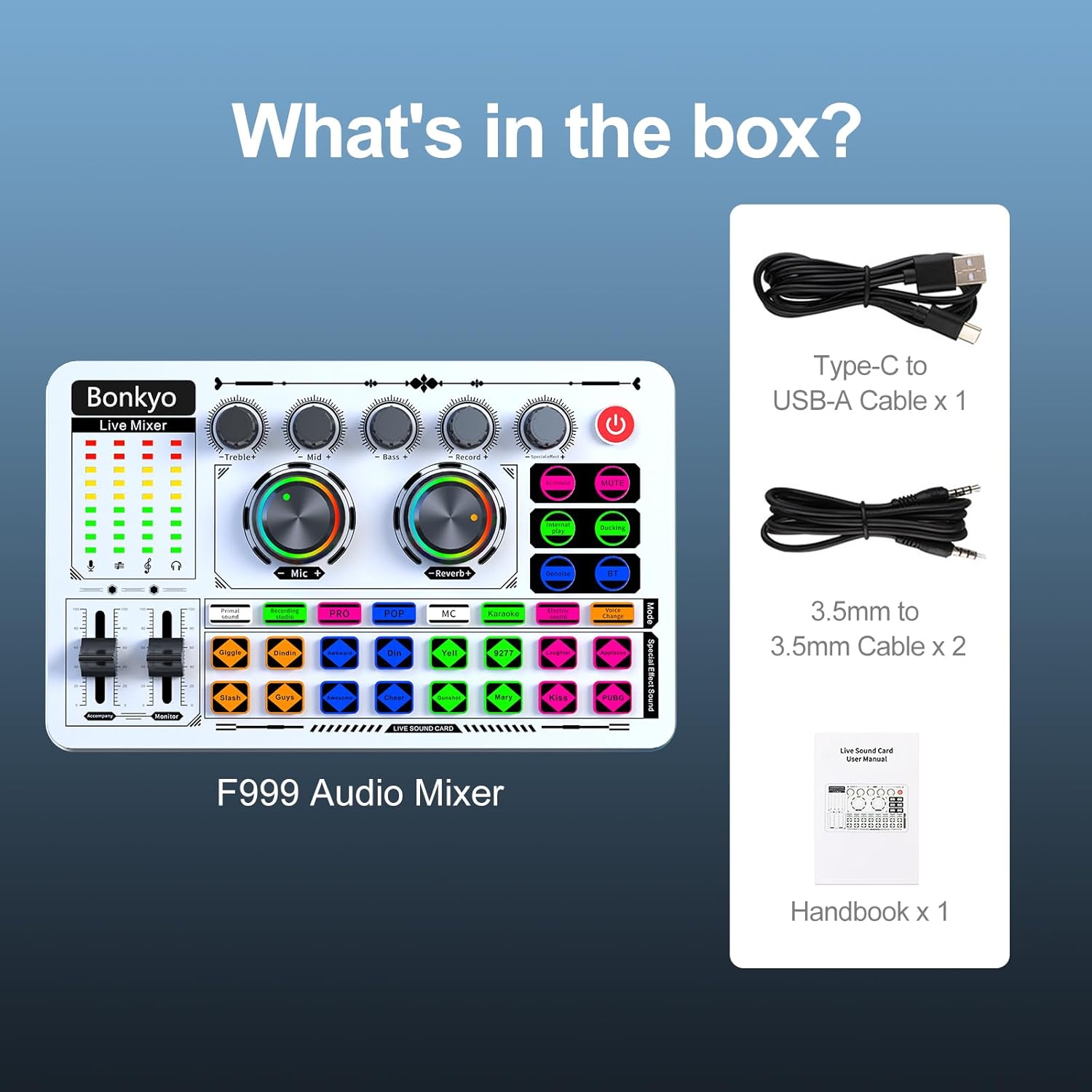
Figure 3: Contents of the F999 Sound Card package.
3.2 مائیکروفون کو جوڑنا
The F999 supports both condenser and dynamic microphones. Connect your microphone(s) to the designated 3.5mm or 6.5mm microphone input jacks on the sound card.
3.3 Connecting to Devices (Phone/PC)
Use the provided 3.5mm TRRS audio cables to connect your phone or PC to the sound card. The sound card features multiple live output ports for simultaneous streaming to up to three devices.

Figure 4: Diagram illustrating the various input and output interfaces on the F999 Sound Card.
3.4 ڈیوائس کو پاور کرنا
Connect the sound card to a power source using the Type-C to USB-A charging cable. The device has a built-in rechargeable battery.
4. آپریٹنگ ہدایات
4.1 بنیادی آپریشن
- پاور آن/آف: Press and hold the power button (usually red) to turn the device on or off.
- حجم کو ایڈجسٹ کرنا: Use the rotary knobs for Microphone Volume and Reverb. Adjust Treble, Mid, and Bass for microphone equalization. Use the sliders for Accompaniment and Monitor headphone volume.
4.2 بلوٹوتھ کنکشن
To connect via Bluetooth for accompaniment:
- اپنے موبائل ڈیوائس پر بلوٹوتھ کو چالو کریں۔
- Press the 'BT' button on the F999 sound card to enable Bluetooth pairing mode.
- تلاش کریں۔ 'F999' in your device's Bluetooth settings and connect.

Figure 5: The Bluetooth feature on the F999 Sound Card for wireless audio input.
4.3 Using Sound Effects and Voice Modes
The F999 features 16 special effects and 8 tone modes, accessible via dedicated buttons. Press the desired button to activate the effect.
5 دیکھ بھال
To ensure the longevity and optimal performance of your bonkyo F999 Sound Card:
- آلے کو صاف اور دھول سے پاک رکھیں۔ صفائی کے لیے نرم، خشک کپڑا استعمال کریں۔
- ڈیوائس کو انتہائی درجہ حرارت، نمی، یا براہ راست سورج کی روشنی کے سامنے لانے سے گریز کریں۔
- آلہ کو خود سے جدا کرنے یا مرمت کرنے کی کوشش نہ کریں۔ کسی بھی مرمت کے لیے اہل سروس اہلکاروں سے رجوع کریں۔
- نقصان کو روکنے کے لیے جب استعمال میں نہ ہو تو آلہ کو محفوظ جگہ پر اسٹور کریں۔
6 خرابیوں کا سراغ لگانا
If you encounter issues with your F999 Sound Card, refer to the following common problems and solutions:
| مسئلہ | ممکنہ وجہ | حل |
|---|---|---|
| کوئی آواز آؤٹ پٹ نہیں ہے۔ | Incorrect cable connection, low volume, muted device | Check all cable connections. Adjust volume knobs and sliders. Ensure device is not muted. |
| مائکروفون کام نہیں کر رہا ہے۔ | Microphone not connected properly, microphone volume too low | Ensure microphone is securely plugged in. Increase microphone volume. |
| بلوٹوتھ جوڑا بنانے میں ناکامی۔ | Device too far, Bluetooth not enabled on sound card/phone | Ensure devices are within range. Activate Bluetooth on both devices. Re-attempt pairing. |
| Sound distortion/noise | High gain, interference, DENOISE not active | Lower input gain. Move away from potential interference sources. Activate DENOISE function. |
اگر مسئلہ برقرار رہتا ہے، تو براہ کرم کسٹمر سپورٹ سے رابطہ کریں۔
7. وضاحتیں
- آئٹم کا وزن: 15.2 اونس (0.43 کلوگرام)
- مصنوعات کے طول و عرض: 7.52 x 4.65 x 1.97 انچ
- آئٹم ماڈل نمبر: F999
- بیٹریاں: 1 بیٹریاں درکار ہیں (شامل)
- رنگ: سفید
- ہم آہنگ آلات: Desktop, Headphone, iPhone, Microphone
- ہارڈ ویئر انٹرفیس: یو ایس بی
- بیٹری کی قسم: لیتھیم
- ہارڈ ویئر پلیٹ فارم: Mac, Microphone, PC
- طاقت کا منبع: بیٹری سے چلنے والا
- چینلز کی تعداد: 5
- کنیکٹوٹی ٹیکنالوجی: ٹائپ سی
8. وارنٹی اور سپورٹ
The bonkyo F999 Live Streaming Sound Card comes with a 365-day replacement policy and lifetime technical support. For any questions or assistance, please contact our customer service team. Our staff is available to help you one-on-one to resolve any issues and ensure a smooth live broadcasting experience.
For further support, please refer to the contact information provided with your product or visit the official bonkyo webسائٹ