
1. حفاظتی معلومات
Please read all safety instructions carefully before operating the WAINLUX K10 laser engraving machine. Failure to follow these instructions may result in injury or damage to the device.
- آنکھوں کی حفاظت: The machine features an eye-friendly shield and laser filtering. However, always ensure the shield is properly closed during operation. Avoid direct exposure to the laser beam.
- Enclosed Design: The WAINLUX K10 is designed with a fully enclosed structure to enhance safety.
- Automatic Stop Features:
- Micro-open Induction Safety Protection: The laser engraving machine will automatically stop operation immediately if the protective lid is opened during engraving.
- Tilt Induction Safety Protection: If the machine's angle relative to the horizontal plane exceeds 13(±5°) for more than 1 second, the laser will stop working immediately.
- وینٹیلیشن: The machine includes a built-in fan for smoke extraction. Ensure proper ventilation in your workspace.
- مواد کی مطابقت: This laser engraver is suitable for materials such as wood, plastic, leather, parchment, plywood, painted metal, and black plastic. Do not engrave or cut white, transparent, or reflective materials directly as the laser may not interact with them effectively or could cause unexpected reflections.
- آتش گیر مواد: Keep flammable materials away from the engraving area.
- نگرانی: آپریشن کے دوران مشین کو نہ چھوڑیں۔

Image: Micro-open Induction Safety Protection Design. The machine stops when the lid is opened.

Image: Tilt Induction Safety Protection Design. The machine stops if tilted beyond a safe angle.

تصویر: ختمview of multiple security protections including anti-blue light shield and built-in fan.
2. پروڈکٹ ختمview
The WAINLUX K10 is a compact and versatile 3W mini laser engraving machine designed for various creative and practical applications. It offers high precision and multiple connectivity options.
اہم خصوصیات:
- کمپیکٹ سائز: Measuring 27 x 27 x 14 cm, it is highly portable and suitable for various environments.
- لیزر ماڈیول: Features a 3W compressed spot laser module with 24W input power.
- اعلی درستگی: Achieves an engraving accuracy of 0.01 mm for detailed results.
- کندہ کاری کا علاقہ: Provides an 80 mm x 80 mm engraving range.
- کندہ کاری کی رفتار: Capable of speeds up to 3000 mm/min.
- کنیکٹوٹی: Supports Bluetooth connection via a mobile app (Android/iOS) and USB connection to Windows or Mac computers.
- حمایت کی File فارمیٹس: JPG, BMP, PNG, PEG, GIF, PLT, XJ, HPGL, DXF.
- Engraving Modes: Black and white, discrete, and contour.
معاون مواد:
The WAINLUX K10 can engrave a wide range of materials, including:
- Wood chips, Plywood, Bamboo
- Plastic, Black Plastic
- Leather, Parchment
- Coated Metal (painted metal surfaces)
- Cardboard, Paper
- سلیکا جیل
- سلیٹ
- Ceramic, Glass (with preparation, see Operating Instructions)
- ایکریلک
- کھانا
It can also be used as a laser cutter for parchment up to 0.5 mm thick.
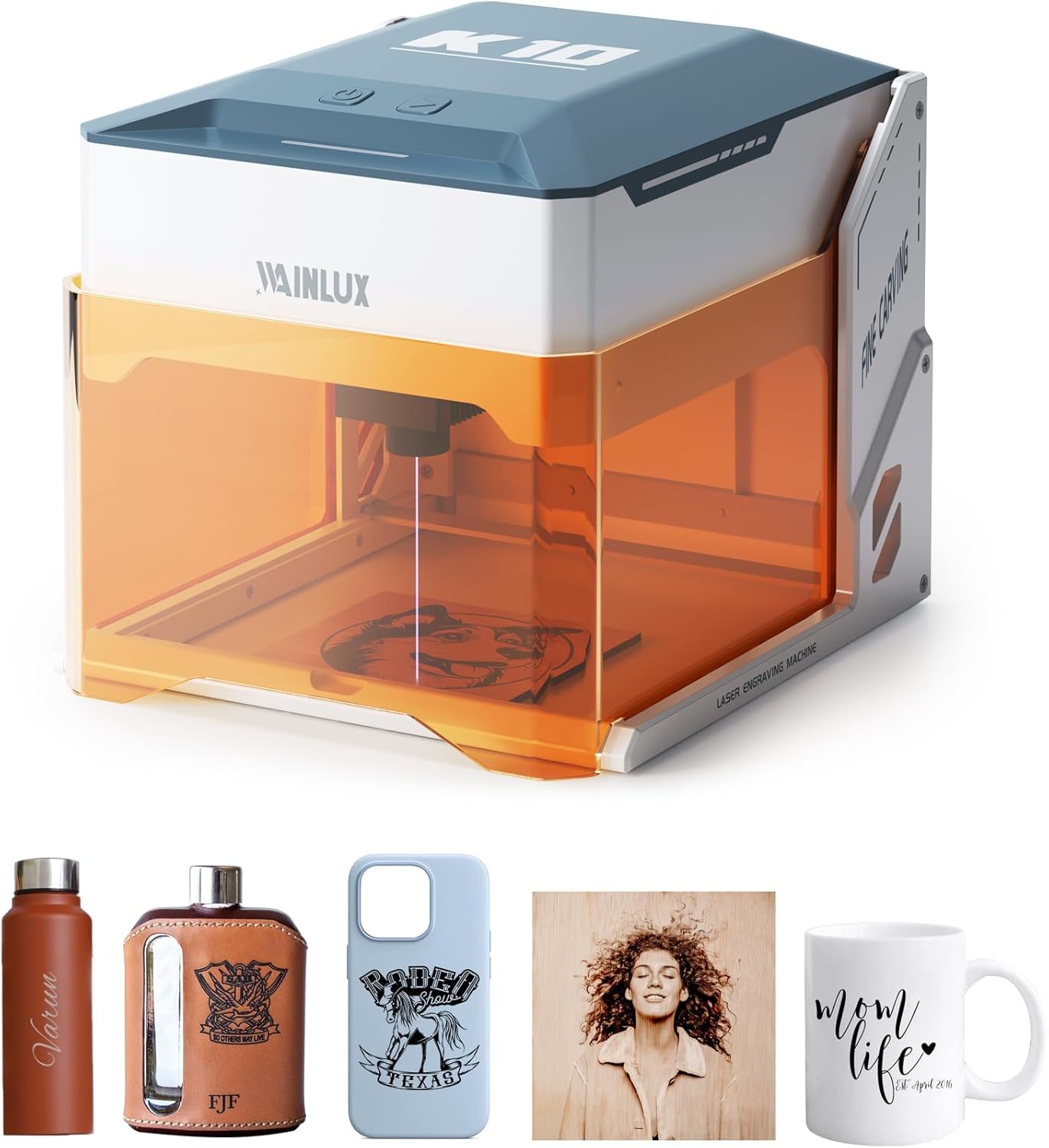
Image: The WAINLUX K10 laser engraver shown with various engraved items like a water bottle, flask, phone case, and mug.

Image: Demonstrates the compact size and capability of the K10, with a laptop displaying design software.

تصویر: سابقamples of unique designs engraved on different materials such as cardboard, plywood, bamboo, leather, slate, and glass.
3. سیٹ اپ
Follow these steps to set up your WAINLUX K10 laser engraving machine.
پیکیج کا مواد:
تصدیق کریں کہ تمام معیاری حصے آپ کے پیکیج میں شامل ہیں:
- WAINLUX K10 Laser Engraver (3W)
- صارف دستی
- بجلی کی فراہمی
- ٹائپ سی کیبل
- Maker Pen
- لکڑی کا تختہ *2
- Brush Kraft Paper *2
- رنچ
Optional parts (sold separately) may include an Air Purifier and an Engraving Positioning Module.

Image: The WAINLUX K10 machine along with its standard accessories and optional parts.
ابتدائی ڈھانچہ:
- جگہ کا تعین: Place the WAINLUX K10 on a stable, level surface in a well-ventilated area.
- پاور کنکشن: Connect the power supply to the machine and plug it into a suitable power outlet.
- ڈیوائس کنکشن:
- Bluetooth (Mobile App): Download the official WAINLUX app on your Android or iOS mobile phone. Enable Bluetooth on your phone and pair it with the K10 machine.
- USB (Computer): Connect the machine to your Windows or Mac computer using the provided Type-C USB cable.
- Software/App Installation: Install the WAINLUX application on your mobile device or the recommended software (e.g., CutlabX, LightBurn, LaserGRBL) on your computer. The application is free and supports various file فارمیٹس

Image: Demonstrates easy height adjustment for accommodating larger items or rotary attachments (not included).
4. آپریٹنگ ہدایات
This section outlines the general steps for operating your WAINLUX K10 laser engraver.
Basic Engraving Process:
- مواد تیار کریں: Place the material you wish to engrave inside the machine's engraving area. Ensure it is flat and securely positioned.
- ڈیوائس کو جوڑیں: Ensure your mobile phone or computer is connected to the K10 via Bluetooth or USB.
- Open Software/App: Launch the WAINLUX app or your chosen engraving software (e.g., CutlabX, LightBurn, LaserGRBL).
- Import/Create Design: Import your desired image or design into the software. The app supports various image formats like JPG, BMP, PNG, etc.
- پیرامیٹرز کو ایڈجسٹ کریں: Set engraving parameters such as power, speed, and engraving mode (black and white, discrete, or contour) based on your material and desired outcome. Refer to the software's guide for detailed parameter settings.
- پریview (اگر دستیاب ہو): پری کا استعمال کریں۔view function to ensure the design is correctly positioned on your material.
- کندہ کاری شروع کریں: Close the protective lid and initiate the engraving process from the software/app. The machine will begin engraving.
- پیشرفت کی نگرانی کریں: Observe the engraving process through the eye-friendly shield. The machine will automatically stop if the lid is opened or if it is tilted.
- تکمیل: Once engraving is complete, the machine will stop. Carefully remove your engraved item.
Engraving on Glass (Exampلی):
For engraving on transparent materials like glass, a preparatory step is often required:
- Soak Colored Paper: Soak a piece of colored paper (e.g., black) in water.
- Glue to Glass: Carefully glue the wet colored paper to the surface of the glass where you intend to engrave. This provides a surface for the laser to interact with.
- Mobile App Design: Use the mobile app to design or import your engraving pattern.
- Engrave: Place the prepared glass inside the machine and start the engraving process. The laser will engrave through the paper onto the glass.

Image: Step-by-step guide for engraving on glass, showing preparation with colored paper and the final engraved result.
5 دیکھ بھال
Regular maintenance ensures the longevity and optimal performance of your WAINLUX K10 laser engraver.
- لینز کی صفائی: Periodically inspect the laser lens for dust or debris. Use a soft, lint-free cloth and a small amount of lens cleaning solution (if recommended by manufacturer, otherwise dry clean) to gently wipe the lens.
- Cleaning the Engraving Area: After each use, clear any debris, dust, or small material scraps from the engraving platform and surrounding area. A small brush or vacuum can be used.
- پنکھے کی صفائی: The built-in fan helps extract smoke and fumes. Over time, dust may accumulate. Gently clean the fan vents to ensure proper airflow.
- بیرونی صفائی: مشین کے بیرونی حصے کو نرم سے صاف کریں، ڈیamp کپڑا سخت کیمیکلز یا کھرچنے والے کلینر کے استعمال سے پرہیز کریں۔
- ذخیرہ: When not in use, store the machine in a clean, dry environment away from direct sunlight and extreme temperatures.
6 خرابیوں کا سراغ لگانا
If you encounter issues with your WAINLUX K10, refer to the following common problems and solutions.
| مسئلہ | ممکنہ وجہ | حل |
|---|---|---|
| مشین آن نہیں ہوتی۔ | پاور کیبل منسلک نہیں ہے؛ پاور آؤٹ لیٹ کا مسئلہ | Ensure power cable is securely connected to machine and outlet. Test outlet with another device. |
| Laser not firing or weak engraving. | Lens dirty; incorrect material settings; material incompatible. | Clean the laser lens. Adjust power/speed settings in software. Ensure material is compatible (not white/transparent/reflective). |
| Connection issues (Bluetooth/USB). | Bluetooth not enabled; incorrect USB port/cable; software driver issue. | Ensure Bluetooth is on and paired. Try a different USB port or cable. Reinstall software/drivers. |
| Engraving quality is poor or inconsistent. | Material not flat; incorrect focus; machine vibration. | Ensure material is flat and secured. Verify laser focus. Place machine on a stable surface. |
| App/Software crashes or freezes. | Outdated software; system incompatibility; corrupted file. | Update app/software to the latest version. Check system requirements. Try a different design file. |
اگر ان حلوں کو آزمانے کے بعد بھی مسئلہ برقرار رہتا ہے، تو مزید مدد کے لیے براہ کرم کسٹمر سپورٹ سے رابطہ کریں۔
7. وضاحتیں
| فیچر | تفصیل |
|---|---|
| ماڈل نمبر | K10-3W |
| کارخانہ دار | DEWALLIE |
| مصنوعات کے طول و عرض | 21 x 21 x 0.1 cm (packaging/product base); Unit: 27 x 27 x 14 cm |
| وزن | 2.6 کلوگرام |
| لیزر پاور | 3W (compressed spot laser module) |
| ان پٹ پاور | 24W |
| کندہ کاری کی درستگی | 0.01 ملی میٹر |
| کندہ کاری کی رفتار | 3000 ملی میٹر فی منٹ تک |
| کندہ کاری کا علاقہ | 80 ملی میٹر x 80 ملی میٹر |
| کنیکٹوٹی | Bluetooth (Android/iOS App), USB (Windows/Mac) |
| بیٹریاں درکار ہیں۔ | نہیں |
| پہلی دستیاب تاریخ | 31 جنوری 2024 |
8. وارنٹی اور سپورٹ
WAINLUX is committed to providing quality products and excellent customer service.
- کوالٹی اشورینس: The WAINLUX K10 laser engraving machine undergoes rigorous quality checks to ensure performance and reliability.
- کسٹمر سروس: A professional customer service team is available to assist you with any pre-sales inquiries or post-purchase issues.
- سپورٹ: For product services, technical support, or warranty information, please refer to the official support website or contact customer service directly. Contact details can typically be found in the product packaging or on the manufacturer's webسائٹ