
1. تعارف
This manual provides essential information for the safe and efficient operation of your Sharp GX-BT190 Portable Bluetooth Speaker. Please read it thoroughly before using the device and retain it for future reference.
2. حفاظتی معلومات
- اسپیکر کو انتہائی درجہ حرارت، براہ راست سورج کی روشنی، یا زیادہ نمی کے سامنے نہ رکھیں۔
- سپیکر کو جدا، مرمت یا ترمیم نہ کریں۔ اس سے وارنٹی ختم ہو سکتی ہے اور حفاظتی خطرات لاحق ہو سکتے ہیں۔
- Ensure the charging port cover is securely closed when using the speaker near water to maintain its IP67 rating.
- صرف فراہم کردہ چارجنگ کیبل یا تصدیق شدہ مساوی استعمال کریں۔
- سپیکر کو بچوں اور پالتو جانوروں سے دور رکھیں۔
- سماعت کو پہنچنے والے نقصان کو روکنے کے لیے لمبے عرصے تک زیادہ مقدار میں سننے سے گریز کریں۔
3. پیکیج کے مشمولات
- Sharp GX-BT190 Portable Bluetooth Speaker
- USB چارجنگ کیبل
- لانیارڈ
- ہدایت نامہ
4. پروڈکٹ ختمview

سامنے والا view of the Sharp GX-BT190 speaker, showing the central speaker grille with the Sharp logo and the LED light ring.

طرف view of the Sharp GX-BT190 speaker, highlighting the textured speaker grille and the integrated lanyard.
پیچھے view of the Sharp GX-BT190 speaker, showing the control buttons and the sealed charging port cover.
کنٹرول اور اشارے:
- پاور بٹن: آن/آف کرنے کے لیے دبائیں اور تھامیں۔
- والیوم اپ / نیکسٹ ٹریک بٹن (+): حجم بڑھانے کے لیے مختصر دبائیں، اگلے ٹریک کے لیے طویل دبائیں
- والیوم کم / پچھلا ٹریک بٹن (-): حجم کم کرنے کے لیے مختصر دبائیں، پچھلے ٹریک کے لیے طویل دبائیں
- Play/Pause / Call Button (►||): Short press to play/pause, answer/end calls. Long press to reject calls.
- Mode / Light Button (M): Short press to cycle through LED light modes. Long press to turn off LED lights.
- USB-C چارجنگ پورٹ: For charging the speaker. Ensure the rubber cover is sealed when not charging.
- ایل ای ڈی اشارے: چارجنگ اسٹیٹس اور بلوٹوتھ پیئرنگ اسٹیٹس دکھاتا ہے۔
5. سیٹ اپ
5.1 اسپیکر کو چارج کرنا
- Open the rubber cover on the back of the speaker to access the USB-C charging port.
- Connect the provided USB charging cable to the speaker's USB-C port.
- USB کیبل کے دوسرے سرے کو USB پاور اڈاپٹر (شامل نہیں) یا کمپیوٹر کے USB پورٹ سے مربوط کریں۔
- LED انڈیکیٹر چارجنگ کے دوران روشن ہو جائے گا اور مکمل چارج ہونے کے بعد بند ہو جائے گا۔
- Close the rubber cover securely after charging to maintain the speaker's waterproof rating.
5.2 پاور آن/آف۔
- پاور آن کرنے کے لیے: Press and hold the Power button for approximately 3 seconds. You will hear an audible prompt, and the LED indicator will flash.
- پاور آف کرنا: Press and hold the Power button for approximately 3 seconds. You will hear an audible prompt, and the LED indicator will turn off.
5.3 بلوٹوتھ جوڑی
- Ensure the speaker is powered on and the LED indicator is flashing, indicating it is in pairing mode.
- اپنے موبائل ڈیوائس پر، بلوٹوتھ کو فعال کریں اور دستیاب آلات تلاش کریں۔
- Select "GX-BT190" from the list of devices.
- جوڑا بننے کے بعد، LED اشارے چمکنا بند کر دے گا اور ٹھوس رہے گا، اور آپ کو ایک تصدیقی لہجہ سنائی دے گا۔
- پاور آن ہونے پر اسپیکر خود بخود آخری جوڑی والے آلے سے دوبارہ جڑ جائے گا، اگر ڈیوائس رینج کے اندر ہے اور بلوٹوتھ فعال ہے۔
5.4 حقیقی وائرلیس سٹیریو (TWS) جوڑا
TWS allows you to pair two GX-BT190 speakers together for a stereo audio experience.

Two Sharp GX-BT190 speakers, one red and one blue, positioned together, illustrating the True Wireless Stereo (TWS) pairing feature.
- Ensure both GX-BT190 speakers are powered on and not connected to any Bluetooth device.
- اسپیکرز میں سے ایک پر (یہ بنیادی اسپیکر ہوگا)، پاور بٹن کو دو بار دبائیں۔ اسپیکر TWS پیئرنگ موڈ میں داخل ہوگا۔
- The two speakers will automatically search for and connect to each other. You will hear a confirmation tone once TWS pairing is successful.
- Once TWS paired, connect your mobile device to the primary speaker via Bluetooth as described in section 5.3.
- To disconnect TWS, double-press the Power button on either speaker.
6. آپریٹنگ
6.1 آڈیو چلانا
- چلائیں/روکیں: پلے/پز بٹن کو مختصر دبائیں۔
- اواز بڑھایں: '+' بٹن کو مختصر دبائیں۔
- آواز کم: '-' بٹن کو مختصر دبائیں۔
- اگلا ٹریک: '+' بٹن کو دیر تک دبائیں۔
- پچھلا ٹریک: '-' بٹن کو دیر تک دبائیں۔
6.2 ہینڈز فری کالنگ
- کال کا جواب دیں: آنے والی کال بجنے پر پلے/پز بٹن کو مختصر دبائیں۔
- کال ختم کریں: کال کے دوران پلے/پز بٹن کو مختصر دبائیں۔
- کال مسترد کریں: آنے والی کال کی گھنٹی بجنے پر پلے/پز بٹن کو دیر تک دبائیں۔
6.3 LED Mood Lights
- Short press the 'M' (Mode/Light) button to cycle through the 6 available LED mood light modes.
- Long press the 'M' button to turn off the LED lights.
6.4 واٹر پروف اور ڈسٹ پروف استعمال (IP67)

The Sharp GX-BT190 speaker partially submerged in water, demonstrating its IP67 waterproof and dustproof capabilities.
The GX-BT190 speaker is rated IP67, meaning it is protected from dust ingress and can withstand immersion in water up to 1 meter for 30 minutes. To ensure this protection:
- Always ensure the rubber cover for the charging port is fully and securely sealed before exposing the speaker to water or dust.
- Do not intentionally submerge the speaker for extended periods or beyond the specified depth.
- After exposure to water, wipe the speaker dry with a soft cloth before charging.
7 دیکھ بھال
7.1 صفائی
- اسپیکر کو نرم سے مسح کریں ، d۔amp کپڑا
- کھرچنے والے کلینر، الکحل یا کیمیائی سالوینٹس کا استعمال نہ کریں۔
- Ensure the speaker is dry before charging or storing.
7.2 اسٹوریج
- اسپیکر کو ٹھنڈی، خشک جگہ پر براہ راست سورج کی روشنی اور انتہائی درجہ حرارت سے دور رکھیں۔
- اگر لمبے عرصے تک ذخیرہ کر رہے ہیں تو، بیٹری کی صحت کو برقرار رکھنے کے لیے وقتاً فوقتاً بیٹری چارج کریں (مثلاً، ہر 3 ماہ بعد)۔
8 خرابیوں کا سراغ لگانا
| مسئلہ | حل |
|---|---|
| سپیکر پاور آن نہیں کرتا۔ | یقینی بنائیں کہ بیٹری چارج ہے۔ USB کیبل کا استعمال کرتے ہوئے اسپیکر کو پاور سورس سے جوڑیں۔ |
| بلوٹوتھ کے ذریعے جوڑا نہیں بنایا جا سکتا۔ | Ensure the speaker is in pairing mode (LED flashing). Turn off and on Bluetooth on your device. Move the speaker closer to your device. Clear previous Bluetooth connections on your device. |
| کوئی آواز یا کم والیوم نہیں۔ | اسپیکر اور اپنے منسلک ڈیوائس دونوں پر والیوم بڑھائیں۔ اس بات کو یقینی بنائیں کہ سپیکر مناسب طریقے سے جوڑا گیا ہے۔ |
| ناقص آواز کا معیار۔ | Move the speaker closer to your device. Ensure there are no obstructions between the speaker and your device. Try playing a different audio source. |
| TWS جوڑا ناکام ہوجاتا ہے۔ | Ensure both speakers are GX-BT190 models and are not connected to any other Bluetooth device. Try powering both speakers off and on, then re-attempt TWS pairing. |
9. وضاحتیں

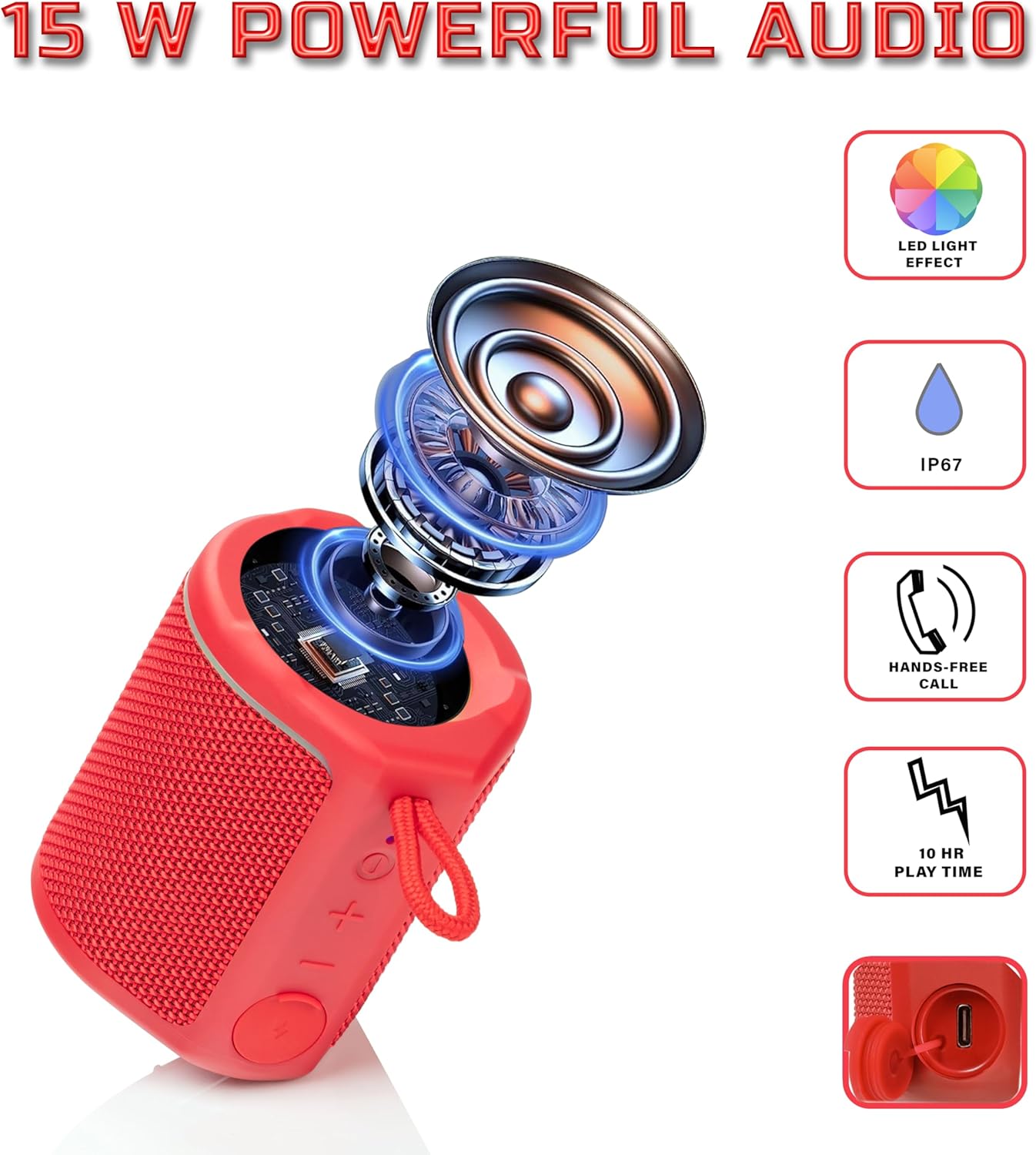
Diagram illustrating the internal components of the Sharp GX-BT190 speaker, including the speaker driver, and highlighting features like LED light effect, IP67 rating, hands-free call function, and battery life.
| فیچر | تفصیل |
|---|---|
| ماڈل نمبر | GX-BT190 |
| کنیکٹوٹی ٹیکنالوجی | بلوٹوتھ |
| اسپیکر زیادہ سے زیادہ آؤٹ پٹ پاور | 10 واٹ |
| واٹر پروف ریٹنگ | آئی پی 67 |
| بیٹری کی زندگی | 15 گھنٹے تک |
| بیٹری کی قسم | 1 لتیم آئن (شامل) |
| بیٹری کی صلاحیت | 1200 ایم اے ایچ |
| پروڈکٹ کے طول و عرض (D x W x H) | 7.5 x 7.5 x 7.5 سینٹی میٹر (تقریبا) |
| شے کا وزن | 226.8 گرام (8 اونس) |
| وائرلیس رینج | 33 فٹ تک |
| اضافی خصوصیات | LED Light, True Wireless Stereo (TWS), Hands-Free Calling |
10. وارنٹی
The Sharp GX-BT190 Portable Bluetooth Speaker comes with a 1-Year Limited Warranty from the date of purchase. This warranty covers manufacturing defects under normal use. It does not cover damage caused by misuse, accidents, unauthorized modifications, or normal wear and tear. Please retain your proof of purchase for warranty claims.
11. سپورٹ
For technical assistance, warranty inquiries, or further information regarding your Sharp GX-BT190 speaker, please contact Sharp Inc. customer support:
- مینوفیکچرر رابطہ: Sharp Inc
- فون: 1-800-BE-SHARP