1. تعارف
Thank you for choosing the Vortex T10M Pro+ Tablet. This manual will guide you through the features and functions of your new device, ensuring a smooth and enjoyable user experience. Please read this manual carefully before using your tablet.
باکس میں کیا ہے۔
Upon unboxing your Vortex T10M Pro+ Tablet, please verify that all the following items are present:
- Vortex T10M Pro+ Tablet
- چارجر
- اسکرین پروٹیکٹر
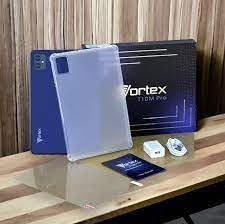
Image: Contents of the Vortex T10M Pro+ Tablet box. This includes the tablet, a clear protective case, the power adapter, and a screen protector, all neatly arranged on a wooden surface.
2. پروڈکٹ ختمview
Familiarize yourself with the physical components and key features of your Vortex T10M Pro+ Tablet.
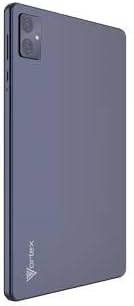
تصویر: پیچھے view of the Vortex T10M Pro+ Tablet. The tablet has a sleek, dark finish with the 'Vortex' logo subtly placed at the bottom. The camera module is visible in the upper left corner.

تصویر: تفصیلی view of the back of the Vortex T10M Pro+ Tablet, highlighting its specifications. Printed details include '10.1-inch Brilliant Display', '5MP Front Camera', '8MP Rear Camera', 'MTK6766 Processor', 'Quad-Core, 4GB+64GB', '5000mAh Mega Battery', and 'Android 12'.
3. سیٹ اپ
3.1. ڈیوائس کو چارج کرنا
Before first use, fully charge your tablet. Connect the provided charger to the tablet's charging port and plug it into a power outlet. The battery indicator on the screen will show charging progress.
3.2. Inserting SIM/MicroSD Card
The Vortex T10M Pro+ supports 4G LTE connectivity and expandable storage. To insert a SIM card (for mobile data) or a microSD card (for additional storage):
- Locate the SIM/microSD card tray on the side of the tablet.
- ٹرے کو کھولنے کے لیے فراہم کردہ سم ایجیکٹر ٹول استعمال کریں۔
- Carefully place the SIM card(s) and/or microSD card into the designated slots, ensuring correct orientation.
- آہستہ سے ٹرے کو ٹیبلیٹ میں واپس دھکیلیں جب تک کہ یہ جگہ پر کلک نہ کرے۔
3.3. ابتدائی پاور آن
Press and hold the Power button located on the side of the tablet until the Vortex logo appears. Follow the on-screen prompts to complete the initial setup, including language selection, Wi-Fi connection, and Google account setup.
4. آپریٹنگ ہدایات
4.1. بنیادی نیویگیشن
Your tablet runs on Android 13.0. Use touch gestures for navigation:
- تھپتھپائیں: کوئی آئٹم منتخب کریں یا ایپ کھولیں۔
- سوائپ: اسکرینوں یا فہرستوں کے ذریعے سکرول کریں۔
- چوٹکی سے زوم: تصاویر کو زوم ان یا آؤٹ کریں۔ web صفحات
- طویل دبائیں: سیاق و سباق کے مینو تک رسائی حاصل کریں یا آئیکنز کو منتقل کریں۔
4.2. وائی فائی سے جڑنا
Wi-Fi نیٹ ورک سے جڑنے کے لیے:
- پر جائیں۔ ترتیبات > نیٹ ورک اور انٹرنیٹ > انٹرنیٹ.
- وائی فائی آن کریں۔
- فہرست سے اپنے مطلوبہ نیٹ ورک کو منتخب کریں اور اگر اشارہ کیا جائے تو پاس ورڈ درج کریں۔
4.3. Using Mobile Data (4G LTE)
If you have inserted a valid SIM card with an active data plan:
- پر جائیں۔ ترتیبات > نیٹ ورک اور انٹرنیٹ > سمز.
- Ensure Mobile data is enabled for your SIM.
4.4. کیمرہ آپریشن
ٹیبلیٹ میں 8MP کا پیچھے والا کیمرہ اور 5MP کا فرنٹ کیمرہ ہے۔
- کیمرہ ایپ کھولیں۔
- تصویر لینے کے لیے شٹر بٹن کو تھپتھپائیں۔
- کیمرہ ٹوگل آئیکن کا استعمال کرتے ہوئے سامنے اور پیچھے والے کیمروں کے درمیان سوئچ کریں۔
4.5 اسٹوریج کا انتظام
Your tablet comes with 64GB of internal storage. You can expand this using a microSD card up to 128GB. To view storage usage, go to ترتیبات > ذخیرہ.
5 دیکھ بھال
5.1. صفائی
ٹیبلٹ کی سکرین اور باڈی کو صاف کرنے کے لیے نرم، لنٹ سے پاک کپڑا استعمال کریں۔ سخت کیمیکلز یا کھرچنے والے مواد کے استعمال سے پرہیز کریں۔
5.2. سافٹ ویئر اپڈیٹس
Periodically check for software updates to ensure your tablet has the latest features and security patches. Go to ترتیبات > سسٹم > سسٹم اپ ڈیٹ.
5.3. بیٹری کی دیکھ بھال
بیٹری کی زندگی کو طول دینے کے لیے:
- انتہائی درجہ حرارت سے پرہیز کریں۔
- بیٹری کو بار بار مکمل طور پر خارج نہ ہونے دیں۔
- بیٹری بھر جانے کے بعد چارجر کو ان پلگ کریں۔
6 خرابیوں کا سراغ لگانا
یہ سیکشن عام مسائل کو حل کرتا ہے جن کا آپ کو اپنے ٹیبلیٹ کے ساتھ سامنا ہو سکتا ہے۔
| مسئلہ | ممکنہ حل |
|---|---|
| ٹیبلٹ آن نہیں ہوتا ہے۔ | یقینی بنائیں کہ بیٹری چارج ہے۔ زبردستی دوبارہ شروع کرنے کے لیے پاور بٹن کو کم از کم 10-15 سیکنڈ تک دبائے رکھیں۔ |
| وائی فائی کنکشن کے مسائل | Restart the tablet and your Wi-Fi router. Forget the network in settings and reconnect. |
| ایپس سست ہیں یا کریش ہو رہی ہیں۔ | Close background apps. Clear app cache (Settings > Apps > [App Name] > Storage > Clear cache). Restart the tablet. |
| Storage full message | غیر ضروری حذف کریں۔ files or apps. Move media to a microSD card. |
7. وضاحتیں
Detailed technical specifications for the Vortex T10M Pro+ Tablet.
| فیچر | تفصیلات |
|---|---|
| ماڈل کا نام | T10M Pro+ Tablet (Unlocked) Blue 10.1" 64GB 4GB GSM 4G LTE + Wifi 8MP |
| ڈسپلے سائز | 10.1 انچ |
| زیادہ سے زیادہ سکرین ریزولوشن | 1280 x 800 پکسلز |
| ریفریش ریٹ | 120 Hz |
| پروسیسر | MediaTek, 2 GHz |
| رام | 4 جی بی |
| اندرونی اسٹوریج | 64 جی بی |
| قابل توسیع اسٹوریج | مائیکرو ایس ڈی (128 جی بی تک) |
| آپریٹنگ سسٹم | اینڈرائیڈ 13.0 |
| پیچھے والا کیمرہ | 8 MP |
| سامنے والا کیمرہ | 5 MP |
| کنیکٹوٹی | 4G LTE، Wi-Fi، بلوٹوتھ، GPS |
| بیٹری کی قسم | لیتھیم آئن |
| بیٹری کی اوسط زندگی | 18 گھنٹے |
| مصنوعات کے طول و عرض | 10.1 x 5 x 3 انچ |
| رنگ | سیاہ |
8. وارنٹی کی معلومات
This product is covered by a manufacturer's warranty. Please refer to the warranty card included with your purchase or visit the manufacturer's official webوارنٹی کوریج، مدت، اور دعووں کے عمل سے متعلق تفصیلی شرائط و ضوابط کے لیے سائٹ۔
9. سپورٹ
For further assistance, technical support, or service inquiries, please contact the manufacturer's customer support. Contact information can typically be found on the product packaging, the manufacturer's website, or the warranty documentation.


