
1. تعارف
Thank you for choosing the MONODEAL DV68 Bone Conduction Headphones. These headphones are designed to provide a comfortable and safe listening experience, especially during sports and outdoor activities. Utilizing advanced bone conduction technology and Bluetooth 5.3, they deliver clear audio while keeping your ears open to ambient sounds. The integrated smart light enhances visibility and safety during nighttime use.
2. پیکیج کے مشمولات
براہ کرم درج ذیل اشیاء کے لیے پیکج چیک کریں:
- MONODEAL DV68 Bone Conduction Headphones
- مقناطیسی چارجنگ کیبل
- صارف دستی
- Earplugs (optional, for enhanced sound isolation)
3. پروڈکٹ ختمview
Familiarize yourself with the components of your MONODEAL DV68 headphones.
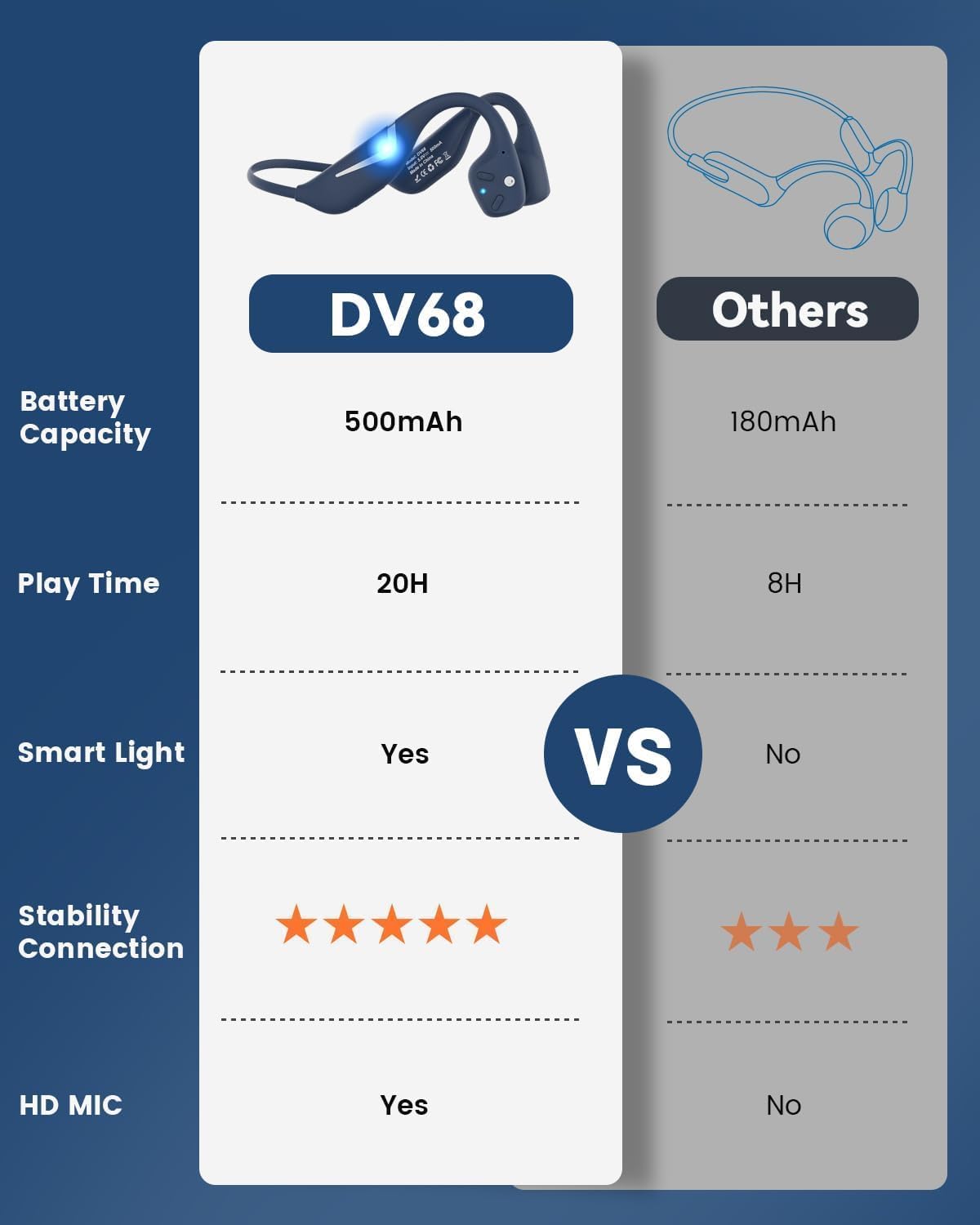
Figure 3.1: MONODEAL DV68 Bone Conduction Headphones, showing the overall design.

تصویر 3.2: پھٹا view illustrating the bone conduction transducer and built-in microphone.
3.1 کنٹرولز اور پورٹس
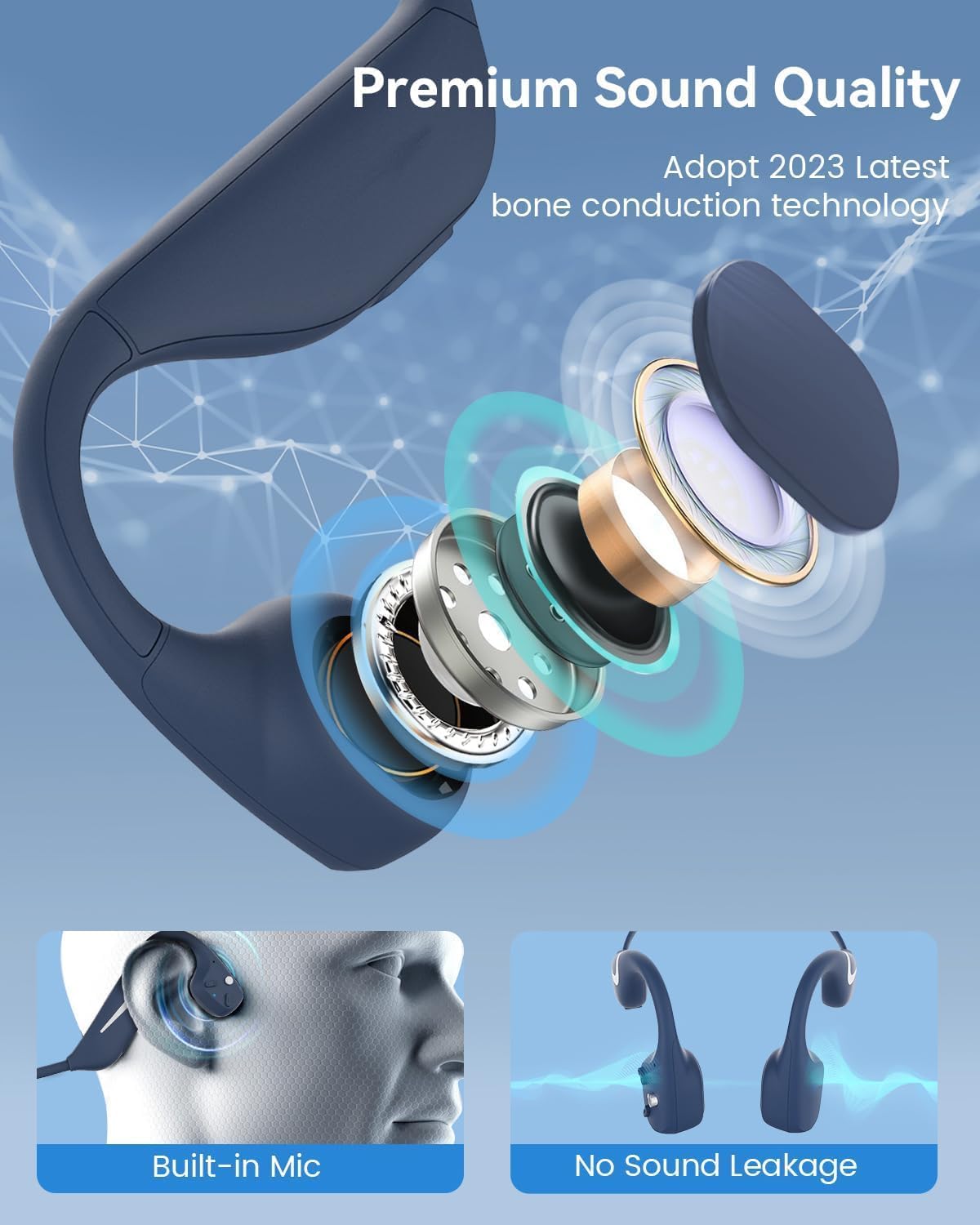
شکل 3.3: طرف view کنٹرول بٹنوں کو نمایاں کرنے والے ہیڈ فونز کا۔

تصویر 3.4: کلوز اپ view of the magnetic charging port.
The headphones feature physical buttons for power, volume, and playback control. The magnetic charging port is located on one of the ear pieces for convenient charging.
4. وضاحتیں
| فیچر | تفصیلات |
|---|---|
| ماڈل نمبر | DV68 |
| بلوٹوتھ ورژن | 5.3 |
| بیٹری کی صلاحیت | 500 ایم اے ایچ |
| پلے ٹائم | 20 گھنٹے تک |
| پانی کی مزاحمت کی درجہ بندی | IP67 (Sweat, rain, and splash resistant) |
| وزن | 34 گرام |
| تعدد کی حد | 20 Hz - 20,000 Hz |
| کنیکٹوٹی ٹیکنالوجی | وائرلیس (بلوٹوتھ) |
| آڈیو ڈرائیور کی قسم | ہڈیوں کی ترسیل |
| خصوصی خصوصیات | Smart LED Light, Built-in Microphone, Multipoint Pairing |

شکل 4.1: ختمview of key features including Open-Ear design, IP67 Waterproofing, 500mAh Battery, Bluetooth V5.3, Lightweight, HD Microphone, Multipoint Pairing, and RGB Light.
5. سیٹ اپ
5.1 ہیڈ فون چارج کرنا
پہلے استعمال سے پہلے، اپنے ہیڈ فون کو مکمل چارج کریں۔
- مقناطیسی چارجنگ کیبل کو ہیڈ فون پر چارجنگ پورٹ سے جوڑیں۔
- کیبل کے دوسرے سرے کو USB پاور اڈاپٹر (شامل نہیں) یا کمپیوٹر کے USB پورٹ سے جوڑیں۔
- The LED indicator will show the charging status. A full charge typically takes approximately 2 hours.

Figure 5.1: Illustration of 20-hour battery life and quick charge feature (10 minutes charging for 2 hours playtime).
5.2 بلوٹوتھ جوڑی
اپنے ہیڈ فون کو کسی ڈیوائس سے جوڑنے کے لیے:
- یقینی بنائیں کہ ہیڈ فون بند ہیں۔
- Press and hold the Power button until the LED indicator flashes red and blue, indicating pairing mode.
- اپنے آلے پر (اسمارٹ فون، ٹیبلیٹ، کمپیوٹر)، بلوٹوتھ کو فعال کریں اور دستیاب آلات تلاش کریں۔
- Select "MONODEAL DV68" from the list of found devices.
- ایک بار منسلک ہونے کے بعد، ایل ای ڈی اشارے آہستہ آہستہ ٹھوس نیلے یا فلیش نیلے رنگ میں بدل جائے گا۔
The headphones support multipoint pairing, allowing connection to two devices simultaneously. Refer to your device's Bluetooth settings for managing multiple connections.
6. آپریٹنگ ہدایات
6.1 پاور آن/آف
- پاور آن: پاور بٹن کو 3 سیکنڈ تک دبائے رکھیں۔
- بجلی بند: پاور بٹن کو 5 سیکنڈ تک دبائے رکھیں۔
6.2 میوزک پلے بیک
- چلائیں/روکیں: ایک بار ملٹی فنکشن بٹن دبائیں۔
- اگلا ٹریک: والیوم + بٹن کو 2 سیکنڈ تک دبائے رکھیں۔
- پچھلا ٹریک: والیوم - بٹن کو 2 سیکنڈ تک دبائیں اور تھامیں۔
- اواز بڑھایں: والیوم + بٹن دبائیں۔
- آواز کم: والیوم - بٹن دبائیں۔
6.3 کال مینجمنٹ
- جواب / کال ختم کریں: ایک بار ملٹی فنکشن بٹن دبائیں۔
- کال مسترد کریں: ملٹی فنکشن بٹن کو 2 سیکنڈ تک دبائے رکھیں۔
- آواز معاون: ملٹی فنکشن بٹن کو ڈبل دبائیں۔
6.4 Smart LED Light
The headphones feature a smart LED light for enhanced visibility during nighttime activities.
- لائٹ آن/آف کریں: Refer to the specific button combination in your quick start guide (usually a dedicated light button or a long press of a volume button).
- The light can cycle through different colors (e.g., blue, green, red) to increase your safety and visibility.

Figure 6.1: A runner demonstrating the smart LED light feature for night safety.
7 دیکھ بھال
7.1 صفائی
To maintain hygiene and product longevity:
- After sweating or intense workouts, gently wipe the headphones with a damp کپڑے یا گیلے مسح.
- سخت کیمیکلز یا کھرچنے والے کلینر کے استعمال سے پرہیز کریں۔
7.2 اسٹوریج
- ہیڈ فونز کو ٹھنڈی، خشک جگہ پر، براہ راست سورج کی روشنی اور انتہائی درجہ حرارت سے دور رکھیں۔
- When not in use, it is recommended to store them in their original packaging or a protective case.
7.3 پانی کی مزاحمت
The MONODEAL DV68 headphones are IP67 rated, meaning they are resistant to sweat, rain, and splashes. However, they are not suitable for swimming or submersion in water.

Figure 7.1: A person exercising with the headphones, demonstrating their IP67 water resistance against sweat and rain. Note: Not for swimming.
8 خرابیوں کا سراغ لگانا
اگر آپ کو اپنے ہیڈ فون کے ساتھ مسائل کا سامنا کرنا پڑتا ہے، تو براہ کرم درج ذیل عام حل سے رجوع کریں:
- کوئی طاقت نہیں:
Ensure the headphones are fully charged. Connect them to the charging cable and a power source. - جوڑا نہیں بن سکتا:
Make sure the headphones are in pairing mode (LED flashing red and blue). Turn off Bluetooth on other nearby devices that may have previously connected. Try restarting both the headphones and your device. - کوئی آواز/کم والیوم نہیں:
Check the volume levels on both the headphones and your connected device. Ensure the headphones are properly positioned on your cheekbones. If using earplugs, ensure they are correctly inserted. - وقفے وقفے سے رابطہ:
Ensure your device is within the Bluetooth range (up to 15 meters) and there are no significant obstacles between the headphones and your device. Avoid strong electromagnetic interference. - ناقص کال کا معیار:
Ensure the microphone is not obstructed. Move to an area with better network reception for your phone.
9. وارنٹی اور سپورٹ
9.1 وارنٹی کی معلومات
MONODEAL provides a 2 سال کی وارنٹی for the DV68 Bone Conduction Headphones from the date of purchase. This warranty covers manufacturing defects and ensures the product meets its specified performance. Please retain your proof of purchase for warranty claims.
9.2 کسٹمر سپورٹ
For further assistance, technical support, or warranty inquiries, please contact MONODEAL customer service through the retailer where you purchased the product or visit the official MONODEAL webرابطے کی معلومات کے لیے سائٹ۔