
BlitzWolf BW-VT2EU
BlitzWolf BW-VT2 منی پروجیکٹر صارف دستی
Your comprehensive guide to setting up, operating, and maintaining your BlitzWolf BW-VT2 Mini Projector.
1. پروڈکٹ ختمview
1.1 پیکیج کے مشمولات
براہ کرم تصدیق کریں کہ تمام اشیاء آپ کے پیکیج میں موجود ہیں:
- BlitzWolf BW-VT2 Mini Projector
- ریموٹ کنٹرول
- پاور اڈاپٹر
- HDMI کیبل
- صارف دستی (یہ دستاویز)
1.2 ڈیوائس لے آؤٹ
Familiarize yourself with the various parts and ports of your projector.
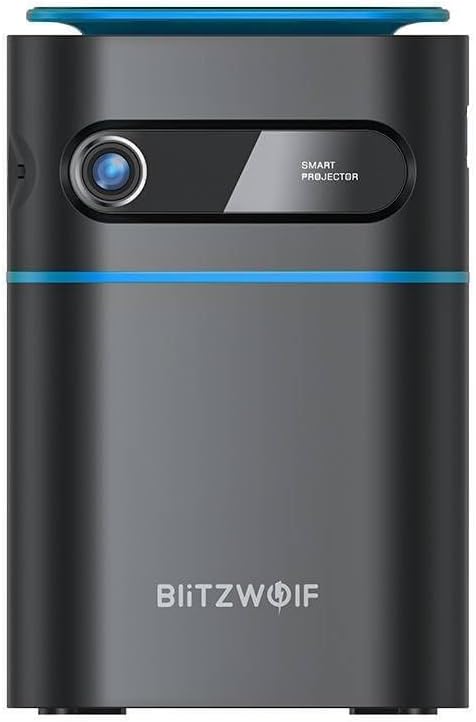
شکل 1.1: سامنے View. This image displays the front of the BlitzWolf BW-VT2 Mini Projector, highlighting the projection lens and the 'SMART PROJECTOR' branding.

Figure 1.2: Projector with Remote Control. This image shows the BlitzWolf BW-VT2 Mini Projector alongside its dedicated remote control, illustrating the compact size of both devices.
شکل 1.3: پیچھے View. The rear of the projector is shown, featuring ventilation grilles and various input/output ports.

شکل 1.4: طرف View. This image highlights the side of the projector where additional connectivity options such as USB and HDMI ports are located.

تصویر 1.5: اوپر View. The top surface of the projector is visible, featuring the integrated touch control panel for direct interaction.
1.3 پورٹس اور کنٹرولز
- HDMI پورٹ: Connect to laptops, game consoles, Blu-ray players, etc.
- USB پورٹ: میڈیا پلے بیک کے لیے USB فلیش ڈرائیوز کو جوڑیں۔
- Audio Out (3.5mm) Port: بیرونی اسپیکر یا ہیڈ فون کو جوڑیں۔
- ڈی سی ان پورٹ: پاور اڈاپٹر کو جوڑیں۔
- پاور بٹن: پروجیکٹر کو آن/آف کرتا ہے۔
- فوکس وہیل: تصویر کی وضاحت کو ایڈجسٹ کرتا ہے۔
- ٹچ کنٹرول پینل: Navigate menus and control playback directly on the device.
2. سیٹ اپ گائیڈ
2.1 پاور آن
- پاور اڈاپٹر کو پروجیکٹر پر DC IN پورٹ سے جوڑیں۔
- پاور اڈاپٹر کو وال آؤٹ لیٹ میں لگائیں۔
- Press and hold the Power Button on the projector or the remote control until the device powers on.
2.2 ابتدائی جگہ کا تعین
بہترین کے لیے viewing experience, consider the following:
- پروجیکٹر کو ایک مستحکم، ہموار سطح پر رکھیں۔
- Ensure there is adequate ventilation around the projector to prevent overheating.
- مستطیل تصویر کے لیے پروجیکٹر کو پروجیکشن کی سطح (دیوار یا اسکرین) پر کھڑا رکھیں۔
- Adjust the distance to achieve your desired screen size.
2.3 فوکس ایڈجسٹمنٹ
After powering on, adjust the focus to ensure a clear image:
- Rotate the focus wheel located near the lens until the projected image appears sharp and clear.
2.4 ریموٹ کنٹرول سیٹ اپ
Insert batteries into the remote control before first use:
- ریموٹ کنٹرول کے پچھلے حصے پر بیٹری کے ٹوکری کا احاطہ کھولیں۔
- دو AAA بیٹریاں داخل کریں (شامل نہیں)، درست قطبیت کو یقینی بناتے ہوئے (+/-)۔
- بیٹری کے کمپارٹمنٹ کور کو بند کریں۔
3. آپریٹنگ ہدایات
3.1 نیویگیشن
You can navigate the projector's interface using either the remote control or the touch control panel on top of the device.
- ریموٹ کنٹرول: Use the directional buttons (up, down, left, right) to move through menus and the 'OK' button to select.
- ٹچ کنٹرول پینل: Swipe and tap on the touch-sensitive surface to navigate.
3.2 کنیکٹنگ ڈیوائسز
The BW-VT2 supports various input sources:
- HDMI ان پٹ: Connect your laptop, game console, or other HDMI-enabled devices using an HDMI cable. Select the HDMI input source from the projector's menu.
- USB ان پٹ: Insert a USB flash drive into the USB port. The projector's media player will typically detect the drive automatically, allowing you to browse and play supported media files (ویڈیوز، تصاویر، موسیقی)۔
- وائی فائی کنیکٹیویٹی: Navigate to the 'Settings' menu, then 'Network' or 'Wi-Fi'. Select your Wi-Fi network and enter the password to connect the projector to the internet. This enables access to online streaming apps and updates.
3.3 Android OS کی خصوصیات
As an Android-powered projector, the BW-VT2 offers smart functionalities:
- ایپ تک رسائی: Download and install various streaming apps (e.g., Netflix, YouTube) directly from the pre-installed app store or by sideloading APKs.
- ترتیبات: Customize display settings, audio output, network configurations, and system preferences through the Android settings menu.
- اسکرین مررنگ: Utilize built-in screen mirroring features (e.g., Miracast, AirPlay compatible apps) to project content from your smartphone or tablet wirelessly.
3.4 آڈیو آؤٹ پٹ۔
The projector has built-in speakers, but you can also connect external audio devices:
- 3.5 ملی میٹر آڈیو آؤٹ: Connect headphones or external speakers via the 3.5mm audio jack for enhanced sound.
4 دیکھ بھال
مناسب دیکھ بھال آپ کے پروجیکٹر کی لمبی عمر اور بہترین کارکردگی کو یقینی بناتی ہے۔
4.1 لینز کی صفائی
To maintain clear image quality, clean the projector lens regularly:
- خاص طور پر آپٹیکل لینز کے لیے ڈیزائن کیا گیا نرم، لنٹ سے پاک کپڑا استعمال کریں۔
- سرکلر موشن میں لینس کو آہستہ سے صاف کریں۔
- کھرچنے والے کلینر یا ضرورت سے زیادہ طاقت استعمال کرنے سے گریز کریں، جو عینک کو کھرچ سکتا ہے۔
4.2 وینٹیلیشن
Ensure proper airflow to prevent overheating:
- Do not block the ventilation vents on the projector.
- پروجیکٹر کو ہوادار جگہ پر چلائیں۔
- Periodically clean dust from the vents using a soft brush or compressed air.
4.3 اسٹوریج
When not in use, store your projector properly:
- Store the projector in a cool, dry place, away from direct sunlight and extreme temperatures.
- Use the original packaging or a protective case to prevent dust accumulation and physical damage.
5 خرابیوں کا سراغ لگانا
عام مسائل اور ان کے حل کے لیے اس سیکشن کو دیکھیں۔
| مسئلہ | ممکنہ وجہ | حل |
|---|---|---|
| Projector does not power on. | No power connection; faulty power adapter. | Ensure power adapter is securely connected to both projector and outlet. Try a different outlet. |
| کوئی تصویر پیش نہیں کی گئی۔ | Incorrect input source selected; loose HDMI/USB cable. | Verify the correct input source is selected in the menu. Check cable connections. |
| تصویر دھندلی ہے۔ | فوکس ایڈجسٹ نہیں ہوا؛ پروجیکٹر بہت قریب/دور۔ | Rotate the focus wheel until the image is clear. Adjust projection distance if necessary. |
| کوئی آواز نہیں۔ | Volume too low; external audio device not connected properly. | Increase volume. Check connections to external speakers/headphones. Ensure audio output is set correctly in settings. |
| وائی فائی کنکشن کے مسائل۔ | غلط پاس ورڈ؛ روٹر کے مسائل؛ سگنل مداخلت. | Re-enter Wi-Fi password. Restart router. Move projector closer to router. |
| ریموٹ کنٹرول کام نہیں کر رہا۔ | مردہ بیٹریاں؛ رکاوٹ ریموٹ جوڑا نہیں ہے۔ | Replace batteries. Ensure no obstruction between remote and projector. |
6. تکنیکی تفصیلات
Key specifications of the BlitzWolf BW-VT2 Mini Projector:
| فیچر | تفصیلات |
|---|---|
| برانڈ | بلٹز وولف |
| ماڈل نمبر | BW-VT2EU |
| رنگ | سیاہ |
| کنیکٹوٹی ٹیکنالوجی | HDMI, USB, VGA, Wi-Fi |
| ڈسپلے ریزولوشن | 1920 x 1080 (مکمل ایچ ڈی) |
| ڈسپلے کی قسم | ایل سی ڈی، ایل ای ڈی |
| فارم فیکٹر | پورٹیبل |
| خصوصی خصوصیات | Portable, Android OS, Wi-Fi, HDMI, USB, VGA |
| ہم آہنگ آلات | Laptops, Smartphones, Game Consoles, Blu-ray Players, Media Players, Wi-Fi enabled devices |
| تجویز کردہ استعمال | ہوم سنیما |
7. وارنٹی اور سپورٹ
7.1 مینوفیکچرر کی وارنٹی
The BlitzWolf BW-VT2 Mini Projector comes with a 2 سالہ صنعت کار کی وارنٹی. یہ وارنٹی عام استعمال کے تحت مواد اور کاریگری میں نقائص کا احاطہ کرتی ہے۔ وارنٹی کے دعووں کے لیے براہ کرم اپنی خریداری کا ثبوت اپنے پاس رکھیں۔
7.2 کسٹمر سپورٹ
If you encounter issues not covered in the troubleshooting section or require further assistance, please contact BlitzWolf customer support. Refer to the product packaging or the official BlitzWolf webتازہ ترین رابطے کی معلومات کے لیے سائٹ۔
Ask a question about this manual
Ask about setup, troubleshooting, compatibility, parts, safety, or missing instructions. Manuals+ will review the question and use this page’s manual context to help answer it.