
تعارف
Thank you for choosing the Thunderobot K87 Wired Mechanical Keyboard. This manual provides essential information for the proper setup, operation, maintenance, and troubleshooting of your new keyboard. Please read this manual thoroughly before using the product to ensure optimal performance and longevity.

شکل 1: زاویہ دار view of the Thunderobot K87 Mechanical Keyboard.
سیٹ اپ
پیکیج کے مشمولات
Before proceeding, please verify that your package contains the following items:
- Thunderobot K87 Wired Mechanical Keyboard
- USB کیبل
- صارف دستی (یہ دستاویز)
کی بورڈ کو جوڑنا
- Unpack the Thunderobot K87 keyboard and the included USB cable.
- Connect the USB-C end of the cable to the port located on the keyboard.
- کیبل کے USB-A سرے کو اپنے کمپیوٹر پر دستیاب USB پورٹ سے جوڑیں۔
- کی بورڈ آپ کے آپریٹنگ سسٹم کے ذریعہ خود بخود پہچان لیا جائے گا۔ بنیادی فعالیت کے لیے عام طور پر کسی اضافی ڈرائیور کی ضرورت نہیں ہے۔

شکل 2: نیچے view of the keyboard, illustrating adjustable feet and cable management options.
آپریٹنگ ہدایات
بنیادی افعال
The Thunderobot K87 is a standard 87-key (TKL) layout mechanical keyboard. Simply plug it into your computer, and it is ready for typing. The keyboard features Red mechanical switches, known for their linear feel and quiet operation, making them suitable for both typing and gaming.
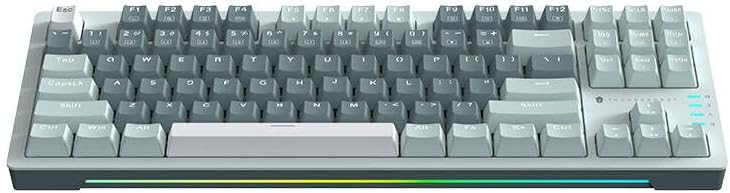
شکل 3: اوپر سے نیچے view of the Thunderobot K87 keyboard layout.
ملٹی میڈیا اور فنکشن کیز
The keyboard includes a Function (Fn) key, typically located near the right Alt key. This key, when pressed in combination with the F1-F12 keys, activates various multimedia and system functions. Refer to the keycap legends for specific functions.
- Fn + F1-F12: Typically control media playback, volume, and other system shortcuts.
- Fn + Windows Key: گیمنگ کے دوران حادثاتی دبائو کو روکنے کے لیے ونڈوز کی کو لاک/ان لاک کرتا ہے۔
بیک لائٹنگ کنٹرول
The Thunderobot K87 keyboard features customizable RGB backlighting. Specific key combinations allow you to change lighting modes, brightness, and speed. Consult the keyboard's keycap legends or the manufacturer's website for detailed instructions on lighting customization.

شکل 4: سامنے view showing the RGB lighting strip.

شکل 5: سائیڈ پروfile view demonstrating keycap height and keyboard angle.
دیکھ بھال
کی بورڈ کی صفائی
باقاعدگی سے صفائی کی بورڈ کی ظاہری شکل اور فعالیت کو برقرار رکھنے میں مدد کرتی ہے۔
- منقطع کریں: صاف کرنے سے پہلے ہمیشہ کی بورڈ کو اپنے کمپیوٹر سے منقطع کریں۔
- دھول ہٹانا: کی کیپس کے درمیان سے دھول اور ملبے کو اڑانے کے لیے کمپریسڈ ہوا کا کین استعمال کریں۔
- سطح کی صفائی: کی کیپس اور کی بورڈ کی سطح کو نرم، لنٹ فری کپڑے سے ہلکے سے صاف کریں۔ampپانی یا ہلکے، غیر کھرچنے والے صفائی کے محلول کے ساتھ ختم کریں۔ ضرورت سے زیادہ نمی سے بچیں۔
- اجتناب: Do not use harsh chemicals, solvents, or abrasive materials, as these can damage the keyboard's finish or keycap legends.
ذخیرہ
When not in use for extended periods, store the keyboard in a dry, cool place away from direct sunlight and extreme temperatures. Consider covering it to prevent dust accumulation.
خرابی کا سراغ لگانا
If you encounter issues with your Thunderobot K87 keyboard, please refer to the following common solutions:
| مسئلہ | ممکنہ وجہ | حل |
|---|---|---|
| کی بورڈ جواب نہیں دے رہا ہے۔ | ڈھیلا USB کنکشن، ناقص USB پورٹ، ڈرائیور کا مسئلہ۔ | Ensure USB cable is securely connected. Try a different USB port on your computer. Restart your computer. |
| مخصوص چابیاں کام نہیں کر رہی ہیں۔ | Debris under keycap, switch malfunction. | Use compressed air to clear debris. If the issue persists, contact customer support. |
| بیک لائٹنگ کام نہیں کر رہی یا غلط | Lighting mode disabled, software conflict. | Check keyboard's lighting control key combinations (Fn + specific keys). Ensure no conflicting software is running. |
| Keyboard input lag | USB port issues, system performance. | Try a different USB port. Close unnecessary background applications. |
If the problem persists after trying these solutions, please contact Thunderobot customer support for further assistance.
وضاحتیں
| فیچر | تفصیل |
|---|---|
| ماڈل نمبر | JM03NQ002 |
| برانڈ | تھنڈربوٹ |
| کنیکٹوٹی | وائرڈ (USB) |
| سوئچ کی قسم | ریڈ مکینیکل سوئچز |
| لے آؤٹ | 87-key (Tenkeyless) |
| بیک لائٹنگ | آر جی بی |
| کارخانہ دار | تھنڈربوٹ |
| ASIN | B0CWS77B83 |
| وارنٹی | 2 سال کارخانہ دار |
وارنٹی کی معلومات
The Thunderobot K87 Wired Mechanical Keyboard (Model JM03NQ002) comes with a 2 سالہ صنعت کار کی وارنٹی from the date of purchase. This warranty covers defects in materials and workmanship under normal use. It does not cover damage caused by accident, misuse, abuse, neglect, unauthorized modification, or improper installation.
To claim warranty service, please retain your proof of purchase. For detailed warranty terms and conditions, or to initiate a warranty claim, please contact Thunderobot customer support.
حمایت
For technical assistance, product inquiries, or warranty claims, please visit the official Thunderobot website or contact their customer support team. Please have your product model number (JM03NQ002) and proof of purchase ready when seeking support.
Official Thunderobot Webسائٹ: www.thunderobot.com (براہ کرم نوٹ کریں: یہ پلیس ہولڈر ہے۔ URL کوئی خاص حمایت کے طور پر URL was provided in the product data. Refer to your product packaging or official Thunderobot documentation for the correct support contact information.)