
1. تعارف
Thank you for choosing the ARROWMAX Mini Electric Drill SDS MINI 22. This compact and powerful cordless drill is designed for precision tasks in various materials, making it ideal for DIY enthusiasts, model builders, and jewelers. This manual provides essential information for safe and efficient operation, maintenance, and troubleshooting.
اہم خصوصیات:
- Compact and powerful with a 500 mAh LiPo battery and 600 RPM rotation speed.
- Ergonomic aluminum alloy body for comfortable single-hand operation.
- Includes 10 precision HSS drill bits (0.6mm to 2.2mm) for diverse materials.
- Equipped with 4 shadowless LED lights for optimal visibility and LED battery indicators.
- Simple one-button operation for clockwise, counter-clockwise rotation, and power off.
- Durable aluminum CNC storage case for drill bits.
2. حفاظتی ہدایات
Please read all safety warnings and instructions carefully before using this product to prevent electric shock, fire, and serious injury.
جنرل سیفٹی
- Always wear appropriate personal protective equipment, including safety glasses, when operating the drill.
- اپنے کام کے علاقے کو صاف اور اچھی طرح سے روشن رکھیں۔ بے ترتیبی یا تاریک علاقے حادثات کو دعوت دیتے ہیں۔
- دھماکہ خیز ماحول، جیسے آتش گیر مائعات، گیسوں یا دھول کی موجودگی میں پاور ٹولز کو نہ چلائیں۔
- پاور ٹول چلاتے ہوئے بچوں اور دیکھنے والوں کو دور رکھیں۔ خلفشار آپ کو کنٹرول کھونے کا سبب بن سکتا ہے۔
- حادثاتی طور پر شروع ہونے سے گریز کریں۔ بیٹری پیک سے منسلک ہونے، ٹول کو اٹھانے یا لے جانے سے پہلے یقینی بنائیں کہ سوئچ آف پوزیشن میں ہے۔
الیکٹریکل سیفٹی
- بجلی کے آلات کو بارش یا گیلے حالات میں بے نقاب نہ کریں۔ بجلی کے آلے میں پانی داخل ہونے سے بجلی کے جھٹکے کا خطرہ بڑھ جائے گا۔
- صرف مخصوص چارجنگ کیبل اور پاور اڈاپٹر استعمال کریں۔
ذاتی حفاظت
- چوکس رہیں، دیکھیں کہ آپ کیا کر رہے ہیں، اور پاور ٹول چلاتے وقت عقل کا استعمال کریں۔
- حد سے تجاوز نہ کریں۔ ہر وقت مناسب فٹنگ اور توازن رکھیں۔
- ورک پیس کو محفوظ کریں۔ cl استعمال کریں۔amps یا workpiece کو پکڑنے کے لئے ایک vise.
- Always ensure the drill bit is securely fastened in the chuck before operation.
3. پیکیج کے مشمولات
تصدیق کریں کہ نیچے دی گئی تمام اشیاء آپ کے پیکج میں شامل ہیں۔ اگر کوئی آئٹم غائب یا خراب ہے تو براہ کرم اپنے خوردہ فروش سے رابطہ کریں۔
- 1 x ARROWMAX Mini Electric Drill (SDS MINI 22)
- 10 x HSS Drill Bits (0.6mm, 0.8mm, 1.0mm, 1.2mm, 1.4mm, 1.5mm, 1.6mm, 1.8mm, 2.0mm, 2.2mm)
- 1 x Aluminum Drill Bit Storage Case
- 1 X USB چارجنگ کیبل (ٹائپ سی)
- 1 ایکس صارف دستی
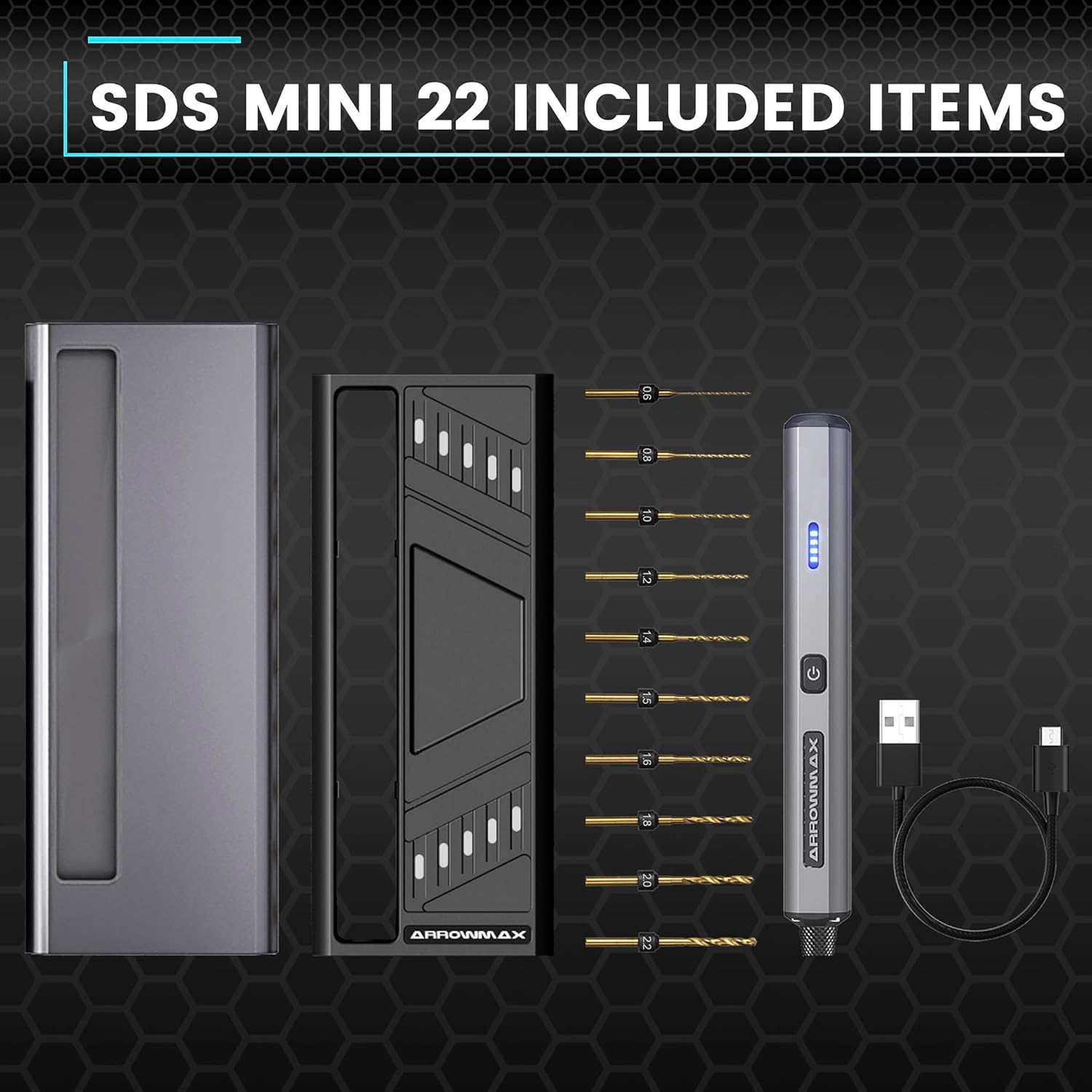
Figure 3.1: Complete package contents of the SDS MINI 22.
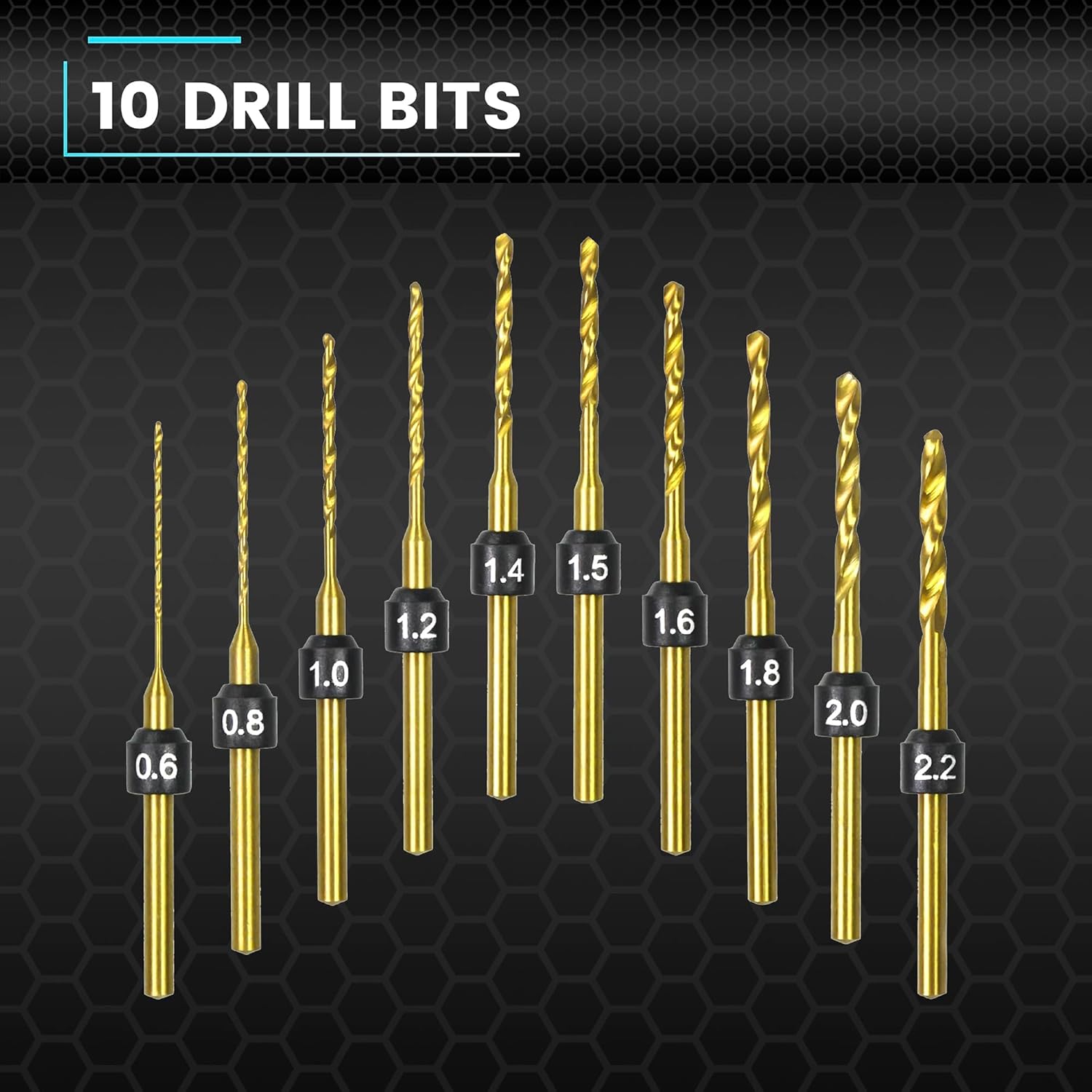
Figure 3.2: The 10 HSS drill bits included with the SDS MINI 22.
4. پروڈکٹ ختمview
Familiarize yourself with the components of your ARROWMAX Mini Electric Drill.
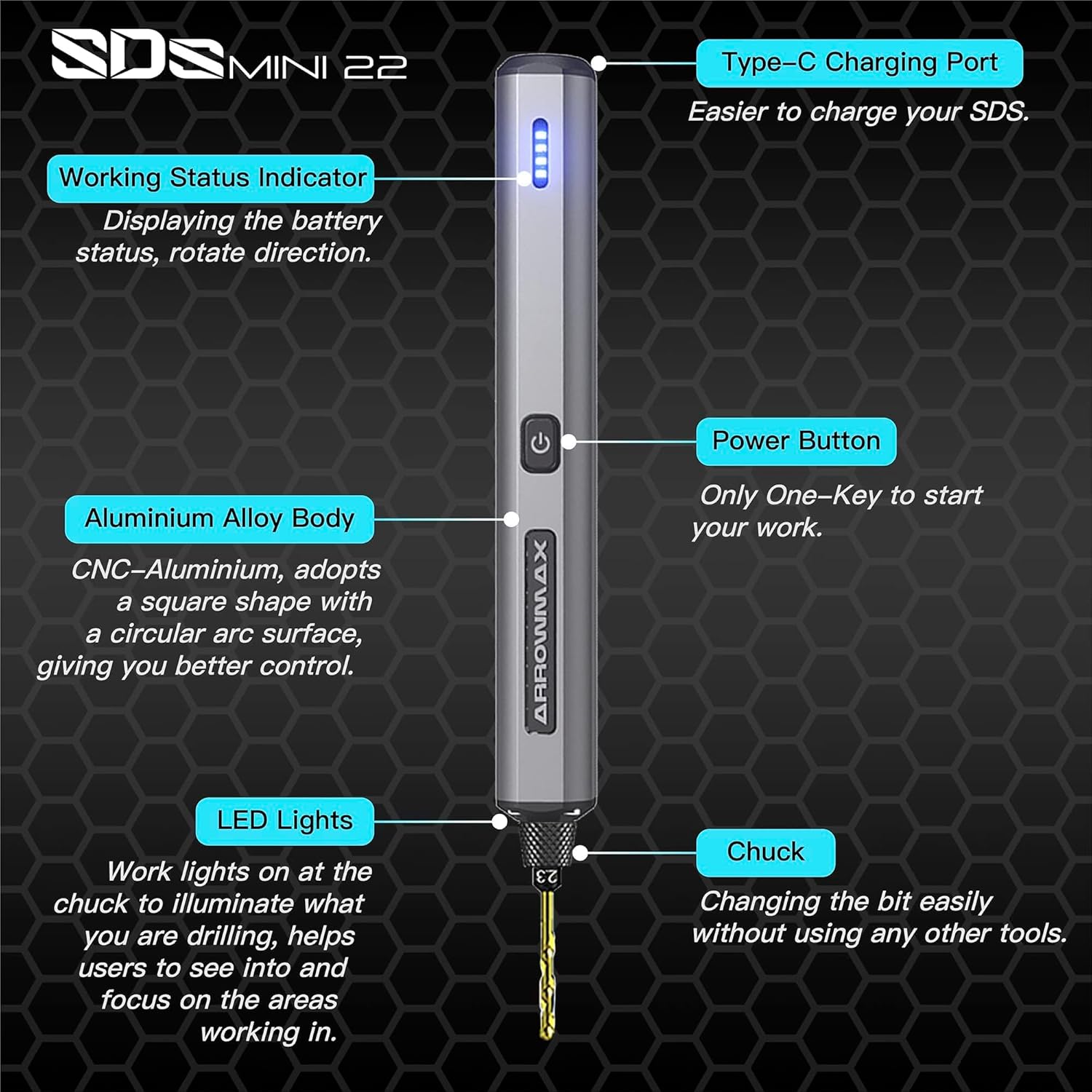
Figure 4.1: Labeled components of the SDS MINI 22.
- ٹائپ سی چارجنگ پورٹ: اندرونی بیٹری چارج کرنے کے لیے۔
- ورکنگ اسٹیٹس انڈیکیٹر: Displays battery status and rotation direction.
- پاور بٹن: Controls power on/off and rotation direction.
- ایلومینیم کھوٹ باڈی: Provides durability and ergonomic grip.
- ایل ای ڈی لائٹس: Illuminates the drilling area for improved visibility.
- چک: Holds the drill bits securely.
5. سیٹ اپ
5.1 ڈیوائس کو چارج کرنا
- Locate the Type-C charging port on the top of the drill.
- Connect the provided USB Type-C cable to the drill and the other end to a compatible USB power source (e.g., computer, wall adapter).
- The Working Status Indicator LEDs will illuminate to show the charging progress. A full charge is indicated when all LEDs are solid.
- Allow approximately 60 minutes for a full charge.
5.2 ڈرل بٹس انسٹال کرنا
- Ensure the drill is powered off before installing or removing bits.
- Gently pull the chuck downwards to open the jaws.
- Insert the desired drill bit into the chuck. Ensure the bit is inserted as far as it can go for maximum stability.
- Release the chuck to secure the drill bit. The chuck is designed for tool-free bit changes.
- To remove a bit, pull the chuck downwards and extract the bit.
6. آپریٹنگ ہدایات
6.1 Power On/Off and Rotation Control
The SDS MINI 22 features a simple one-button control:
- پہلا پریس: The drill will power on and rotate in a clockwise direction. The LED indicator will show the direction.
- دوسرا پریس: The drill will switch to counter-clockwise rotation. The LED indicator will update to show the new direction.
- تیسری پریس: The drill will power off.
You do not need to continuously hold the button during operation.
6.2 بیٹری اشارے
The LED indicators on the drill body display the remaining battery power. Monitor these lights to know when recharging is necessary.
6.3 Working with Materials
The SDS MINI 22 is suitable for drilling various materials, including:
- پلاسٹک
- گولے
- لکڑی
- چمڑا
- Soft metals (e.g., aluminum)
Always select the appropriate drill bit size for your task and material. Apply gentle, consistent pressure. Avoid excessive force, which can damage the bit or the material.
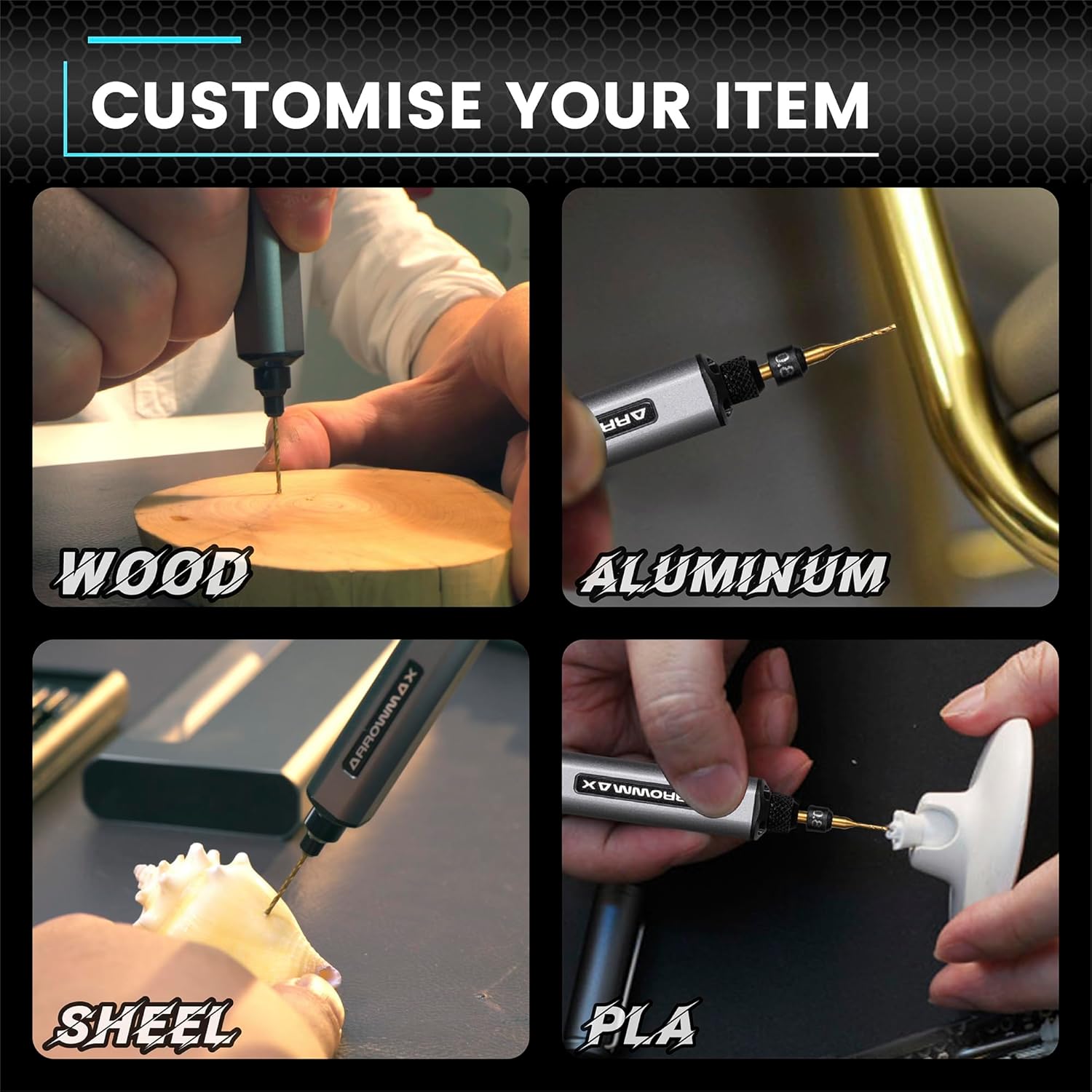
شکل 6.1: سابقamples of materials suitable for drilling with the SDS MINI 22.
7 دیکھ بھال
7.1 صفائی
- Ensure the drill is powered off and disconnected from any charging source before cleaning.
- Wipe the drill body with a soft, dry cloth. Do not use harsh chemicals or abrasive cleaners.
- Remove any dust or debris from the chuck and ventilation openings using a soft brush or compressed air.
7.2 اسٹوریج
- Store the drill and its accessories in a cool, dry place, away from direct sunlight and moisture.
- Always store the drill bits in their provided aluminum case to protect them from damage and loss.
- For long-term storage, ensure the battery is partially charged (around 50%) to prolong its lifespan. Recharge every 3-6 months if not in use.
8 خرابیوں کا سراغ لگانا
If you encounter issues with your ARROWMAX Mini Electric Drill, refer to the following common problems and solutions:
- Problem: The drill does not turn on.
حل: Check the battery level. If the battery is low or depleted, connect the drill to a power source using the USB-C cable and charge it fully. Ensure the power button is pressed correctly (first press for clockwise, second for counter-clockwise). - Problem: The drill is not charging.
حل: Verify that the USB-C cable is securely connected to both the drill and the power source. Try a different USB port or power adapter. Ensure the charging port on the drill is clean and free of debris. - Problem: The drill bit is loose or falls out.
حل: Ensure the drill bit is inserted correctly and fully into the chuck. Pull the chuck down, insert the bit, and release it to ensure it clamps securely. If the chuck mechanism appears damaged, discontinue use and contact support. - Problem: Reduced drilling performance or unusual noise.
حل: Check if the drill bit is dull or damaged; replace it if necessary. Ensure you are using the correct bit for the material. If the issue persists, contact customer support.
9. وضاحتیں
| فیچر | تفصیلات |
|---|---|
| ماڈل | SDS MINI 22 |
| برانڈ | ARROWMAX |
| کارخانہ دار | Freemax Technology Company Limited (IMPORT) |
| پروڈکٹ کے طول و عرض (L x W x H) | 18.5 x 7 x 3 سینٹی میٹر |
| وزن | 280 گرام |
| طاقت کا منبع | بیٹری سے چلنے والا |
| بیٹری کی قسم | لتیم پولیمر |
| بیٹری کی صلاحیت | 500 ایم اے ایچ |
| والیومtage | 5 وولٹ |
| Ampایجری | 2 اے |
| Maximum Rotation Speed | 600 RPM |
| خصوصی خصوصیات | Compact, LED Lights, Battery Indicator |
| رنگ | سیاہ |
| شامل اجزاء | 1 Electric Pen, 10 Drill Bits, 1 Manual, 1 USB Charging Cable |
10. وارنٹی اور سپورٹ
Specific warranty information for the ARROWMAX Mini Electric Drill SDS MINI 22 is not provided in the product details. For warranty claims, technical support, or inquiries regarding spare parts, please contact your retailer or the manufacturer directly. Keep your purchase receipt as proof of purchase.