
تعارف
Thank you for choosing the HyperGear Halo Waterproof LED Wireless Speaker. This manual provides essential information for setting up, operating, and maintaining your speaker to ensure optimal performance and longevity. The Halo speaker combines powerful HD sound with a vibrant 360° multicolor LED light show, designed for both indoor and outdoor use. Its IPX6 waterproof rating makes it suitable for various environments, from poolside parties to everyday listening.
باکس میں کیا ہے۔
- HyperGear Halo Waterproof LED Wireless Speaker
- USB-C چارجنگ کیبل
- 3.5mm Aux Cord
سیٹ اپ گائیڈ
1. اسپیکر کو چارج کرنا
Before first use, fully charge your Halo speaker. Connect the included USB-C charging cable to the speaker's charging port and the other end to a USB power adapter (not included). The LED indicator will show charging status and turn off when fully charged.
2. پر / آف پاور
Press and hold the Power button on the speaker's top panel to turn it on or off. A sound prompt will indicate the power status.
3. بلوٹوت جوڑی بنانا
- یقینی بنائیں کہ اسپیکر آن اور بلوٹوتھ پیئرنگ موڈ میں ہے (ایک چمکتی ہوئی LED سے اشارہ کیا گیا ہے)۔
- اپنے آلے پر (اسمارٹ فون، ٹیبلیٹ، کمپیوٹر)، بلوٹوتھ کو فعال کریں اور دستیاب آلات تلاش کریں۔
- Select "HyperGear Halo" from the list.
- ایک بار جوڑا بننے کے بعد، اسپیکر ایک تصدیقی آواز خارج کرے گا، اور LED چمکنا بند کر دے گا۔
پاور آن ہونے پر، اگر حد کے اندر ہو تو اسپیکر خود بخود آخری جوڑی والے آلے سے دوبارہ جڑ جائے گا۔

The top panel of the HyperGear Halo speaker, showing controls and its connection to a smartphone via Bluetooth.
آپریٹنگ ہدایات
بنیادی کنٹرولز
| بٹن/فنکشن | ایکشن |
|---|---|
| پاور بٹن | Press and hold to Power On/Off |
| چلائیں/روکیں۔ | Press once to Play/Pause music |
| والیوم اوپر (+) | حجم بڑھانے کے لیے ایک بار دبائیں۔ |
| آواز کم (-) | والیوم کو کم کرنے کے لیے ایک بار دبائیں۔ |
| اگلا ٹریک | Press and hold Volume Up (+) |
| پچھلا ٹریک | Press and hold Volume Down (-) |
| جواب / کال ختم کریں۔ | پلے/پاز بٹن کو ایک بار دبائیں۔ |
| کال کو مسترد کریں۔ | پلے/پاز بٹن کو دبائیں اور تھامیں |
| لائٹ موڈ بٹن | 6 LED لائٹ موڈز کے ذریعے سائیکل کرنے کے لیے دبائیں۔ |
Party Mode (Stereo Pairing)
To achieve immersive stereo sound, you can pair two HyperGear Halo speakers together:
- Ensure both Halo speakers are powered on and not connected to any other Bluetooth device.
- On one speaker (this will be the primary speaker), double-press the Power button. It will enter pairing mode for Party Mode.
- دونوں اسپیکر خود بخود ایک دوسرے سے جڑ جائیں گے۔ ایک تصدیقی آواز کامیاب جوڑی کی نشاندہی کرے گی۔
- Now, connect your device to the primary speaker via Bluetooth as described in the 'Bluetooth Pairing' section. Both speakers will play synchronized audio and light shows.

Two HyperGear Halo speakers paired together for Party Mode, offering synchronized audio and light effects.
Alternative Playback Modes

The side panel of the HyperGear Halo speaker, revealing the AUX, microSD, and USB-C ports for versatile connectivity.
- آکس ان: Connect your device using the included 3.5mm Aux cord to the speaker's AUX port for a wired audio connection.
- مائیکرو ایس ڈی کارڈ: Insert a microSD card loaded with audio files into the designated slot. The speaker will automatically play music from the card.
خصوصیات ختمview
- IPX6 واٹر پروف درجہ بندی: Designed to withstand splashes, rain, and spills, making it ideal for outdoor adventures and poolside use.
- Powerful 5W Front-Firing Sound: Equipped with a 52mm full-range driver for rich, dynamic audio with pulse-pounding bass. The front-firing design ensures clearer sound projection.
- 360° Multicolor LED Lights: Features a vibrant light ring that synchronizes with your music, offering 6 different lighting modes to enhance your listening experience.
- بلٹ ان مائیکروفون: Allows for convenient hands-free calling.
- بلوٹوتھ 5.3 ٹیکنالوجی: Provides a stable, stutter-free wireless connection with a range of up to 33 feet.
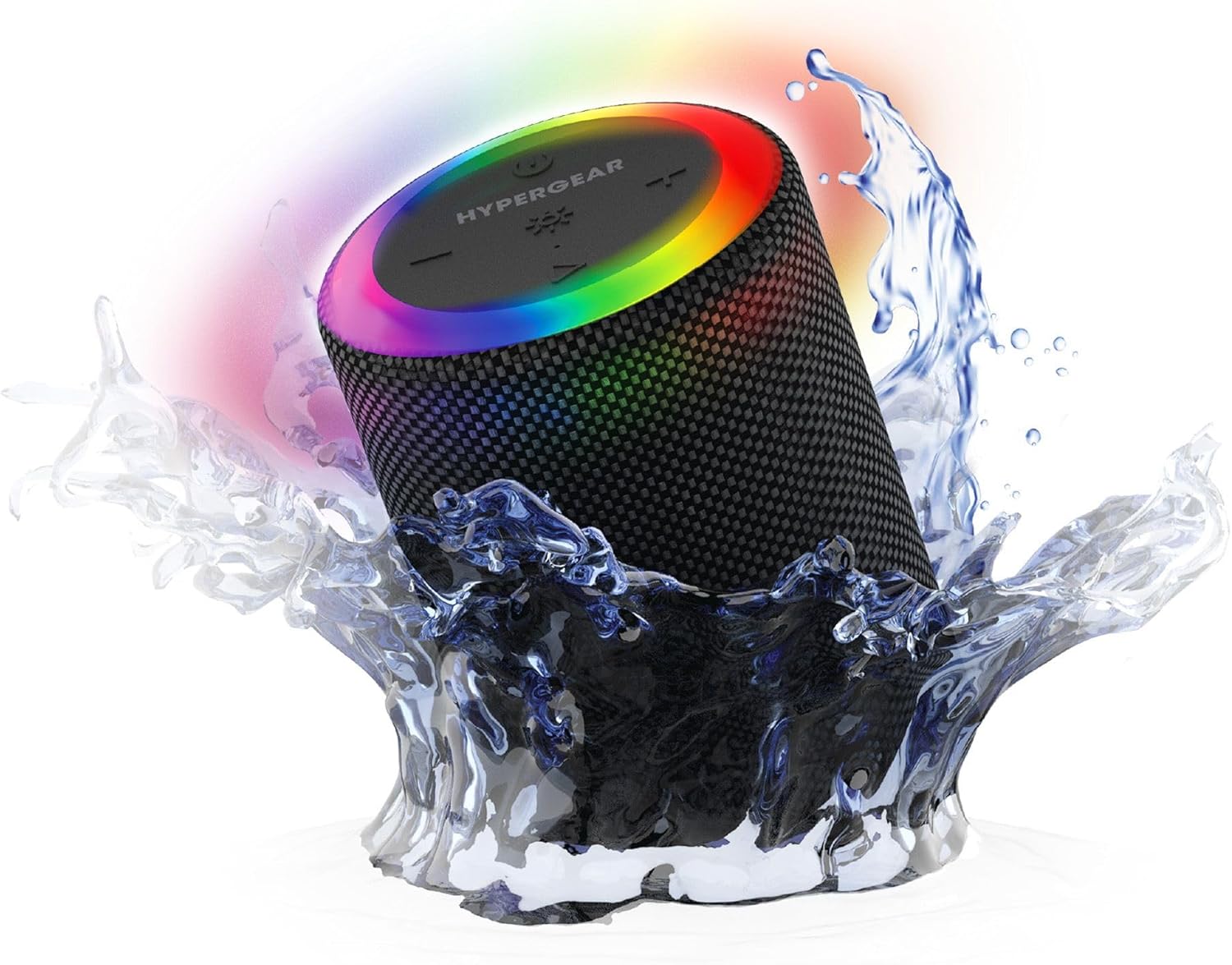
The HyperGear Halo speaker immersed in water, highlighting its robust waterproof design.

Visual representation of the HyperGear Halo speaker's powerful audio features, including its 5W output and 52mm driver.

The HyperGear Halo speaker showcasing its beat-synced 360° multicolor LED light ring with various lighting modes.
وضاحتیں
| فیچر | تفصیل |
|---|---|
| ماڈل کا نام | Halo Waterproof LED Wireless Speaker |
| اسپیکر کی قسم | ملٹی میڈیا |
| کنیکٹوٹی ٹیکنالوجی | بلوٹوتھ 5.3 |
| آڈیو آؤٹ پٹ وضع | Mono (Stereo with Party Mode) |
| اسپیکر زیادہ سے زیادہ آؤٹ پٹ پاور | 5 واٹ |
| آڈیو ڈرائیور کا سائز | 52 ملی میٹر |
| پانی کی مزاحمت کی سطح | IPX6 واٹر پروف |
| مصنوعات کے طول و عرض | 3.27"D x 3.27"W x 4.13"H |
| شے کا وزن | 1.05 پاؤنڈ |
| طاقت کا منبع | بیٹری سے چلنے والا |
| شامل اجزاء | USB-C Charging Cable, 3.5mm Aux Cord |
| کنٹرول کا طریقہ | بٹن |
| یو پی سی | 633755158858 |
دیکھ بھال
- صفائی: اسپیکر کو نرم سے مسح کریں ، d۔amp کپڑا سخت کیمیکل یا کھرچنے والے کلینر کا استعمال نہ کریں۔
- ذخیرہ: اسپیکر کو ٹھنڈی، خشک جگہ پر براہ راست سورج کی روشنی اور انتہائی درجہ حرارت سے دور رکھیں۔
- بیٹری کی دیکھ بھال: بیٹری کی زندگی کو محفوظ رکھنے کے لیے، سپیکر کو کثرت سے مکمل طور پر خارج کرنے سے گریز کریں۔ اسے باقاعدگی سے چارج کریں، چاہے طویل عرصے تک استعمال میں نہ ہوں۔
- پنروک مہر: Ensure the silicone cover for the charging and AUX ports is securely closed when near water to maintain its IPX6 rating.
خرابی کا سراغ لگانا
| مسئلہ | ممکنہ حل |
|---|---|
| سپیکر پاور آن نہیں کرتا۔ | یقینی بنائیں کہ اسپیکر چارج کیا گیا ہے۔ اسے پاور سورس سے جوڑیں اور دوبارہ کوشش کریں۔ |
| بلوٹوتھ ڈیوائس کے ساتھ جوڑا نہیں بنایا جا سکتا۔ | Make sure the speaker is in pairing mode (flashing LED). Turn off and on Bluetooth on your device. Ensure no other devices are connected to the speaker. Move speaker closer to your device. |
| سپیکر سے آواز نہیں آتی۔ | Check volume levels on both the speaker and your device. Ensure the correct input mode (Bluetooth, Aux, MicroSD) is selected. If using Aux, ensure the cable is fully inserted. |
| Party Mode not working. | Ensure both speakers are fully charged and not connected to any other Bluetooth devices. Try resetting both speakers by powering them off and on, then re-attempt Party Mode pairing. |
| ایل ای ڈی لائٹس کام نہیں کر رہی ہیں۔ | Press the Light Mode button to cycle through modes. Ensure the speaker is powered on. |
وارنٹی اور سپورٹ
The HyperGear Halo Waterproof LED Wireless Speaker comes with a محدود وارنٹی. For specific details regarding warranty coverage, duration, and claims, please refer to the warranty card included with your product or visit the official HyperGear website. For technical support or further assistance, please contact HyperGear customer service through their official channels.