
BSP D9
BSP D9 گیم کنٹرولر صارف دستی
ماڈل: D9
1. تعارف
The BSP D9 Game Controller is a versatile gaming accessory designed to enhance your mobile and PC gaming experience. It supports a wide range of devices including iPhones, iPads, Android phones and tablets, PCs, Nintendo Switch, and PlayStation consoles. Featuring advanced Hall Effect joysticks and triggers, programmable back buttons, and a stretchable design, the D9 controller provides precise control and comfortable gameplay across various platforms.
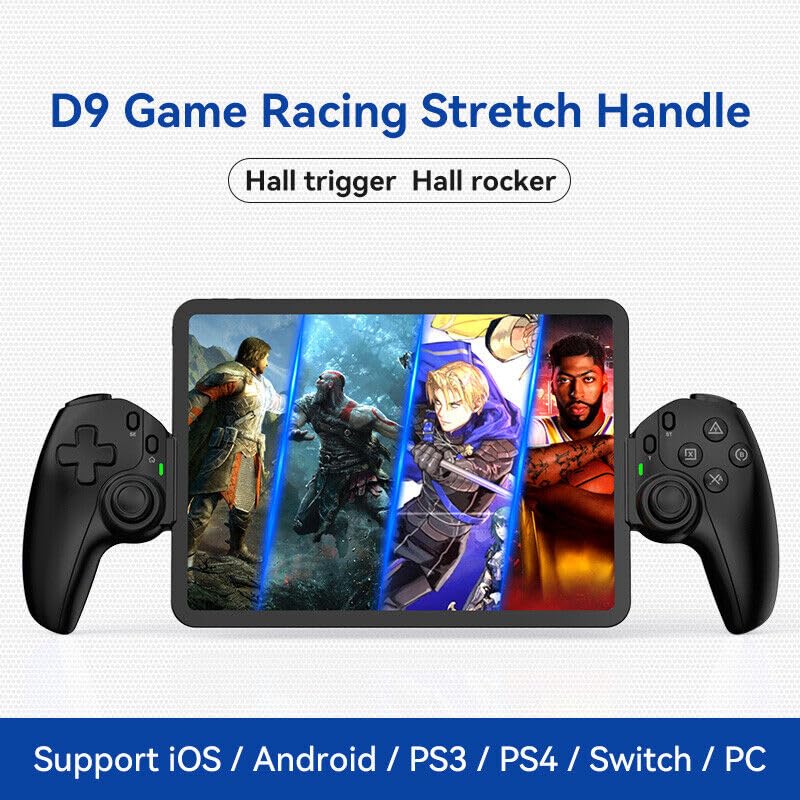
Figure 1.1: The BSP D9 Game Controller attached to a tablet, showcasing its design and compatibility with mobile gaming.
2. پروڈکٹ ختمview: Key Details
Familiarize yourself with the various buttons and components of your D9 Game Controller.

Figure 2.1: Detailed diagram of the D9 controller's button layout, including the Cross Key, SELECT, HOME, START, A/B/X/Y buttons, L1/R1, L2/R2 triggers, M1/M2 back buttons, Left/Right Sticks (L3/R3), Status Indicator, and Charging Indicator.
- Cross Key (D-Pad): دشاتمک ان پٹ۔
- Left Stick/L3: Left analog joystick, press down for L3.
- منتخب بٹن: Function button, typically for menu selection.
- ہوم بٹن: Power on/off, mode switching, return to home screen.
- حیثیت کا اشارہ: Shows connection status and mode.
- چارجنگ انڈیکیٹر: Displays battery charging status.
- Right Stick/R3: Right analog joystick, press down for R3.
- A/B/X/Y بٹن: معیاری ایکشن بٹن۔
- اسٹارٹ بٹن: Function button, typically for pausing or starting games.
- ٹربو بٹن: Activates/deactivates turbo function for assigned buttons.
- L1/R1 بٹن: کندھے کے بٹن۔
- L2/R2 محرکات: اینالاگ ٹرگرز۔
- M1/M2 بٹن: Programmable back buttons.
3 خصوصیات
3.1 Hall Effect Triggers and Joysticks
The D9 controller is equipped with advanced Hall Effect technology for both its triggers and joysticks. This provides superior precision and durability compared to traditional potentiometers.

Figure 3.1: Explanation of Hall Effect Triggers and Joysticks, highlighting 0.1mm accuracy for triggers and benefits like no drift issues, no dead zone, long lifespan, and precise control for joysticks.
- Hall Effect Triggers: Provide 0.1mm accuracy for precise micro-operations in games.
- Hall Effect Joysticks: Eliminate drift issues, maintain stable trajectory, offer precise positioning, and provide a smooth feel without stuttering.
3.2 ٹربو فنکشن
The Turbo function allows you to set automatic rapid firing for specific buttons, giving you an advantage تیز رفتار گیمز میں۔

Figure 3.2: The Turbo function allows setting A/B/X/Y, L1/R1, L2/R2 buttons for rapid fire. Three adjustable turbo speeds are available: 8 shots/s, 15 shots/s, and 25 shots/s.
3.3 Macro Programming Function
The M1 and M2 back buttons can be programmed to execute complex key combinations with a single press, reducing repetitive actions and extending controller lifespan.

Figure 3.3: Instructions for setting and canceling macro programming on the M1 and M2 back buttons. Macros can be assigned to A/B/X/Y/L1/R1/L2/R2/Cross Key combinations.
3.4 Stretchable Design
The controller features a stretchable design to accommodate a wide range of smartphones and tablets, ensuring a secure fit and comfortable grip.

Figure 3.4: The controller supports device lengths from 130mm to 280mm (5-11 inches) and a maximum thickness of 13mm. It is perfectly compatible with iPhone 15 series and supports silicone & clear phone cases.
4 مطابقت
The BSP D9 Game Controller offers broad compatibility with various operating systems and gaming platforms, transforming your mobile device into a portable gaming console.

Figure 4.1: The controller supports streaming & cloud gaming (PS Remote Play, Xbox Game Pass, Steam Link, Rainway, NVIDIA GeForce NOW, Moonlight Game Streaming, Apple Arcade), direct play on iOS devices (Genshin Impact, Call of Duty Mobile, Diablo Immortal, Minecraft, Roblox), and direct play on Android devices (Call of Duty Mobile, Diablo Immortal, Minecraft, NBA 2K, Asphalt).
- آپریٹنگ سسٹمز: iOS, Android, Windows (PC).
- کنسولز: Nintendo Switch, PlayStation (PS3, PS4, PS5 via remote play).
- کلاؤڈ گیمنگ: Supports services like Xbox Game Pass, PS Remote Play, Steam Link, NVIDIA GeForce NOW, and more.
- Direct Play: Compatible with popular mobile games on both iOS and Android.
5. سیٹ اپ
5.1 کنٹرولر کو چارج کرنا
- Connect the provided USB-C charging cable to the charging port on the controller.
- کیبل کے دوسرے سرے کو USB پاور سورس سے جوڑیں (مثلاً کمپیوٹر USB پورٹ، وال اڈاپٹر)۔
- The Charging Indicator light will illuminate during charging and turn off when fully charged.
5.2 اپنا آلہ داخل کرنا
- Gently pull the two sides of the controller apart to extend the stretchable mechanism.
- Carefully place your smartphone or tablet into the central slot, ensuring it is securely seated. The controller supports devices with lengths between 130mm and 280mm and a maximum thickness of 13mm.
- The controller is designed to accommodate devices with slim cases.
5.3 Connecting to Your Device (Bluetooth Pairing)
The connection method varies slightly depending on your device's operating system.
اینڈرائیڈ ڈیوائسز کے لیے:
- دبائیں اور تھامیں۔ گھر button until the Status Indicator light begins to flash rapidly, indicating pairing mode.
- On your Android device, go to ترتیبات > بلوٹوتھ اور بلوٹوتھ آن کریں۔
- تلاش کریں۔ available devices and select "BSP-D9" or similar from the list.
- Once connected, the Status Indicator light on the controller will become solid.
iOS آلات کے لئے:
- دبائیں اور تھامیں۔ گھر button until the Status Indicator light begins to flash rapidly.
- On your iOS device, go to ترتیبات > بلوٹوتھ اور بلوٹوتھ آن کریں۔
- تلاش کریں۔ available devices and select "Xbox Wireless Controller" or "DUALSHOCK 4 Wireless Controller" (depending on the mode the D9 emulates for iOS compatibility) from the list.
- Once connected, the Status Indicator light on the controller will become solid.
For PC/Switch/PS (Wired/Wireless):
Refer to the specific connection instructions provided with your controller for PC, Switch, or PS modes, as these may involve different button combinations or wired connections.
6. آپریٹنگ ہدایات
6.1 Basic Button Functions
Refer to Section 2, "Product Overview: Key Details," for the layout and basic functions of all buttons (Cross Key, A/B/X/Y, L1/R1, L2/R2, Joysticks, SELECT, START, HOME).
6.2 Using the Turbo Function
- دبائیں اور تھامیں۔ ٹربو بٹن
- منعقد کرتے ہوئے ٹربو, press the button you wish to assign the turbo function to (e.g., A, B, X, Y, L1, R1, L2, R2). The button will now have turbo enabled.
- To adjust the turbo speed, press and hold ٹربو and then press the Right Stick (R3) up or down to cycle through the 3 available speeds (8, 15, 25 shots/s).
- To cancel the turbo function for a specific button, press and hold ٹربو and press the assigned button again.
- To clear all turbo settings, press and hold ٹربو and then press the SELECT button.
6.3 Programming Macro Buttons (M1/M2)
The M1 and M2 back buttons can be programmed to store a sequence of button presses.
How to Set a Macro:
- دبائیں اور تھامیں۔ منتخب کریں۔ بٹن اور M1 (or M2) key for 2 seconds. The LED indicator light will flash quickly.
- Press the key(s) you want to set for the macro programming function (e.g., A+B+X+Y).
- After setting the sequence, press the M1 (or M2) key again. The LED light will become solid, indicating that the setting is complete.
- Once set, pressing M1 (or M2) will automatically execute the programmed key combination.
How to Cancel a Macro:
- دبائیں اور تھامیں۔ منتخب کریں۔ بٹن اور M1 (or M2) key for 2 seconds. The LED indicator light will flash quickly.
- دبائیں M1 (or M2) key again to clear the macro programming. (Note: Do not press other buttons at this time). The LED light will remain solid to confirm the setting is cleared.
7 دیکھ بھال
- صفائی: کنٹرولر کو صاف کرنے کے لیے نرم، خشک کپڑا استعمال کریں۔ کھرچنے والے کلینر یا سالوینٹس کا استعمال نہ کریں۔
- ذخیرہ: کنٹرولر کو کسی ٹھنڈی، خشک جگہ پر براہ راست سورج کی روشنی اور انتہائی درجہ حرارت سے دور رکھیں۔
- بیٹری کی دیکھ بھال: بیٹری کی زندگی کو طول دینے کے لیے، کنٹرولر کو کثرت سے مکمل طور پر خارج کرنے سے گریز کریں۔ اسے باقاعدگی سے چارج کریں، چاہے طویل عرصے تک استعمال میں نہ ہوں۔
- قطروں سے بچیں: Protect the controller from drops and impacts, which can damage internal components.
8 خرابیوں کا سراغ لگانا
| مسئلہ | ممکنہ وجہ | حل |
|---|---|---|
| کنٹرولر آن نہیں ہے۔ | کم بیٹری۔ | Charge the controller for at least 30 minutes. |
| بلوٹوتھ کے ذریعے جوڑا بنانے سے قاصر۔ | Controller not in pairing mode; Bluetooth interference; device Bluetooth off. | Ensure controller is in pairing mode (flashing LED). Turn off and on Bluetooth on your device. Move closer to the device. |
| بٹن یا جوائس اسٹک غیر جوابی ہیں۔ | Connection issue; software glitch; physical damage. | Reconnect the controller. Restart your device. If problem persists, contact customer support. |
| Device does not fit in the controller. | Device dimensions exceed supported limits. | Ensure your device length is between 130-280mm and thickness is max 13mm. Remove bulky cases. |
9. وضاحتیں
- ماڈل: D9
- برانڈ: بی ایس پی
- کنیکٹوٹی: Bluetooth, Wired (for PC/Switch/PS, specific modes may vary)
- Supported Device Length: 130 ملی میٹر - 280 ملی میٹر (5 - 11 انچ)
- Supported Device Thickness: 13 ملی میٹر تک
- Joystick/Trigger Technology: ہال اثر
- قابل پروگرام بٹن: M1, M2 (back buttons)
- ٹربو فنکشن: Yes, with 3 adjustable speeds
- مینوفیکچرر: شینزین شان وان ٹیکنالوجی کمپنی، لمیٹڈ
- پہلی دستیاب تاریخ: 30 مارچ 2024
10. وارنٹی اور سپورٹ
For warranty information and technical support, please refer to the documentation included with your purchase or visit the official BSP product support webسائٹ وارنٹی کے دعووں کے لیے اپنی خریداری کا ثبوت رکھیں۔
Note: Specific warranty terms and support contact details may vary by region.
Ask a question about this manual
Ask about setup, troubleshooting, compatibility, parts, safety, or missing instructions. Manuals+ will review the question and use this page’s manual context to help answer it.