
1. ختمview
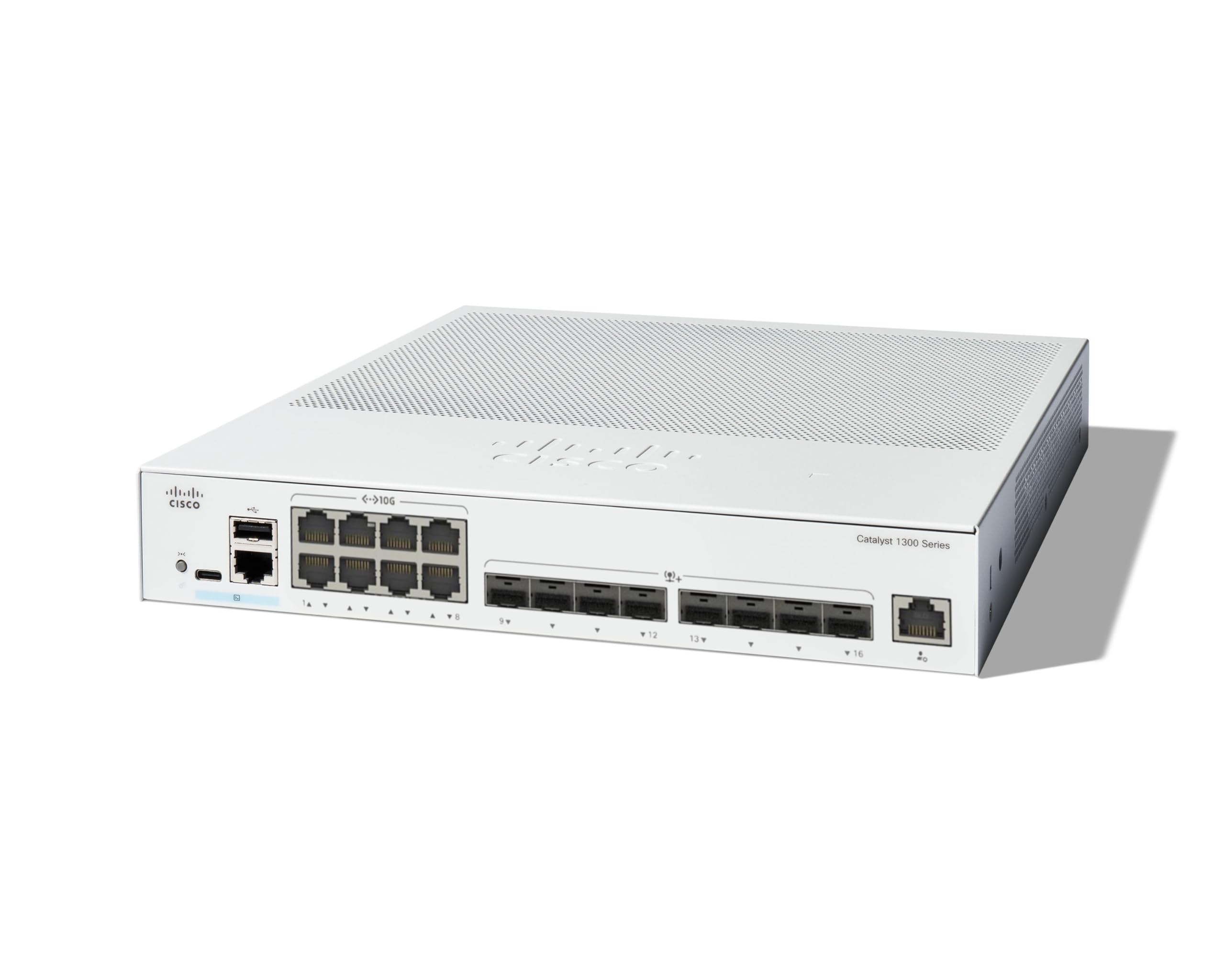
The Cisco Catalyst 1300-16XTS is a fully managed switch designed to provide reliable and secure connectivity for small business networks. This switch offers full Layer 2/3 capabilities, an intuitive web dashboard, advanced networking features, and Power over Ethernet Plus (PoE+) support.
اہم خصوصیات میں شامل ہیں:
- سوئچ بندرگاہیں: 8 ports 10G Copper + 8x 10GE SFP+ ports + 1x GE Management Port.
- آسان انتظام: Intuitive Cisco Business mobile app and local web interface for setup, management, and monitoring.
- بہتر سیکورٹی: IP-MAC port binding and IPv6 First Hop Security for network protection.
- توانائی کی کارکردگی: Optimizes power usage, compliant with IEEE 802.3az Energy Efficient Ethernet.
- Business Ready: No subscription or licenses required, includes limited lifetime hardware warranty and complimentary 1-year technical support.
2. پیکیج کے مشمولات
تصدیق کریں کہ آپ کے پیکیج میں درج ذیل آئٹمز ہیں:
- Cisco Catalyst 1300-16XTS Managed Switch unit
- پاور کی ہڈی یا اڈاپٹر
- USB Type-C کیبل
- بڑھتے ہوئے ہارڈ ویئر
اگر کوئی آئٹم غائب یا خراب ہے تو، براہ کرم اپنے وینڈر یا سسکو سپورٹ سے رابطہ کریں۔
3. سیٹ اپ
Follow these steps to set up your Cisco Catalyst 1300-16XTS Managed Switch:
- پاور سے رابطہ کریں: Connect the power adapter to the switch's power input and then plug the power cord into an electrical outlet. Ensure the power LED on the switch illuminates.
- راؤٹر/نیٹ ورک سے جڑیں: Use an Ethernet cable to connect one of the switch's 10G copper ports (or SFP+ ports with appropriate transceivers) to your router or existing network infrastructure.
- آلات کو جوڑیں: Connect your network devices (e.g., computers, servers, wireless access points) to the remaining available ports on the switch.
- Initial Configuration (Mobile App):
- Download the Cisco Business mobile app from your device's app store.
- Launch the app and follow the on-screen instructions to create your site and add your switch.
- The app will guide you through basic configuration, including setting up site credentials and adding wired/wireless devices.
- Initial Configuration (Web UI): Alternatively, you can access the switch's webپر مبنی صارف انٹرفیس (Web UI) by connecting a computer directly to the switch and navigating to its default IP address (refer to the Quick Start Guide for details).

4. آپریٹنگ ہدایات
Once the switch is powered on and connected, it will begin forwarding network traffic. For advanced configuration and monitoring, use the following tools:
- سسکو بزنس موبائل ایپ: Provides real-time monitoring of device status, network activity, and connected clients. It also allows for basic actions like rebooting devices and upgrading firmware.
- Web یوزر انٹرفیس (Web UI): Offers comprehensive configuration options for all Layer 2/3 features, including VLANs, QoS, security settings, and port management.
- سسکو بزنس ڈیش بورڈ: For managing multiple Cisco Business devices across different sites, the Dashboard provides a centralized platform for monitoring, configuration, and troubleshooting.
Refer to the detailed documentation available via the QR code on the product packaging or the Cisco support website for in-depth configuration guides.
5 دیکھ بھال
To ensure optimal performance and longevity of your Cisco Catalyst 1300-16XTS switch, consider the following maintenance practices:
- فرم ویئر اپ ڈیٹس: Regularly check for and apply the latest firmware updates to benefit from new features, performance improvements, and security patches.
- ماحولیاتی حالات: یقینی بنائیں کہ سوئچ اس کے مخصوص درجہ حرارت اور نمی کی حدود میں چل رہا ہے۔ اسے براہ راست سورج کی روشنی میں یا گرمی کے ذرائع کے قریب رکھنے سے گریز کریں۔
- جسمانی معائنہ: Periodically inspect the switch for any physical damage, loose cables, or excessive dust accumulation. Clean vents and ports as needed to maintain proper airflow.
- بیک اپ کنفیگریشن: Regularly back up your switch configuration to prevent data loss in case of unexpected issues.
6 خرابیوں کا سراغ لگانا
If you encounter issues with your switch, try these basic troubleshooting steps:
- کوئی طاقت نہیں: Verify that the power cord is securely connected to both the switch and the electrical outlet. Check the power adapter and outlet for functionality.
- کوئی نیٹ ورک کنیکٹیویٹی نہیں:
- Check the Ethernet cables connecting devices to the switch and the switch to the router. Ensure they are securely plugged in and not damaged.
- Observe the link/activity LEDs on the switch ports. A solid green or amber light typically indicates a valid connection, while a blinking light indicates activity. No light may suggest a cable or device issue.
- Verify IP address settings on connected devices and the switch.
- سست کارکردگی:
- Check for excessive network traffic or loops using the switch's management interface.
- Ensure all devices are connected at their optimal speed (e.g., 10G devices to 10G ports).
- Consider updating firmware.
- مینجمنٹ انٹرفیس تک رسائی: اگر آپ تک رسائی حاصل نہیں کرسکتے ہیں۔ Web UI or mobile app, ensure your device is on the same network segment as the switch or connected directly. Verify the switch's IP address.
For more complex issues, refer to the comprehensive troubleshooting guides on the Cisco support webسائٹ یا تکنیکی مدد سے رابطہ کریں۔
7. وضاحتیں
| فیچر | تفصیل |
|---|---|
| برانڈ | سسکو |
| ماڈل نمبر | C1300-16XTS |
| بندرگاہوں کی تعداد | 16 (8x 10G Copper, 8x 10GE SFP+) + 1x GE Management Port |
| ڈیٹا کی منتقلی کی شرح | 80 گیگا بٹس فی سیکنڈ |
| سوئچ کی قسم | منظم نیٹ ورک سوئچ |
| انٹرفیس | PoE، SFP |
| آئٹم کے طول و عرض (L x W x H) | 11.81"L x 10.55"W x 1.73"H |
| شے کا وزن | 3.6 کلوگرام |
| کیس کے مواد کی قسم | تانبا |
| یو پی سی | 889728521482 |
8. وارنٹی اور سپورٹ
The Cisco Catalyst 1300-16XTS Managed Switch comes with a محدود لائف ٹائم ہارڈ ویئر وارنٹی, which includes return-to-factory replacement. Additionally, you receive 1-year complimentary phone support to the Small Business Support Center.
For technical assistance, warranty claims, or to access additional resources, please visit the official Cisco support website or contact the Small Business Support Center.