
1. تعارف
This manual provides instructions for the Varmilo Koi 73 JIS Keyboard with Sakura Switches (Model: VMMA73A039SAKURA). This keyboard features a unique design inspired by traditional Chinese Koi fish and water elements, combined with a modern aesthetic. It is a compact 65% size keyboard with a Japanese Industrial Standard (JIS) layout, designed for both functionality and portability. The keyboard is equipped with Cherry-style stabilizers for a stable typing experience.
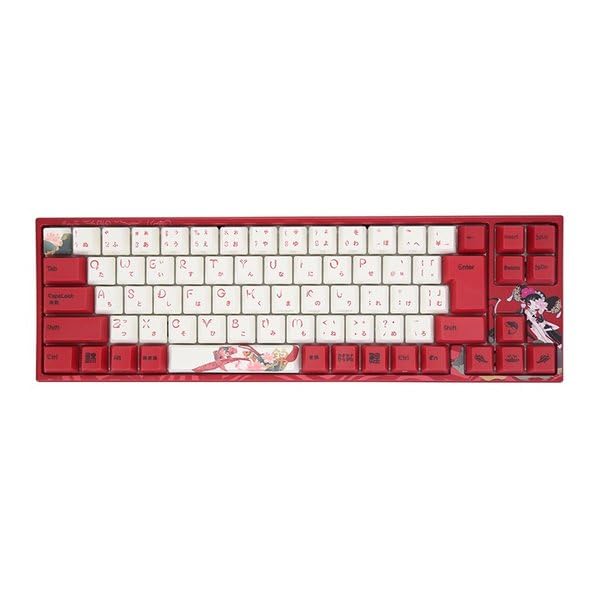
Image: Varmilo Koi 73 JIS Keyboard overview.
2. کلیدی خصوصیات
- Unique Koi Design: Features vibrant koi fish illustrations and a red aesthetic, developed in collaboration with illustrator Li Huan.
- JIS Layout: 73-key Japanese Industrial Standard layout for specific regional input needs.
- Compact 65% Size: Optimizes desk space while retaining essential function and arrow keys.
- Customizable Switches: Offers a choice of Varmilo mechanical electrostatic capacity switches to suit individual typing preferences.
- Cherry-Style Stabilizers: Ensures consistent and stable key presses, especially for larger keys.
- USB کنیکٹوٹی: Reliable wired connection for stable performance.
3. سیٹ اپ گائیڈ
3.1 پیکیج کے مشمولات
شروع کرنے سے پہلے، براہ کرم یقینی بنائیں کہ تمام اشیاء پیکیج میں موجود ہیں:
- Varmilo Koi 73 JIS Keyboard
- USB کیبل
- صارف دستی (یہ دستاویز)
3.2 کی بورڈ کو جوڑنا
To connect your Varmilo Koi 73 keyboard to your computer, follow these steps:
- Locate the USB-C port on the back of the keyboard.
- Connect one end of the provided USB cable to the keyboard's USB-C port.
- USB کیبل کے دوسرے سرے کو اپنے کمپیوٹر پر دستیاب USB پورٹ سے جوڑیں۔
- The keyboard should be automatically recognized by your operating system.
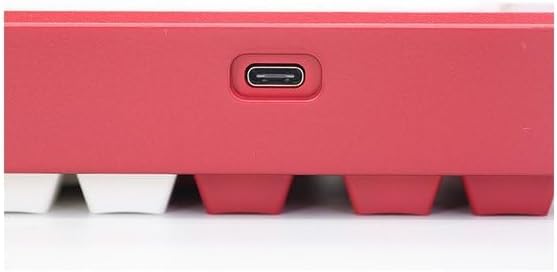
Image: USB-C port for keyboard connection.
3.3 Driver Installation (Optional)
For advanced customization and optimal performance, it is recommended to install the Varmilo driver software. This software allows you to remap keys, adjust performance settings, and customize lighting effects.
Video: This video demonstrates the driver installation process and software usage for Varmilo keyboards. While it features the Muse65 model, the steps for driver installation and basic software navigation are generally applicable to other Varmilo keyboards like the Koi 73.
Please visit the official Varmilo website for the latest driver downloads specific to your keyboard model. Follow the on-screen instructions during installation.
4. آپریٹنگ ہدایات
4.1 بنیادی کلیدی افعال
The Varmilo Koi 73 keyboard features a standard JIS layout. Most keys function as labeled. For special functions, refer to the combination keys below.
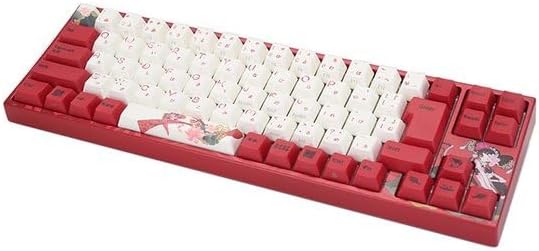
تصویر: ختمview of the Varmilo Koi 73 JIS Keyboard layout.
4.2 فنکشن (Fn) کلیدی امتزاج
Since this is a 73-key layout, some functions are accessed via the Fn key. Hold down the Fn key and press the corresponding key to activate its secondary function. Common Fn combinations include:
- Fn + F1-F12: ملٹی میڈیا کنٹرولز (مثلاً، والیوم، پلے/پز)۔
- Fn + تیر والی کلیدیں: Page Up/Down, Home/End (specific to model, refer to keycap legends).
- Fn + Win Key: Locks/unlocks the Windows key.

Image: Left side keys, often used with Fn for additional functions.
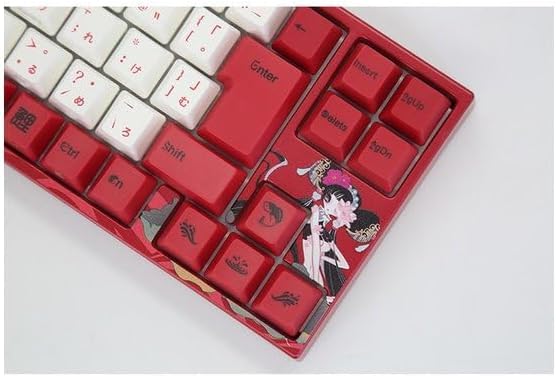
Image: Right side keys, including navigation and utility keys.
4.3 روشنی کے اثرات
The Varmilo Koi 73 keyboard supports various RGB lighting effects. You can cycle through different modes and adjust brightness using specific key combinations. Refer to your keyboard's specific keycap legends or the driver software for detailed lighting controls.
Video: This video showcases various RGB lighting effects on a Varmilo keyboard. While the model shown is Muse65, it provides a general idea of the dynamic lighting capabilities available on Varmilo keyboards, including the Koi 73.
5. دیکھ بھال اور دیکھ بھال
Proper maintenance ensures the longevity and optimal performance of your Varmilo Koi 73 keyboard.
- کلیننگ کی کیپس: Gently remove keycaps using a keycap puller. Clean the keycaps with a soft cloth dampہلکے صابن اور پانی کے ساتھ ختم. دوبارہ جوڑنے سے پہلے یقینی بنائیں کہ وہ مکمل طور پر خشک ہیں۔
- کی بورڈ باڈی کی صفائی: Use a soft, dry cloth to wipe down the keyboard body. For stubborn dirt, a slightly damp cloth with a small amount of isopropyl alcohol can be used. Avoid excessive moisture.
- دھول ہٹانا: چابیاں کے درمیان سے دھول اور ملبہ ہٹانے کے لیے کمپریسڈ ہوا کا استعمال کریں۔
- مائعات سے پرہیز کریں: Keep liquids away from the keyboard to prevent damage.
- کیبل کی دیکھ بھال: Do not bend or crimp the USB cable excessively.
6 خرابیوں کا سراغ لگانا
If you encounter issues with your Varmilo Koi 73 keyboard, try the following solutions:
- کی بورڈ جواب نہیں دے رہا ہے:
- یقینی بنائیں کہ USB کیبل کی بورڈ اور کمپیوٹر دونوں سے محفوظ طریقے سے جڑی ہوئی ہے۔
- اپنے کمپیوٹر پر کی بورڈ کو کسی دوسرے USB پورٹ سے جوڑنے کی کوشش کریں۔
- اپنے کمپیوٹر کو دوبارہ شروع کریں۔
- اگر USB ہب استعمال کر رہے ہیں، تو براہ راست کمپیوٹر سے جڑنے کی کوشش کریں۔
- کلیدیں رجسٹر نہیں ہو رہی ہیں:
- Check for any debris or foreign objects under the keycaps.
- If specific keys are not working, consider reinstalling the keyboard driver.
- روشنی کے مسائل:
- Ensure the keyboard driver is installed and up to date.
- Use the Fn key combinations or driver software to adjust lighting modes and brightness.
- Windows Key Locked:
- دبائیں Fn + Win Key to toggle the Windows key lock.
If the problem persists, please contact Varmilo customer support for further assistance.
7. وضاحتیں
| برانڈ | ورمیلو |
| ماڈل نمبر | VMMA73A039SAKURA |
| کی بورڈ لے آؤٹ | 73-key JIS (Japanese Industrial Standard) |
| کنیکٹوٹی | USB وائرڈ |
| سوئچ کی قسم | Mechanical (Linear) |
| ہم آہنگ آلات | لیپ ٹاپ |
| مصنوعات کے طول و عرض | 34.2 سینٹی میٹر (ایل) x 34.2 سینٹی میٹر (ڈبلیو) ایکس 5.1 سینٹی میٹر (ایچ) |
| شامل اجزاء | USB کیبل |
8. وارنٹی اور سپورٹ
Varmilo products typically come with a manufacturer's warranty. Please refer to the warranty card included with your product or visit the official Varmilo webتفصیلی وارنٹی شرائط و ضوابط کے لیے سائٹ۔
For technical support, driver downloads, or further inquiries, please visit the official Varmilo support page or contact their customer service.
Official Varmilo Webسائٹ: www.varmilo.com