
Angrox NS-RCFNA-21-Upgrade
Angrox Universal TV Remote Control Instruction Manual
Model: NS-RCFNA-21-Upgrade
برانڈ: اینگروکس
1. تعارف
Thank you for choosing the Angrox Universal TV Remote Control. This remote is designed to simplify your entertainment experience by providing a single control solution for a wide range of smart TVs. It offers seamless compatibility and intuitive operation, making it an ideal replacement for lost or broken original remotes.

شکل 1.1: سامنے view of the Angrox Universal TV Remote Control.
2. حفاظتی معلومات
- بیٹریاں بچوں کی پہنچ سے دور رکھیں۔ اگر نگل لیا جائے تو فوری طبی امداد حاصل کریں۔
- پرانی اور نئی بیٹریاں، یا مختلف قسم کی بیٹریوں کو مکس نہ کریں۔
- بیٹریاں ہٹا دیں اگر رساو کو روکنے کے لیے ریموٹ طویل مدت تک استعمال نہیں کیا جائے گا۔
- Avoid exposing the remote to direct sunlight, heat sources, or excessive moisture.
- ریموٹ کنٹرول کو الگ کرنے یا اس میں ترمیم کرنے کی کوشش نہ کریں۔
3. پیکیج کے مشمولات
پیکیج میں درج ذیل اشیاء ہونی چاہئیں۔
- 1 x Angrox Universal TV Remote Control
- 1 ایکس ہدایات دستی (یہ دستاویز)
نوٹ: آپریشن کے لیے 2 AAA بیٹریاں درکار ہیں اور پیکیج میں شامل نہیں ہیں۔
4. حصے اور خصوصیات
Familiarize yourself with the buttons and functions of your new remote control.
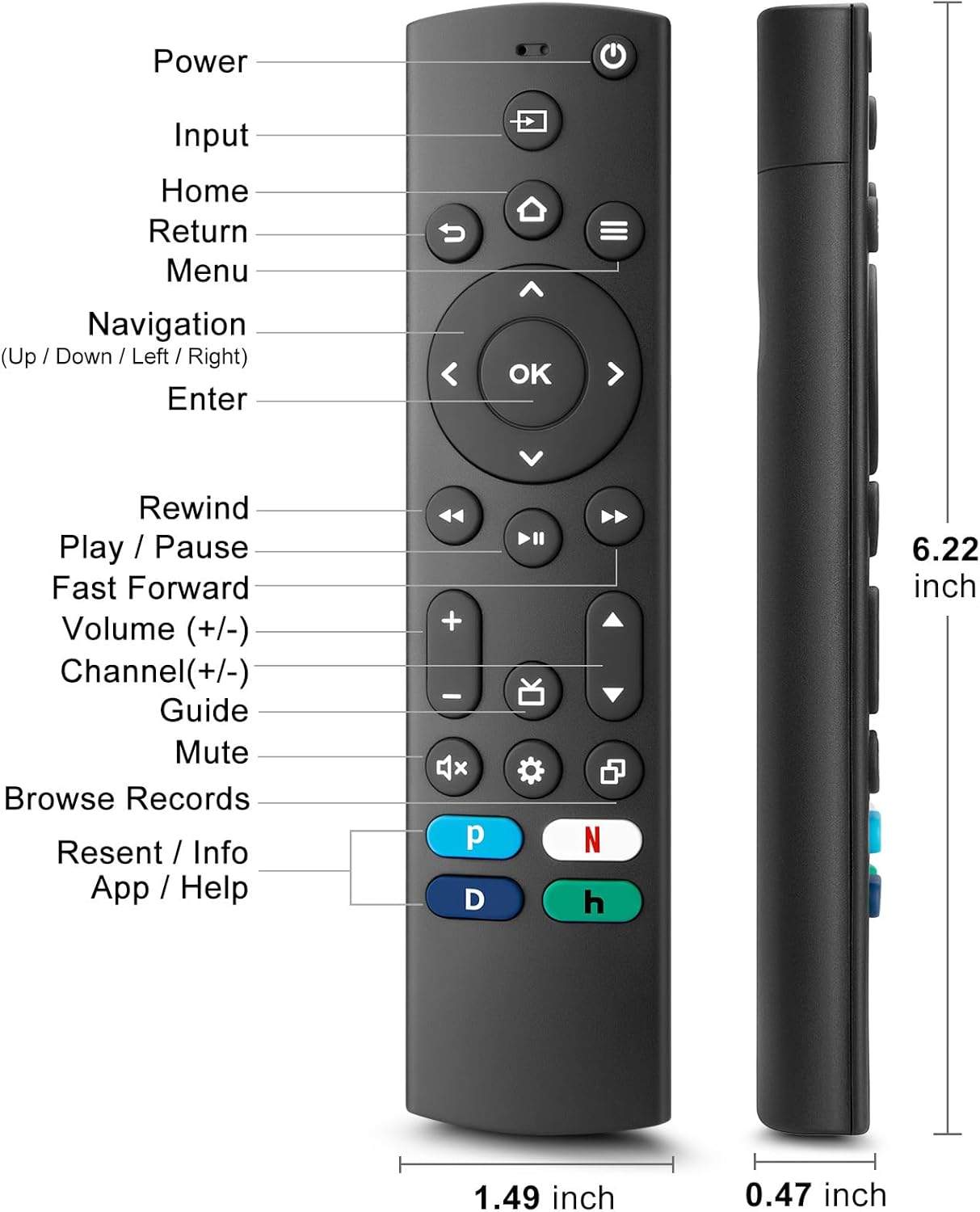
Figure 4.1: Labeled buttons and dimensions of the remote control.
- پاور بٹن: ٹی وی کو آن یا آف کرتا ہے۔
- ان پٹ بٹن: ان پٹ سورس (HDMI، AV، وغیرہ) کو منتخب کرتا ہے۔
- ہوم بٹن: TV کی ہوم اسکرین پر واپس آجاتا ہے۔
- Navigation Pad (Up/Down/Left/Right) & OK Button: مینو نیویگیشن اور انتخاب کے لیے۔
- واپسی بٹن: پچھلی اسکرین پر واپس چلا جاتا ہے۔
- مینو بٹن: Accesses TV settings or options menu.
- Rewind/Play/Pause/Fast Forward Buttons: میڈیا پلے بیک کنٹرولز۔
- والیوم اوپر/نیچے: ٹی وی والیوم کو ایڈجسٹ کرتا ہے۔
- چینل اوپر/نیچے: ٹی وی چینلز بدلتے ہیں۔
- بٹن خاموش کریں: ٹی وی کی آواز کو خاموش یا چالو کریں۔
- ترتیبات کا بٹن: Accesses quick settings.
- Dedicated Hotkeys (Netflix, P-Video, Disney+, Hulu): مقبول اسٹریمنگ سروسز تک براہ راست رسائی۔
This remote control utilizes infrared (IR) technology for stable performance and a fast response time of 0.2 seconds, with a control range of up to 40 feet. Please note that this remote does نہیں support voice search functions.

Figure 4.2: Remote's stable performance and precise control features.

Figure 4.3: This remote does not include voice search functionality.
5. سیٹ اپ
5.1. بیٹری کی تنصیب
- ریموٹ کنٹرول کے پچھلے حصے پر بیٹری کے ٹوکری کا احاطہ کھولیں۔
- دو (2) AAA بیٹریاں ڈالیں، اس بات کو یقینی بناتے ہوئے کہ مثبت (+) اور منفی (-) ٹرمینلز کمپارٹمنٹ کے اندر نشانات کے ساتھ سیدھ میں ہوں۔
- بیٹری کے کمپارٹمنٹ کور کو محفوظ طریقے سے بند کریں۔
5.2. Initial Pairing and TV Compatibility
This universal remote is designed for easy setup with most major TV brands. Simply press and hold two specific buttons simultaneously to pair it with your TV.

Figure 5.1: Easy 2-button setup for various TV brands.
| ٹی وی برانڈ | Button Combination (Press & Hold) | نوٹس |
|---|---|---|
| نشانی ٹی وی | OK + Home Button | |
| توشیبا ٹی وی | OK + Home Button | |
| روکو ٹی وی | OK + Up Arrow | |
| ہائی سینس ٹی وی | OK + Down Arrow | Hulu not supported |
| ٹی سی ایل ٹی وی | OK + Right Arrow | Hulu not supported |
| سام سنگ ٹی وی | OK + Return Button | |
| ویزیو ٹی وی | OK + Menu Button | |
| LG TV | OK + Rewind Button | Hulu not supported |
| فلپس ٹی وی | OK + Play/Pause Button | Prime Video, Disney+, Hulu not supported |
| سونی ٹی وی | OK + Fast Forward Button | Hulu not supported |
Once the remote is paired, it should function immediately. No further programming is typically required.
5.3 مطابقت کے نوٹس
This remote is designed to be a universal replacement for many TV models, including specific Insignia and Toshiba smart TV remotes (e.g., NS-RCFNA-21, NS-RCFNA-19, CT-95018, CT-RC1US-21, CT-RC1US-19). However, it is important to note that it may not be compatible with all specific original remote models or streaming devices, particularly those with unique pairing methods or voice control features.

شکل 5.2: سابقamples of remote controls and devices that are NOT compatible with this universal remote.

Figure 5.3: This remote is not compatible with TV Cube or TV Stick streaming devices.
For optimal performance, ensure your TV's infrared receiver is unobstructed.
Video 5.1: An official product video demonstrating the features and ease of use of the Angrox Universal TV Remote. This video highlights the remote's compatibility and quick access buttons for streaming services.
6. ریموٹ کو آپریٹ کرنا
Once paired, the Angrox Universal TV Remote operates like a standard TV remote. Point the remote directly at your TV's infrared receiver for best results.
6.1. بنیادی افعال
- طاقت: دبائیں طاقت ٹی وی کو آن یا آف کرنے کے لیے ایک بار بٹن لگائیں۔
- والیوم: استعمال کریں۔ والیوم اوپر (+) اور آواز کم (-) آواز کی سطح کو ایڈجسٹ کرنے کے لیے بٹن۔
- چینل: استعمال کریں۔ Channel Up (▲) اور Channel Down (▼) چینلز کو تبدیل کرنے کے بٹن۔
- نیویگیشن: استعمال کریں۔ اوپر، نیچے، بائیں، دائیں arrows to navigate through menus and options. Press OK ایک انتخاب کی تصدیق کرنے کے لئے.
- گھر: دبائیں گھر button to return to the main smart TV interface.
- واپسی: دبائیں واپسی button to go back to the previous screen or menu.
6.2. Dedicated Hotkeys
The remote features dedicated hotkeys for quick access to popular streaming platforms:
- نیٹ فلکس: Instantly launch the Netflix application.
- P-Video (Prime Video): Instantly launch the Prime Video application.
- ڈزنی+: Instantly launch the Disney+ application.
- Hulu: Instantly launch the Hulu application.

Figure 6.1: Quick access to streaming services with dedicated hotkeys.
7 دیکھ بھال
- صفائی: ریموٹ کو نرم، خشک کپڑے سے صاف کریں۔ کھرچنے والے کلینر یا سالوینٹس کا استعمال نہ کریں۔
- بیٹری کی تبدیلی: Replace batteries when the remote's response becomes sluggish or it stops functioning. Always replace both batteries at the same time.
- ذخیرہ: ریموٹ کو براہ راست سورج کی روشنی اور انتہائی درجہ حرارت سے دور ٹھنڈی، خشک جگہ پر اسٹور کریں۔
8 خرابیوں کا سراغ لگانا
| مسئلہ | ممکنہ وجہ | حل |
|---|---|---|
| Remote not responding to TV. | Low or dead batteries. Incorrect pairing. Obstruction between remote and TV. | Replace batteries with new AAA batteries. Re-attempt pairing using the correct button combination for your TV brand (refer to Section 5.2). Ensure no objects are blocking the TV's IR receiver. |
| Specific hotkey (e.g., Hulu) not working. | TV brand incompatibility with specific hotkey functions. | Some TV brands (e.g., Hisense, TCL, LG, Philips, Sony) may not support all dedicated hotkeys. This is a limitation of the TV's software, not the remote. You may need to navigate to these apps manually. |
| No voice control functionality. | This remote does not support voice commands. | The Angrox Universal TV Remote Control is designed for infrared (IR) control and does not include a microphone for voice search. This is an intended feature. |
| Remote feels unresponsive or delayed. | Weak batteries. Remote too far from TV. | Replace batteries. Ensure you are within the effective range (up to 40 feet) and pointing directly at the TV. |
9. وضاحتیں
| فیچر | تفصیل |
|---|---|
| ماڈل نمبر | NS-RCFNA-21-Upgrade |
| برانڈ | اینگروکس |
| طول و عرض (L x W x H) | 6.22 x 1.49 x 0.47 انچ |
| شے کا وزن | 1.76 اونس |
| طاقت کا منبع | 2 x AAA بیٹریاں (شامل نہیں) |
| مواد | اعلی معیار کا ABS اور سلیکون |
| کنٹرول ٹیکنالوجی | اورکت (IR) |
| رسپانس ٹائم | 0.2 سیکنڈ |
| کنٹرول رینج | 40 فٹ تک |
| خصوصی خصوصیات | Universal, Ergonomic, Lightweight, Pre-Programmed, No Programming Required (for most TVs) |
| رنگ | سیاہ |
| ہم آہنگ آلات | Television (Insignia, Toshiba, Pioneer, Samsung, TCL, LG, Hisense, Vizio, Sony, Philips, Roku TVs) |
10. وارنٹی اور سپورٹ
Angrox products are manufactured with high-quality materials and undergo strict quality control. For information regarding warranty coverage, returns, or technical support, please refer to the product listing page on Amazon or contact Angrox customer service directly through the Amazon platform.
You can visit the official Angrox store on Amazon for more information and contact options: Angrox Store
Ask a question about this manual
Ask about setup, troubleshooting, compatibility, parts, safety, or missing instructions. Manuals+ will review the question and use this page’s manual context to help answer it.