
Elektron Digitakt II
Elektron Digitakt II User Manual
Model: Digitakt II
پروڈکٹ ختمview
The Elektron Digitakt II is a powerful 16-track drum computer and sampler designed for music production and live performance. It offers extensive sound manipulation capabilities, a robust sequencer, and a compact, durable design, making it suitable for both studio and on-the-go creative work.

شکل 1: سامنے view of the Elektron Digitakt II, showing the display, knobs, and performance pads.
پیکیج کے مشمولات
یقینی بنائیں کہ تمام اشیاء باکس میں موجود ہیں:
- Elektron Digitakt II Unit
- پاور اڈاپٹر
- USB کیبل
ابتدائی سیٹ اپ
Follow these steps to set up your Digitakt II for the first time:
- پاور سے رابطہ کریں: Plug the included power adapter into the 12V DC IN port on the rear of the unit and then into a wall outlet.
- آڈیو منسلک کریں: Connect your audio output cables from the L/R OUT ports to your mixer, audio interface, or headphones. If using external audio sources, connect them to the L/R IN ports.
- USB سے جڑیں (اختیاری): For computer integration and use with Elektron's Overbridge software, connect a USB cable from the Digitakt II's USB port to your computer.
- پاور آن: Press the Power button on the rear of the unit to turn on the Digitakt II.
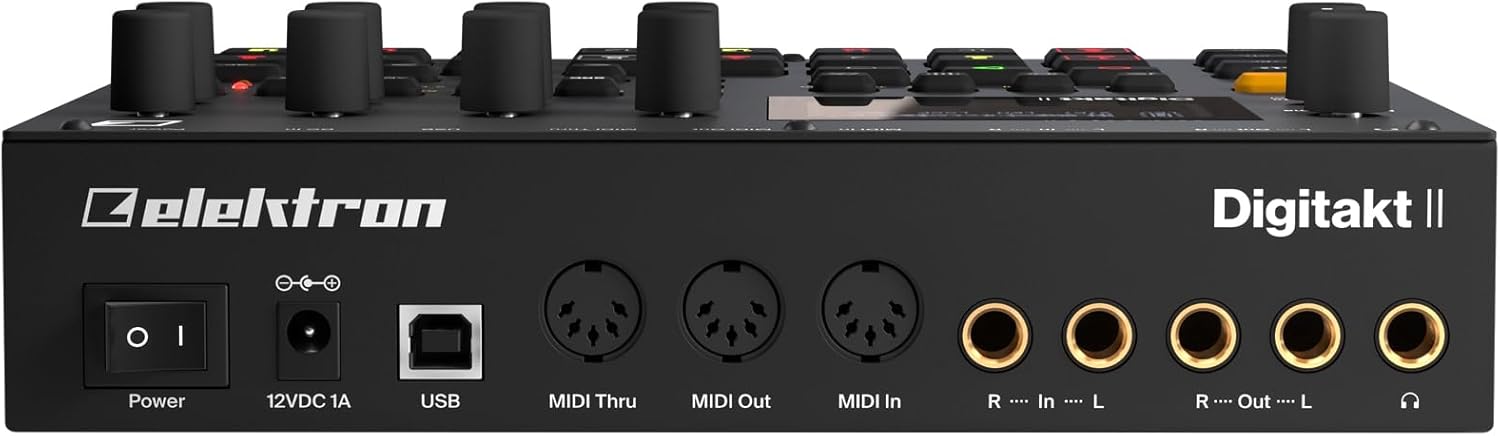
شکل 2: پیچھے view of the Elektron Digitakt II, showing power, USB, MIDI, and audio connections.
Operating Your Digitakt II
The Digitakt II features an intuitive interface with dedicated buttons and encoders for efficient workflow. Familiarize yourself with the main display and control layout.
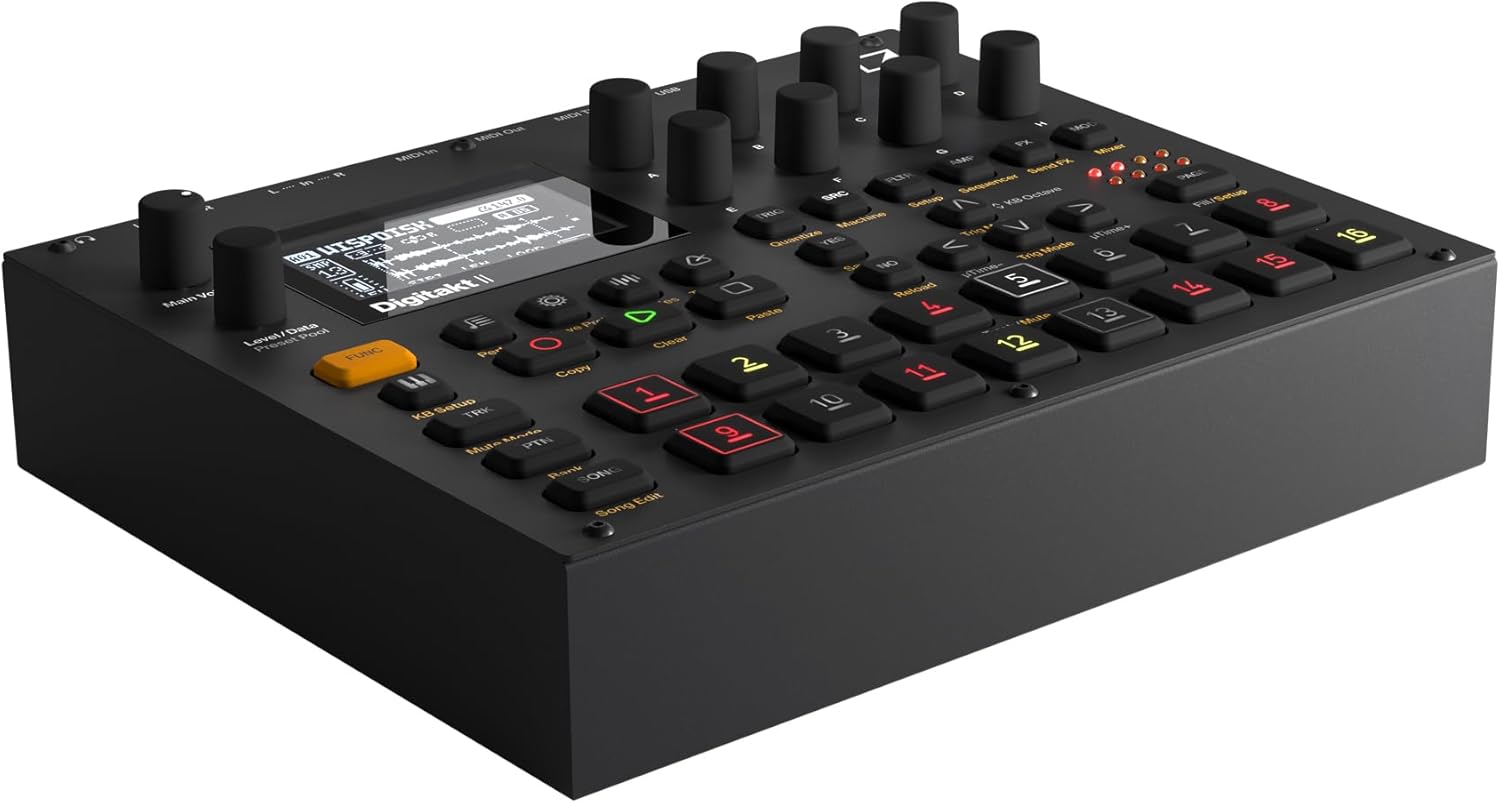
شکل 3: زاویہ دار view of the Elektron Digitakt II, highlighting the control surface and display.
کلیدی خصوصیات
- 16 Audio Tracks: Each track supports stereo or mono samples, or MIDI data.
- 128-Step Elektron Sequencer: Program intricate patterns with precise control.
- 3 Assignable LFOs per Track: Modulate various parameters for dynamic sound design.
- Per-Track Effects: Apply Delay, Reverb, Chorus, Bit Reduction, Sample Reduction, and Overdrive to individual tracks.
- Euclidean Sequence Generator: Explore complex rhythmic possibilities.
- Swappable Filters: Utilize a Base-width filter and choose from Multi-mode, Low Pass 4, Comb, EQ, or Legacy LP/HP filters.
- 4 Trig Modes: Enhance sequencing with various trigger behaviors.
- گانے کا موڈ: Create, edit, and play full compositions with ease.
بنیادی آپریشن
S لوڈ ہو رہا ہے۔amples: Use the 'Samples' button and the data encoders to browse and load samples into your project. Samples can be imported via USB using Elektron's software.
ترتیب: Select a track using the numbered pads. Enter notes and parameter locks by holding a trig button and adjusting parameters. The 128-step sequencer allows for detailed pattern creation.
اثرات: Access the FX section to apply and adjust the built-in effects for each track. Experiment with different effect types and parameters to shape your sound.
Saving Projects: Regularly save your work by pressing the 'Save Proj' button to prevent data loss.
دیکھ بھال اور دیکھ بھال
To ensure the longevity and optimal performance of your Digitakt II, follow these guidelines:
- صفائی: یونٹ کو صاف کرنے کے لیے نرم، خشک کپڑا استعمال کریں۔ کھرچنے والے کلینر یا سالوینٹس سے پرہیز کریں۔
- ذخیرہ: یونٹ کو براہ راست سورج کی روشنی اور انتہائی درجہ حرارت سے دور ٹھنڈی، خشک جگہ پر اسٹور کریں۔
- ہینڈلنگ: Avoid dropping the unit or exposing it to excessive force.
- وینٹیلیشن: زیادہ گرمی سے بچنے کے لیے یونٹ کے ارد گرد مناسب وینٹیلیشن کو یقینی بنائیں۔
خرابی کا سراغ لگانا
If you encounter issues with your Digitakt II, refer to the table below for common problems and solutions:
| مسئلہ | ممکنہ وجہ | حل |
|---|---|---|
| کوئی آواز آؤٹ پٹ نہیں ہے۔ | Incorrect audio connections, volume too low, muted tracks. | Check audio cables, increase Main Volume, ensure tracks are not muted in Mute Mode. |
| یونٹ پاور آن نہیں ہے۔ | Power adapter not connected or faulty, power outlet issue. | Verify power adapter connection, try a different power outlet, ensure power button is pressed. |
| USB کنیکٹیویٹی کے مسائل | Incorrect USB cable, driver not installed, Overbridge not running. | Use the provided USB cable, install the latest Elektron drivers and Overbridge software from the official webسائٹ |
| Pads unresponsive | Unit frozen, calibration issue. | Restart the unit. If the problem persists, consult the full manual for calibration procedures. |
تکنیکی وضاحتیں
| فیچر | تفصیل |
|---|---|
| ماڈل کا نام | Digitakt II |
| شے کا وزن | 3.3 پاؤنڈ (1.5 کلوگرام) |
| پروڈکٹ کے طول و عرض (L x W x H) | 8.4 x 6.9 x 2.5 انچ (21.3 x 17.5 x 6.4 سینٹی میٹر) |
| جسمانی مواد | کاسٹ ایلومینیم |
| رنگ | سیاہ |
| کنیکٹر کی قسم | USB, Proprietary Power, MIDI In/Out/Thru, Audio In L/R, Audio Out L/R, Headphones |
| شامل اجزاء | پاور اڈاپٹر |
وارنٹی اور سپورٹ
Elektron products are manufactured to high standards and come with a limited warranty. For detailed warranty information, product registration, and technical support, please visit the official Elektron webسائٹ یا ان کی کسٹمر سروس سے رابطہ کریں۔ وارنٹی کے دعووں کے لیے اپنی خریداری کا ثبوت رکھیں۔
آن لائن وسائل: For the most up-to-date information, firmware updates, and additional resources, please refer to the official Elektron support page.
Ask a question about this manual
Ask about setup, troubleshooting, compatibility, parts, safety, or missing instructions. Manuals+ will review the question and use this page’s manual context to help answer it.