
ایمیزون فائر ٹی وی ساؤنڈ بار پلس
ایمیزون فائر ٹی وی ساؤنڈ بار پلس صارف دستی
Model: Fire TV Soundbar Plus (ASIN: B0D1ZSC62P)
تعارف
The Amazon Fire TV Soundbar Plus is a 3.1 channel all-in-one soundbar designed to enhance your home audio experience. It features integrated bass, clear dialogue, and supports advanced audio formats like Dolby Atmos and DTS:X, providing immersive sound for movies, music, and more. This manual provides detailed instructions for setting up, operating, maintaining, and troubleshooting your Fire TV Soundbar Plus.

شکل 1: سامنے view of the Fire TV Soundbar Plus, highlighting its key audio technologies.
سیٹ اپ
پیکیج کے مشمولات
شروع کرنے سے پہلے، یقینی بنائیں کہ تمام اشیاء باکس میں موجود ہیں:
- فائر ٹی وی ساؤنڈ بار پلس
- ریموٹ کنٹرول
- HDMI 2.0 کیبل
- AC پاور کیبل
- 2 AAA بیٹریاں
- وال ماؤنٹ کٹ
- کوئیک اسٹارٹ گائیڈ

Figure 2: Contents included in the Fire TV Soundbar Plus package and product dimensions.
فزیکل پلیسمنٹ
The soundbar measures approximately 6.4 cm (height) x 94 cm (width) x 13.2 cm (depth) and weighs 4 kg. For optimal audio performance, place the soundbar centrally in front of your television. Ensure there are no obstructions in front of the soundbar. The included wall mount kit allows for wall installation if preferred.
ساؤنڈ بار کو جوڑنا
Follow these steps to connect your Fire TV Soundbar Plus to your television:
- HDMI (eARC/ARC) Connection: Connect one end of the included HDMI 2.0 cable to the HDMI (eARC/ARC) port on the back of the soundbar. Connect the other end to the HDMI eARC/ARC port on your television. This connection ensures optimal audio quality and allows your TV remote to control the soundbar's volume.
- پاور کنکشن: Connect the AC power cable to the Power port on the soundbar and then plug it into a wall outlet.
- Optical Connection (Optional): If your TV does not have an HDMI eARC/ARC port, you can use an optical cable (not included) to connect the soundbar to your TV's optical audio output.
- USB-A پورٹ: The USB-A port is typically used for service or firmware updates and is not for general user connection.

شکل 3: پیچھے view of the soundbar displaying available connection ports.
ابتدائی پاور آن
Once connected, the soundbar will typically power on automatically with your TV if using the HDMI eARC/ARC connection. If not, press the Power button on the included remote control.
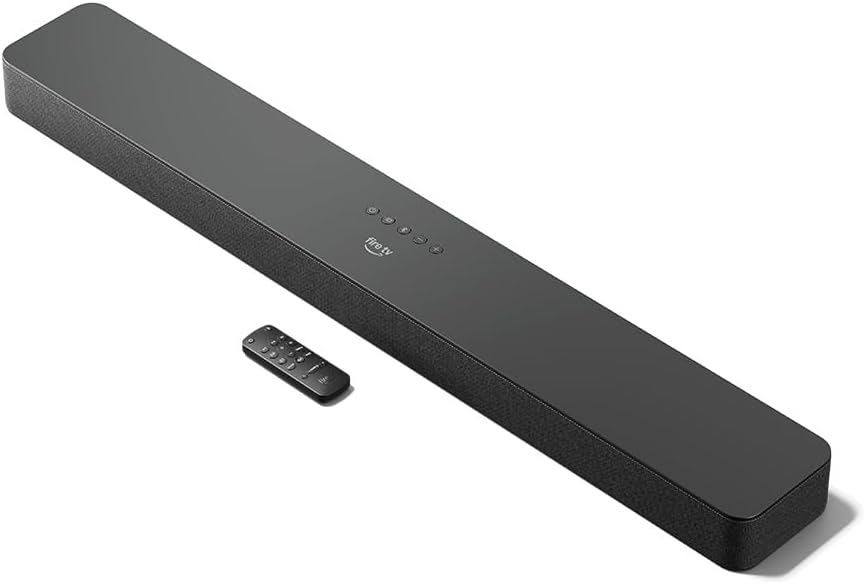
Figure 4: The Fire TV Soundbar Plus and its compact remote control.
ساؤنڈ بار کو آپریٹ کرنا
بنیادی کنٹرولز
Use the included remote control to manage your soundbar's functions:
- پاور بٹن: ساؤنڈ بار کو آن یا آف کرتا ہے۔
- والیوم اوپر/نیچے: ماسٹر والیوم لیول کو ایڈجسٹ کرتا ہے۔
- بٹن خاموش کریں: آواز کو خاموش یا غیر خاموش کرتا ہے۔
- ان پٹ انتخاب: Switches between HDMI, Optical, and Bluetooth inputs.
- صوتی موڈز: Cycles through optimized audio presets.
ساؤنڈ موڈز
The Fire TV Soundbar Plus offers several equalizer modes to optimize audio for different content types:
- مووی موڈ: Enhances cinematic soundscapes with dynamic range and surround effects.
- میوزک موڈ: Provides balanced audio for music playback, emphasizing clarity and bass.
- کھیل موڈ: Optimizes audio for sports broadcasts, often enhancing commentary and crowd noise.
- نائٹ موڈ: اچانک تیز آوازوں کو روکنے کے لیے متحرک حد کو کم کرتا ہے، رات گئے کے لیے مثالی ہے۔ viewing
The soundbar features a dedicated central channel for dialogue, ensuring clear conversations in all modes, especially beneficial for movies and TV shows.

Figure 5: Internal components illustrating the integrated speakers, tweeters, and subwoofer for rich sound.

Figure 6: The soundbar delivering immersive audio with Dolby Atmos and DTS:X in a home environment.
بلوٹوتھ سٹریمنگ
You can stream audio from your phone or tablet to the Fire TV Soundbar Plus via Bluetooth. To connect:
- Press the Bluetooth button on the remote control or select Bluetooth input.
- On your mobile device, go to Bluetooth settings and select "Fire TV Soundbar Plus" from the list of available devices.
- ایک بار جوڑا بننے کے بعد، آپ کے آلے سے آڈیو ساؤنڈ بار کے ذریعے چلے گا۔

Figure 7: Connecting a mobile device via Bluetooth to stream music or podcasts.
Fire TV Integration
For seamless integration with Fire TV devices (sold separately), you can control both your TV and the soundbar with a single remote. Audio settings can be customized directly within the Fire TV interface on selected models.
دیکھ بھال
To ensure the longevity and optimal performance of your Fire TV Soundbar Plus, follow these maintenance guidelines:
- صفائی: ساؤنڈ بار کی سطح کو صاف کرنے کے لیے نرم، خشک کپڑا استعمال کریں۔ مائع کلینر یا کھرچنے والے مواد کا استعمال نہ کریں، کیونکہ وہ ختم کو نقصان پہنچا سکتے ہیں۔
- وینٹیلیشن: اس بات کو یقینی بنائیں کہ زیادہ گرم ہونے سے بچنے کے لیے ساؤنڈ بار کے وینٹ کو بلاک نہیں کیا گیا ہے۔
- سافٹ ویئر اپ ڈیٹس: Periodically check for firmware updates to ensure your soundbar has the latest features and performance improvements. Updates are typically delivered automatically when connected to a Fire TV device or can be performed via USB if available.
خرابی کا سراغ لگانا
اگر آپ کو اپنے فائر ٹی وی ساؤنڈ بار پلس کے ساتھ مسائل درپیش ہیں، تو درج ذیل عام مسائل اور حل دیکھیں:
| مسئلہ | ممکنہ وجہ | حل |
|---|---|---|
| ساؤنڈ بار سے کوئی آواز نہیں۔ |
|
|
| آواز مسخ یا غیر واضح ہے۔ |
|
|
| ریموٹ کنٹرول کام نہیں کر رہا۔ |
|
|
| بلوٹوتھ جوڑا بنانے کے مسائل۔ |
|
|
وضاحتیں
| فیچر | تفصیل |
|---|---|
| Soundbar Dimensions (LxWxH) | 94 سینٹی میٹر x 13.2 سینٹی میٹر x 6.4 سینٹی میٹر |
| ساؤنڈ بار کا وزن | 4 kg (Actual dimensions and weight may vary based on configuration and manufacturing process) |
| سپیکر چینلز | 3.1 (integrated subwoofer) |
| ایکویلائزر موڈز | Movie, Music, Sport, Night |
| گھیر آواز کی حمایت | ڈولبی ایٹموس، ڈی ٹی ایس: ایکس |
| بندرگاہیں | HDMI (eARC/ARC), Optical, AC Power, USB-A |
| بلوٹوتھ سپورٹ | جی ہاں |
| مطابقت | سٹریمنگ میڈیا پلیئرز کے ساتھ اسمارٹ ٹی وی اور ٹی وی |
| باکس میں شامل ہے۔ | Fire TV Soundbar Plus, remote control, HDMI 2.0 cable, 1 AC power cable, 2 AAA batteries, wall mount kit, Quick Start Guide |
وارنٹی اور سپورٹ
The Fire TV Soundbar Plus comes with a one-year limited warranty provided by the manufacturer. This limited warranty is in addition to, and does not compromise, consumer rights. Consumers may have additional rights provided by law even after the limited warranty expires. Use of the Fire TV Soundbar Plus is subject to the terms indicated by Amazon.
For further assistance, please refer to the official Amazon support channels or the Quick Start Guide included with your product.
Ask a question about this manual
Ask about setup, troubleshooting, compatibility, parts, safety, or missing instructions. Manuals+ will review the question and use this page’s manual context to help answer it.